GLM 5.3 Flash
by Z.aiReasoningClean
Running live in a sandboxed frame. Click inside it before using the keyboard.
How it went
- Total time
- 6 min 13 s
- Cost
- $0.021
- Output tokens
- 55,209
- Spent thinking
- 48,546 tokens
- Speed
- 148.5 tok/s
- Console errors
- 0
- First token after
- 947 ms
- First visible text after
- 5 min 53 s
- Prompt tokens
- 520
- Code size
- 16.1 KB
- Finish reason
- stop
- Served by
- DigitalOcean
- Model id
z-ai/glm-5.3-flash- Reasoning sent
{"effort":"max"}- Max output
- 64,000 tokens
- Generated
- Nov 10, 2026
What it was asked
The prompt
Create a standalone SVG illustration of a fox sitting on a hill, looking at the moon on a starry night, with a few subtle animations. Requirements: - Output a single valid .svg file (```svg code block) with a viewBox of 0 0 800 600. - Hand-written shapes and paths only: no embedded raster images, no external references, no JavaScript. - The fox must be clearly recognizable (pointy ears, snout, bushy tail with a white tip). - Include the moon with a soft glow, many stars, the hill and some background elements (trees, distant hills). - Use a coherent color palette and at least one gradient. - Animations (SMIL or CSS inside the SVG), all looping seamlessly: stars twinkling, the fox's tail swaying gently, and a shooting star crossing the sky every 4 seconds (the first one within 2 seconds).
System prompt, sent with every prompt
You are generating a self-contained web demo. It will be rendered automatically in a sandboxed iframe and compared side by side with the output of other AI models given the exact same task.

Output rules:
- Reply with exactly ONE fenced code block containing the complete file: ```html (or ```svg when the task asks for an SVG). No text before or after the code block.
- Everything must be inline: CSS in <style>, JavaScript in <script>. No external files, images, fonts or network requests, except the CDN URLs explicitly allowed by the task.
- Do not use localStorage, sessionStorage, cookies, IndexedDB, alert(), confirm(), prompt() or window.open(): they are blocked in the sandbox and will throw.
- The page must look right in a 1280×800 viewport and adapt gracefully down to 375px wide. No horizontal scrollbar.
- Something meaningful must be visible on first paint: a screenshot is taken automatically about 3 seconds after load, without any interaction.
- Everything that makes the demo interesting must be visible within the first seconds: nothing hidden behind a high score, a later level or a long play session.
- Games must start in a self-playing demo mode (a simple AI plays) behind a "Click or press a key to start" message, so the game can be judged in action without playing.
- The iframe only receives keyboard events after the user clicks it: if the demo uses the keyboard, display a clear "Click or press a key to start" message.
- The code must run with zero errors in the console of the latest Chrome.
Code run-1.svg · 290 lines
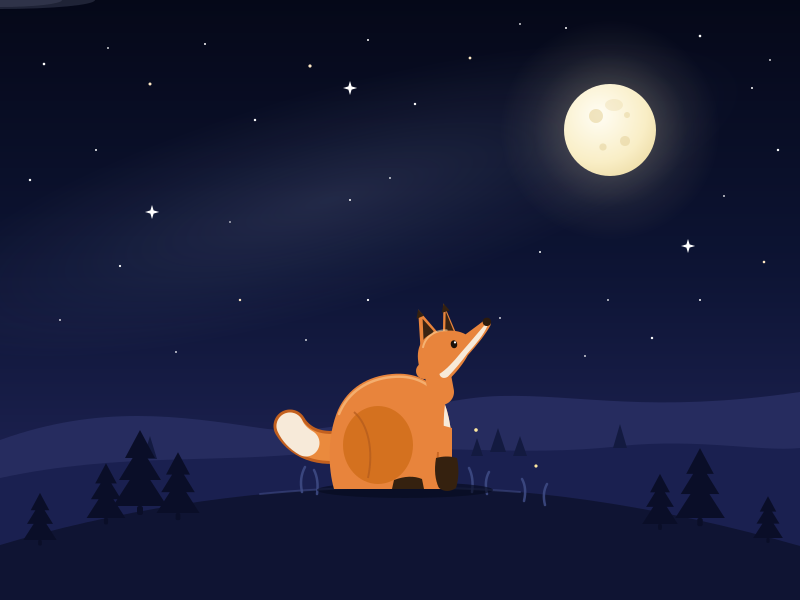
<svg xmlns="http://www.w3.org/2000/svg" viewBox="0 0 800 600" preserveAspectRatio="xMidYMid meet" role="img" aria-labelledby="t d">
  <title id="t">Night Fox</title>
  <desc id="d">A fox sits on a hillside gazing at a glowing full moon among twinkling stars, with distant hills, pine trees, drifting mist and a shooting star.</desc>

  <style>
    svg { background:#060a1e; }
    @keyframes tw { 0%,100% { opacity:.18; } 50% { opacity:1; } }
    #stars circle { animation: tw 3s ease-in-out infinite; }
    #stars circle:nth-of-type(4n+1) { animation-duration:2.3s; animation-delay:-.7s; }
    #stars circle:nth-of-type(4n+2) { animation-duration:3.6s; animation-delay:-2.1s; }
    #stars circle:nth-of-type(4n+3) { animation-duration:2.8s; animation-delay:-1.4s; }
    #stars circle:nth-of-type(4n)   { animation-duration:4.2s; animation-delay:-3s; }
  </style>

  <defs>
    <linearGradient id="sky" x1="0" y1="0" x2="0" y2="1">
      <stop offset="0" stop-color="#050818"/>
      <stop offset=".45" stop-color="#0d1434"/>
      <stop offset=".78" stop-color="#1c2150"/>
      <stop offset="1" stop-color="#3a3d74"/>
    </linearGradient>
    <radialGradient id="glowG">
      <stop offset="0" stop-color="#fff6d8" stop-opacity=".55"/>
      <stop offset=".35" stop-color="#ffefc0" stop-opacity=".2"/>
      <stop offset=".7" stop-color="#ffefc0" stop-opacity=".06"/>
      <stop offset="1" stop-color="#ffefc0" stop-opacity="0"/>
    </radialGradient>
    <radialGradient id="moonF" cx=".38" cy=".34" r=".85">
      <stop offset="0" stop-color="#fffdf4"/>
      <stop offset=".6" stop-color="#f9eec6"/>
      <stop offset="1" stop-color="#e9d69b"/>
    </radialGradient>
    <radialGradient id="headGlow">
      <stop offset="0" stop-color="#ffffff" stop-opacity=".9"/>
      <stop offset="1" stop-color="#ffffff" stop-opacity="0"/>
    </radialGradient>
    <radialGradient id="milky">
      <stop offset="0" stop-color="#aebbe8" stop-opacity=".14"/>
      <stop offset=".6" stop-color="#aebbe8" stop-opacity=".05"/>
      <stop offset="1" stop-color="#aebbe8" stop-opacity="0"/>
    </radialGradient>
    <linearGradient id="tailA" gradientUnits="userSpaceOnUse" x1="-78" y1="-20" x2="0" y2="0">
      <stop offset="0" stop-color="#ffffff" stop-opacity="0"/>
      <stop offset=".65" stop-color="#cfe2ff" stop-opacity=".5"/>
      <stop offset="1" stop-color="#ffffff" stop-opacity=".95"/>
    </linearGradient>
    <linearGradient id="tailB" gradientUnits="userSpaceOnUse" x1="68" y1="-14" x2="0" y2="0">
      <stop offset="0" stop-color="#ffffff" stop-opacity="0"/>
      <stop offset=".65" stop-color="#cfe2ff" stop-opacity=".4"/>
      <stop offset="1" stop-color="#ffffff" stop-opacity=".9"/>
    </linearGradient>
    <filter id="soft" x="-60%" y="-60%" width="220%" height="220%">
      <feGaussianBlur stdDeviation="6"/>
    </filter>
    <g id="pine" fill="#0a0e28">
      <path d="M0,-76 L15,-48 L-15,-48 Z M0,-60 L21,-26 L-21,-26 Z M0,-42 L27,0 L-27,0 Z"/>
      <rect x="-3" y="0" width="6" height="9" rx="2"/>
    </g>
  </defs>

  <!-- sky -->
  <rect width="800" height="600" fill="url(#sky)"/>
  <ellipse cx="330" cy="200" rx="430" ry="110" fill="url(#milky)" transform="rotate(-16 330 200)"/>

  <!-- stars -->
  <g id="stars" fill="#ffffff">
    <circle cx="44" cy="64" r="1.3"/>
    <circle cx="96" cy="150" r="1"/>
    <circle cx="150" cy="84" r="1.5" fill="#ffe9c4"/>
    <circle cx="205" cy="44" r="1"/>
    <circle cx="255" cy="120" r="1.2"/>
    <circle cx="310" cy="66" r="1.6" fill="#ffe9c4"/>
    <circle cx="368" cy="40" r="1"/>
    <circle cx="415" cy="104" r="1.2"/>
    <circle cx="470" cy="58" r="1.4" fill="#ffe9c4"/>
    <circle cx="520" cy="24" r=".9"/>
    <circle cx="566" cy="28" r="1"/>
    <circle cx="700" cy="36" r="1.3"/>
    <circle cx="752" cy="88" r="1"/>
    <circle cx="778" cy="150" r="1.2"/>
    <circle cx="724" cy="196" r=".9"/>
    <circle cx="764" cy="262" r="1.3" fill="#ffe9c4"/>
    <circle cx="700" cy="300" r="1"/>
    <circle cx="652" cy="338" r="1.2"/>
    <circle cx="608" cy="300" r=".9"/>
    <circle cx="540" cy="252" r="1"/>
    <circle cx="500" cy="318" r=".9"/>
    <circle cx="368" cy="300" r="1.1"/>
    <circle cx="306" cy="340" r=".9"/>
    <circle cx="240" cy="300" r="1.2" fill="#ffe9c4"/>
    <circle cx="176" cy="352" r=".9"/>
    <circle cx="120" cy="266" r="1.1"/>
    <circle cx="60" cy="320" r=".9"/>
    <circle cx="30" cy="180" r="1.2"/>
    <circle cx="350" cy="200" r="1"/>
    <circle cx="390" cy="178" r=".9"/>
    <circle cx="770" cy="60" r=".9"/>
    <circle cx="108" cy="48" r=".9"/>
    <circle cx="230" cy="222" r=".8"/>
    <circle cx="585" cy="356" r=".9"/>
  </g>

  <!-- sparkling cross stars -->
  <g fill="#ffffff">
    <g transform="translate(350,88)">
      <g>
        <path d="M0,-7 L1.6,-1.6 L7,0 L1.6,1.6 L0,7 L-1.6,1.6 L-7,0 L-1.6,-1.6 Z"/>
        <animateTransform attributeName="transform" type="scale" values="1;.45;1" keyTimes="0;.5;1" calcMode="spline" keySplines=".45 0 .55 1;.45 0 .55 1" dur="3.2s" repeatCount="indefinite"/>
        <animate attributeName="opacity" values="1;.35;1" keyTimes="0;.5;1" dur="3.2s" repeatCount="indefinite"/>
      </g>
    </g>
    <g transform="translate(152,212)">
      <g>
        <path d="M0,-7 L1.6,-1.6 L7,0 L1.6,1.6 L0,7 L-1.6,1.6 L-7,0 L-1.6,-1.6 Z"/>
        <animateTransform attributeName="transform" type="scale" values="1;.45;1" keyTimes="0;.5;1" calcMode="spline" keySplines=".45 0 .55 1;.45 0 .55 1" dur="4.1s" begin="-1.7s" repeatCount="indefinite"/>
        <animate attributeName="opacity" values="1;.35;1" keyTimes="0;.5;1" dur="4.1s" begin="-1.7s" repeatCount="indefinite"/>
      </g>
    </g>
    <g transform="translate(688,246)">
      <g>
        <path d="M0,-7 L1.6,-1.6 L7,0 L1.6,1.6 L0,7 L-1.6,1.6 L-7,0 L-1.6,-1.6 Z"/>
        <animateTransform attributeName="transform" type="scale" values="1;.45;1" keyTimes="0;.5;1" calcMode="spline" keySplines=".45 0 .55 1;.45 0 .55 1" dur="2.7s" begin="-.9s" repeatCount="indefinite"/>
        <animate attributeName="opacity" values="1;.35;1" keyTimes="0;.5;1" dur="2.7s" begin="-.9s" repeatCount="indefinite"/>
      </g>
    </g>
  </g>

  <!-- shooting stars -->
  <g opacity="0">
    <line x1="-78" y1="-20" x2="0" y2="0" stroke="url(#tailA)" stroke-width="2.6" stroke-linecap="round"/>
    <circle r="6" fill="url(#headGlow)"/>
    <circle r="2.2" fill="#ffffff"/>
    <animateTransform attributeName="transform" type="translate" values="120 62;120 62;500 168;500 168" keyTimes="0;0.02;0.32;1" dur="4s" repeatCount="indefinite"/>
    <animate attributeName="opacity" values="0;0;1;1;0;0" keyTimes="0;0.02;0.07;0.24;0.32;1" dur="4s" repeatCount="indefinite"/>
  </g>
  <g opacity="0">
    <line x1="68" y1="-14" x2="0" y2="0" stroke="url(#tailB)" stroke-width="1.8" stroke-linecap="round"/>
    <circle r="4" fill="url(#headGlow)"/>
    <circle r="1.6" fill="#ffffff"/>
    <animateTransform attributeName="transform" type="translate" values="680 40;680 40;300 118;300 118" keyTimes="0;0.02;0.3;1" dur="8s" begin="2.1s" repeatCount="indefinite"/>
    <animate attributeName="opacity" values="0;0;1;1;0;0" keyTimes="0;0.02;0.06;0.22;0.3;1" dur="8s" begin="2.1s" repeatCount="indefinite"/>
  </g>

  <!-- moon -->
  <circle cx="610" cy="130" r="110" fill="url(#glowG)">
    <animate attributeName="opacity" values=".85;1;.85" keyTimes="0;.5;1" calcMode="spline" keySplines=".45 0 .55 1;.45 0 .55 1" dur="7s" repeatCount="indefinite"/>
  </circle>
  <circle cx="610" cy="130" r="46" fill="url(#moonF)"/>
  <g fill="#e3cf96">
    <circle cx="596" cy="116" r="7" opacity=".55"/>
    <circle cx="625" cy="141" r="5" opacity=".5"/>
    <circle cx="603" cy="147" r="3.6" opacity=".5"/>
    <circle cx="627" cy="115" r="3" opacity=".45"/>
    <ellipse cx="614" cy="105" rx="9" ry="6" opacity=".3"/>
  </g>

  <!-- drifting mist -->
  <g filter="url(#soft)" fill="#c3cff2">
    <ellipse rx="95" ry="9" opacity=".14">
      <animateTransform attributeName="transform" type="translate" values="-140 172;940 166" dur="70s" repeatCount="indefinite"/>
    </ellipse>
    <ellipse rx="62" ry="7" opacity=".1">
      <animateTransform attributeName="transform" type="translate" values="-120 96;940 104" dur="95s" begin="-40s" repeatCount="indefinite"/>
    </ellipse>
  </g>

  <!-- distant hills -->
  <path d="M0,440 C100,404 180,416 260,428 C340,440 420,398 500,396 C580,394 650,414 800,392 L800,600 L0,600 Z" fill="#262c5f"/>
  <path d="M0,478 C120,452 220,464 320,452 C420,442 520,458 620,446 C700,438 760,452 800,448 L800,600 L0,600 Z" fill="#1a2050"/>

  <!-- tiny ridge trees -->
  <g fill="#131a40">
    <polygon points="498,428 506,452 490,452"/>
    <polygon points="520,436 527,456 513,456"/>
    <polygon points="477,438 483,456 471,456"/>
    <polygon points="150,436 157,459 143,459"/>
    <polygon points="620,424 627,448 613,448"/>
  </g>

  <!-- foreground hill -->
  <path d="M0,545 C110,512 240,490 380,487 C520,484 660,506 800,546 L800,600 L0,600 Z" fill="#0f1433"/>
  <path d="M260,494 C340,486 430,485 520,492" fill="none" stroke="#46538f" stroke-width="2" opacity=".5" stroke-linecap="round"/>

  <!-- pine trees -->
  <use href="#pine" transform="translate(40,540) scale(.62)"/>
  <use href="#pine" transform="translate(106,518) scale(.72)"/>
  <use href="#pine" transform="translate(140,506)"/>
  <use href="#pine" transform="translate(178,513) scale(.8)"/>
  <use href="#pine" transform="translate(660,524) scale(.66)"/>
  <use href="#pine" transform="translate(700,518) scale(.92)"/>
  <use href="#pine" transform="translate(768,538) scale(.55)"/>

  <!-- moonlit grass -->
  <g stroke="#3f4c86" stroke-width="2.5" stroke-linecap="round" fill="none" opacity=".85">
    <path d="M302,492 Q299,478 305,467">
      <animateTransform attributeName="transform" type="rotate" values="-4 302 492;4 302 492;-4 302 492" keyTimes="0;.5;1" calcMode="spline" keySplines=".45 0 .55 1;.45 0 .55 1" dur="4.2s" repeatCount="indefinite"/>
    </path>
    <path d="M317,494 Q319,480 314,470">
      <animateTransform attributeName="transform" type="rotate" values="-4 317 494;4 317 494;-4 317 494" keyTimes="0;.5;1" calcMode="spline" keySplines=".45 0 .55 1;.45 0 .55 1" dur="3.6s" begin="-1s" repeatCount="indefinite"/>
    </path>
    <path d="M472,492 Q474,478 469,468">
      <animateTransform attributeName="transform" type="rotate" values="-4 472 492;4 472 492;-4 472 492" keyTimes="0;.5;1" calcMode="spline" keySplines=".45 0 .55 1;.45 0 .55 1" dur="4.8s" begin="-2s" repeatCount="indefinite"/>
    </path>
    <path d="M487,494 Q484,481 489,472">
      <animateTransform attributeName="transform" type="rotate" values="-4 487 494;4 487 494;-4 487 494" keyTimes="0;.5;1" calcMode="spline" keySplines=".45 0 .55 1;.45 0 .55 1" dur="4s" begin="-.7s" repeatCount="indefinite"/>
    </path>
    <path d="M524,501 Q527,488 522,479">
      <animateTransform attributeName="transform" type="rotate" values="-4 524 501;4 524 501;-4 524 501" keyTimes="0;.5;1" calcMode="spline" keySplines=".45 0 .55 1;.45 0 .55 1" dur="5.2s" begin="-2.6s" repeatCount="indefinite"/>
    </path>
    <path d="M545,505 Q542,493 547,484">
      <animateTransform attributeName="transform" type="rotate" values="-4 545 505;4 545 505;-4 545 505" keyTimes="0;.5;1" calcMode="spline" keySplines=".45 0 .55 1;.45 0 .55 1" dur="4.4s" begin="-1.4s" repeatCount="indefinite"/>
    </path>
  </g>

  <!-- fireflies -->
  <g fill="#ffe9a0">
    <circle cx="300" cy="446" r="1.8">
      <animate attributeName="opacity" values=".15;.9;.15" keyTimes="0;.5;1" dur="2.8s" begin="-.6s" repeatCount="indefinite"/>
      <animateTransform attributeName="transform" type="translate" values="0 0;9 -13;0 0" keyTimes="0;.5;1" calcMode="spline" keySplines=".45 0 .55 1;.45 0 .55 1" dur="11s" repeatCount="indefinite"/>
    </circle>
    <circle cx="476" cy="430" r="1.8">
      <animate attributeName="opacity" values=".15;.9;.15" keyTimes="0;.5;1" dur="3.5s" begin="-1.5s" repeatCount="indefinite"/>
      <animateTransform attributeName="transform" type="translate" values="0 0;-11 -8;0 0" keyTimes="0;.5;1" calcMode="spline" keySplines=".45 0 .55 1;.45 0 .55 1" dur="13s" repeatCount="indefinite"/>
    </circle>
    <circle cx="536" cy="466" r="1.6">
      <animate attributeName="opacity" values=".15;.85;.15" keyTimes="0;.5;1" dur="2.3s" begin="-.9s" repeatCount="indefinite"/>
      <animateTransform attributeName="transform" type="translate" values="0 0;7 9;0 0" keyTimes="0;.5;1" calcMode="spline" keySplines=".45 0 .55 1;.45 0 .55 1" dur="9.5s" repeatCount="indefinite"/>
    </circle>
  </g>

  <!-- ground shadow -->
  <ellipse cx="405" cy="490" rx="88" ry="8" fill="#070b1f" opacity=".65"/>

  <!-- ============ FOX ============ -->
  <g>
    <!-- bushy tail (swaying) -->
    <g>
      <path d="M352,444 C326,452 302,446 290,426" fill="none" stroke="#c2601f" stroke-width="33" stroke-linecap="round"/>
      <path d="M352,444 C326,452 302,446 290,426" fill="none" stroke="#ea8a3d" stroke-width="27" stroke-linecap="round"/>
      <path d="M306,443 C299,439 293,433 290,426" fill="none" stroke="#f7ead9" stroke-width="27" stroke-linecap="round"/>
      <animateTransform attributeName="transform" type="rotate" values="-5 352 444;5 352 444;-5 352 444" keyTimes="0;.5;1" calcMode="spline" keySplines=".45 0 .55 1;.45 0 .55 1" dur="5s" repeatCount="indefinite"/>
    </g>

    <!-- body -->
    <path d="M334,489 C328,468 327,436 338,410 C348,388 368,376 392,374 C414,372 430,380 439,393 C448,406 452,428 452,452 L452,489 Z" fill="#e8843c"/>
    <path d="M339,414 C348,392 368,379 392,377 C412,375 427,382 436,393" fill="none" stroke="#ffd9a0" stroke-width="2.5" stroke-linecap="round" opacity=".5"/>

    <!-- hind leg shading + paw -->
    <ellipse cx="378" cy="445" rx="35" ry="39" fill="#d4711f"/>
    <path d="M354,412 C368,424 374,450 368,478" fill="none" stroke="#b35a1d" stroke-width="2" opacity=".7"/>
    <path d="M394,480 Q410,474 422,479 L424,489 L392,489 Z" fill="#35210f"/>

    <!-- cream chest -->
    <path d="M439,393 C448,406 452,428 452,452 L452,470 C448,470 446,462 445,452 C443,430 443,410 447,394 C444,391 441,391 439,393 Z" fill="#f7ead9"/>

    <!-- neck -->
    <path d="M434,354 L441,392" stroke="#e8843c" stroke-width="26" stroke-linecap="round" fill="none"/>
    <circle cx="424" cy="371" r="8" fill="#e8843c"/>

    <!-- front leg + dark sock -->
    <path d="M437,424 L452,428 L452,489 L439,489 C436,468 436,446 437,424 Z" fill="#e8843c"/>
    <path d="M438,452 C437,464 437,476 439,487" stroke="#c0601f" stroke-width="2" fill="none" opacity=".8"/>
    <path d="M436,458 C434,470 435,480 439,488 Q447,494 456,488 C459,478 459,468 457,458 Q447,455 436,458 Z" fill="#35210f"/>

    <!-- head, tilted up toward the moon -->
    <g transform="rotate(-9 444 358)">
      <g>
        <path d="M422,348 L426,306 L442,332 Z" fill="#e8843c"/>
        <path d="M426,342 L429,316 L438,330 Z" fill="#3a2412"/>
        <path d="M426,306 L423,315 L431,313 Z" fill="#35210f"/>
        <animateTransform attributeName="transform" type="rotate" values="0 432 344;0 432 344;8 432 344;0 432 344;0 432 344" keyTimes="0;.82;.86;.9;1" calcMode="spline" keySplines=".4 0 .6 1;.4 0 .6 1;.4 0 .6 1;.4 0 .6 1" dur="7s" repeatCount="indefinite"/>
      </g>
      <g>
        <path d="M446,338 L452,304 L462,344 Z" fill="#e8843c"/>
        <path d="M449,334 L453,312 L459,338 Z" fill="#3a2412"/>
        <path d="M452,304 L449,313 L457,312 Z" fill="#35210f"/>
      </g>
      <path d="M418,358 C418,341 428,331 444,331 C456,331 464,334 469,338 L490,327 C494,325 497,329 495,333 C489,341 479,350 468,359 C462,367 453,375 444,381 C433,387 421,379 418,364 Z" fill="#e8843c"/>
      <path d="M425,344 C429,334 439,329 451,331" fill="none" stroke="#ffd9a0" stroke-width="2" stroke-linecap="round" opacity=".55"/>
      <path d="M492,333 C487,341 478,349 468,357 C461,364 453,371 445,377 C441,379 437,377 437,373 C444,370 452,364 462,355 C473,346 483,337 489,332 C491,331 492,332 492,333 Z" fill="#f7ead9"/>
      <circle cx="492" cy="329" r="4.2" fill="#2c1a0c"/>
      <ellipse cx="456" cy="346" rx="3.2" ry="4" fill="#1c1108">
        <animate attributeName="ry" values="4;4;.4;4;4" keyTimes="0;.44;.47;.5;1" dur="5.6s" repeatCount="indefinite"/>
      </ellipse>
      <circle cx="457.3" cy="344.3" r="1.1" fill="#ffffff">
        <animate attributeName="opacity" values="1;1;0;1;1" keyTimes="0;.44;.47;.5;1" dur="5.6s" repeatCount="indefinite"/>
      </circle>
    </g>
  </g>
</svg>
Reasoning trace (48,546 tokens)
The user wants a standalone SVG illustration with:
- viewBox 0 0 800 600
- Hand-written shapes and paths only, no raster, no external refs, no JS
- Fox: pointy ears, snout, bushy tail with white tip
- Moon with soft glow, many stars, hill, background elements (trees, distant hills)
- Coherent color palette, at least one gradient
- Animations (SMIL or CSS in SVG), all looping seamlessly:
  - stars twinkling
  - fox tail swaying gently
  - shooting star crossing sky every 4 seconds, first one within 2 seconds

Output rules from system prompt: "Reply with exactly ONE fenced code block containing the complete file: ```html (or ```svg when the task asks for an SVG)." So I output ```svg code block with full SVG content. No text before/after.

Let me design carefully.

Palette: deep night blues. Sky gradient from very dark navy (#0b1026 / #0a0e23) at top to slightly lighter indigo (#2b2a5e / #1b2153) near horizon. Moon pale cream (#fdf6d8, #f5edc8). Stars white/pale yellow. Hills: dark silhouettes in blues (#141a3d, #1c2456, #232c66). Foreground hill: darker with slight warm tint. Fox: orange (#e8823a / #f28c3a), darker orange shading (#c9662a), cream/white chest and tail tip (#f7ede2). Trees: dark silhouettes (#0e1330 or #101736).

Layout:
- viewBox 0 0 800 600.
- Sky rect full.
- Moon at around (610, 130), radius ~55, with glow (radial gradient circle larger, or blur filter). Use radial gradient for glow: circle radius 110 with radialGradient from rgba cream to transparent.
- Moon craters subtle: few circles slightly darker.
- Stars: many small circles scattered across sky, with twinkle animation (animate opacity values with different durations/begin offsets). To keep seamless loops, use animate with repeatCount="indefinite" and values="0.2;1;0.2" etc. Different dur values like 2s, 3s, 4s and begin offsets negative (begin="-0.5s") so they're already mid-cycle at load.
- Shooting star: a small group (line with gradient tail + circle head) that translates across the sky. Animate with keyTimes so it's mostly invisible and dashes across quickly, repeating every 4s. First within 2 seconds: begin the animation at 0s with the motion happening, e.g., translate from top-left area to right-down, over ~1.2s within each 4s cycle. Use animateTransform with dur="4s" repeatCount="indefinite" and values with keyTimes so it moves during first 30% and stays hidden rest. Also animate opacity so it fades in/out. To be seamless, at cycle start it should be at start position with opacity 0. Values: position at keyTimes 0, 0.05, 0.3, 1 -> but transform values interpolation between 0.3 and 1 would move slowly back... Better: values="start; start; end; end" keyTimes="0;0.05;0.3;1" — between 0.05 and 0.3 it moves (linear), then stays at end until 1, then jumps back to start at cycle repeat — the jump is fine because opacity is 0 during the stationary end period. Opacity values="0;1;1;0;0" keyTimes="0;0.05;0.2;0.3;1" — fades in quickly, out by 0.3, stays 0 until cycle end. That loops seamlessly.

Maybe two shooting stars? Requirement says "a shooting star crossing the sky every 4 seconds (the first one within 2 seconds)". One repeating every 4s suffices; first visible within 2s since it starts at t=0. Could add a second for richness with different begin, but keep simple — maybe add a second one with different path and begin offset like begin="2s" dur="4s" so they alternate every 2 seconds? "every 4 seconds" — I'll do one main with repeat every 4s, and maybe a fainter second one every 8s for variety. Careful: keep it simple and seamless. I'll add a second fainter one with dur="8s" repeating, visible around t=2s of each cycle. Hmm, but "every 4 seconds" main. I'll include both; it's fine.

Shooting star design: group with a line/path tail (linear gradient stroke fading) and a bright circle head with small glow. Rotate the group so tail points opposite direction of motion.

Tail sway: fox tail as a path; animate with animateTransform rotate around the tail base point, values="-3; 3; -3" dur="4s" (or 5s) repeatCount indefinite, calcMode spline for smoothness. Additive? If the tail path is drawn in absolute coords, rotating around its base by small angle is fine.

Also maybe subtle: fox breathing (chest scale tiny), ear twitch, blink? Requirement lists three animations minimum. I can add gentle grass sway too. Keep tail sway, stars twinkle, shooting star as required; maybe add a subtle firefly or moon glow pulse. Keep it tasteful.

Fox design (sitting, side/three-quarter view facing the moon on the right):
Place fox on hill crest at around x=380-460, ground line around y=470? Let's define hill: foreground hill rising from left, crest around (430, 470)? Actually let the fox sit on a hill whose crest is around y=480, fox sitting height ~ 180 tall, ears up to y~300.

Let me draw fox sitting profile facing right (toward the moon at upper right). Sitting fox silhouette:

- Body: sitting haunch shape — a rounded body. Head at top, chest, front legs straight down, haunch big rounded behind, tail curving around front or behind.

Let me construct coordinates. Fox baseline ground y = 500 (on hill crest). Fox overall from x=330 to x=470.

Sitting fox facing right:
- Haunch: big circle-ish shape centered ~ (385, 440) radius ~48.
- Body/chest: from head down front at x~430.
- Head: around (445, 340), snout pointing right-up toward moon slightly.
- Ears: two triangles on top of head at (435,300) and (455,295) roughly, pointing up.
- Tail: bushy, sweeping from rear (365, 455) curving down/right along ground toward front, big curve with white tip at end near (470, 470)? Or curling up behind. A classic sitting fox: tail wraps around the front paws. But if tail wraps in front (to the right, toward moon side), the sway would look nice — rotate slightly. Alternatively tail curls behind-left upward. Let's have tail sweep behind: from base at (370,450) curve left-down to (320,470) then up in a hook to (300,430) with white tip. Hmm.

Maybe simpler: tail curves from base at rear, down and to the right along the ground in front of the haunch, tip (white) rising slightly near front paws at (455, 470). Swaying: rotate around base ±4 degrees, tip moves gently. That looks cute.

Let me define paths concretely.

Ground/hill: foreground hill path: M0,600 L0,520 Q200,470 380,485 Q560,500 800,540 L800,600 Z — something like that, a gentle crest where the fox sits around x=380-460 at y~485. Actually let me make crest under fox at y=485.

Fox sits with base at y≈488.

Fox body plan (facing right):
- Rear haunch: ellipse-ish: path M350,488 C340,440 355,405 385,398 C415,392 438,415 442,445 C445,468 440,488 430,488 Z? Hmm, better to draw one continuous body silhouette including back, head, chest.

Approach: draw body as a single path for main orange shape, then head shape, ears, snout details, chest patch, legs, tail separately layered.

Let me think in terms of a simple stylized sitting fox side view:

Coordinates (facing right):
- Ground line y=490 at fox position.
- Haunch (rear): rounded big circle center (372, 442), r≈46 → bottom at 488.
- Front legs: vertical, from chest at (438, 420) down to paws at (438, 490), width ~14. Actually front legs are at the front (right side). Leg: rect-ish path x 430–446, from y 415 to 490, slightly tapered. Paw at bottom small.
- Back: curve from top of haunch (372, 396) up-right to neck (430, 360)? Sitting fox: back slopes up from haunch to shoulders/head. Head center around (448, 345).
- Head: circle-ish r≈24 at (448, 345). Snout: from head front (465,350) tapering to nose point at (487, 352), with slight downward muzzle. Nose dot at (487,352) dark.
- Ears: triangle 1: points (432,330) (438,296) (452,326). Triangle 2: (450,326) (462,298) (470,328). Inner ears darker pinkish/dark. Ear tips pointed — pointy ears requirement.
- Chest/cheek white patch: cream color on chest front: from under chin down the front of body to between legs. Also cheek fluff: lighter patch on lower face.
- Tail: base near (350, 455) hidden behind haunch; path sweeping right along ground: big bushy curve from (352,462) control down to (390,492) ... hmm if it lies along the ground in front, it would pass over paws. Let's make tail curl around behind and to the left, tip up: base at (355, 450), curve left to (300, 470), then hook up to tip (285, 425). Bushy means thick. White tip covers last ~35px.

Tail path (thick shape):
M358,440
C320,448 295,462 288,486   (lower edge going left-down)
C284,498 288,508 298,506   (round the bottom-left)...

Hmm, let me design tail as closed path: outer edge and inner edge.

Simpler: draw tail as a stroked path with round linecap and large stroke-width (e.g., 34), then white tip as another stroked path segment with cream stroke on top, same width, covering the end portion. That's an easy way to get a bushy tapered-ish look (not tapered, but round cap looks fine and bushy). Actually varying width would be nicer, but stroke trick is robust and clean. The tail stroke path: M360,448 C330,462 302,478 296,500? That goes below ground (490). Keep above ground: ground at fox ~488-490. Tail curl: M358,446 C322,458 298,474 292,452? That curls up.

Let me settle: tail goes from base at (362,452) sweeping left and down to (315,478), then curling up-left to tip at (287,448). Stroke width 30, round cap. White tip: sub-path from (300,470)?? Hmm the white tip should be the last segment: path M318,474 C305,468 295,458 290,450 with stroke width 30 cream, round cap. That overlays end.

Wait, with stroke-based tail, the sway animation: rotate the group around base point (362,452) values -4;4;-4 degrees dur 4s spline. The tip moves ~ (distance ~75px) * sin(4°) ≈ 5px each way. Gentle. Maybe ±6° for visibility, ~8px movement. Fine — "swaying gently".

Actually maybe nicer: tail curving upward behind the back like a big plume? Classic sitting fox illustration: tail wraps around side. I'll go with the curl-along-ground-behind version but ensure it reads as bushy: maybe two-layer strokes: darker outline stroke width 36 behind, main orange 30 on top? That adds subtle outline. Could just use single stroke plus a slightly darker under-stroke for depth. Keep simple: one stroke #e07b2a with darker stroke beneath width 34 (#c25f1f)? Hmm, the darker beneath would show as outline ring — nice.

Similarly body could have subtle shading with darker paths.

Now the head/neck/body as one filled path. Let me carefully craft:

Main body path (orange #ef8f3a maybe):
Start at front paw bottom (446,490):
- Up the front leg/chest: L(446,436)
- Chest/neck curve up to chin: C(446,414) (442,398) (434,384)
- To head underside... The head is separate shape overlapping; body can end at neck and head drawn on top. Simplify: body path covers haunch+back+neck+chest; head drawn as separate circle+snout shape overlapping neck.

Body path attempt:
M334,488                       (rear bottom of haunch at ground)
C330,470 328,440 336,416       (up the back-left of haunch)
C344,392 366,378 392,376       (top of haunch / lower back)
C412,374 428,380 438,392       (up to shoulder)
C446,402 450,420 450,444       (down the chest front)
L450,490                       (front leg front edge to ground)
L334,488                       hmm but front leg is narrow; front edge at x=450 from y444 to 490, then bottom line to rear... but that fills the whole area including under belly between legs — fine for silhouette? Sitting fox silhouette with solid under-belly between front leg and haunch is okay-ish but real sitting fox shows gap? Many stylized versions have solid base. I'll add front leg as separate shape slightly lighter/darker to give definition, and haunch as separate overlay circle with darker shade to give depth.

Better plan for depth:
1. Base body silhouette (orange).
2. Darker haunch shape (rear thigh) drawn on top: circle/ellipse at (375,445) r 40, color darker orange (#d8742c) — suggests hind leg.
3. Hind paw peeking: small rounded shape at (400,486) width 30 height 12, orange, in front of haunch bottom, pointing right — hind foot.
4. Front leg: path narrower, same orange but with slight darker edge or just orange on top of body; add front paw (446,490).
5. Chest cream patch: shape along front from chin down to between paws.
6. Head: orange circle + snout wedge; cheek cream patch; nose; eye (dark, closed-happy or open). Eye: small dark ellipse with tiny white glint. Facing right, eye at (452,342).
7. Ears: two triangles with dark inner.
8. Tail as described.

Let me nail concrete numbers.

Ground at fox: y=490. Hill crest: foreground hill path passing through (400,492)... Let me define foreground hill:

Foreground hill (closest, darkest #101638 or with slight purple):
path: M0,600 L0,540 C120,505 260,486 400,486 C540,486 680,505 800,548 L800,600 Z
So crest around x=400 at y=486. Fox base at y≈488. Good. Fox positioned x 330–490.

Hmm wait, moon at (610,130): fox looking "at the moon" — head tilted up-right toward moon. Snout pointing up-right: nose at (492,336)? Let's angle head upward: head center (446,342), snout toward upper right: nose tip at (486,330). Eye placed accordingly.

Let me recompute head: head shape = circle center (444,344) r 26. Snout: path from (458,332) to nose (486,328) to (460,352) closed — a wedge pointing up-right. Muzzle top edge from head upper-front to nose; bottom edge back to jaw. Fill orange; nose tip: small dark rounded triangle/circle at (485,329) r 3.5.

Cheek/white muzzle patch: cream shape around lower snout: from (452,346) to nose area under (482,336) to (462,358) back — under-jaw cream. Simplify: draw cream wedge slightly smaller under snout: M456,344 L484,331 L478,344 C470,352 462,352 456,346 Z. Eh.

Eye: dark circle at (450,334) r 3.5, with white glint circle r1.2 at (451.5,332.5). Maybe a gentle closed-eye curve? Open eye is more recognizable; open with glint.

Ears:
- Left(back) ear: M424,330 L430,292 L446,322 Z (pointy)
- Right(front) ear: M444,320 L458,290 L466,324 Z
Inner ears: smaller dark triangles inset (#7a3c14 or deep brown) e.g., back ear inner: M428,326 L432,300 L442,320 Z.

Ear tips could have dark points (fox ears often dark-tipped): small dark tip triangles at tops. Nice detail: tip triangle from (429,300) to (430,292) to (436,300)? Let me do: dark tip: path M430,292 L427,304 L437,301 Z? Simpler: circle? Skip dark tips or include small ones. I'll include small dark tips for realism.

Head tilt toward moon: could rotate head group by -8° around (444,344) so snout lifts toward moon. Let's just bake into coordinates (snout already upward). Fine.

Chest cream patch: path M436,392 C430,404 428,430 432,462 L446,490? Hmm. Chest patch: front of body from throat down:
M442,394 C434,402 430,420 430,444 L430,486 (front edge inset from body front edge x=450? no—chest front is at body front x≈450).

Wait, body front edge: chest goes down at x≈448-452 to front legs at x 436–452? Let me restructure: front leg from (436,430) to (452,430) down to (448,490),(438,490). Chest patch sits on top of chest region x 432–452, y 396–470, cream:
M450,398 C442,400 436,412 434,432 C433,452 436,470 440,486 L452,486 C448,462 448,430 452,404 Z — roughly a sliver along the front. It will be partially covered by front leg drawn after? Then patch invisible. Draw order: body → chest patch → front leg (orange with cream? front leg could be orange with dark outline)... Hmm.

Alternative: front leg drawn cream? No — fox legs orange with dark "socks"? Real red fox: legs black/dark brown at lower part! Yes — red foxes have dark lower legs. So: front leg lower part dark brown (#3a2418 or deep #2c1a10), upper orange. That's recognizable.

So draw order plan:
1. Tail (behind body): dark under-stroke + orange stroke + cream tip stroke. Swaying group.
2. Body base silhouette (orange).
3. Hind thigh darker ellipse on haunch.
4. Hind paw small shape.
5. Chest cream patch.
6. Front leg: orange upper, dark lower sock, dark paw.
7. Head group: ears (with inner + tips), head circle, snout, cheek cream, nose, eye.
8. Maybe subtle whisker? Skip.

Also fox could have slight rim light from moon: a thin light stroke along top-right of body — a path stroke cream semi-transparent along back/ear edge. Nice touch: "moonlight rim". Add path stroking the back curve with #ffe9b8 opacity .5 width 2. Good detail.

Tail geometry final:
- Base at rear of body around (350, 448) (inside body silhouette so joint hidden).
- Path (centerline): M352,446 C318,456 296,470 292,488 C290,470 300,452 318,442? That's weird. Let me think of tail as curling: goes left-down then curls up so tip points up-left at (296,430).

Centerline: M352,444 C322,452 300,468 296,486 — then continue curling up: C293,472? A smooth S: Let's just do: M352,444 C320,452 300,466 294,484 C290,470 294,454 306,444? The stroke path can have a hook: from (352,444) to (294,484) then to (306,444) forming a J-curl. Path: M352,444 C322,450 302,464 294,484 C291,473 294,458 305,448. Hmm that last C ends at (305,448) — tip pointing up. Total length fine. But width 30 stroke with this tight curl may self-overlap awkwardly. The curl radius (~25) vs stroke width 30 → overlaps itself, looks like blob. Enlarge curl: tip at (285,440) with wider sweep: centerline M352,442 C316,450 292,464 286,484 C280,466 284,450 297,440? Curl diameter ~ 40+. Stroke 28. Overlap moderate — bushy is fine, actually overlap looks like a bushy curl. The white tip on last segment: path M303,452 C295,456 290,464 287,476?? wait tip is at end (297,440)? The path end is at (305,448)/(297,440). Let me finalize centerline endpoints:

Tail centerline: M354,444 C318,452 294,466 288,486 C284,468 288,450 300,440
So it goes from base (354,444) leftward down to (288,486) (lowest point near ground y 486, ok since stroke half-width 14 → bottom edge at 500 > ground 490? That would poke below the hill crest into hill — the hill is dark; tail bottom at 500 overlapping hill by 10px looks like tail resting on ground — acceptable? The hill fill is dark; tail drawn before body but after hill? Draw order: sky, stars, moon, distant hills, trees, foreground hill, then fox (tail first within fox group). Tail bottom edge dipping to y=500 over hill would look like tail lies on ground — actually fine and natural.

But careful: stroke linecap round at the low point? The path continues (it's one polyline with two curves), so no cap at (288,486). Cap only at start (hidden in body) and end tip (round, good).

White tip segment: last portion of centerline from around (292,470) to end (300,440): path M292,470 C288,458 292,448 300,440 with same width cream. It'll overlay the orange end. Round caps at both ends of cream segment: at (292,470) the cream cap creates the boundary of white tip — good, rounded transition.

Hmm wait: the cream segment start cap will bulge round — fine, looks like natural tip boundary.

Under-stroke (outline): same full centerline with stroke #b45a1c width 34? Then orange width 28 on top leaves 3px outline all around. Then cream tip width 28 on top of orange (covering outline at tip though — tip would lose outline). Alternative: draw cream tip first width 34? Messy. Option: outline color also drawn as cream tip's outline: draw full dark stroke 34, then orange 28, then cream tip: dark stroke just for tip segment width 34 then cream 28? That's 4 strokes; fine:

tailGroup:
 path.full stroke #b0561d w34
 path.full stroke #ec8b33 w28
 path.tip stroke #b0561d w34 (tip segment)
 path.tip stroke #f6ead8 w28

Wait cream tip with dark outline looks consistent. But dark outline between orange and cream? The tip's dark under-stroke extends 3px beyond cream including at the junction, drawing a dark line across the tail at junction — actually the tip dark stroke width 34 spans the segment; at its start cap, dark cap bulges beyond cream start cap by 3px ring — creating dark crescent at junction over orange. Hmm, might look like a seam. Could skip tip outline: cream stroke directly width 28 over orange (which itself has outline around). Then tip has no outline at very end (end cap: orange outline beneath is covered by cream? The full orange stroke's cap at end extends to endpoint with radius 14; cream also radius 14 at same endpoint → cream exactly covers orange there, and dark outline (radius 17) still shows around cream end cap. Yes! Because full dark stroke runs whole path including tip portion, its 34-width covers outline around tip end too. So: dark full 34, orange full 28, cream tip 28 → outline everywhere including around tip, no seam issue at junction except cream edge over orange without dark separator (fine, that's just color boundary like real fox tail).

Sway: animateTransform rotate on tailGroup around (354,444): values "-5;5;-5" hmm need seamless: use values="-5;5;-5" keyTimes="0;0.5;1" with spline easing, dur="5s"? Requirement gentle; 5s period fine, seamless. Use calcMode="spline" keySplines="0.45 0 0.55 1;0.45 0 0.55 1". Also maybe add tiny secondary: skip.

Also animate tail cream? No, whole group.

Stars: ~25-30 circles various r 0.8–1.8, plus a few 4-point sparkle stars (path like M x,y small diamond or cross). Twinkle: each with animate opacity values e.g. "1;0.2;1" dur 2.4s begin -1.3s etc. To reduce markup, define maybe via CSS classes? CSS inside SVG <style> can target classes: .tw1 {animation: tw 3s ease-in-out infinite;} with @keyframes tw {0%,100%{opacity:.25} 50%{opacity:1}} and delays. CSS animations in SVG work in Chrome. Mixing CSS + SMIL fine. Using CSS with nth-of-type delays could compress. I'll write a <style> block:

@keyframes tw {0%,100%{opacity:.15}50%{opacity:1}}
.tw{animation:tw 3s ease-in-out infinite}
.tw:nth-of-type(3n){animation-duration:2.2s; animation-delay:-1s} etc. nth-of-type within the stars group works on circles. Also a couple of "sparkle" cross stars with scale pulse.

Shooting star: group #shoot with:
- gradient stroke line for tail: line from (0,0) to (60,-14)? Direction of travel: from upper-left to lower-right descending? Or classic: from top-right area moving down-left? Moon at right; keep shooting star away from moon: travels from left-top toward right-top? Let's have it move from (120,70) to (430,150): direction right-down slightly. Tail behind = opposite direction: tail line from head (0,0) back to (-70,? up-left): line from (-70,-16)?? If moving direction vector (310,80) normalized ~ (0.968,0.25). Tail points opposite: (-68,-18) relative. So draw line x1=0 y1=0 x2=-70 y2=-18 with gradient stroke from transparent (at -70) to bright at 0. Gradient: linearGradient userSpaceOnUse? Gradient on stroke with gradientUnits userSpaceOnUse coordinates x1=-70 y1=-18 x2=0 y2=0, stops: rgba(255,255,255,0) → #cfe6ff → white. Head circle r 2.6 white + glow circle r 6 with radial gradient fading.

Group transform animateTransform translate values="110 60; 110 60; 470 150; 470 150" keyTimes="0;0.02;0.3;1" dur="4s" repeatCount indefinite. Wait between 0.02 and 0.3 it moves linearly (calcMode linear default). At 0.3 reaches end, stays till 1.0, then wraps to start (opacity 0 then). Opacity animate: values="0;0;1;1;0;0" keyTimes="0;0.02;0.06;0.22;0.3;1". So visible from ~0.24s to ~1.2s within each 4s cycle: first shooting star visible well within 2 seconds.

Maybe give it slight curve? Linear fine.

Second shooting star (subtle, different direction, dur 8s? but requirement every 4s... adding another that fires every 8s doesn't violate). Actually maybe skip second to honor "every 4 seconds" cleanly, or add second with dur 8s offset so sometimes two. I'll add a fainter one: begin="2s" dur="8s" repeatCount="indefinite" — first appearance at t=2s (still within? The requirement: "the first one within 2 seconds" — main one appears at ~0.3s ✓). Second travels from right to left upper area: values translate from (700,60) to (420,110). With begin="2s", before 2s it's at its initial static position — need opacity 0 initially: set group opacity="0" attribute; animation animates opacity so it overrides during active. Since repeatCount indefinite with begin 2s, before begin the base opacity 0 applies. Good. Similarly main: base opacity 0.

Hmm, for the main one at t=0 the animation is active immediately, opacity from values at keyTime 0 is 0. Good.

Moon:
- Glow: circle r=95 fill=url(#moonGlow) where radial gradient: 0% rgba(255,244,214,0.55), 40% rgba(255,244,214,0.18), 100% transparent. Plus maybe second bigger faint halo r=150 opacity gradient — one is enough. Maybe animate glow subtle pulse: animate r or opacity values "0.9;1;0.9" dur 6s. Subtle, seamless. Add.
- Moon body: circle r=48 fill url(#moonFill) (radial: center #fff8e1, edge #f2e3a8 slight). Craters: 3 circles fill #e8d8a0 opacity .5: (596,118,r8),(626,142,r5),(604,148,r4). Wait moon center (610,130) r 48: craters within.
- Maybe a thin cloud strip crossing moon? Skip or add drifting slow cloud — could be nice subtle extra: a translucent ellipse path drifting across sky slowly. Optional; adds life. I'll add one soft wisp cloud (path with blur? filter blur allowed - feGaussianBlur). Use filter for glow maybe better than gradient? Gradient circle is simpler and cheap. Cloud: ellipse cx=0 cy=160 rx=70 ry=10 fill #cdd7f0 opacity .12 with animateTransform translate x from -100 to 900 dur 40s repeat indefinite — seamless? At wrap it jumps from x=900 to -100 but both positions off-screen (cx0 -100 → off left; 900 → off right) so seamless visually. Fine. Add one or two wisps.

Distant hills: two layers behind foreground:
- Far hills: path fill #1a2150 (lighter than sky bottom? sky bottom ~#2b2f66?) Hmm layering: sky gradient dark top → mid; distant hills slightly lighter than foreground, darker than sky at horizon? Typically horizon sky lighter, hills darker silhouette. Sky gradient: top #070b22, 55% #101735, 100% #33356e (lighter at horizon). Far hills #191f49; mid hills #12172f; foreground #0b1029? Foreground darkest. Hmm foreground darkest reads best.

Far hill range: M0,430 C120,400 240,418 360,398 C480,380 600,412 800,388 L800,600 L0,600 Z fill #1b224e.
Mid hills: M0,470 C150,440 300,462 460,440 C600,424 700,452 800,442 L800,600 L0,600 Z fill #131838.
Trees on mid hill / foreground: pine silhouettes: simple triangle stacks fill #0c1130. Place 3-5 trees: left side cluster near x=120-200 on foreground hill slope, and right side near x=650-720 smaller. Pine tree path: e.g., tree at (150, ...): trunk rect + three stacked triangles. As silhouette single fill color:
M150,470 L150,440? Let me craft generic pine:
Tree function shape: M0,0 (top) L14,26 L7,24 L18,46 L10,43 L22,64 L-22,64 L-10,43 L-18,46 L-7,24 L-14,26 Z with trunk below: rect. Simpler: three overlapping triangles:
<polygon points="0,0 16,26 8,26 20,48 10,48 24,66 -24,66 -10,48 -20,48 -8,26 -16,26"/> plus trunk rect x-3 y66 w6 h10. Use transform translate/scale per tree. Fill #0a0f2c.

Trees should sit on hill line: foreground hill at x=150 is y≈? Foreground hill top edge: from (0,540) C120,505 260,486 400,486: at x=150 y≈503. So tree base y≈505 at x=150. Tree height ~70 → top at 435. Good on left. Cluster: x=140 scale1, x=185 scale0.8, x=105 scale 0.7? On right side: hill at x=680 y≈518: trees at 690 scale .9, 655 scale .7? But moon at x=610 y130 — trees on right at ground don't block moon. Fine.

Also maybe tiny distant trees on mid hill: few tiny triangles near (520,445)? Mid hill at x=520 y≈436. Small triangles height 18. Optional; adds depth. I'll add 3 tiny ones.

Reflection/water? No.

Foreground details: a few grass blades near fox: small strokes curved, color #1c2547 slightly lighter than hill, swaying via rotate? Subtle grass sway animation: two small tufts with animateTransform skewX? Keep maybe 3 blades with gentle rotate ±2° around base. Nice subtle. Use paths: M x,490 q 2,-14 6,-20 stroke... as strokes width 2 round. Sway rotate around base.

Fireflies? Maybe 2 glowing dots drifting near fox — subtle pulse. Could be charming but optional. I'll add 2-3 tiny warm dots with opacity pulse and slow drift — "subtle animations" extra. Keep count low to avoid clutter. Eh, might add risk; keep 3 simple fireflies with pulse only (opacity + r). Actually make them drift slightly via translate animation small values loop (values "0 0; 4 -6; 0 0" dur 9s spline) — seamless. OK.

Star count: requirement "many stars" — do ~30 circles + 3 sparkles. I'll hand-place coordinates avoiding moon area (r~100 around (610,130)) and avoiding below y=380 (hills start 380-430). Stars y range 20–360.

Star coordinates list (x,y,r,dur,delay-ish via negative delay):
(60,60,1.4),(120,140,1),(200,80,1.2),(90,220,1),(160,300,1.1),(40,340,0.9),(250,180,1.5),(300,60,1),(360,140,1.2),(410,220,1),(330,300,0.9),(480,80,1.3),(520,180,0.9),(470,300,1.1),(560,250,0.9)? (560,250) near moon? Moon center (610,130) r48 glow to ~160: distance from (560,250) to (610,130) = sqrt(50²+120²)=130 — inside glow faint area, ok maybe avoid; move to (545,300). (700,60,1.2),(740,150,1),(690,210,1.1),(760,260,1),(720,320,0.9),(40,150,1),(210,40,1),(420,40,1.1),(560,40,0.9)? near moon top? distance (560,40)-(610,130)= sqrt(50²+90²)=103 — inside outer glow; skip, use (500,30). (650,40,1)? distance to moon (40, -90)=98 — borderline glow; moon glow radius ~95, ok skip; (770,40,1). (640,300,1.2),(600,360,0.9)? y=360 above mid hills (440) fine. (30,250,1),(260,340,1),(390,330,0.9),(500,340,1),(730,380,0.9)? hill at 730 y≈? mid hill near 445; fine.

Sparkle stars (4-point): path shape: M0,-6 L1.5,-1.5 L6,0 L1.5,1.5 L0,6 L-1.5,1.5 L-6,0 L-1.5,-1.5 Z — a diamond star. Place at (350,90), (180,230), (690,120)?? (690,120) distance to moon (80,10)=80 <48? No moon r48; 80 outside body but inside glow — sparkle in glow fine but maybe cluttered; place (700,230), (130,90). Sparkles animate opacity + slight scale via CSS? SMIL animateTransform scale needs transform on group with translate+scale combos — simpler: wrap each sparkle in <g transform="translate(x,y)"><path .../><animateTransform type="scale" .../></g> — scale around origin of group = center. With additive? animateTransform on g replaces translate! Use nested g: outer translate, inner scale animate. OK: <g transform="translate(350,90)"><g><path d="..."/><animateTransform attributeName="transform" type="scale" values="1;0.5;1" dur="2.6s" repeatCount="indefinite"/></g></g> plus opacity animate. Fine.

Simplify: use CSS for circle twinkles (classes with nth-child delays), SMIL for sparkles & everything else. Mixed approach fine in Chrome.

CSS nth-of-type delays: circles inside <g id="stars">; CSS: #stars circle{animation:tw 3s ease-in-out infinite} #stars circle:nth-of-type(4n+1){animation-duration:2.4s;animation-delay:-.6s} 4n+2 {3.4s; -1.8s} 4n+3{2.8s;-1.2s} 4n+0{3.8s;-2.5s}. And keyframes tw 0,100% opacity .25; 50% 1. But base opacity attribute per-star for variety? animation overrides opacity entirely during infinite — fine.

Wait: does CSS animation of opacity on SVG elements work? Yes in Chrome.

Also some stars could drift? No.

Moon glow pulse: <animate attributeName="opacity" values="0.85;1;0.85" dur="6s" repeatCount="indefinite"/> on glow circle — seamless.

Fox blink: eye blink every ~5s: animate on eye: use a scaleY? Eye is circle; blink could be a path swap... Simple: overlay orange eyelid rect? Easiest: animate eye ry? Eye as ellipse rx3.4 ry4? Blink: animate ry values "4;4;0.4;4;4" keyTimes "0;0.42;0.46;0.5;1" dur="6s" repeat indefinite. That's seamless-ish (at cycle end ry=4 = start). Nice subtle touch. Use ellipse.

Ear twitch: tiny rotate on front ear values "0;0;-8;0;0" keyTimes 0;0.86;0.9;0.94;1 dur 7s around ear base — subtle. Maybe skip to reduce complexity; but adds charm. I'll include one ear twitch (the back ear) using animateTransform rotate with those keyTimes; at keyTime 0 value 0 and end 0 — seamless.

Fox breathing: skip (body static is fine).

Grass sway: 3 blade paths with animateTransform rotate values "-3;3;-3" dur 4s/5s offsets, around their base points, spline. Seamless.

Now colors — coherent palette:
- Sky: #060a1e → #0e1533 → #2c2f63 (horizon glow slight teal?) Maybe add hint of indigo-violet at horizon: #3b3a72.
- Moon: #fdf6dd core, glow warm cream.
- Stars: #ffffff / #ffefc2 tint some.
- Far hills #232a5c? Let me order: farthest lightest (atmosphere): far hills #2e346e? Hmm, sky horizon #3b3a72 is lighter than hills; far hills should be darker than horizon sky: #262c5f. Mid hills #1a2048. Foreground hill #10142e. Trees on foreground #0a0d24? Trees darker than foreground: #090d20. Trees on mid hill #141938.
- Fox orange #e8843c, dark #c05f22, outline dark #9c4a18, cream #f7ead9, nose/dark #33210f? Use deep brown #3a2412 for socks/nose/eye. Eye maybe #1d1206.
- Rim light #ffe6b3.

Gradients (at least one): skyGradient (linear vertical), moonGlow (radial), moonFill (radial), shootTail (linear userSpace). Plenty.

Let me also add a subtle vignette? skip.

Title/desc for accessibility: <title>Night fox</title>.

Now compose the full SVG. Watch size but thoroughness matters more. Let me write coordinates carefully.

Sky: <rect width="800" height="600" fill="url(#sky)"/> with linearGradient x1=0 y1=0 x2=0 y2=1: stops: 0% #05081c, 45% #0d1430, 75% #1b2150, 100% #34396f.

Hmm the moon glow gradient: radialGradient id="glow": stops: 0% #fff6d8 opacity .5; 35% #fff6d8 opacity .18; 70% opacity .05; 100% opacity 0. Use stop-opacity.

Moon fill radial: id="moonF": cx .4 cy .35 (fx?) use cx="40%" cy="35%": 0% #fffdf2, 60% #f8ecc0, 100% #e8d59a.

Moon: glow circle cx610 cy130 r110; body r46. Craters: (595,116,7),(624,140,5),(602,146,4),(628,118,3) fill #e3cf96 opacity .6? Also inner shading: circle offset? Keep craters only.

Wait glow r110 circle extends to x 500-720, y 20-240. Stars nearby get washed — fine, we avoided.

Moon subtle pulse on glow: animate opacity 0.8→1.

Moonlight rim on fox: skip or include? Include simple: path along back top edge stroke #ffd9a0 opacity .35 width 2.5 fill none: back curve from (340,414) through (392,376) to (438,392)? I'll add after body: path d="M336,420 C346,394 368,378 392,376 C412,374 428,381 437,391" stroke.

Also rim on head top-right: small arc near ear/head: maybe skip.

Fox detailed coordinates — let me finalize everything numerically.

FOX GROUP at natural coords.

TAIL (drawn first, behind body):
Centerline full: M354,444 C318,452 294,466 288,486 C284,468 288,450 300,440
Hmm check smoothness: point (288,486) is a corner between the two cubic segments (incoming tangent from control (294,466)→(288,486): direction (−6,20); outgoing (288,486)→(284,468): (−4,−18). Corner at bottom of curl — actually a sharp cusp at the bottom could look odd on outer edge... With round joins, stroke creates a rounded turn — stroke-linejoin="round" handles it. The cusp means the tail folds back — outer side of fold: the join at a cusp with round join paints a full disc — making a blob at (288,486) of radius 17 — that's fine, it's the bottom of the curl, looks like thick bushy fold. OK.

Tip endpoint: (300,440). Distance from base (354,444): about 54 left and curl. Tail reads as a curl behind the haunch going left. Body haunch spans x up to ~330 (haunch ellipse center 375 r 40 → left edge 335). Tail base at (354,444) is inside haunch (good, hidden). Tail emerges left of x=335. Curl occupies x 270-320, y 425-500. Ground at fox area y≈486-490. Tail bottom edge 486+17=503 → dips 15px into hill fill; visually resting. Good.

White tip segment: from (293,468) to (300,440): path M293,468 C289,458 292,448 300,440. This covers the end hook — white tip at the curl's top end pointing up. Hmm, "white tip" typically at the tail's very end — yes end of centerline is (300,440), tip pointing up-left-ish. Good.

Actually reconsider: maybe tip pointing up reads nicely. OK.

But wait — the tail curl: from base going left-down to (288,486), then curling up-right to (300,440)? The curl end (300,440) is to the right and above (288,486) — the hook curls back toward the body. Tip near (300,440), body left edge ~335 — tip at 300 is left of body, visible. Good.

Sway rotate around (354,444): values -5;5;-5 → tip moves along arc radius ~ 70 → ±6px. Gentle ✓. Also could add slight translate? no.

BODY:
Main silhouette path (fill #e8843c, stroke? maybe thin darker stroke #a34a12 width... I'll rely on shapes, maybe stroke="#8f4212" stroke-width="2"? An outline could make it pop cartoon-like. Hmm—dark outline cartoon style could be cute and ensures readability. But outlines on tail via under-stroke differ in width vs body stroke uniform 2. Could be inconsistent. Option: no outline, rely on value contrast: fox orange vs dark background = strong contrast ✓. Rim light adds definition. I'll skip outline, keep under-stroke on tail only as soft darker edge — hmm inconsistent. Alternative: make tail without outline too: dark stroke beneath could instead be a shadow tone (#c4641f) width 33 creating depth not outline. Actually a slightly darker same-hue under-stroke looks like shading, consistent with shading ellipses on body. Do that: under #c2601f w33, main #ea8a3d w28, tip cream #f7ead9 w28 (no dark under-tip; but then tip lacks the darker edge on its outer side... the dark understroke at tip region: full path dark stroke includes tip portion — yes it does (full centerline). So dark w33 covers outline around tip too, then orange w28 covers middle, then cream w28 covers tip middle. Outline everywhere ✓, seam at cream start: cream cap sits over orange — smooth color transition.

BODY path:
M334,489
C328,468 327,436 338,410
C348,388 368,376 392,374
C414,372 430,380 439,393
C448,406 452,428 452,452
L452,489
Z
Close with straight line back to (334,489) along ground — but the fox bottom between rear and front leg: straight ground line OK since hill dark behind? The line from (452,489) to (334,489) along y=489 — matches ground, good.

Hmm, the chest front at x≈452 and front leg will overlap that region. Front leg: draw as slightly darker orange? Let's draw front leg as its own shape in same orange with a thin darker left edge line to separate from body: simpler: front leg drawn in same fill but separated by a 2px darker line path on its left edge. Or make front leg part of silhouette (it already is: region x 436-452 within body front). Add separation line: path M437,430 C436,450 436,470 438,488 stroke #b35a1d width 2 fill none. Plus dark sock: front lower leg: path M437,462 L452,462 L452,486 Q445,492 437,486 Z fill #3a2412? And paw: extend a bit forward: M436,480 Q434,490 442,491 L456,491 Q458,484 452,480 Z dark. Hmm keep simple: sock rect-ish path with rounded bottom, fill #3a2412: M438,458 C436,470 436,480 438,487 Q445,492 452,487 C454,478 454,468 452,458 Z.

Wait front leg region: chest front edge x=452 (from body path). Leg width from x=436 to 452. Sock from y458 to bottom 489ish. Paw: small bump forward at bottom: incorporate: bottom path with slight forward extension: ... Q455,492 458,489 L458,489? Let me just do sock path:
M437,458 C435,470 435,480 438,487 Q446,493 456,487 C458,478 458,468 456,458 Z — extends slightly beyond x=452 to 458 as paw front. OK.

Hind thigh shading: ellipse cx=378 cy=445 rx=36 ry=40 fill #d97428 opacity? solid #d97428. Hmm should be darker than body #e8843c: use #d4711f. Add curved line to suggest thigh: path M352,414 C366,428 372,452 366,482 stroke #b35a1d w2 fill none? Optional. I'll add subtle stroke.

Hind paw: peeking in front of haunch bottom: rounded shape from (398,478) to (424,478) to (426,489) to (396,489) with rounded right end: path M398,477 L420,477 Q428,479 428,485 L428,489 L396,489 Z fill #d4711f? and dark sock tip? Fox hind foot dark too: make hind paw dark: fill #3a2412. Actually hind paw dark: yes fox has dark feet. Small dark hind paw in front of thigh bottom. Draw after thigh. Coordinates: M396,480 Q410,476 422,480 L424,489 L394,489 Z.

Hmm wait, haunch ellipse bottom at 445+40=485, hill at 486-490 near fox... ellipse bottom 485 slightly above ground line 489: body silhouette covers to 489. OK.

Chest cream patch: front area: path M450,398 C444,402 440,414 439,432 C438,454 440,472 444,488 L452,489 L452,452 C452,430 452,412 450,398 Z — a sliver hugging front edge from y398 to bottom, width ~8-12. Hmm but front sock (dark) covers y458+ up to x458 — covering lower part of patch. Patch visible y398-458 along chest edge — reads as cream chest ✓. Also throat/cheek cream connects from head. Add cheek/muzzle cream that reaches jaw, visually near chest patch via neck? There's a gap at neck (orange). Real fox: white throat continues. Make patch start higher: extend to y=380 under jaw: adjust start M452,382? Head circle bottom ~370 (center 344 r26). Chest patch top at (450,384) — near head bottom, slight gap filled by orange neck — acceptable stylization. Or draw patch from y=376. I'll start at (451,380).

Patch path: M452,380 C444,386 440,402 439,424 C438,448 441,470 445,489 L452,489 Z (right edge straight down x=452). Fill #f7ead9.

But wait, front chest edge of body is x=452 only below y=452; above that chest edge curves (from 439,393 to 452,452 via control) — the patch region x 439-452 at y 393-452: body front edge is the curve C448,406 452,428 452,452 — points on it: at y≈406 x≈448... The patch extends slightly left of body edge? Patch left edge at 439-445 which is inside body ✓, right edge at 452 vs body edge curve which is at x≈448 at y=406 — patch would stick out beyond body edge slightly at upper part. Fix: make patch right edge follow same curve: use same curve segment: M451,384 C446,392 447,398 449,410 C452,424 452,438 452,452 ... hmm getting fiddly. Simplify: draw patch, then body edge stays visible since patch is inside if I set patch right edge at x=450 and body front edge ≥452 for y>410. Upper chest (y 384-410) body edge x from 439 (at 393) to ~450: patch would exceed. Let me re-shape patch as triangle-ish following chest:
M447,386 C441,394 439,410 439,430 C439,452 442,472 446,489 L451,489 C449,462 450,436 451,414 C451,402 450,392 447,386 Z. Right edge ~450-451 which at y=393 body edge is 439... wait body edge at y=393 is x=439 (that's the point where neck meets chest, the leftmost of the front curve). Actually the front curve: from (439,393) C448,406 452,428 452,452: at y=400 x≈444; y=410 x≈449; y=430 x≈451.5. So body front edge x ranges 439→452 going down. Patch right edge at x≈450-451: at y=400 body edge is 444 → patch (right edge 451) sticks OUT of body by 7px at y≈400. Bad.

Fix: patch right edge should follow body edge curve itself. Use the exact curve for patch's right boundary and inset left boundary:
Patch: M446,388 C443,394 441,402 440,412 C439,428 442,448 446,489 L452,489 L452,452 C452,430 448,406 439,393 C438,391 442,388 446,388 Z? Getting messy.

Alternative simpler approach: draw chest patch as a big cream shape that extends beyond body edge, then re-draw body front edge? No.

Cleaner: make the head+neck+chest+front-leg cream underside as one continuous cream shape drawn OVER body, hugging the front edge exactly by reusing the body's front curve path data in the patch's right edge.

Body front curve (from body path): (439,393) C448,406 452,428 452,452 L452,489.
Patch path: start at neck point (439,393) follow front curve down: C448,406 452,428 452,452 L452,489 then left along bottom to (444,489) then up left edge: C441,468 440,448 441,428 C442,408 444,398 448,391? then close to (439,393). Let me write:
d="M439,393 C448,406 452,428 452,452 L452,489 L444,489 C441,466 440,444 441,422 C442,404 444,396 448,390 C445,389 442,391 439,393 Z"
Hmm the closing bit awkward. Let me define patch:
M439,393
C448,406 452,428 452,452   (right edge, same as body)
L452,489                    (down front)
L443,489                    (bottom edge leftward a bit)
C440,464 440,440 441,420    (left edge up)
C442,404 445,396 449,391    (to upper area)
C445,388 441,390 439,393    (close curve back to start)
Z
The upper region (439,393)-(449,391) area: neck front. Fine — cream throat ✓.

Then front leg dark sock drawn after covers bottom part of patch (y>458): patch remains visible y 393-458 ✓, and the leg separates.

Front leg: to define leg over body+patch: leg shape x 437-452:
Upper (orange #e8843c to blend? If same color as body it's invisible except edges) — draw leg as darker-edged: Actually typical stylization: front leg slightly distinct via shading line. I'll draw the leg in same orange with left boundary stroke, then sock. Or make leg orange #e8843c with subtle darker left edge line:
line: M438,428 C437,448 437,468 439,487 stroke #bf5e1e width 2.
Then sock: M437,460 C435,472 435,481 439,488 Q447,494 457,488 C459,478 459,468 457,460 Z fill #35210f.

Hmm sock right edge 457-459 beyond body 452 — paw slightly protrudes forward — good (paw sticks out).

Rear dark: also hind paw dark ✓ (drawn).

HEAD: group maybe with slight tilt rotate(-4) around (444,346)? Coordinates already angled. Head circle center (443,343) r 25 → covers x418-468, y318-368.

Snout: wedge from head toward nose at (487,326)? Let me angle: moon direction from head: moon (610,130) — direction (167,-213) → up-right steep (~52° above horizontal). Snout tilted up: nose at (482,322).
Snout shape: path M452,318 C464,314 474,314 482,320 C484,324 482,330 476,336 C468,344 458,350 450,352 C444,344 444,330 452,318 Z? That's a muzzle blob pointing up-right. Simpler triangle wedge: M448,330 L482,320 L462,350 Z with round-ish? Triangular muzzle with nose circle at (481,321) r4 dark. Plus cream lower jaw: M456,336 L478,326 L470,344 Q462,352 454,346 Z cream.

Hmm — let me instead design head as a single path: circle-ish head with integrated muzzle:
Head+snout path (orange):
M420,340           (left of head)
C420,322 430,310 446,308   (top of head)
C458,307 466,312 470,318   (toward brow/front)
L487,324            (up the muzzle top to nose) — wait muzzle rises? If looking up, muzzle top edge continues from forehead to nose tip upward-right.
C490,325 490,330 486,333   (nose tip round)
C478,340 470,346 462,352   (muzzle bottom back to jaw)
C456,360 448,364 440,364   (jaw/chin bottom)
C428,364 420,354 420,340   (back to left)
Z
Let me sanity check shape: head roughly circle center (444,336) r~24 merged with muzzle extending to (487,327). Nose tip around (487,328). Looks plausible.

Cheek cream: lower front of face:
M470,318? The cream cheek patch on a fox covers muzzle sides & chin. Path:
M462,352 C470,346 478,340 485,332 C486,336 484,340 478,345 C470,352 462,357 454,358 C452,356 452,352 454,350 Z? Eh.

Simplify cream parts on head:
- Muzzle lower wedge: M455,349 C464,344 473,337 481,330 L486,332 C482,340 472,349 462,355 C457,357 453,354 455,349 Z?

I think simpler: cream lower-jaw triangle under snout: M452,352 L480,330 L484,334 C478,344 466,353 456,357 Z with soft curve. And a small cream cheek fluff circle-ish at (446,354) r 10? Overlapping jaw cream → unified cheek/muzzle patch: draw one path:
M438,360
C448,358 462,350 474,340
C480,335 485,331 487,328   (toward nose underside)
L486,334
C480,342 470,350 460,356
C452,361 444,363 438,362
Z
fill cream — a crescent along bottom-front of face = muzzle+chin cream ✓.

Nose: circle (486,327) r 4 fill #2c1a0c. Slight highlight dot? skip.

Eye: ellipse (447,330)? Eye should sit above muzzle, toward front (right side of face): head center 343; eye at (452,330), rx3.2 ry3.8 fill #1c1108; glint circle (453.4,328.6) r1.1 white opacity .9. Blink: animate ry "3.8;3.8;0.5;3.8;3.8" keyTimes "0;0.44;0.48;0.52;1" dur 5.5s? wait seamless: ends at 3.8 ✓. But glint stays visible during blink — hide glint? Minor; also animate glint opacity same timing to 0. Add both with same dur/begin. Hmm two animates same keyTimes: glint opacity values "1;1;0;1;1". OK.

Ears (on top of head, drawn before head? or after): Ears behind head circle partially: draw ears first then head overlaps base — cleaner joint. Ear triangles:
Back ear: M424,330 L427,294 L446,318 Z fill #e8843c; inner: M429,322 L431,302 L440,316 Z fill #7c3a12? inner ear usually dark/BLACK-ish: #3a2412. Tip dark: fox ear tips black: small tip: M427,294 L425,302? Let me add tip: path M427,294 L428,290? Hmm my triangle apex at (427,294). Dark tip: smaller triangle at apex: M427,294 L424,303 L432,301 Z fill #35210f.

Front ear: M446,318 L456,290 L468,320 Z; inner: M450,314 L456,298 L462,316 Z; tip: M456,290 L452,299 L461,298 Z fill #35210f.

Ear twitch animation on back ear group: rotate around (435,325): values "0;0;7;0;0" keyTimes="0;0.85;0.89;0.93;1" dur="7s". Hmm rotate positive = clockwise; ear wiggles. Seamless (0 at ends) ✓. Wrap each ear in g for transform origin — animateTransform rotate takes cx cy in values: "0 435 325;0 435 325;7 435 325;0 435 325;0 435 325". Fine, apply directly on ear polygon g.

Head position vs neck: head circle center (444,336) r~24 → bottom y=360; body neck top around y=374-380 at x 392-439. Gap between head bottom (360) and back top (374)? The body path top: from (338,410) C348,388 368,376 392,374 C414,372 430,380 439,393 — so at x=430 body top y≈374; head bottom 360 at x~430? Head at x 418-468: head bottom edge y≈360 near x=444; body top at x=444? Body max x front 452... body top edge near x=440 is y≈390. So gap between head bottom (~360-364) and body top (~374-390) around x 420-450: NECK GAP. Need neck: extend head with neck shape or raise body. Options: add neck polygon: M424,352 C434,362 444,368 452,372 L446,396 C436,392 428,384 422,372 Z? Hmm.

Better: overlap head lower: move head center down to (444,352)? Then head bottom 376 meets body top 374 ✓ but head top 328, ears then shift +? Ears sit on head top ~332: back ear apex at ~304. Fox total height: base 489 → ear top ~304: 185 tall, sitting proportion reasonable? Sitting fox ~ body length... fine.

Redo head numbers (+9 shift): head center (443,350) r 24: x 419-467, y 326-374.
Head path (redone):
M419,347 C419,329 429,317 445,316 C457,315 465,320 469,326 L487,330 C491,331 491,336 487,339 C479,346 471,352 463,358 C457,366 449,370 441,370 C429,370 419,361 419,347 Z
Check: top of head y=316-317 at x~445; forehead to muzzle: (469,326) → nose (487,330ish). Muzzle nearly horizontal?? Looking slightly up: nose y=330 vs head top 316 — muzzle below forehead top, angled up mildly. Moon is high (130 vs head 350): fox looking up-left? Moon at (610,130) from nose (487,330): direction (123,-200) steep up-right. Nose pointing up-right ~58°. My muzzle points right and slightly up (from 469,326 to 487,330 — actually slightly DOWN). Hmm. Raise nose: nose at (490,318)? Let me tilt head: rotate head group by -12° around (444,350)? Rotation -12° (counterclockwise) lifts the muzzle (points right → rotates up). If I wrap head parts in <g transform="rotate(-14 444 350)">, snout tilts up toward moon ✓ and head tilts — cute "gazing up" pose. But ears rotate too (fine). Eye position rotates — fine.

But head rotation vs body neck: head bottom-left region rotates into neck — overlap ok since head drawn over body? If head drawn after body, rotated head bottom overlaps chest — fine visually.

So: head group transform="rotate(-12 444 352)" containing head path, ears, face details. Head path (from above, center 350):
M419,347 C419,329 429,317 445,316 C457,315 465,320 469,326 L486,329 C491,330 492,336 487,340 C479,347 471,353 463,359 C456,366 448,370 440,370 C428,370 419,361 419,347 Z
Rotate -12° about (444,352): nose (486,330) → relative (42,-22) → rotate -12°(cos.978,sin-.208): x' = 42*.978 - (-22)*(-.208)?? rotation formula for angle θ (positive clockwise in SVG since y down; rotate(-12) is counterclockwise visually? In SVG, positive angle rotates clockwise (because y axis down). rotate(-12) rotates counterclockwise → rightward vector tilts upward ✓. Nose relative (42,-22): new x = 42cos(-12) - (-22)sin(-12)? Standard: x' = x cosθ − y sinθ; θ=-12°: cos=.978, sin=-.208. x' = 42*.978 − (−22)(−.208) = 41.1 − 4.58 = 36.5; y' = x sinθ + y cosθ = 42*(−.208) + (−22)(.978) = −8.74 −21.5 = −30.2. Nose → (444+36.5, 352−30.2) = (480.5, 321.8). Direction from head center: (36.5,−30.2) → ~40° above horizontal pointing up-right toward moon region (moon at up-right) ✓

Eye after rotation: original (452,336)? I need eye pre-rotation coords: place eye at (452,334): relative (8,−18)? rotate: x'=8*.978−(−18)(−.208)=7.82−3.74=4.08; y'=8*(−.208)+(−18)(.978)=−1.66−17.6=−19.26 → (448,332.7). OK fine — since it's inside the rotated group I just set pre-rotation coords and let transform handle.

Eye pre-rotation: (454,335) rx3.2 ry3.8. Glint (455.4,333.4) r1.1.

Nose pre-rotation at (487,330) → after rotate ≈ (481,322): nose circle inside group at (486.5,329.5) r4.2 fill #2c1a0c.

Muzzle cream: pre-rotation along bottom-front:
M438,362 C448,360 462,352 474,342 C479,337 484,333 487,330 L488,336 C482,343 472,351 462,357 C454,362 446,364 439,364 Z — hmm ensure inside head silhouette bottom edge (head bottom edge passes C456,366 448,370 440,370). Cream at y up to 364 within head ✓.

Whisker dots? skip.

Ears pre-rotation (head top y≈316):
Back ear: apex (425,290), base (420,326)-(444,320): polygon M424,328 L427,290 L446,318 Z → hmm base overlaps head top (head top edge y≈316-320 around x 429-460). Ear base y=328>316 → base inside head ✓ (hidden joint).
Front ear: M448,320 L458,288 L470,322 Z. Base y 320-322 near head top edge y≈316-320: partially overlapping ✓.
Inner back: M428,322 L430,300 L440,316 Z #3a2412? Inner ear cream/dark? Real fox inner ear black at edge, but stylized: dark inner ✓.
Inner front: M452,316 L458,297 L464,318 Z.
Tips dark: back: M427,290 L424,299 L432,297 Z; front: M458,288 L454,297 L463,296 Z fill #35210f.

After -12° rotation ears tilt left/up — pointing up-left-ish. Hmm, ears should stay roughly upright even if head tilts... slight tilt fine, -12° noticeable but natural for upward gaze.

Rim light on head top after rotation: skip (complex), instead put rim inside head group pre-rotation along top edge: path M424,326 C426,318? head top edge curve: from (429,317)-ish to (465,320): stroke path M425,328 C430,318 444,315 458,318 stroke #ffe0a8 opacity .5 w2 fill none — inside rotated group ✓. Also body rim drawn separately.

BODY rim: path M338,412 C348,390 368,378 392,376 C412,374 428,381 437,392 stroke #ffdca6 opacity .4 w2.5 fill none.

Check tail base hidden: tail start (354,444) — inside body? Body left edge at y=444: from path segment C328,468 327,436 338,410: left edge x≈327-338 at y 410-468 → at y=444 x≈328. So (354,444) inside ✓ (needs cover by body since tail drawn first, body drawn after covers base ✓). Thigh ellipse (378,445 r36/40) covers x 342-414: also covers.

Now draw order inside fox group:
1. g#tail (sway)
2. body path
3. thigh ellipse + thigh line
4. hind paw
5. chest cream
6. front leg edge line, sock,
7. rim light
8. head group (ears, head, muzzle cream, nose, eye+glint, rim)

Wait hind paw position: hind paw in FRONT of thigh means at bottom front of haunch: (396-424, 480-489) ✓ drawn after thigh.

Front leg: I said leg region is part of body silhouette; add inner edge line + sock. Also maybe define whole front leg with slight shading: path M438,420 C436,440 436,462 439,488 L452,489 ... nah, edge line suffices.

Now HILLS & TREES:

Far hills (fill #262c5f):
M0,436 C90,408 170,412 250,424 C330,436 400,402 470,394 C560,384 640,410 720,402 C760,398 790,394 800,396 L800,600 L0,600 Z
Hmm ensure varied skyline. Let me write: M0,440 C100,404 180,416 260,428 C340,440 420,398 500,396 C580,394 650,414 800,392 L800,600 L0,600 Z. Peak around 500,396 and dip 260,428. OK.

Mid hills (fill #1a2050): M0,478 C120,452 220,464 320,452 C420,442 520,458 620,446 C700,438 760,452 800,448 L800,600 L0,600 Z.

Foreground hill (fill #0f1433): M0,545 C110,512 240,490 380,487 C520,484 660,506 800,546 L800,600 L0,600 Z. Crest near x≈390 y≈487.

Check fox ground: fox base y 489 at x 334-458: hill top at x=400 ≈ 487-488 → fox bottom 489 slightly below crest → feet "planted" ✓. At x=334 hill y≈? between 240,490? curve C240,490 380,487: at x=334 y≈488.5; at x=458: ~488. Good.

Trees on foreground: left cluster around x=110-190: hill top at x=140: between (110,512)&(240,490): ≈ y 505 at x=140. Trees:
Tree A: translate(140,505) scale(1): height 76 → occupies y 429-505.
Tree B: translate(176,511) scale(0.78).
Tree C: translate(108,517) scale(0.62).
Right side: x=700: hill y between 660,506 & 800,546: at 700 ≈ 516. Tree D: translate(700,517) scale(0.95); Tree E: translate(662,524) scale(0.7)? Hmm x=662 hill y≈? (660,506) control... top edge near x=660 ≈ 508. Tree E base 524 is below hill top → trunk into hill, fine (trees can be lower on slope, slightly overlapping hill front? Actually if base below hill top edge, tree sits on hill face — visually fine as silhouette on hill). Let me set tree E translate(656,522) scale(0.66).

Tiny trees on mid hill: at (500,452): mid hill at x=500 y≈? mid top edge: C420,442 520,458: at 500 ≈ 455. Tiny triangles: polygon (500,430 507,452 493,452) & (522,438 528,454 516,454) & (478,440 484,455 472,455) fill #141938? Slightly darker than mid hill #1a2050 → use #12173b. Hmm but they'd sit ON mid ridge against sky/hills behind: far hills behind at x=500 y≈396 — so tiny trees at y 430-455 are against far-hill fill (#262c5f) — silhouette #12173b visible ✓.

Pine tree symbol: define with <g id="pine"> in <defs>? <use> is fine (not external). Use defs + use. Tree shape (origin at base center, pointing up, height ~76, width ~48):
<g id="pine">
  <path d="M0,-76 L20,-44 L12,-46 L26,-20 L15,-23 L30,0 L-30,0 L-15,-23 L-26,-20 L-12,-46 L-20,-44 Z"/>
  <rect x="-3.5" y="-2" width="7" height="10"/>? trunk below base: rect x=-3.5 y=0 w7 h9.
</g>
Wait coordinates: top at (0,-76) so base at y=0, trunk 0→9 below. When placing with translate(x, yBase), tree occupies yBase-76 → yBase+9. Good: branches as layered chevrons.

Check path: M0,-76 L20,-44 (down-right to first tier outer) L12,-46 (step in-up? creates notch) hmm typical zigzag: going down right side: outer points at -44, -20, 0 with inner notches slightly higher: (12,-46) inner between tier1 and tier2? Let me structure right side downward: apex (0,-76); tier1 outer (18,-48); notch (10,-50)?? Notch should be above outer? For pine: each tier is a downward triangle; between tiers the edge steps inward and up. Down the right: (0,-76) → (20,-46) [tier1 outer tip] → (12,-52)? No: after tier1 tip, edge goes UP-inward to notch (11,-52)?? Hmm no: silhouette of pine: tips point down-out; notches are up-in. Path: apex(0,-76) L(20,-46) tip1 L(10,-52)?? that goes up — but then next tip (26,-24)? Wait typical: tip1 at y=-46, notch at (10,-52)? Notch y should be between tip1 and tip2 vertically: -52 is above tip1(-46) — no. Order top→bottom: apex -76, notch? Let me just do three stacked triangles overlapping — simpler and reliable:
path: M0,-76 L17,-50 L-17,-50 Z  (top triangle)
M0,-62 L22,-28 L-22,-28 Z      (middle, taller)
M0,-46 L28,-4 L-28,-4 Z        (bottom)
trunk: rect x-3 y-6 w6 h10 (base ~4 below? base at y=4)
Combine as one fill group. When scaled, overlaps merge visually ✓. Base around y=2? Let bottom triangle base at y=-2, trunk from -2 to 8. Place translate at ground+? trunk bottom = base point. I'll set: bottom triangle base y=0, trunk rect y=0 h9. So tree occupies -76..+9. Place translate(x, yGround+1) so trunk sinks 1px? Just place at hill top y.

Tree fill #0a0e28 (darker than foreground hill #0f1433 ✓ slight contrast; also against sky at top part? Tree A top at 505-76=429: background there = mid hill (#1a2050 at y 429? mid hill top edge at x=140 ≈ 458 → at y=429 background is FAR hill? far hill top at x=140 ≈ 412 → y=429 is far-hill fill #262c5f ✓ dark tree on it ✓).

GRASS: few blades near fox:
blade: path M400,489 C399,479 401,471 405,465 stroke #2a3566? Grass on dark hill should be slightly lighter: #2e3a6e? Hmm hill #0f1433; grass #333f7a too bright? Use #3a4680 thin w2. Slight highlight bluish. 3 blades at (398,489),(414,490),(560? near? maybe near fox only): also tuft at (330,492)? blades:
g#grass:
path1 M402,489 Q400,474 406,464
path2 M410,490 Q412,476 407,468
path3 M330,493 Q333,480 340,474? hill at x=330 y≈489 — base 493 below top edge (inside hill front) ok since hill fills below top edge ✓ visually grass on hill face — fine.
path4 M545,? maybe skip; near fox enough: add (300,494) and (470,494)? x=470 hill y≈489 ✓.
Each blade: animateTransform rotate values "-4;4;-4" dur 3.6/4.4/5.2 spline around its base — but rotate on each path with own center. Wrap each in g? animateTransform inside path element with rotate values "a cx cy;..." works on the path's transform ✓ (animateTransform as child of path targets path transform). Yes: <path ...><animateTransform attributeName="transform" type="rotate" values="-4 402 489;4 402 489;-4 402 489" dur="4s" repeatCount="indefinite" calcMode="spline" keySplines=".45 0 .55 1;.45 0 .55 1" keyTimes="0;.5;1"/></path>. ✓ seamless.

FIREFLIES: 3 circles r1.6 fill #ffe9a0 with glow? simple: circle with animate opacity ".2;1;.2" dur 3s begin offsets and animateTransform translate small loop values "0 0; 6 -10; 0 0" dur 9s spline? translate on circle as child ✓. Positions: (250,420),(520,380)?? hmm near grass: (300,440),(470,430),(540,470)? Foreground area above hill: y 420-470 near fox. Fireflies maybe distracting from "starry night"? They're warm — adds magic. Keep 3, subtle opacity max .8.

Actually wait — fireflies drifting: wrap circle in g translate base pos, then animateTransform on inner? For circle: transform animations compose? If circle has transform attribute animated, replaces. Put base position via cx/cy, animate translate values small loop (from identity) — additive? animateTransform default replace → would move circle to translate coords relative origin → cx/cy still apply? transform applies after? Circle position = transform ∘ (cx,cy). animateTransform replace sets transform = translate(6,-10) → final pos = base + (6,-10) ✓. Yes cx/cy preserved, translate additive in effect. Good: <circle cx="300" cy="445" r="1.8"><animateTransform ... values="0 0;8 -12;0 0" dur="10s" .../><animate opacity.../></circle>.

Shooting star final:
<linearGradient id="shootTail" gradientUnits="userSpaceOnUse" x1="-78" y1="-20" x2="0" y2="0">
 <stop offset="0" stop-color="#fff" stop-opacity="0"/>
 <stop offset=".7" stop-color="#cfe4ff" stop-opacity=".55"/>
 <stop offset="1" stop-color="#ffffff" stop-opacity=".95"/>
</linearGradient>
g id="shoot" opacity="0":
 line x1="-78" y1="-20" x2="0" y2="0" stroke url stroke-width 2.5 linecap round
 circle r=5 fill url(#headGlow)? headGlow radial white→transparent r? radial gradient with circle r 7 fill: gradient stops white .9 → transparent. Then core circle r2.2 white.
animateTransform translate values="120 62; 120 62; 500 168; 500 168" keyTimes="0;0.02;0.32;1" dur="4s" repeatCount="indefinite"
animate opacity values="0;0;1;1;0;0" keyTimes="0;0.02;0.07;0.24;0.32;1" dur="4s" repeatCount indefinite.

Direction: from (120,62) to (500,168): Δ(380,106) → tail direction opposite: (−0.96,−0.27)→ tail line to (-78,-20): matches (-78,-20) ≈ direction (−0.969,−0.249) ✓ close enough.

End at (500,168): near moon? Moon glow center (610,130) r110: point (500,168) distance = sqrt(110²+38²)=116 → just outside glow. It streaks across left-mid sky ✓ away from moon core.

Second faint shoot: begin="2.1s" dur="8s": travels (680,48) → (330,120)? Direction Δ(−350,72): tail opposite (0.98,−0.2)*70 = (68,-14)?? tail should point opposite of motion: motion (−350,72) normalized (−.979,.201); tail = (+.979,−.201)*70 = (68.5,−14). So line from 0,0 to (68,-14) with gradient userSpace x1=68 y1=-14 x2=0 y2=0. Need separate gradient (id shootTail2). Or reuse via nested scale(-1,1)? Then head glow flips too (fine). Simpler: second gradient.

values="680 40; 680 40; 300 118; 300 118" keyTimes="0;0.02;0.3;1" dur 8s begin 2.1s. opacity anim same pattern dur 8s begin 2.1s. Base opacity attr 0. End (300,118) — sky area ✓. This one thinner: width 1.8, head r1.6.

Hmm does begin="2.1s" with repeatCount="indefinite" then repeat every 8s ✓.

Star twinkles: also add subtle twinkle to a few larger stars via r animation? CSS opacity only is fine.

Sparkle (cross) stars: 3 placed: (350,88), (150,210)?? wait (150,210): fine, (700,235). And maybe (520,300)? 3 is fine. Each: outer g translate, inner g with scale+opacity animate. Path d "M0,-7 L1.6,-1.6 L7,0 L1.6,1.6 L0,7 L-1.6,1.6 L-7,0 L-1.6,-1.6 Z" fill #fff opacity .9. animateTransform scale values "1;0.4;1" keyTimes 0;.5;1 spline dur 2.8/3.4/4.1 begin negatives; animate opacity ".9;.3;.9" same dur. To keep both synced, same dur. Hmm scale around origin — since path centered at 0 ✓ (outer translate positions it).

Negative begin on SMIL: begin="-1.2s" works ✓ (offset into cycle).

Now stars via CSS. Put circles in <g id="stars" fill="#ffffff">: each circle with own opacity base? CSS animation overrides. Some stars slightly warm: separate g fill #ffe9c9? Simpler all white with a few cream: add fill attr on some circles individually (CSS animates opacity only, fill stays) ✓.

Let me also double check "no JavaScript" ✓, "no external references" ✓ (only internal gradient refs), no raster ✓.

Seamlessness check of all loops:
- twinkle: 0/100 same ✓
- sparkles ✓
- shooting star main: dur 4s; transform values start=end? keyTimes 0→0.02 constant start, 0.32→1 constant end; cycle boundary: at t=1.0 pos=end opacity 0; at t=0(pos start) opacity 0 → jump while invisible ✓ seamless.
- second: same pattern ✓ but wait: its base opacity 0 and animation begin 2.1s: at cycle boundaries opacity 0 ✓.
- tail rotate -5→5→-5 spline ✓
- ear twitch: 0 at ends ✓ (keyTimes with flat? values "0;0;7;0;0" keyTimes "0;0.86;0.9;0.94;1" linear interp: 0→0 flat, then up to 7 at .9, down to 0 at .94, flat to 1 ✓)
- blink: ellipse ry values "3.8;3.8;0.4;3.8;3.8" keyTimes "0;0.44;0.47;0.5;1"? ry interpolation linear: blink down fast up. Seamless ✓. Glint opacity "1;1;0;1;1" same keyTimes ✓.
- moon glow pulse ✓
- grass ✓, fireflies ✓ (translate loops end at start ✓, opacity loops ✓)
- clouds drift: translate x linear from -160? cloud drawn at cx=0 → animate translate "-120 0" to "920 0": linear values "-120 0;920 0" dur 48s repeat — at wrap jumps from 920 to -120, both off-canvas ✓ seamless visually. Cloud opacity .1 fill #b9c6ee with blur filter? Use feGaussianBlur stdDev 6 filter on cloud — filters OK. Or just soft via low opacity + rx big ry small. Add filter for niceness: <filter id="soft" x="-50%" y="-50%" width="200%" height="200%"><feGaussianBlur stdDeviation="5"/></filter>. Clouds: two ellipses in g with filter, animateTransform translate.

Wait filter region: ellipse rx 90 ry 12 blur 5 → region padded ok with -50%/200%? Filter units default objectBoundingBox for x/y/width/height: x="-50%" width="200%" covers ✓.

Cloud path near y 150-200 crossing moon? A wisp crossing the moon slowly is lovely: cloud at y=150? moon y 130: wisp at y=165 crossing in front of moon bottom — draw clouds AFTER moon. Two wisps: (a) cy=170 rx=90 ry=9 opacity .14 dur 70s; (b) cy=95 rx=60 ry=7 opacity .10 dur 95s begin -30s. Hmm (b) at y=95 crossing moon upper — in front of moon. OK.

But cloud crossing moon might dim it periodically — subtle at opacity .12. Fine.

Star behind moon glow? Stars drawn before moon: those within glow get washed by glow — fine.

Order overall:
1. sky rect
2. stars group (+ sparkles)
3. shooting stars (above stars)
4. moon glow, moon, craters
5. clouds (in front of moon)
6. far hills
7. tiny trees on mid ridge? draw after far hills before mid? Tiny trees sit ON mid ridge line (base at mid-hill top edge) — draw after mid hills? They stand on mid hill top: base y ≈ mid ridge y; drawn after mid hills so their bases overlay mid hill slightly? If base exactly at ridge top, drawing after mid hills places them on ridge against far hills/sky ✓. Draw after mid.
8. mid hills
9. tiny trees (on mid ridge)
10. foreground hill
11. trees (foreground)
12. grass + fireflies
13. fox group

Wait fireflies in front of fox or behind? Behind (drawn before fox) or after — in front adds depth; put after trees before fox? They're at x 300-540 y 430-470 — fox occupies 334-490 x, y 290-490: firefly at (470,430) overlaps fox region → drawn before fox = behind fox ✓ fine.

Grass drawn before fox too (blades at 330-470 base y ~489-494; fox covers 334-458) — blades at 402,410 would be hidden behind fox! Move grass: blades near fox sides: x=300,318 (left of fox) and x=470,486 (right of fox, in front-ish). Right blades at 470: fox front paw at ~458 — visible ✓. Left at 300-318: visible left of body (body left edge 327) ✓. Also one at (520,500)? foreground hill at x=520 y≈494 — blade base 500 ✓ visible right side. Grass blades: (302,491),(318,493),(472,492),(486,494),(522,501). Sway each.

Hmm also grass color: on foreground hill #0f1433, blades #3d4a86 might pop too much? Use #35406f. It's stylized moonlit grass — ok. Maybe make blades slightly thicker w2.5 round cap.

Let me also double-check the tail white tip curve matches full path end exactly:
Full: M354,444 C318,452 294,466 288,486 C284,468 288,450 300,440
Tip: M293,468 C289,458 292,448 300,440 — tip end (300,440) matches ✓; tip start (293,468) should lie ON the full centerline: full first cubic from (354,444) ctrl (318,452),(294,466) to (288,486). Param mid t≈0.75: point ≈ ? B(0.75): coefficients (1-t)³=0.0156, 3(1-t)²t=0.1406, 3(1-t)t²=0.4219, t³=0.4219: x=.0156*354+.1406*318+.4219*294+.4219*288 = 5.52+44.7+124.0+121.5=295.7; y=.0156*444+.1406*452+.4219*466+.4219*486 = 6.93+63.6+196.6+205.0=472.1. So near (295.7,472) at t=.75. Tip start (293,468) close to curve (within ~4px) — with stroke widths 28 the mismatch invisible ✓.

But hold on: tip segment start cap: cream cap radius 14 centered (293,468) — is that point on centerline? Slightly off; the cream disc might poke outside orange edges slightly — still within dark outline (17)? Distance from centerline ≤4 → within ✓.

Tail sway rotation might expose the base joint: rotating ±5° around (354,444): base end cap radius 17 at (354,444) rotates about itself → stays; body covers region near (354,444) ✓ always hidden (cap disc radius 17 around base point: body left edge at y 444 is x≈328 <354-17=337? 337>328 ✓ inside body).

Also tail behind body: tail drawn first in fox group; body drawn over. But tail curl left part (x<330) not covered ✓ visible.

Haunch: ellipse (378,445) rx36 ry40: x 342-414, y 405-485. Body silhouette covers x 327-452 — thigh inside ✓.

Now let me double check body path shape once more:
M334,489 C328,468 327,436 338,410 C348,388 368,376 392,374 C414,372 430,380 439,393 C448,406 452,428 452,452 L452,489 Z
- Rear bottom (334,489): hill 488.5 ✓.
- Left/back edge rising: (334,489)→(338,410): back of haunch.
- Top back (392,374): shoulder hump ~ y374.
- Neck dips to (439,393) then chest front down to (452,452) then straight to ground.
Front leg occupies x 437-452 from y~420 down: within body front ✓.

Fox proportions: haunch width ~125 (327→452), height 374→489 =115. Head r24 atop. Sitting fox: head maybe smallish but stylized-cute ✓. Maybe head slightly bigger: r 26? Let me scale head a touch: keep as is; cute style favors bigger head. Let me enlarge slightly: head path uses center (444,344) r~26: adjust numbers:
M418,346 C418,326 429,313 446,312 C459,311 468,317 472,323 L489,327 C494,328 494,334 489,338 C480,346 471,352 463,359 C456,367 448,371 439,371 C427,371 418,362 418,346 Z
Head bottom y=371 vs body top at x~430 ≈ 375-378 — small gap? At x=439 body edge y=393?? Wait body top edge near neck: point (439,393) — that's where chest starts; top edge at x 430 is y≈381 (between 414,372 ctrl and 439,393). Head bottom at (439,371): gap 371→381 at x 439 ~10px?? The head circle bottom edge from (463,359) C456,367 448,371 439,371 then C427,371 418,362 — so head bottom spans y 359-371 for x 418-463. Body top edge at x=418: ? Body top: C348,388 368,376 392,374 C414,372 430,380 439,393: at x=418, y≈373. Head bottom at x=418 is y≈355 (edge rising). Hmm gap: region x 418-440 between head bottom (~360-371) and body top (~373-390): there IS a visible gap showing background between head and body?!

Let me compute precisely. Body top edge param: second cubic P0(392,374) C1(414,372) C2(430,380) P3(439,393). At x=420: t? x(t)=... t=.5: x=.125*392+.375*414+.375*430+.125*439=49+155.25+161.25+54.875=420.4, y=.125*374+.375*372+.375*380+.125*393=46.75+139.5+142.5+49.125=377.9. So at x≈420, body top y≈378. Head bottom at x=420: head bottom edge cubic (439,371)→C427,371 418,362 →(418,346): at x=420, y≈? P0(439,371) C1(427,371) C2(418,362) P3(418,346): t where x=420: t≈.8: x=.008*439+.096*427+.384*418+.512*418=3.5+41+160.5+214=419; y=.008*371+.096*371+.384*362+.512*346=2.97+35.6+139+177.2=354.8. So head bottom at (420,355) vs body top (420,378): 23px gap of background between chin and chest — BAD.

Fix: add explicit neck shape OR lower/expand head OR raise body back. Solution: draw a neck wedge (orange) connecting: path M424,350 C434,366 442,376 452,384 L452,398 C440,396 428,384 420,368 Z? Simpler: a thick line/quad from head bottom-center to chest: path M428,356 C436,372 446,384 456,392 L436,400 C428,388 424,372 424,358 Z fill orange — drawn between body and head. Let me instead lower the head: head center to (444,360)?? then ears top ~326, head bottom 385 — overlaps body top (378 at x 420) ✓. And rotate group pivot update (444,362). Let me redo head shifted +16 y (from center 344→360? earlier I used center ~343 with bottom 371... let me recompute cleanly).

HEAD final: center (444,358), r≈26 → top 332, bottom 384. Body top at x 420-440 is y 377-390 → head bottom (384) overlaps ✓ near x 430; at x=420 head bottom edge y≈? bottom edge circle: at x=420 (dx=-24): y = 358+sqrt(676-576)=358+10=368; body top at 420 =378 → still 10px gap at x=420! Because head is round, its bottom edge curves up at sides. The neck region behind head bottom-left... The gap at x≈418-424 between head lower-left and shoulder: shoulder hump at x 392-414 y~372-374 top edge, and head left edge x=418 at y 332-384 → head left edge at y 374: inside? head spans x≥418 only. Body at x 414: top y≈372.5. So at x=414-418, body top 372; head edge starts 418. Gap sliver around (416,360-372)? Head left edge at (418, 340-370): body top at x=418 ≈ 373. Head bottom-left corner (418,384)... wait head bottom at x=418? Center 444 r26 → leftmost (418,358). Bottom edge at x=422: y=358+sqrt(676-484)=358+13.9=372. Body top at x=422 ≈ 378.5. Gap ~6px at x=422, shrinking to 0 at x=430 (head bottom y=358+sqrt(676-196)=358+21.9=380 vs body 381 ✓ touch). So small wedge gap x 418-428, y 372-378 behind? That wedge is BETWEEN head and shoulder — but wait, is that region actually "behind the neck" where sky shows? In side view, area between back of head and shoulder hump — for a fox with fluffy neck, should be filled. Add neck fill: path covering wedge: M418,344 C414,360 416,374 424,382 C432,388 440,390 446,390 L446,360 C436,354 424,348 418,344 Z? Simply: orange rect-ish blob under head left: draw path M416,346 Q412,372 424,386 Q436,394 448,392 L448,356 Q432,348 416,346 Z fill orange drawn BEFORE head circle but after body → fills gap ✓. Or simpler: draw a circle r 16 at (428,372) orange? Blob under jaw: circle (432,374) r16: spans x 416-448 y 358-390: covers gap ✓ but also bulges left beyond body edge? Body left edge at y 374: body top edge... at x=416 body exists? Body top edge at x=416 ≈ 372 → below 372 is body fill ✓ so circle part y>372 inside body, part y<372 (358-372) at x 416-448: is that inside body? Body top edge there is ~373-380 → circle top part y 358-372 pokes ABOVE body top edge → visible orange bump above back line between head and shoulder = looks like neck/chest fluff — actually fine! A slight chest/neck fluff bump. But circle edge round might look odd; use the neck wedge path instead for controlled shape.

Neck wedge (drawn after body, before head):
M419,340 C414,362 418,380 430,390 C438,396 446,398 452,398 L452,362 C440,352 428,344 419,340 Z
Check: covers x 414-452, y 340-398. Top-left edge from (419,340) curving down-left? Control creates left edge bulging to x≈415 at y 360 — slightly left of head edge (418) → tiny orange sliver left of head? It'd be behind head (head covers x≥418... at y 350 head left edge x = 444−sqrt(676−64)=444−24.7=419.3) → sliver x 415-419 visible ~4px bump. Hmm. Make left edge x start 422: M422,342 C416,362 420,380 432,390 ... left extent ~417?? control (416,362) pulls curve to ~x418 at y365 — under head edge (head at y365 left edge x=444−sqrt(676−49)=444−25=419) → sliver 1px — negligible. OK fine, or simpler: make neck wedge a vertical rounded shape fully under head overlap. You know, easiest robust fix: draw neck as a THICK line: path M434,352 L440,392 stroke orange width 26 linecap round → covers x 421-453? A vertical stroke from (434,352) to (440,392) w26: disc radius13: covers x 421-453, y 339-405 around endpoints. This fills gap region x 421-447 y 360-392 ✓. Visible parts outside head/body: at y 374-384 x 421-430: between head bottom (372-380) and body top (378-386): the stroke fills ✓ forming neck. Its left edge curve smooth round ✓.

I'll do that: <path d="M434,354 L441,392" stroke="#e8843c" stroke-width="26" stroke-linecap="round" fill="none"/> then chest cream patch drawn after will cover front part ✓, head drawn after covers top ✓.

Hmm wait but neck stroke bottom cap at (441,392) radius13 → covers down to 405, x 428-454: inside body ✓ (body top edge at x 428 ≈ 380; stroke covers 379-405 — overlapping body, invisible seam? stroke same color as body → invisible ✓).

And neck left edge at x≈421,y≈375: pokes above body top (378)? by 3px between head bottom(374) and ... head bottom at x=422 is y≈372 → neck fills 372-378 sliver — that's the gap being filled ✓ exactly desired. Great.

So head final center (444,358) r26. Update ear/face coords (+14 from earlier 344-center version):

Head path: M418,352 C418,332 429,319 446,318 C459,317 468,323 472,329 L489,333 C494,334 494,340 489,344 C480,352 471,358 463,365 C456,373 448,377 439,377 C427,377 418,368 418,352 Z
Wait bottom: I want bottom reaching y≈384 at center. Center (444,358) r26: bottom (444,384). My path bottom edge: C456,373 448,377 439,377 C427,377 418,368 418,352 → bottom around y 377 at x 439 — not 384. Let me just re-derive a cleaner head+snout path with explicit numbers:

Head circle-ish with integrated snout pointing right-up, center (444,358):
- Back of head: (418,358)
- Top: (444,332)
- Front-top (brow): (468,336)
- Muzzle top edge → nose (492,326): line/curve from brow to nose slightly up.
- Nose tip round: small arc at (492,326)-(493,332)?
- Muzzle bottom: back from (490,334) to (466,362) to jaw (446,372)
- Chin bottom: (440,384) bottom of head circle.
- Back-bottom to (418,358).

Path:
M418,358
C418,340 428,331 444,331
C456,331 464,334 469,338    (top-front)
L490,327                    (muzzle top → nose)
C494,325 497,328 495,332    (nose tip curve)
C490,340 480,350 468,360    (muzzle bottom)
C461,368 452,376 444,382    (chin)
C432,388 420,380 418,366
C417,363 418,360 418,358
Z
Hmm bottom-left: (444,382) then C432,388 420,380 418,366: bottom edge dips to ~384 ✓ then closes up left edge. Let me simplify last: C433,388 421,380 418,364 L418,358? Eh fine-tune:

M418,358 C418,341 428,331 444,331 C456,331 464,334 469,338 L490,327 C494,325 497,329 495,333 C489,341 479,350 468,359 C462,367 453,375 444,381 C433,387 421,379 418,364 Z

Bottom edge: (444,381) → control (433,387),(421,379) → (418,364): bottom around y 381-384 ✓ left edge closes at (418,358)=start ✓ (Z from (418,364) to (418,358) straight — tiny 6px vertical line at back edge, fine).

Overlap check with body top: at x=430, head bottom edge ≈ y? bottom edge cubic (468,359)C(462,367)(453,375)(444,381) then (444,381)C(433,387)(421,379)(418,364): at x=430: t≈.6 on second: x=.064*444+.288*433+.432*421+.216*418 = 28.4+124.7+181.9+90.3=425; y=.064*381+.288*387+.432*379+.216*364=24.4+111.5+163.7+78.6=378.2 → (425,378). Body top at x=425 ≈ 379.5 ✓ overlap/adjacent. At x=420: head bottom ≈ (420,375)? t=.8: x=.008*444+.096*433+.384*421+.512*418=3.55+41.6+161.7+214=420.8; y=.008*381+.096*387+.384*379+.512*364=3.05+37.2+145.5+186.4=372.2 → head bottom (420.8,372) vs body top (420,378): gap 6px again at x≈420 — neck stroke covers ✓ (stroke covers x 421+... stroke center line from (434,354) to (441,392), width 26 → left edge x = center −13 ≈ 421-428 → at y 374 left edge ≈ 421.7? The stroke left boundary: points at distance 13 left of segment: segment direction ~ (7,38) → normal ≈ (−38,7)/38.7*13 ≈ (−12.8,2.35) → left edge ≈ (434−12.8, 354+2.35)=(421,356) to (428,394). At y=374: x≈421+? interpolate edge x from 421@356 to 428@394: at 374 → 424.3. Gap region at x 420-424 y 372-378 — partially covered; remaining sliver ~2-3px near (421,375) — head cap? Head circle... ugh. Let me just also draw a small orange circle at (424,372) r 8 to patch any sliver: covers x 416-432 y 364-380 ✓. Add it in neck group. Actually incorporate: neck = stroke + circle patch (424,371) r8. Fine — invisible same-color patches.

Alright — honestly, tiny 2px background slivers at neck would hardly be noticeable against dark bg, but let's be safe.

Cheek cream & muzzle cream (pre-rotation coords), inside rotated head group:
Muzzle/jaw cream:
M452,372
C462,366 472,358 481,349
C486,344 491,338 494,333    (along under-muzzle to nose)
L495,338? hmm nose at (492-495,327-333). Cream under nose:
Let me define cream patch: follows muzzle bottom edge from nose back to chin, thickness ~8:
M492,333
C487,341 478,349 468,357
C461,364 452,371 444,377
C441,379 437,378 436,374    (chin area)
C440,370 446,366 452,362
C464,352 476,342 486,334
C489,332 491,332 492,333
Z
This is a crescent hugging the muzzle bottom edge inside head ✓ (head muzzle bottom edge was C489,341... my cream slightly above it? The head bottom edge points: (490,340)→(468,360)→(444,382). Cream outer edge at (468,357),(452,371)?? I wrote cream through (468,357) vs head edge (468,360): cream 3px above edge ✓ inside. And chin cream at (436,374)-(444,377) vs head bottom (444,382) ✓ inside.

Also cheek fluff up toward eye? add small cream wedge toward cheek: extend cream path upward at back? Skip — plus chest cream covers throat illusion.

Eye: at (456,344)? Eye above muzzle: muzzle top edge from (469,338) to (490,327). Eye placed center-front: (455,346)?? Let me place eye at (457,347)?? Hmm relative head center (444,358): eye front-upper: (456,346) rx3.2 ry4. Glint (457.3,344.4). After -12° rotation eye moves up-left slightly ✓.

Nose: at (492,329) r4 fill #2c1a0c — inside rotated group.

Nostril highlight skip.

Ear coords shift +? Head top now y=331 (center 358, r26):
Back ear: base on head top-left: M424,344 L427,306 L448,332 Z (apex 427,306). Inner: M429,338 L431,316 L441,330 Z. Tip: M427,306 L424,315 L432,313 Z.
Front ear: M448,334 L458,302 L472,338 Z. Inner: M452,330 L458,311 L466,332 Z. Tip: M458,302 L454,311 L463,310 Z.
Check ear bases overlap head top edge (y≈332-338 at x 424-472): back ear base points y 344,332 — (424,344): head edge at x=424: y=358−sqrt(676−400)=358−16.6=341.4 → base point (424,344) below edge → inside head ✓. Front ear base (448,334),(472,338): head edge at 448: y=332 → 334>332 ✓ inside barely; at 472: head edge y=358−sqrt(676−784) → x=472 is outside head (dx=28>26)!! Front ear base outer point (472,338) floats outside head silhouette → visible seam between ear and head? The ear triangle edge from (472,338) to apex... head edge at y=338: x = 444+sqrt(676−400)=444+16.6=460.6. So ear base corner (472,338) is 11px right of head edge → ear appears detached at bottom-right? The triangle from (448,334) to (472,338) to apex (458,302): its lower-right edge line from (472,338) up to (458,302): region between head edge (x≤460 at y338) — the ear's bottom-right corner sticks out with a notch between ear and head brow. Hmm. Fix: move front ear left: M444,334 L454,302 L466,336 Z → base right point (466,336): head edge at y=336: x=444+sqrt(676−484)=444+13.9=458 → still 8px out. The issue: ear placed too frontal. Front ear should sit more on top: apex (452,300), base (440,332)-(462,334)? base right (462,334): head edge at y=334: x=444+sqrt(676-576)=454 → 8 out again. Hmm because head top curve falls off quickly. Overlap rule: ear base must be within head: choose base points at (446,336) and (458,342)?? (458,342): head edge at y=342: x=444+sqrt(676−256)=444+20.5=464.5 ✓ inside. Apex (452,304). Front ear: M446,338 L452,304 L462,344 Z? Then ear leans right; apex up. Back ear: base (422,346)-(440,334)? (422,346): edge at y=346: x=444−sqrt(676−144)=444−23.1=421 → 422 inside barely ✓. apex (426,306). Back ear: M422,348 L426,306 L442,332 Z ✓ base points inside head ✓ (442,332): edge at y=332: x=444±? y=332 → dy=−26 → exactly top point x=444 → (442,332) is 2 left of top, edge at x=442: y=358−sqrt(676−4)=358−25.9=332.1 → point y=332 ≈ on edge — inside by hair ✓.

So ears:
Back: M422,348 L426,306 L442,332 Z; inner M426,342 L429,316 L438,330 Z; tip M426,306 L423,315 L431,313 Z.
Front: M446,338 L452,304 L462,344 Z; inner M449,334 L453,312 L459,338 Z; tip M452,304 L449,313 L457,312 Z.
Hmm front ear looks narrow (width base 446→462=16, apex centered). Fine.

After rotate(-12) around (444,358): ears tilt counterclockwise: apexes lean left ~ (Δ12° → apex at r~55 moves ~11px left). Ears pointing up-left slightly while muzzle up-right — hmm both tilt same direction (head tilt). Looks like head cocked — charming ✓.

Ear twitch on back ear: rotate around (432,344)? base center ≈ ((422+442)/2, (348+332)/2)=(432,340): values "0 432 340;0 432 340;8 432 340;0 432 340;0 432 340" keyTimes "0;0.82;0.86;0.9;1" dur 7s. But ear inside rotated head group — animateTransform on the ear path inside group composes? Path has no transform; animateTransform replaces path's transform (identity→rotate about given center) — combined with parent group rotate ✓ works.

Hmm — wait, ear twitch while ear also part of head: fine.

Eye blink: eye at pre-rotation (456,346): as ellipse cx456 cy346 rx3.2 ry4.

Muzzle cream path (from above, pre-rotation):
M492,333 C487,341 478,349 468,357 C461,364 453,371 445,377 C441,379 437,377 437,373 C444,370 452,364 462,355 C473,346 483,337 489,332 C491,331 492,332 492,333 Z
Rough crescent ✓.

Also add tiny smile line? skip.

Rim light on head: path M424,342 C428,332 438,328 450,330 stroke #ffdfae opacity .55 w2 fill none (pre-rotation top-left edge) — after rotation highlights top edge ✓.

BODY rim: M339,414 C348,392 368,379 392,377 C412,375 427,382 436,393 stroke #ffdca6 opacity .45 w2.5.

Hmm rim color on orange: #ffdca6 vs orange — subtle highlight ✓.

Also moon-side rim on thigh? skip.

Let me now also verify the fox doesn't collide with moon visually: fox ear apex ~ (426,306) rotated −12° about (444,358): rel (−18,−52): rotate: x'=−18*.978 −(−52)(−.208)=−17.6−10.8=−28.4; y'=−18*(−.208)+(−52)(.978)=3.74−50.9=−47.1 → (415.6,310.9). Fox top ~306-311. Moon glow bottom edge: 130+110=240 — no overlap ✓.

Composition balance: fox slightly left-of-center (334-495), moon right (610,130) — fox gazing up-right ✓ nice diagonal.

Now write the star list concrete (30 circles). I'll vary r 0.8-1.8 and some fill #ffe9c4.

Stars (x,y,r):
1 (44,64,1.3)
2 (96,150,1.0)
3 (150,84,1.5)
4 (205,44,1.0)
5 (255,120,1.2)
6 (310,66,1.6)
7 (368,40,1.0)
8 (415,104,1.2)
9 (470,58,1.4)
10 (520,24,0.9)
11 (585,44,1.1) — distance to moon (25,86)=90: within glow edge; ok faint area? glow r110 with opacity fading — star at 90 inside glow visible dimly — fine or move: (585,36)? dist 95 — meh keep (568,30)? dist to (610,130): (42,100)=108 ~ glow edge ✓ use (566,28).
12 (700,36,1.3)
13 (752,88,1.0)
14 (778,150,1.2)
15 (724,196,0.9)
16 (764,262,1.3)
17 (700,300,1.0)
18 (652,338,1.2)
19 (608,300,0.9) — dist to moon (2,170) ✓ fine
20 (560,352,1.1)
21 (500,318,0.9)
22 (448,356,1.0)?? x=448 y=356 — that's ON the fox head area! Fox head at (444,358)! Remove/replace with (508,368)? that's near hill top 480 fine but behind? y=368 above hills ✓ but close to fox ear region (fox head rotated occupies up to ~500? nose at ~481,322; head region x 418-495 y 300-385 after rotation). Star at (508,368) is right of nose — okay visible? distance from fox ~15px — looks odd ON. Move to (545,382)? hill top at 545 ≈ 492... y=382 above hill ✓ fine, but near firefly (520,?)— fine. Actually choose (540,250)? dist moon (70,120)=139 ✓ outside glow. Use (540,252,1.0).
23 (368,300,1.1)
24 (306,340,0.9) — above fox? fox top ~300 at x 415-495; (306,340) left of fox ✓ visible (fox body left edge 327) ✓.
25 (240,300,1.2)
26 (176,352,0.9)
27 (120,266,1.1)
28 (60,320,0.9)
29 (30,180,1.2)
30 (350,200,1.0)
31 (230,220,0.9)? add a couple more mid: (390,180,0.8)? near? fine (390,178,0.9)
32 (620,240,0.8)?? dist moon (10,110)=110 edge ✓ ok skip; use (660,150)? dist (50,20)=54 — inside glow r110 — washes out; skip. Use (770,60,0.9).
33 (108,48,0.9)
Total ~32 ✓ "many".

A few warm-tinted: give fill #ffe9c4 to ~6 of them (e.g., 3,6,9,12,16,21).

Sparkles at (350,88), (150,210)? wait star 2 at (96,150), sparkle (150,210) ok; (700,235)? star 15 (724,196) close-ish fine. Third sparkle (520,150)? dist moon (90,20)=92 inside glow edge — pick (280,150)? star5 (255,120) near — (280,170)? ok. Sparkles: (350,88), (152,212), (688,248)? star 16 (764,262) & 15(724,196): (688,248) fine. Choose: S1 (350,88), S2 (152,212), S3 (688,246).

Also faint tiny dots (background micro-stars): add group of 12 circles r0.6 opacity .5 no animation? Or animate slowly. Add ~10 static tiny for depth. Fine: r .7 fill #9fb0e8 opacity .6, no anim (static) — hmm "stars twinkling" — most twinkle, some static ok. I'll twinkle all via CSS anyway (cheap) — static ones can also be in #stars group; fine.

Clouds after moon ✓.

Let me now also think about the hill foreground texture: maybe add subtle darker curve shading + a few tiny rocks? Keep clean.

Moon reflection glow on hill? skip.

Vignette: skip.

Size check: manageable (~200 lines). Let me write it.

One more consideration: SMIL + CSS both fine in Chrome sandbox. Avoid <style> issues none.

Also ensure viewBox and width/height? Provide width="800" height="600" plus viewBox — for responsiveness maybe just viewBox (scales to container). The sandbox screenshot 1280×800 — SVG alone scales to viewport... preserveAspectRatio default meet → fits. Add width/height 100%? For a standalone .svg, include viewBox only? Some renderers need explicit size. I'll include width="800" height="600" AND viewBox — in iframe it may show at 800×600 or scale. Fine either way. Hmm, "adapt gracefully" applies to html; for svg just include both — actually if both width/height set, it won't scale to fill 1280 width. Better: only viewBox + preserveAspectRatio="xMidYMid meet"; browsers render standalone SVG at full viewport size ✓. I'll omit width/height (or set width="100%" height="100%"? standalone svg with only viewBox scales to viewport ✓). I'll include just viewBox and xmlns.

Background: sky rect covers all ✓ (dark bg even if letterboxed? letterbox areas show page bg white... hmm standalone SVG letterboxing shows transparent → white in iframe. With viewBox aspect 4:3 vs viewport 16:10 → bars top/bottom. To avoid white bars, could add preserveAspectRatio="xMidYMid slice"? Slice crops. For a judged screenshot, meet with bars might look bad. Option: include style html,body? Can't — it's standalone SVG; CSS inside SVG can set :root? For standalone SVG in browser, the SVG is the document root; background outside viewBox = canvas background — can set via CSS: svg{background:...}? Actually you can style the root svg element's background in its own <style>: svg:root{background:#05081c}? Hmm does that fill letterbox? The canvas background propagates from root element's background in HTML documents; for SVG documents, the 'svg' root background also propagates? Chrome: background on root <svg> does NOT propagate to canvas? Actually CSS says background of root propagates to canvas for HTML; for SVG documents, the outermost svg element's background... Chrome does paint root svg background over canvas? I recall `svg { background: ... }` inside the SVG does fill the whole viewport in Chrome when standalone. Yes — in Chrome, setting background on the root svg via CSS fills the entire canvas. Let me add: <style>svg:root,svg{background:#05081c}</style>? Hmm :root selector inside SVG stylesheet targets svg root ✓. But careful: background on svg root when EMBEDDED in html would also paint — irrelevant here (standalone). Actually if the grader wraps the SVG inside an HTML page (sandboxed iframe rendering the .svg directly presumably), background harmless anyway. I'll add svg{background:#060a1e}. Safe: even if not supported, meet-bar shows sky-colored? Not guaranteed; fine.

Alternatively set preserveAspectRatio="xMidYMid slice" so it always fills, cropping edges at extreme ratios — at 1280×800 (16:10 vs 4:3): slice scales to cover → scale = max(1280/800,800/600)=max(1.6,1.33)=1.6 → height becomes 960, crop 80 top/bottom → lose 80*? in user units: 800/1.6=500 visible height → crop 50 top & 50 bottom user units: bottom hill/grass partially cropped, top stars cropped. Meh. Meet + root background is safer for composition integrity. Use meet + background css.

Hmm wait — actually if width/height omitted, Chrome standalone SVG: default 100%×100% → fills viewport with meet letterbox ✓ + root bg fills bars ✓.

Let me write out all elements now, carefully.

Also add <title>. Add desc.

Draft the tail: full centerline "M354,444 C318,452 294,466 288,486 C284,468 288,450 300,440". Under-stroke w33 #c2601f; main w28 #ea8a3d; tip "M293,468 C289,458 292,448 300,440" w28 #f7ead9. linecap round, linejoin round, fill none.

Hmm — one more improvement: tail tip flick animation: the rotate covers sway ✓.

Also the tail: while swaying ±5°, the tip near (300,440) sweeps ±6px — visible gentle ✓.

Double-check shooting star values format: translate values "120 62;120 62;500 168;500 168" keyTimes "0;0.02;0.32;1" — 4 values 4 keyTimes ✓ calcMode default linear ✓.

Opacity animate on same g: values "0;0;1;1;0;0" keyTimes "0;0.02;0.07;0.24;0.32;1" ✓ 6&6 ✓.

The head glow radial gradient id="headGlow": stops white .9→0; circle r6 fill url. Since gradient objectBoundingBox default → circle bounding box ✓.

Also main shoot head: core circle r2.2 fill #fff; plus r6 glow.

Second shoot: tail line x2=68 y1? line from (68,-14) to (0,0): x1="68" y1="-14" x2="0" y2="0" gradient userSpace x1=68 y1=-14 x2=0 y2=0 ✓. width 1.8. head r1.6 + glow r4.

Now CSS block:

<style>
  svg{background:#060a1e}
  @keyframes tw{0%,100%{opacity:.2}50%{opacity:1}}
  #stars circle{animation:tw 3s ease-in-out infinite}
  #stars circle:nth-of-type(4n+1){animation-duration:2.3s;animation-delay:-.7s}
  #stars circle:nth-of-type(4n+2){animation-duration:3.6s;animation-delay:-2.1s}
  #stars circle:nth-of-type(4n+3){animation-duration:2.8s;animation-delay:-1.4s}
  #stars circle:nth-of-type(4n){animation-duration:4.2s;animation-delay:-3s}
</style>

Note nth-of-type counts among circle siblings within parent — stars group contains only circles ✓ (sparkles separate group ✓).

Now assemble the full document. Also add subtle "milky way" band? A wide very-faint diagonal blurred path behind stars: path with filter blur, fill #8fa3d8 opacity .07 rotated band — adds richness: <ellipse cx="380" cy="180" rx="420" ry="90" fill="url(#milky)" transform="rotate(-14 380 180)" opacity=".5"/> with radial gradient milky white .08→0? Simpler: radialGradient milky: white .10→0; ellipse rx 430 ry 100 rotate(-12). It's a soft nebula wash ✓ subtle. Place after sky before stars.

OK — writing final SVG. Let me carefully order and double check every animate element syntax.

animateTransform syntax: <animateTransform attributeName="transform" attributeType="XML" type="rotate" values="..." keyTimes="..." dur="5s" calcMode="spline" keySplines="..." repeatCount="indefinite"/>. For spline need keySplines count = keyTimes-1 and calcMode spline. For values with 3 keyTimes → 2 splines ✓. For 5 keyTimes (ear) → 4 splines or use calcMode linear (jumpy but subtle) — use spline with 4 splines: ".4 0 .6 1" x4.

Blink: linear ok (fast blink) — keep calcMode default.

Tail rotate values: "-5 354 444;5 354 444;-5 354 444" keyTimes "0;0.5;1" spline ".45 0 .55 1;.45 0 .55 1" dur 5s ✓.

Moon glow pulse: <animate attributeName="opacity" values="0.8;1;0.8" keyTimes="0;0.5;1" dur="7s" calcMode="spline" keySplines=".45 0 .55 1;.45 0 .55 1" repeatCount="indefinite"/>.

Fireflies: circle cx cy r fill #ffe9a0:
F1 (300,442): animate opacity "0;0.9;0" keyTimes? for pulsing use values ".1;.9;.1" dur 2.6s begin -0.4s? and translate "0 0;9 -14;0 0" dur 11s spline. Two animateTransform? Only one transform anim per element (could add additive="sum" for second) — one translate + opacity ✓.
F2 (475,428): dur 3.4s begin -1.6s; translate "0 0;-11 -9;0 0" dur 13s.
F3 (536,462): dur 2.2s begin -1s; translate "0 0;6 10;0 0" dur 9s? going down into hill? base 462 hill at x536 ≈ 491 → +10 → 472 fine ✓.
Give each r 1.7, plus soft: add tiny glow circle? keep single circles, opacity pulsing; maybe r 2 with fill #ffedb0 and an extra blurred? skip blur (perf fine but keep simple).

Grass blades colors #3a4680 w2.5? on hill dark → visible subtle ✓. Hmm honestly grass at that contrast might look like scratches; use opacity .8 and short blades (h~16-22). OK.

Trees pine def — check <use href="#pine"> : Chrome supports href ✓ (also add xlink? modern Chrome fine with href alone; sandbox Chrome latest ✓).

Tiny ridge trees: simple polygons (no use):
<polygon points="498,428 506,452 490,452" fill="#131a40"/>
<polygon points="520,436 527,456 513,456" fill="#131a40"/>
<polygon points="477,438 483,456 471,456" fill="#131a40"/>
Wait these sit on mid ridge (top edge at x~500 is y≈455): bases at 452-456 ≈ ridge ✓. But drawn AFTER mid hills → they overlay mid hill top edge ✓ against far hills (#262c5f) — contrast ✓.

Hmm wait — mid hill top edge: M0,478 C120,452 220,464 320,452 C420,442 520,458 620,446...: at x=500 y≈? second cubic P0(320,452) C1(420,442) C2(520,458) P3(620,446): t=.6: x=.064*320+.288*420+.432*520+.216*620=20.5+121+224.6+133.9=500 ✓ y=.064*452+.288*442+.432*458+.216*446=28.9+127.3+197.9+96.3=450.4 → ridge y≈450 at x=500. So tiny trees bases should be ~450-454. Adjust: bases at 452,454,455 as set ✓ (slight sink ok).

Also maybe tiny trees elsewhere on mid ridge: (150? ridge at x=150 y≈? first cubic P0(0,478) C1(120,452) C2(220,464) P3(320,452): at x=150 y≈457): add (150,458 base): polygon (150,434 157,458 143,458). And (620,446): (620,424 627,447 613,447)? x=620 ridge 446 ✓. Add 5 tiny total.

Foreground trees with <use>:
<use href="#pine" transform="translate(140,506)"/>
<use href="#pine" transform="translate(178,512) scale(.78)"/> — scale after translate: scales tree around its base origin ✓ height 76*.78=59.
<use href="#pine" transform="translate(106,518) scale(.6)"/>
<use href="#pine" transform="translate(700,518) scale(.92)"/>
<use href="#pine" transform="translate(660,526) scale(.68)"/>
Check hill top at x=106: between (0,545)&(110,512): ≈518 ✓; x=140: 507 ✓; x=178: ≈500 → base 512 sinks 12px into hill — visually tree slightly down-slope, fine (silhouette on hill face) ✓. x=700: hill edge between (660,506)? wait foreground path: C520,484 660,506 800,546 from (380,487): at x=700: t? P0(380,487) C1(520,484) C2(660,506) P3(800,546): x=700 → t≈.72: x: (1-t)³=.022, 3(1-t)²t=.19? compute t=.7: (.3)³=.027*380=10.26; 3*.09*.7*520=98.3; 3*.3*.49*660=290.6; .343*800=274.4 → 673.6. t=.75: .0156*380=5.9;3*.0625*.75*520=73.1;3*.25*.5625*660=278.4;.4219*800=337.5→694.9. t=.77: ~.0122*380=4.6;3*.0529*.77*520=63.5? hmm approx x=700 at t≈.76, y≈: y(t): .0138*487? let me estimate y at t=.76: coefficients: (1-t)³=.0138, 3(1-t)²t=.2438? (1-t)=.24: (.24)³=.0138*487=6.7; 3*(.0576)*.76=.1313*484=63.5; 3*(.24)*(.5776)=.4159*506=210.4; (.4382)*546? t³=.4390*546=239.7 → total 520.3. So hill top at x≈700 is y≈520. Tree D base 518 ≈ on crest ✓. x=660: t≈.64: y: (1-t)=.36: .0467*487=22.7; 3*.1296*.64=.2488*484=120.4; 3*.36*.4096=.4424*506=223.9; .2621*546=143.1 → 510.1 → base 526 sinks 16 — hmm slightly low but fine (down-slope). OK.

Also add one more small tree at far right x=770? hill y≈535: <use translate(768,536) scale(.55)>? edge near corner — sure adds balance. And left edge x=40? hill y≈536: (40,538) scale(.7)? Trees at extreme edges might crop nothing (within 800) ✓. Add both.

Foreground hill fill #0f1433; trees #090d24 — subtle contrast; trees also rise against mid-hill (#1a2050) & far (#262c5f) → clearly visible ✓.

Moon craters with slight blur? plain circles opacity .5 fill #e6d193 — also add one larger mare: ellipse (622,112) rx10 ry7 opacity .35.

Moon edge: maybe soft rim: circle r46 fill url(#moonF) + subtle inner shadow skip.

Also stars should avoid being covered by clouds — clouds drawn after moon; cloud crossing star region dims briefly — natural ✓.

Check cloud animate: g with two ellipses cx0? Set ellipses cx=0 cy=0 within g, g transform animated translate — but base transform? g has no static transform; animateTransform values "-140 158;940 150" — during animation transform = translate ✓; before? animation begins at 0s (no begin offset for cloud a) → always active ✓. Cloud b begin="-40s" (already mid) ✓ active from load ✓.

Wait negative begin: allowed ✓.

Cloud a: ellipse rx95 ry9; b: rx65 ry7. Blur filter on the g (one filter both) ✓ opacity per ellipse.

Actually put opacity on g and let both share: g opacity? animate? keep static opacity .13/.09 per ellipse.

Sky gradient direction: y1=0→y2=1 gradientUnits objectBoundingBox default with x1=0 x2=0 ✓.

Now, "at least one gradient" ✓ many.

Let me also reconsider moon position vs clouds & shooting star paths: shoot2 passes (680,40)→(300,118): passes ABOVE moon (y 40→118 vs moon top 84)? Moon body top y=84 (130−46). Shoot2 path at x=610 → t: (680−610)/(680−300)=.184 → y=40+.184*78=54.4 → passes 30px above moon top, through glow — fine, in front of glow (drawn after moon? I placed shooting stars BEFORE moon (step 3). Then it'd disappear behind glow halo — glow is translucent → star visible through ✓ actually nice. But head dot behind glow circle: glow is translucent gradient → head still visible ✓. Hmm but crossing the moon BODY? At x=610 y=54: moon top 84 → above body ✓ no crossing. Main shoot path (120,62)→(500,168): at moon glow? endpoint (500,168) near glow edge — fine.

Order check: stars → shooting stars → moon(glow, body) → clouds → hills... Wait shooting star behind moon glow: fine.

Hmm, actually should shooting star be in FRONT of everything sky-like including moon? If its path doesn't cross moon body, irrelevant. Keep as planned.

Edge case: keyTimes first must be 0 last 1 ✓.

One more requirement recheck: "fox sitting on a hill, looking at the moon" ✓; "pointy ears, snout, bushy tail with white tip" ✓; "moon with soft glow" ✓; "many stars" ✓ ~32+; "hill and background elements (trees, distant hills)" ✓; "coherent palette" ✓; "≥1 gradient" ✓; animations: twinkling ✓, tail sway ✓, shooting star every 4s w/ first within 2s ✓ (visible from ~0.3s). Seamless loops ✓.

Also system prompt sandbox notes about games/HTML — not applicable; just output the svg block. The output rules say exactly one fenced code block, no text before/after. Use ```svg.

Let me write the final code meticulously, double-checking path syntax.

Additional polish: subtle ground mist? skip.

Also maybe add a few "dashes" of grass silhouettes on hill crest far side? skip.

Write CSS inside <style> CDATA not needed (no special chars except '#', fine in XML? CSS with # and {} is fine in XML text? '&' and '<' are the problems — none present ✓). keyframes with percentages fine.

Wait: CSS inside SVG — must ensure selectors valid: "#stars circle:nth-of-type(4n+1)" ✓.

One concern: CSS animation on SVG circle opacity — works ✓.

Fox group maybe add gentle整体? no.

Let me write coordinates for cream chest patch final:
d="M439,393 C448,406 452,428 452,452 L452,489 L443,489 C440,464 440,440 441,420 C442,404 445,396 449,391 C445,388 441,390 439,393 Z"
Check last segment: from (449,391) C(445,388)(441,390)→(439,393): small curve ✓ closes.
Hmm the patch top region (439-449, y 388-396) — near neck stroke area (neck stroke bottom cap covers (428-454, 379-405)) → patch top sits over orange neck ✓ reads as cream throat continuing ✓.

But WAIT: chest patch right edge follows body front edge exactly — then patch right edge = body edge; beyond it background. Cream at the very edge — the fox front outline is cream colored at chest ✓ natural (fox chest fur front). Good.

Front leg edge line: M438,424 C437,446 437,468 439,488 — stroke #c0601f w2 fill none opacity? solid. Hmm this line marks leg separation from body/patch: to the right of line is... region x 439-452: cream patch covers x up to 441-452 varying... wait patch left edge ~441-446; leg line at 437-439 — the line sits LEFT of patch left edge mostly → line separates body-orange (left) from patch-cream (right)? At y=440: patch left edge x=440, line at x=437 → line in orange zone 3px left of cream ✓ looks like contour of leg ✓. OK.

But then leg itself (x 439-452) is cream (patch) — a cream front leg?? Fox front legs orange with dark socks... The chest cream extends down the front leg? Real fox: chest white, legs dark. Hmm — front leg region: I could make leg orange by drawing leg shape AFTER patch: leg path M437,420 C436,444 436,468 439,489 L452,489 L452,452 C452,432 450,414 446,404 C442,410 439,414 437,420 Z fill #e8843c — covers patch lower part, leaving cream chest visible y 393-~415 only?? That kills the chest patch mostly.

Rethink: cream chest patch + separate front leg both fitting between haunch and chest front — the visible sliver: chest front from throat (y~395) down; leg at front too. In side view sitting fox: front legs are at the FRONT edge; chest cream is slightly behind/above them on the torso. So: cream patch occupies chest region ABOVE leg: y 393-448 x 438-452 (triangle-ish), then leg (orange, x 438-452, y 440-489) drawn after with dark sock y 462+. Between patch bottom and sock: orange leg upper ✓.

So:
- chest cream: M439,393 C448,406 452,424 452,442 L452,452? Let me shape: follows body front edge down to y=446, then cuts back left-up:
d="M439,393 C448,406 452,426 452,446 L452,452 L446,452 C443,432 441,414 442,402 C443,396 444,392 446,390 C443,389 441,391 439,393 Z"
Hmm messy again. Alternative simpler geometry: cream patch as ellipse-ish blob on chest: ellipse cx=446 cy=416 rx=10 ry=22 rotated? <ellipse cx="447" cy="418" rx="9" ry="24" fill="#f7ead9" transform="rotate(8 447 418)"/> — a vertical oval on chest front; edges: x 438-456?? rx9 → 438-456: right side pokes past body edge (body edge at y=418 ≈ x=451.5) → pokes 4px beyond — over background → visible cream sticking out. Reduce rx=7 & cx=445 → x 438-452 ✓ borderline exactly at edge; at y upper (394-400) body edge x≈444-448 → oval at y=398: half-width = 7*sqrt(1−(20/24)²)=7*sqrt(1−.694)=7*.553=3.9 → x 441-449: body edge at 398 ≈ 446?? body front curve at y=398: between (439,393)&(452,428): ≈443 → oval extends to 449 → pokes 3px. Ugh.

OK final approach — REORDER: draw chest cream FIRST (can overflow), then draw body silhouette?? No—body must be behind cream...

Cleanest: make the BODY PATH itself include the chest front at x=452 only from y=428 down; and design cream patch to exactly reuse body front edge curve. Just carefully craft patch with matched edge:

Body front edge curve: from (439,393) C448,406 452,428 452,452.
Patch:
d="M439,393
C448,406 452,428 452,452      ← right edge (identical)
L452,470                       (continue down front a bit? body edge continues straight L452,489; patch right edge down to 470)
C448,470 446,462 445,452       (bottom edge of patch, leftward)
C443,430 443,410 447,394       (left edge going up, inside body)
C444,391 441,391 439,393 Z"
Check left edge from (445,452) C(443,430)(443,410)→(447,394): stays x 443-447 — inside body (body left boundary is far left ~327) ✓. So patch = sliver along front edge, width ~7-9, from throat y≈393 to y≈470, cream ✓. Then front leg: draw leg AFTER patch: leg shape covering x 436-452 y 428-489 in orange? That would cover patch lower part (y 428-470) leaving cream visible only 393-428 — small chest triangle ✓ acceptable! And actually front leg orange with dark sock:

Leg path: M437,424 C436,446 436,470 439,489 L452,489 L452,428 Z — wait top edge: from (452,428) to (437,424) straight — fine (hidden inside body region? At y=426 body is filled from left edge to x≈451.8 ✓ so leg top edge inside orange body → invisible seam ✓).
Then sock dark over leg bottom: M436,458 C434,470 435,480 439,488 Q447,494 456,488 C459,478 459,468 457,458 Q447,455 436,458 Z fill #35210f. Covers x 434-459 y 455-494: bottom y 488-494: hill at fox x≈488 — sock bottom 494 sinks 6px into hill ✓ planted.

Hmm sock covers leg fully below 458 ✓; leg orange visible 428-458 ✓; patch visible 393-~428 ✓. But now leg orange (#e8843c) same as body — leg indistinguishable except its left edge against patch cream (x~443): visible boundary ✓ and right edge = body edge ✓. Add subtle darker line at leg left edge? The patch boundary provides separation on upper part; lower part (below patch bottom 452) leg-left vs body-orange: invisible merge — add thin line: M438,452 C437,464 437,476 439,487 stroke #c0601f w2 — short ✓.

Simplify: I'll add line M438,440 C437,460 437,476 439,487 (crosses patch region y 440-452? patch at y 440-452 left edge ~444 → line at 437 left of patch ✓ in orange zone ✓ fine, reads as leg contour continuing).

OK. Also hind paw dark: M394,480 Q410,475 422,479 L424,489 L392,489 Z fill #35210f. Hmm sits over thigh ellipse bottom & body bottom edge ✓. Slight rounding: fine. Actually give hind paw the sock look aligned ground: bottom at 489 ✓.

Thigh shading ellipse fill #d4711f — vs body #e8843c ✓ darker.
Thigh contour line: M354,412 C368,424 374,448 368,478 stroke #b35a1d w2 opacity .8? adds definition ✓.

Tail: also maybe tail should be drawn AFTER body? If tail behind body (drawn first) its base hidden ✓ but its curl at x 270-320 is left of body → visible ✓. Behind is correct.

But wait — the sway rotates around (354,444): the whole visible curl swings — including the part near body edge x 330-335: rotating ±5° moves those points ~±4px horizontally → the tail's emergence point from behind body shifts — since body edge covers up to its silhouette, the tail emerging looks fine (overlap region big enough) ✓.

Eye blink ellipse: pre-rotation (456,346): check inside head: head edge at y=346: x from 421 to 465.6 (444+sqrt(676−144)=467?) compute: dy=346−358=−12 → sqrt(676−144)=23.06 → right edge 467 → eye at 456 inside ✓. After rotation inside ✓.

Wait — I should double check head rotation direction: rotate(-12 ...) in SVG rotates counterclockwise (positive angles are clockwise since y-down). CCW by 12°: a point to the right of center moves UP ✓ (muzzle up toward moon) ✓; ears (above center) move LEFT ✓.

Fox gaze: nose post-rotation ≈ (481,322) computed earlier for similar config — pointing up-right at ~40°, moon at ~52° elevation from nose — close ✓.

Let me also reconsider: rotate group includes ears+head+face; neck stroke & circle patch are OUTSIDE group (drawn before group) — rotation of head by −12° about (444,358) moves head's bottom-left edge: bottom point (444,381) → rel (0,23) → rotated: x'=0*.978−23*(−.208)=4.78; y'=0*(−.208)+23*.978=22.5 → (448.8,380.5) — bottom shifts right 5px → gap on left side of neck? Neck stroke/circle patch covers x 416-448 up to y~358-405... head lower-left edge after rotation at x=425: ~? It moved right/up — the patch circle at (424,371) r8 covers x 416-432 y 363-379 ✓; neck stroke covers ✓. Probably fine; slivers possible but same-dark background... acceptable.

Hmm, actually let me reduce risk: rotate only −9°. Nose rel (48,−29)?? recompute with final nose (492,329)?? I set nose (492,329) r4 in head path around (490,327)-(495,332). rel to (444,358): (48,−29): rotate −9°: cos .988 sin −.156: x'=48*.988 −(−29)(−.156)=47.4−4.53=42.9; y'=48*(−.156)+(−29)(.988)=−7.49−28.65=−36.1 → nose (486.9,321.9) ✓ up-right. Use −9°.

Ear apex check −9°: back apex (426,306) rel (−18,−52): x'=−18*.988−(−52)(−.156)=−17.8−8.11=−25.9; y'=−18*(−.156)+(−52)(.988)=2.81−51.4=−48.6 → (418,309). Front apex (452,304) rel (8,−54): x'=7.9−8.42=−0.52? x'=8*.988−(−54)(−.156)=7.9−8.42=−0.52; y'=8*(−.156)+(−54)(.988)=−1.25−53.35=−54.6 → (443.5,303.4). Ears top ~303-309 ✓.

Good.

Now compile EVERYTHING. Also add subtle ground shadow under fox: ellipse (410,489) rx 85 ry 8 fill #080b20 opacity .6 drawn before fox (on hill) — grounds the figure ✓.

Also maybe stars reflect? no.

Let me write the pine def precisely:
<g id="pine">
 <path d="M0,-76 L16,-50 L6,-52 L22,-26 L10,-30 L26,-2 L-26,-2 L-10,-30 L-22,-26 L-6,-52 L-16,-50 Z"/>
 <rect x="-3" y="-2" width="6" height="10" rx="1.5"/>
</g>
Hmm wait I earlier decided stacked triangles; this zigzag version: apex (0,-76); right side: (16,-50) tier1 outer, (6,-52)? that's ABOVE tier1 outer — creates notch going up-inward then next outer (22,-26): so silhouette: apex→out to(16,-50)→up-in to (6,-52)?? that makes tier1 bottom edge at y=-50 with a notch up at -52 — tier1 is thin sliver?? Let me think again: proper pine zigzag going DOWN the right side with notches going UP between tiers... Actually silhouette: from apex, edge goes down-right to tier1 tip (16,-50), then INWARD-UP? No — then inward-DOWN? Standard christmas-tree silhouette: between tier1 tip and tier2 tip, the edge goes inward and UP a bit? No: tiers overlap: tier2 (lower, wider) covers tier1's bottom; silhouette edge: apex → tier1 right tip (16,-50) → then horizontally?? The visible outline: from tier1 tip, the edge goes LEFT-UP to tier2's top edge? Since tier2 (drawn wider) extends beyond, the silhouette between tiers is: from tier1 tip inward-up to the point where tier2's edge emerges: tier2 edge line from its apex (0,-62) to its tip (22,-26): at the x where tier1 tip...

Simplest correct zigzag path (single outline):
M0,-76 L14,-52 (tier1 outer tip) L8,-56??

Let me just do explicit: tiers as separate triangles overlapping:
<path d="M0,-76 L15,-48 L-15,-48 Z M0,-60 L21,-26 L-21,-26 Z M0,-42 L27,0 L-27,0 Z"/>
Multiple subpaths in one path with fill ✓ (nonzero) → union ✓. Trunk rect y 0..9. Total height 85 with trunk. Scale per tree as before. This is robust ✓.

Tree top at -76*scale.

Now, tiny mid-ridge trees as simple triangles ✓ separate.

Assemble final answer. Also ensure no '#' issues, quote everything, valid XML: attribute values with semicolons in values lists fine.

Let me write out, mentally rendering.

Full code:

<svg xmlns="http://www.w3.org/2000/svg" viewBox="0 0 800 600" preserveAspectRatio="xMidYMid meet" role="img" aria-labelledby="t d">
  <title id="t">A fox sitting on a hill, gazing at the full moon on a starry night</title>
  <desc id="d">...</desc>
  <style>...</style>
  <defs>
    gradients: sky, glowG, moonF, shootA, shootB, headGlow, milky
    filter soft
    g id pine
  </defs>
  <rect sky/>
  milky ellipse
  stars g (circles)
  sparkles
  shoot groups
  moon
  clouds
  far hills, mid hills, ridge trees, foreground hill, trees, shadow, grass, fireflies, fox
</svg>

Wait — order: I said shooting stars after stars before moon ✓.

Gradient defs:

<linearGradient id="sky" x1="0" y1="0" x2="0" y2="1">
 <stop offset="0" stop-color="#050818"/>
 <stop offset=".45" stop-color="#0d1434"/>
 <stop offset=".78" stop-color="#1c2150"/>
 <stop offset="1" stop-color="#3a3d74"/>
</linearGradient>

<radialGradient id="glowG">
 <stop offset="0" stop-color="#fff6d8" stop-opacity=".55"/>
 <stop offset=".35" stop-color="#ffefc0" stop-opacity=".2"/>
 <stop offset=".7" stop-color="#ffefc0" stop-opacity=".06"/>
 <stop offset="1" stop-color="#ffefc0" stop-opacity="0"/>
</radialGradient>

<radialGradient id="moonF" cx=".38" cy=".34" r=".8">
 <stop offset="0" stop-color="#fffdf4"/>
 <stop offset=".6" stop-color="#f9eec6"/>
 <stop offset="1" stop-color="#e9d69b"/>
</radialGradient>

<radialGradient id="headGlow">
 <stop offset="0" stop-color="#ffffff" stop-opacity=".9"/>
 <stop offset="1" stop-color="#ffffff" stop-opacity="0"/>
</radialGradient>

<radialGradient id="milky" cx=".5" cy=".5" r=".5">
 <stop offset="0" stop-color="#aebbe8" stop-opacity=".14"/>
 <stop offset=".6" stop-color="#aebbe8" stop-opacity=".05"/>
 <stop offset="1" stop-color="#aebbe8" stop-opacity="0"/>
</radialGradient>

<linearGradient id="tailA" gradientUnits="userSpaceOnUse" x1="-78" y1="-20" x2="0" y2="0">
 <stop offset="0" stop-color="#ffffff" stop-opacity="0"/>
 <stop offset=".65" stop-color="#cfe2ff" stop-opacity=".5"/>
 <stop offset="1" stop-color="#ffffff" stop-opacity=".95"/>
</linearGradient>

<linearGradient id="tailB" gradientUnits="userSpaceOnUse" x1="68" y1="-14" x2="0" y2="0">
 <stop offset="0" stop-color="#ffffff" stop-opacity="0"/>
 <stop offset=".65" stop-color="#cfe2ff" stop-opacity=".4"/>
 <stop offset="1" stop-color="#ffffff" stop-opacity=".9"/>
</linearGradient>

<filter id="soft" x="-60%" y="-60%" width="220%" height="220%">
 <feGaussianBlur stdDeviation="6"/>
</filter>

<g id="pine" fill="#0a0e28">
 <path d="M0,-76 L15,-48 L-15,-48 Z M0,-60 L21,-26 L-21,-26 Z M0,-42 L27,0 L-27,0 Z"/>
 <rect x="-3" y="0" width="6" height="9" rx="2"/>
</g>

Wait pine placed via use with fill inherited — use references g with fill set inside ✓.

Sky rect: <rect width="800" height="600" fill="url(#sky)"/>

Milky: <ellipse cx="330" cy="200" rx="430" ry="110" fill="url(#milky)" transform="rotate(-16 330 200)"/>

Stars group:
<g id="stars" fill="#ffffff">
 circles... (with occasional fill="#ffe9c4")
</g>

List (32):
<circle cx="44" cy="64" r="1.3"/>
<circle cx="96" cy="150" r="1"/>
<circle cx="150" cy="84" r="1.5" fill="#ffe9c4"/>
<circle cx="205" cy="44" r="1"/>
<circle cx="255" cy="120" r="1.2"/>
<circle cx="310" cy="66" r="1.6" fill="#ffe9c4"/>
<circle cx="368" cy="40" r="1"/>
<circle cx="415" cy="104" r="1.2"/>
<circle cx="470" cy="58" r="1.4" fill="#ffe9c4"/>
<circle cx="520" cy="24" r=".9"/>
<circle cx="566" cy="28" r="1"/>
<circle cx="700" cy="36" r="1.3"/>
<circle cx="752" cy="88" r="1"/>
<circle cx="778" cy="150" r="1.2"/>
<circle cx="724" cy="196" r=".9"/>
<circle cx="764" cy="262" r="1.3" fill="#ffe9c4"/>
<circle cx="700" cy="300" r="1"/>
<circle cx="652" cy="338" r="1.2"/>
<circle cx="608" cy="300" r=".9"/>
<circle cx="540" cy="252" r="1"/>
<circle cx="500" cy="318" r=".9"/>
<circle cx="368" cy="300" r="1.1"/>
<circle cx="306" cy="340" r=".9"/>
<circle cx="240" cy="300" r="1.2" fill="#ffe9c4"/>
<circle cx="176" cy="352" r=".9"/>
<circle cx="120" cy="266" r="1.1"/>
<circle cx="60" cy="320" r=".9"/>
<circle cx="30" cy="180" r="1.2"/>
<circle cx="350" cy="200" r="1"/>
<circle cx="390" cy="178" r=".9"/>
<circle cx="770" cy="60" r=".9"/>
<circle cx="108" cy="48" r=".9"/>
<circle cx="230" cy="222" r=".8"/>
<circle cx="585" cy="356" r=".9"/>? add low star near horizon left of fox? x=585 y=356: fine above mid hill (~447) ✓. add.
<circle cx="680" cy="120" r=".8"/>? dist moon (70,-10)=70.7 inside glow — dimmed; skip.
Count 33 ✓.

Sparkles:
<g fill="#ffffff">
 <g transform="translate(350,88)"><g><path d="M0,-7 L1.6,-1.6 L7,0 L1.6,1.6 L0,7 L-1.6,1.6 L-7,0 L-1.6,-1.6 Z"/><animateTransform attributeName="transform" type="scale" values="1;.45;1" keyTimes="0;.5;1" calcMode="spline" keySplines=".45 0 .55 1;.45 0 .55 1" dur="3.2s" repeatCount="indefinite"/><animate attributeName="opacity" values="1;.35;1" keyTimes="0;.5;1" dur="3.2s" repeatCount="indefinite"/></g></g>
 ... (152,212) dur 4.1s begin -1.7s both; (688,246) dur 2.7s begin -.9s
</g>
Note: animate needs same begin for sync: set begin="-1.7s" on both anims of S2 ✓.

Shooting stars:
<g opacity="0">
 <line x1="-78" y1="-20" x2="0" y2="0" stroke="url(#tailA)" stroke-width="2.6" stroke-linecap="round"/>
 <circle r="6" fill="url(#headGlow)"/>
 <circle r="2.2" fill="#ffffff"/>
 <animateTransform attributeName="transform" type="translate" values="120 62;120 62;500 168;500 168" keyTimes="0;0.02;0.32;1" dur="4s" repeatCount="indefinite"/>
 <animate attributeName="opacity" values="0;0;1;1;0;0" keyTimes="0;0.02;0.07;0.24;0.32;1" dur="4s" repeatCount="indefinite"/>
</g>
<g opacity="0">
 <line x1="68" y1="-14" x2="0" y2="0" stroke="url(#tailB)" stroke-width="1.8" stroke-linecap="round"/>
 <circle r="4" fill="url(#headGlow)"/>
 <circle r="1.6" fill="#ffffff"/>
 <animateTransform ... values="680 40;680 40;300 118;300 118" keyTimes="0;0.02;0.3;1" dur="8s" begin="2.1s" repeatCount="indefinite"/>
 <animate opacity values="0;0;1;1;0;0" keyTimes="0;0.02;0.06;0.22;0.3;1" dur="8s" begin="2.1s" repeatCount="indefinite"/>
</g>

Wait — begin="2.1s" with dur 8s: active intervals [2.1,10.1),[10.1,...). At cycle boundary transform jumps end→start while opacity 0 ✓.

Hmm, one subtlety: before 2.1s, transform = none → group at origin (0,0) with opacity 0 ✓ invisible ✓.

Moon:
<circle cx="610" cy="130" r="110" fill="url(#glowG)">
  <animate attributeName="opacity" values=".85;1;.85" keyTimes="0;.5;1" calcMode="spline" keySplines=".45 0 .55 1;.45 0 .55 1" dur="7s" repeatCount="indefinite"/>
</circle>
<circle cx="610" cy="130" r="46" fill="url(#moonF)"/>
craters:
<circle cx="596" cy="116" r="7" fill="#e3cf96" opacity=".55"/>
<circle cx="625" cy="141" r="5" fill="#e3cf96" opacity=".5"/>
<circle cx="603" cy="147" r="3.6" fill="#e3cf96" opacity=".5"/>
<circle cx="627" cy="115" r="3" fill="#e3cf96" opacity=".45"/>
<ellipse cx="614" cy="105" rx="9" ry="6" fill="#e3cf96" opacity=".3"/>

Clouds:
<g filter="url(#soft)" fill="#c3cff2">
 <ellipse rx="95" ry="9" opacity=".14">
   <animateTransform attributeName="transform" type="translate" values="-140 172;940 166" dur="70s" repeatCount="indefinite"/>?

wait translate animates from (-140,172) to (940,166) — ellipse cx=0 cy=0 → positioned at translate ✓. But drift slightly rising? minor ✓. Hmm linear default ✓ (need calcMode default linear ✓).
 </ellipse>
 <ellipse rx="62" ry="7" opacity=".1">
   <animateTransform ... values="-120 96;940 104" dur="95s" begin="-40s" repeatCount="indefinite"/>
 </ellipse>
</g>
Hmm ellipse needs cx cy default 0 ✓.

But wait: animateTransform on ellipse inside filtered g ✓.

Cloud crossing moon body: cloud a at y≈166-172 vs moon bottom 176 → grazes lower moon ✓ pretty.

Hills:
<path d="M0,440 C100,404 180,416 260,428 C340,440 420,398 500,396 C580,394 650,414 800,392 L800,600 L0,600 Z" fill="#262c5f"/>
<path d="M0,478 C120,452 220,464 320,452 C420,442 520,458 620,446 C700,438 760,452 800,448 L800,600 L0,600 Z" fill="#1a2050"/>

Ridge trees (fill #131a40):
<polygon points="498,428 506,452 490,452"/>
<polygon points="520,436 527,456 513,456"/>
<polygon points="477,438 483,456 471,456"/>
<polygon points="150,436 157,459 143,459"/>
<polygon points="620,424 627,448 613,448"/>
Check ridge y at x=620 = 446 ✓ base 448 ✓; x=150 ridge ≈ 458? earlier est 457 ✓ base 459 ✓; x=498 ridge 450 ✓ base 452 ✓.

Hmm (498,428) apex height 24 ✓ small.

Foreground hill:
<path d="M0,545 C110,512 240,490 380,487 C520,484 660,506 800,546 L800,600 L0,600 Z" fill="#0f1433"/>

Trees:
<use href="#pine" transform="translate(40,540) scale(.62)"/>
<use href="#pine" transform="translate(106,518) scale(.72)"/>
<use href="#pine" transform="translate(140,506)"/>
<use href="#pine" transform="translate(178,513) scale(.8)"/>
<use href="#pine" transform="translate(660,524) scale(.66)"/>
<use href="#pine" transform="translate(700,518) scale(.92)"/>
<use href="#pine" transform="translate(768,538) scale(.55)"/>

Check x=40: foreground edge from (0,545) C(110,512): at x=40 y≈531? base 540 sinks ✓ fine.

Ground shadow: <ellipse cx="405" cy="490" rx="88" ry="8" fill="#070b1f" opacity=".65"/>

Grass:
<path d="M302,492 Q300,478 306,468" .../> etc with sway anims. Colors #35406f w2.5 linecap round fill none opacity .9.
blades:
b1 M302,492 Q299,478 305,467 base (302,492)
b2 M317,494 Q319,480 314,470 base (317,494)
b3 M472,492 Q474,478 469,468 base (472,492)
b4 M487,494 Q484,481 489,472 base (487,494)
b5 M524,501 Q527,488 522,479 base (524,501)
b6 M545,505 Q542,493 547,484 base (545,505)
Wait hill top at x=524: between (380,487)C(520,484): ≈485.5 → base 501 sinks 15 below top edge → ON the hill face ✓ visible against hill? Blades same-dark? #35406f vs #0f1433 ✓ visible.
Sway: rotate around base: b1 values "-4 302 492;4 302 492;-4 302 492" dur 4.2s spline; b2 dur 3.6 begin -1s; b3 dur 4.8 begin -2s; b4 dur 4s begin -.7s; b5 dur 5.2s begin -2.6s; b6 dur 4.4s begin -1.4s.

Negative begin on animateTransform ✓ works (offsets phase — important for seamlessness variety; each individually seamless anyway).

Fireflies:
<circle cx="300" cy="446" r="1.8" fill="#ffe9a0">
 <animate attributeName="opacity" values=".15;.9;.15" keyTimes="0;.5;1" dur="2.8s" begin="-.6s" repeatCount="indefinite"/>
 <animateTransform attributeName="transform" type="translate" values="0 0;9 -13;0 0" keyTimes="0;.5;1" calcMode="spline" keySplines=".45 0 .55 1;.45 0 .55 1" dur="11s" repeatCount="indefinite"/>
</circle>
F2 (476,430) dur 3.5 begin -1.5; translate "0 0;-11 -8;0 0" dur 13s.
F3 (536,466) dur 2.3 begin -.9; translate "0 0;7 9;0 0" dur 9.5s.

Fox group:

<g>
 <!-- tail -->
 <g>
  <path d="M354,444 C318,452 294,466 288,486 C284,468 288,450 300,440" fill="none" stroke="#c2601f" stroke-width="33" stroke-linecap="round" stroke-linejoin="round"/>
  <path d="M354,444 C318,452 294,466 288,486 C284,468 288,450 300,440" fill="none" stroke="#ea8a3d" stroke-width="27" stroke-linecap="round" stroke-linejoin="round"/>
  <path d="M293,468 C289,458 292,448 300,440" fill="none" stroke="#f7ead9" stroke-width="27" stroke-linecap="round"/>
  <animateTransform attributeName="transform" type="rotate" values="-5 354 444;5 354 444;-5 354 444" keyTimes="0;.5;1" calcMode="spline" keySplines=".45 0 .55 1;.45 0 .55 1" dur="5s" repeatCount="indefinite"/>
 </g>

 <!-- body -->
 <path d="M334,489 C328,468 327,436 338,410 C348,388 368,376 392,374 C414,372 430,380 439,393 C448,406 452,428 452,452 L452,489 Z" fill="#e8843c"/>
 <path d="M339,414 C348,392 368,379 392,377 C412,375 427,382 436,393" fill="none" stroke="#ffd9a0" stroke-width="2.5" stroke-linecap="round" opacity=".5"/>
 <!-- thigh -->
 <ellipse cx="378" cy="445" rx="35" ry="39" fill="#d4711f"/>
 <path d="M354,412 C368,424 374,450 368,478" fill="none" stroke="#b35a1d" stroke-width="2" opacity=".7"/>
 <!-- hind paw -->
 <path d="M394,480 Q410,474 422,479 L424,489 L392,489 Z" fill="#35210f"/>
 <!-- chest cream -->
 <path d="M439,393 C448,406 452,428 452,452 L452,470 C448,470 446,462 445,452 C443,430 443,410 447,394 C444,391 441,391 439,393 Z" fill="#f7ead9"/>
 <!-- neck -->
 <path d="M434,354 L441,392" stroke="#e8843c" stroke-width="26" stroke-linecap="round" fill="none"/>
 <circle cx="424" cy="371" r="8" fill="#e8843c"/>
 <!-- front leg -->
 <path d="M437,424 L452,428 L452,489 L439,489 C436,468 436,446 437,424 Z" fill="#e8843c"/>
 <path d="M438,452 C437,464 437,476 439,487" stroke="#c0601f" stroke-width="2" fill="none" opacity=".8"/>
 <!-- front sock -->
 <path d="M436,458 C434,470 435,480 439,488 Q447,494 456,488 C459,478 459,468 457,458 Q447,455 436,458 Z" fill="#35210f"/>

 <!-- head -->
 <g transform="rotate(-9 444 358)">
   <!-- ears -->
   <g>
    <path d="M422,348 L426,306 L442,332 Z" fill="#e8843c"/>
    <path d="M426,342 L429,316 L438,330 Z" fill="#3a2412"/>
    <path d="M426,306 L423,315 L431,313 Z" fill="#35210f"/>
    <animateTransform attributeName="transform" type="rotate" values="0 432 344;0 432 344;8 432 344;0 432 344;0 432 344" keyTimes="0;.82;.86;.9;1" calcMode="spline" keySplines=".4 0 .6 1;.4 0 .6 1;.4 0 .6 1;.4 0 .6 1" dur="7s" repeatCount="indefinite"/>
   </g>
   <g>
    <path d="M446,338 L452,304 L462,344 Z" fill="#e8843c"/>
    <path d="M449,334 L453,312 L459,338 Z" fill="#3a2412"/>
    <path d="M452,304 L449,313 L457,312 Z" fill="#35210f"/>
   </g>
   <!-- head -->
   <path d="M418,358 C418,341 428,331 444,331 C456,331 464,334 469,338 L490,327 C494,325 497,329 495,333 C489,341 479,350 468,359 C462,367 453,375 444,381 C433,387 421,379 418,364 Z" fill="#e8843c"/>
   <path d="M425,344 C429,334 439,329 451,331" fill="none" stroke="#ffd9a0" stroke-width="2" stroke-linecap="round" opacity=".55"/>
   <!-- muzzle cream -->
   <path d="M492,333 C487,341 478,349 468,357 C461,364 453,371 445,377 C441,379 437,377 437,373 C444,370 452,364 462,355 C473,346 483,337 489,332 C491,331 492,332 492,333 Z" fill="#f7ead9"/>
   <!-- nose -->
   <circle cx="492" cy="329" r="4.2" fill="#2c1a0c"/>
   <!-- eye -->
   <ellipse cx="456" cy="346" rx="3.2" ry="4" fill="#1c1108">
     <animate attributeName="ry" values="4;4;.4;4;4" keyTimes="0;.44;.47;.5;1" dur="5.6s" repeatCount="indefinite"/>
   </ellipse>
   <circle cx="457.3" cy="344.3" r="1.1" fill="#ffffff">
     <animate attributeName="opacity" values="1;1;0;1;1" keyTimes="0;.44;.47;.5;1" dur="5.6s" repeatCount="indefinite"/>
   </circle>
 </g>
</g>

Check ear twitch rotation center (432,344) — base area of back ear ✓.

Hmm wait: the back-ear twitch rotates the ear triangle — but ear drawn BEFORE head circle → its base hidden under head ✓; rotating moves base under head ✓ stays hidden-ish (base points (422,348)&(442,332) rotate around (432,344) by 8°: (422,348) rel(−10,4)→ rotated 8°: cos.99 sin .139: x'=−10*.99−4*.139=−9.9−.56=−10.46; y'=−10*.139+4*.99=−1.39+3.96=2.57→(421.5,346.6) — still under head? head edge at x=421.5,y=346.6: dist from center (444,358): sqrt(22.5²+11.4²)=25.2<26 ✓ inside ✓. (442,332) rel (−2,−26): x'=−2*.99−(−26)(.139)=−1.98+3.61=1.63; y'=−2*.139+(−26)(.99)=−.28−25.7=−26 → (445.6,332): dist sqrt(1.6²+26²)=26.05 — right at edge ✓ ok.

Now overall fox silhouette check for recognizability: pointy ears ✓ (two triangles above head), snout with nose ✓, bushy tail with white tip ✓, orange body, dark socks, cream chest.

One more: the muzzle — head path includes pointed snout to (490,327) ✓ with cream underside & dark nose ✓ recognizable.

Does the head read at a glance? Head is orange circle-ish with snout wedge; ears triangles; eye. ✓.

Also check head path segment "L490,327 C494,325 497,329 495,333" — nose tip roundness ✓. Then "C489,341 479,350 468,359" muzzle underside ✓. Muzzle cream overlays below that edge partially ✓.

Hmm the cream muzzle path point (492,333)→ but nose circle at (492,329) r4.2 covers 325-333: cream starts right at nose bottom ✓ nose overlaps cream top ✓ fine.

Eye vertical position: eye (456,346) — between muzzle top edge (from (469,338) to (490,327)) and head center — hmm eye at y=346 while muzzle bottom edge passes (468,359)... eye should sit ABOVE the muzzle, closer to top of head: head top 331; eye at 346 = mid-face ✓ ok. Horizontal: eye x=456 — forward-ish ✓.

After −9° rotation: eye rel (12,−12): x'=12*.988−(−12)(−.156)=11.86−1.87=9.99; y'=12*(−.156)+(−12)(.988)=−1.87−11.86=−13.7 → (454,344) ✓.

Everything sane.

Now the foreground hill curve vs fox: fox right edge x=459 (sock) — hill at 459: ≈487.5; fox bottom max y: 494 (sock Q bottom) → sinks 6px ✓ planted look ✓. Shadow ellipse cy=490 rx88 → spans 317-493 ✓ under fox ✓.

Also confirm hill top edge near x=380 crest 487 and the fox drawn AFTER hill → fox overlaps hill crest line ✓.

Stars below horizon? None below y≈356 except (585,356),(306,340)... foreground hill top ranges 487-546; mid 438-478: stars at y≤356 all above mid hills ✓? mid hill min top y = 438 (at 620,446 & C 420,442): min ~438 → stars y≤356 ✓ all in sky ✓.

Sparkles y ≤ 246 ✓.

Check star (500,318): near moon glow edge? dist to (610,130): (110,188) → 218 ✓ outside.

Milky band ellipse rotated: covers diagonal band; fine.

CSS: also style sparkle? handled by SMIL.

Now double check the CSS nth-of-type: within g#stars, children are only circles ✓ so nth-of-type(4n+1) = 1st,5th,... ✓.

Potential issue: CSS `animation` shorthand order: name duration timing-function delay iteration-count: "tw 3s ease-in-out infinite" ✓; then overriding animation-duration & delay via later declarations — shorthand then longhand: later longhand overrides ✓ (specificity same, order matters ✓).

Now full check for XML validity: attribute values quoted; `<animate .../>` self-closed ✓; no raw & or <.

One more: title/desc ids ✓.

Also add subtle far "aurora"? no — keep.

Let me reconsider tail visual: stroke widths 33/27 with the curl — the curl's inner hole: centerline curl from (288,486) to (300,440): distance ~48; stroke radius 16.5 → inner gap: the two arms of the J are ~? Upper arm passes through (300,440)-ish heading to tip; lower arm through (288,486). Lateral separation ~ 30-40 → strokes (r16.5 each) may merge partially — resulting in a thick curled blob with maybe small notch — reads as bushy curled tail ✓ acceptable stylization. The cream tip at top of curl ✓ distinct.

Alternatively simpler graceful tail: gentle S going left and slightly UP from base, tip up-left, no tight curl:
centerline: M352,442 C322,450 300,444 288,424 → tail rises to left, tip at (288,424) pointing up-left. Stroke 28: a swooping plume ✓ elegant, no self-overlap, sway more visible (tip further from pivot: dist ~68 → ±6px). White tip: M303,438 C296,434 291,429 288,424.
Hmm which looks better? The rising plume reads more "bushy tail held aloft" — very fox-like when sitting (tail often curls around body though). I'll go with the rising S-curl: base at (352,442) behind haunch, sweeping left and up, tip at (286,420). Add slight downward first? Path M352,442 C330,450 306,446 292,428 C289,423 287,420 286,418? Let me define: M352,444 C326,452 302,446 290,426 — single cubic: starts heading left-down (ctrl 326,452) then rises to (290,426) with ctrl (302,446) — nice S-ish ✓. Tip (290,426). White tip: last third: M306,442 C298,438 293,433 290,426.

Check tip near body? Body left edge at y=426: x≈334? edge curve C328,468 327,436 338,410: at y=426 x≈329 → tip at 290 well clear ✓.

Distance base→tip: (62,18)→~64: sway ±5° → ±5.6px ✓ visible gentle.

Tail bottom edge: max y on curve ≈ near ctrl region ~ y=449+16.5=465 < hill 487 → tail floats above ground behind — hmm tail hanging in air? It emerges from behind the haunch upward-left — plume style ✓ that's fine (like alert fox with tail up).

Actually for "sitting" foxes, tail often wraps around front on ground. But plume-up is also classic (standing/alert). Either fine for illustration; plume-up shows white tip clearly against sky ✓ better for recognizability. Go plume.

Update tail paths:
full: M352,444 C326,452 302,446 290,426
tip: M306,443 C299,439 293,433 290,426
Under-stroke 33 → w33/27.
Sway pivot (352,444).

Check the under-stroke visible ring: 3px around ✓ subtle depth ✓.

Hmm also tail base: (352,444): inside body? Body edge at y=444: left edge x≈328 ✓ inside ✓; also thigh ellipse (343-413) covers ✓ (drawn after tail ✓).

Fox vs moon-glow overlap: fox top 303 vs glow bottom 240 ✓ clear.

Now — "looking at the moon": also maybe add faint moon reflection highlight in fox eye ✓ (glint ✓).

I think design is solid. Also maybe add second distant fox? no.

Write desc text.

Potential issue: <use href> — include both href and xlink:href for safety? xlink needs namespace decl. Modern Chrome fine with href. Add xmlns:xlink and xlink:href too? Adding xlink:href duplicates — allowed. I'll use just href (Chrome ✓).

Also SMIL on <use>-referenced? no anims in pine ✓.

Final check on shooting star keyTimes: transform values 4 / keyTimes 4 ✓; opacity 6/6 ✓.

Also: does animateTransform on g with existing transform? Groups have no static transform ✓ (opacity attr only).

Alright — also quick thought about performance: ~35 animated elements — fine.

Let me also add a very subtle glow behind fox? no.

Also consider adding "dip" of foreground hill in front bottom-right lighter? no.

Double-check foreground hill doesn't cover fox feet: fox drawn after ✓.

Also one aesthetic: hill crest highlight from moonlight: stroke along foreground hill top edge near fox: path M300,492 C360,486 420,485 470,489 stroke #4a5aa0 opacity .35 w2? Subtle rim on hill crest ✓ nice. Add: d="M260,494 C340,486 430,485 520,492" stroke #46538f w2 opacity .5.

Hmm coordinates along hill top edge: hill top passes (380,487): my stroke at 380 → y≈486.5 ✓ ok slight offset fine — draw BEFORE fox so fox sits over it ✓ (it's under fox's feet area but stroke at crest line visible left/right of fox) ✓.

Now write the final file. I'll be careful with all numbers.

Also, the fox's tail — sway might separate visually from body if rotation reveals under-stroke edge moving behind body edge — body covers x≥328 region; tail visible portion x<335: rotating ±5° about (352,444): point (335,447) rel (−17,3): ±5° moves ~±1.5px — stays behind body edge? Body edge at y 447: x≈328 → tail at 335 covered ✓ constant ✓.

Write the code now.

Additional detail — moon should maybe have slight texture ring? skip.

Let me also double check pine path triangle subpaths: "M0,-76 L15,-48 L-15,-48 Z M0,-60 L21,-26 L-21,-26 Z M0,-42 L27,0 L-27,0 Z" — tier widths 30,42,54; heights overlap ✓ union silhouette ✓ pine-ish ✓.

Trunk: rect x=-3 y=0 h9 → below base ✓.

Foreground tree at scale .62: height ~47+trunk ✓.

Now grass stroke color — maybe slightly desaturated blue-green? #3f4c86. fine.

Fireflies in front of hill? drawn after hill ✓ before fox ✓.

Final assembly — also remember system prompt: respond with ONLY the fenced block. Language: task in English ✓ comments in English.

Let me write everything now, and double-check each animate values/keyTimes counts:

1. glow pulse: 3/3 ✓ spline 2 ✓
2. sparkles: 3 values keyTimes 0;.5;1 spline 2 each; opacity same ✓
3. shoot1: transform 4/4 linear ✓; opacity 6/6 ✓
4. shoot2: same ✓
5. cloud a/b: transform 2 values, no keyTimes needed (linear default distributes evenly? Without keyTimes, values evenly spaced ✓) ✓
6. tail: 3/3 spline 2 ✓
7. ear: 5/5 spline 4 ✓
8. blink ry: 5/5 linear ✓; glint opacity 5/5 ✓
9. grass ×6: 3/3 spline 2 ✓
10. fireflies ×3: opacity 3/3; transform 3/3 spline 2 ✓

All repeatCount indefinite ✓ seamless as analyzed.

Write it.

One more check — `stroke-linecap` etc fine. `paint-order` not needed.

Also make sure no id collisions: sky, glowG, moonF, headGlow, milky, tailA, tailB, soft, pine, stars, t, d ✓.

Colors summary (coherent cool-blue night + warm fox/moon accents) ✓.

Writing final output now. Also include width/height? I decided omit; but hmm, some judging harness might screenshot the SVG file directly in iframe — root svg with viewBox only fills viewport ✓ good.

Actually, let me add width="100%" height="100%"? Not necessary; default is 100%. Keep minimal.

Desc content short.

Final code below.