GPT-5 Nano
by OpenAIReasoningClean
Running live in a sandboxed frame. Click inside it before using the keyboard.
How it went
- Total time
- 2 min 1 s
- Cost
- $0.0071
- Output tokens
- 17,610
- Spent thinking
- 15,552 tokens
- Speed
- 148.2 tok/s
- Console errors
- 0
- First token after
- 2.4 s
- First visible text after
- 1 min 47 s
- Prompt tokens
- 522
- Code size
- 5.6 KB
- Finish reason
- stop
- Served by
- OpenAI
- Model id
openai/gpt-5-nano- Reasoning sent
{"effort":"medium"}- Max output
- 128,000 tokens
- Generated
- Nov 12, 2026
What it was asked
The prompt
Create a standalone SVG illustration of a fox sitting on a hill, looking at the moon on a starry night, with a few subtle animations. Requirements: - Output a single valid .svg file (```svg code block) with a viewBox of 0 0 800 600. - Hand-written shapes and paths only: no embedded raster images, no external references, no JavaScript. - The fox must be clearly recognizable (pointy ears, snout, bushy tail with a white tip). - Include the moon with a soft glow, many stars, the hill and some background elements (trees, distant hills). - Use a coherent color palette and at least one gradient. - Animations (SMIL or CSS inside the SVG), all looping seamlessly: stars twinkling, the fox's tail swaying gently, and a shooting star crossing the sky every 4 seconds (the first one within 2 seconds).
System prompt, sent with every prompt
You are generating a self-contained web demo. It will be rendered automatically in a sandboxed iframe and compared side by side with the output of other AI models given the exact same task.

Output rules:
- Reply with exactly ONE fenced code block containing the complete file: ```html (or ```svg when the task asks for an SVG). No text before or after the code block.
- Everything must be inline: CSS in <style>, JavaScript in <script>. No external files, images, fonts or network requests, except the CDN URLs explicitly allowed by the task.
- Do not use localStorage, sessionStorage, cookies, IndexedDB, alert(), confirm(), prompt() or window.open(): they are blocked in the sandbox and will throw.
- The page must look right in a 1280×800 viewport and adapt gracefully down to 375px wide. No horizontal scrollbar.
- Something meaningful must be visible on first paint: a screenshot is taken automatically about 3 seconds after load, without any interaction.
- Everything that makes the demo interesting must be visible within the first seconds: nothing hidden behind a high score, a later level or a long play session.
- Games must start in a self-playing demo mode (a simple AI plays) behind a "Click or press a key to start" message, so the game can be judged in action without playing.
- The iframe only receives keyboard events after the user clicks it: if the demo uses the keyboard, display a clear "Click or press a key to start" message.
- The code must run with zero errors in the console of the latest Chrome.
Code run-1.svg · 122 lines
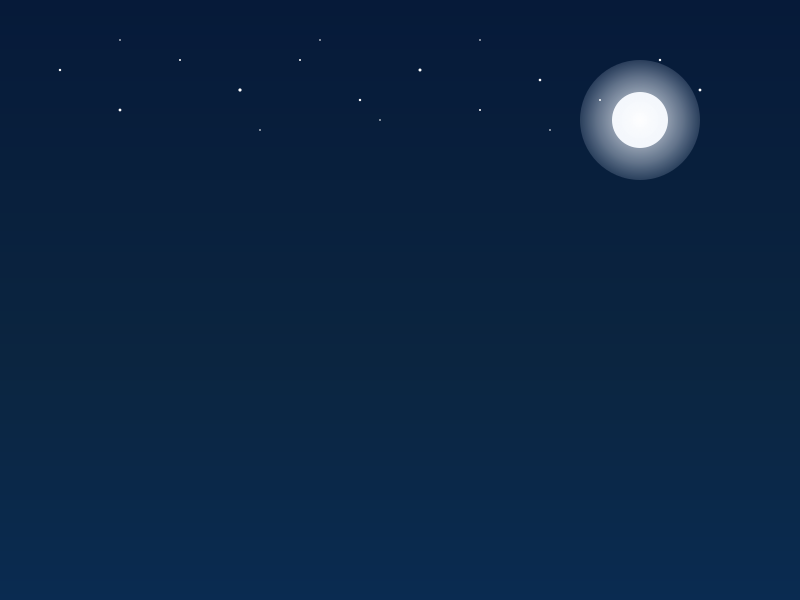
<svg viewBox="0 0 800 600" xmlns="http://www.w3.org/2000/svg" version="1.1" aria-label="Night scene with a fox on a hill looking at the moon">
  <defs>
    <!-- Sky gradient -->
    <linearGradient id="nightSky" x1="0" y1="0" x2="0" y2="1">
      <stop offset="0%" stop-color="#061a39"/>
      <stop offset="60%" stop-color="#0b2540"/>
      <stop offset="100%" stop-color="#0a2b51"/>
    </linearGradient>

    <!-- Moon glow gradient -->
    <radialGradient id="moonGlow" cx="50%" cy="50%" r="60%">
      <stop offset="0%"  stop-color="#fff" stop-opacity="0.9"/>
      <stop offset="60%" stop-color="#e8f1ff" stop-opacity="0.4"/>
      <stop offset="100%" stop-color="#cbdfff" stop-opacity="0"/>
    </radialGradient>

    <!-- Hills gradients -->
    <linearGradient id="hillBack" x1="0" y1="0" x2="0" y2="1">
      <stop offset="0%" stop-color="#2b5a38"/>
      <stop offset="100%" stop-color="#1b3e2b"/>
    </linearGradient>
    <linearGradient id="hillFront" x1="0" y1="0" x2="0" y2="1">
      <stop offset="0%" stop-color="#254f2c"/>
      <stop offset="100%" stop-color="#0f2a1b"/>
    </linearGradient>

    <!-- Subtle glow filter for moon -->
    <filter id="softGlow" x="-50%" y="-50%" width="200%" height="200%">
      <feGaussianBlur stdDeviation="6" result="blur"/>
      <feMerge>
        <feMergeNode in="blur"/>
        <feMergeNode in="SourceGraphic"/>
      </feMerge>
    </filter>

    <!-- A few tree silhouettes shade (used with gradient mask-like feel) -->
    <linearGradient id="treeDark" x1="0" y1="0" x2="0" y2="1">
      <stop offset="0%" stop-color="#1a2a22"/>
      <stop offset="100%" stop-color="#0e1a13"/>
    </linearGradient>
  </defs>

  <!-- Background sky -->
  <rect width="800" height="600" fill="url(#nightSky)"/>

  <!-- Moon with glow -->
  <circle cx="640" cy="120" r="28" fill="#f7f7f7"/>
  <circle cx="640" cy="120" r="60" fill="url(#moonGlow)" filter="url(#softGlow)"/>

  <!-- Stars (twinkling) -->
  <!-- A dozen twinkling stars with staggered begins -->
  <circle cx="60" cy="70" r="1.2" fill="#fff">
    <animate attributeName="opacity" values="0.3;1;0.3" dur="3s" repeatCount="indefinite" begin="0s"/>
  </circle>
  <circle cx="120" cy="110" r="1.4" fill="#fff">
    <animate attributeName="opacity" values="0.4;1;0.4" dur="2.8s" repeatCount="indefinite" begin="0.6s"/>
  </circle>
  <circle cx="180" cy="60" r="1" fill="#fff">
    <animate attributeName="opacity" values="0.25;1;0.25" dur="3.2s" repeatCount="indefinite" begin="1.2s"/>
  </circle>
  <circle cx="240" cy="90" r="1.6" fill="#fff">
    <animate attributeName="opacity" values="0.3;1;0.3" dur="3s" repeatCount="indefinite" begin="0.3s"/>
  </circle>
  <circle cx="300" cy="60" r="1" fill="#fff">
    <animate attributeName="opacity" values="0.3;1;0.3" dur="2.6s" repeatCount="indefinite" begin="0.9s"/>
  </circle>
  <circle cx="360" cy="100" r="1.2" fill="#fff">
    <animate attributeName="opacity" values="0.4;1;0.4" dur="3.4s" repeatCount="indefinite" begin="0.2s"/>
  </circle>
  <circle cx="420" cy="70" r="1.5" fill="#fff">
    <animate attributeName="opacity" values="0.25;1;0.25" dur="3s" repeatCount="indefinite" begin="1.6s"/>
  </circle>
  <circle cx="480" cy="110" r="1" fill="#fff">
    <animate attributeName="opacity" values="0.3;1;0.3" dur="2.9s" repeatCount="indefinite" begin="0.4s"/>
  </circle>
  <circle cx="540" cy="80" r="1.3" fill="#fff">
    <animate attributeName="opacity" values="0.4;1;0.4" dur="3.1s" repeatCount="indefinite" begin="0.8s"/>
  </circle>
  <circle cx="600" cy="100" r="1" fill="#fff">
    <animate attributeName="opacity" values="0.25;1;0.25" dur="3.2s" repeatCount="indefinite" begin="1.5s"/>
  </circle>
  <circle cx="660" cy="60" r="1.2" fill="#fff">
    <animate attributeName="opacity" values="0.3;1;0.3" dur="2.7s" repeatCount="indefinite" begin="0.2s"/>
  </circle>
  <circle cx="700" cy="90" r="1.4" fill="#fff">
    <animate attributeName="opacity" values="0.5;1;0.5" dur="3.3s" repeatCount="indefinite" begin="0.95s"/>
  </circle>

  <!-- More subtle faint stars -->
  <circle cx="120" cy="40" r="0.8" fill="#fff">
    <animate attributeName="opacity" values="0.2;1;0.2" dur="2.5s" repeatCount="indefinite" begin="0s"/>
  </circle>
  <circle cx="260" cy="130" r="0.8" fill="#fff">
    <animate attributeName="opacity" values="0.3;1;0.3" dur="2.7s" repeatCount="indefinite" begin="0.5s"/>
  </circle>
  <circle cx="320" cy="40" r="0.8" fill="#fff">
    <animate attributeName="opacity" values="0.3;1;0.3" dur="3.0s" repeatCount="indefinite" begin="1.0s"/>
  </circle>
  <circle cx="380" cy="120" r="0.8" fill="#fff">
    <animate attributeName="opacity" values="0.25;1;0.25" dur="2.6s" repeatCount="indefinite" begin="0.15s"/>
  </circle>
  <circle cx="480" cy="40" r="0.8" fill="#fff">
    <animate attributeName="opacity" values="0.3;1;0.3" dur="2.9s" repeatCount="indefinite" begin="0.25s"/>
  </circle>
  <circle cx="550" cy="130" r="0.8" fill="#fff">
    <animate attributeName="opacity" values="0.3;1;0.3" dur="3.1s" repeatCount="indefinite" begin="0.65s"/>
  </circle>

  <!-- Shooting star: a streak moving across the sky every 4s (first within 2s) -->
  <g id="shootingStar" transform="translate(-50,-50)">
    <path d="M0,0 L40,8" stroke="#fff" stroke-width="2" stroke-linecap="round" fill="none" opacity="0.95">
      <!-- streak animation -->
      <animateTransform attributeName="transform" type="translate"
        values=" -50,-50; 750,540" dur="4s" begin="0s" repeatCount="indefinite"/>
    </path>
    <!-- tiny head glow to imply a streak -->
    <circle cx="0" cy="0" r="1.5" fill="#fff">
      <animateTransform attributeName="transform" type="translate"
        values=" -50,-50; 750,540" dur="4s" begin="0s" repeatCount="indefinite"/>
    </circle>
  </g>
</svg>
Reasoning trace (15,552 tokens)
**Designing SVG Illustration**

I need to create a standalone SVG illustration of a fox that includes animations. It must be a single valid .svg file presented in a code block without any external references or JavaScript. The plan includes twinkling stars, a swaying fox tail, and a shooting star that crosses the sky every 4 seconds, with the first one appearing within 2 seconds. I’ll use SMIL for the animations, adjusting opacity for the stars and finding the best way to animate the fox's tail.**Animating SVG Components**

I’m using the SMIL `<animateTransform>` element to rotate the fox's tail; I need to set the transform origin correctly with `transform-box: fill-box` and `transform-origin: center`. Since SMIL's handling of transform origin isn't standard, I might wrap the tail in a group that translates to its pivot for proper rotation. The tail animation will rotate around its base, using specific coordinates for smooth movement. I’ll also create a complete 800x600 viewBox with stars, a glowing moon, and no external resources—keeping everything inline within the SVG.**Implementing SVG Structure**

I’ll set up the SVG with a width and height of 100%, sized at 800 by 600 pixels. For the night sky, I plan to use a linear gradient from deep navy to a lighter shade near the horizon, while the moon will have a soft glow created with radial gradients and a Gaussian blur filter.

For the stars, I will position many small circles randomly and animate their opacity to create a twinkling effect. Each star will start with different begin times, staggered using durations like 0s, 0.5s, and 1s to avoid compatibility issues.**Creating Stars and Shooting Star Animation**

I’ll create about 60 stars with random start times for their twinkling animations, which is feasible!

For the shooting star, I plan to implement a diagonal line that moves from the top left to the bottom right. I'll use SMIL `<animate>` to adjust either the x and y positions or apply a translation path. I’ll create a group with a streak line and a tail circle for the shooting star. Animating the x and y positions will be done with the `<animate>` tag, but animating the path's "d" attribute seems tricky.**Designing the Scene and Fox**

I’m defining a radial gradient, "moonGlow," for the moon’s glow with a circle behind it that uses this gradient. Next, I plan to generate around 60 stars with varying positions and twinkling effects using SMIL to adjust their opacity at different start times.

For the hills, I'll create layered paths with gradient fills to add depth. The fox will be simplified, using basic shapes like ellipses and paths for the head, body, and a bushy tail. I’ll ensure it’s recognizable yet not overly complex.**Creating the Fox and Tail Animation**

I’m proposing a design for the fox by grouping various shapes: an ellipse for the body, a circle for the head, and polygons for the ears. I'd also make a small muzzle, eye, and nose using simple shapes.

For the tail, I could use either a path shape or an ellipse, creating a white tip as an overlay. To animate the tail sway, I'll group its shapes and apply a SMIL animation for rotation, setting the initial transformation to ensure smooth movement around a pivot point at the tail's base.**Animating the Fox Tail**

I need to focus on animating the tail of the fox now. To avoid complexity, I’ll go with SMIL for robust animation. I’ll create a separate group for the tail, starting by setting its position.

The tail's rotation will use `animateTransform`, and I need to specify a pivot point correctly. My plan is to use the coordinates (320, 520) for the tail's base while ensuring the rotation is centered accurately.

I'll define the tail shapes, applying the correct SMIL syntax to animate its sway effectively around the chosen pivot.**Simplifying Animation Parameters**

I’m working through the details for the tail animation, focusing on the `from` and `to` parameters. It seems clearer to use `animateTransform` directly with values structured as transformation strings.

I’ll set the rotation using values in the form of "rotate(angle cx cy)", so my final code will look like this:

<animateTransform attributeName="transform" type="rotate" values="rotate(-8 320 520); rotate(8 320 520); rotate(-8 320 520)" dur="1.8s" repeatCount="indefinite"/>

For the shooting star, I’ll create a separate group with movement across the sky, ensuring both animations complement each other beautifully. Then, I'll finalize the SVG code for stability and clarity!**Crafting the Scene Elements**

I'm setting up the star positions for a night sky, specifying coordinates to ensure visibility. To create a twinkling effect, each star will animate their opacity with a staggered start.

For the hills, I'll define background layers and front hills using gradient fills. The silhouettes of trees will be represented by simple triangular shapes along the skyline.

Next, I'll incorporate a fox, focusing on its body and tail using ellipses. I'll carefully position each element with the right colors and shapes, while avoiding overlapping.

It's important to wrap the tail with a transformation group for smooth movement. Let's finalize this scene with all animations in place!**Defining the Shooting Star and Elements**

I'm coding a shooting star animation. It will start at coordinates (-40, -40) and move across the sky to (760, 560), ensuring it crosses the horizon every 4 seconds. I need to make sure the path doesn’t go off-screen.

For the overall scene, I’ll create an 800x600 SVG viewBox and add elements like twinkling stars, hills, trees, and a fox. I’ll simplify the fox tail design with an ellipse and incorporate animations for the tail sway, ensuring that all elements stay visually cohesive.**Implementing the Fox Animation**

I'm setting up the fox animation by using a group for the tail so it rotates smoothly with the body. The tail will have its own rotation effect, ensuring all parts work together harmoniously. I’ll draw the fox body, head, and other features like ears, eyes, and nose with absolute coordinates, making sure they all fit well.

I’ll also include the moon and stars with appropriate animations for a night sky ambiance, aiming for at least 28 twinkling stars to give that magical feel! Now I’m ready to finalize the SVG code.**Creating the Fox SVG**

I’m working on adding the fox to the SVG. The fox's body will be represented by an ellipse, and since it's within a group using translate, I need to adjust the coordinates for everything to fit well. I’ll define the ears, head, and tail while ensuring the tail appears behind the body.

Instead of complex details, I’m considering a simpler silhouette while still meeting the requirement for recognizability. I’ll finalize with a proper structure for the whole SVG image, including a gradient sky, moon, stars, hills, trees, and the fox itself. Now it’s time to put everything into action!