Skateboarding astronaut catOne-line
GPT-5 Nano
by OpenAIReasoningClean
Running live in a sandboxed frame. Click inside it before using the keyboard.
How it went
- Total time
- 1 min 13 s
- Cost
- $0.0037
- Output tokens
- 9,318
- Spent thinking
- 7,360 tokens
- Speed
- 139.4 tok/s
- Console errors
- 0
- First token after
- 5.8 s
- First visible text after
- 1 min 1 s
- Prompt tokens
- 347
- Code size
- 5.4 KB
- Finish reason
- stop
- Served by
- OpenAI
- Model id
openai/gpt-5-nano- Reasoning sent
model default- Max output
- 128,000 tokens
- Generated
- Nov 12, 2026
What it was asked
The prompt
“draw me an SVG of an astronaut cat skateboarding on the moon”
System prompt, sent with every prompt
You are generating a self-contained web demo. It will be rendered automatically in a sandboxed iframe and compared side by side with the output of other AI models given the exact same task.

Output rules:
- Reply with exactly ONE fenced code block containing the complete file: ```html (or ```svg when the task asks for an SVG). No text before or after the code block.
- Everything must be inline: CSS in <style>, JavaScript in <script>. No external files, images, fonts or network requests, except the CDN URLs explicitly allowed by the task.
- Do not use localStorage, sessionStorage, cookies, IndexedDB, alert(), confirm(), prompt() or window.open(): they are blocked in the sandbox and will throw.
- The page must look right in a 1280×800 viewport and adapt gracefully down to 375px wide. No horizontal scrollbar.
- Something meaningful must be visible on first paint: a screenshot is taken automatically about 3 seconds after load, without any interaction.
- Everything that makes the demo interesting must be visible within the first seconds: nothing hidden behind a high score, a later level or a long play session.
- Games must start in a self-playing demo mode (a simple AI plays) behind a "Click or press a key to start" message, so the game can be judged in action without playing.
- The iframe only receives keyboard events after the user clicks it: if the demo uses the keyboard, display a clear "Click or press a key to start" message.
- The code must run with zero errors in the console of the latest Chrome.
Code run-1.svg · 126 lines
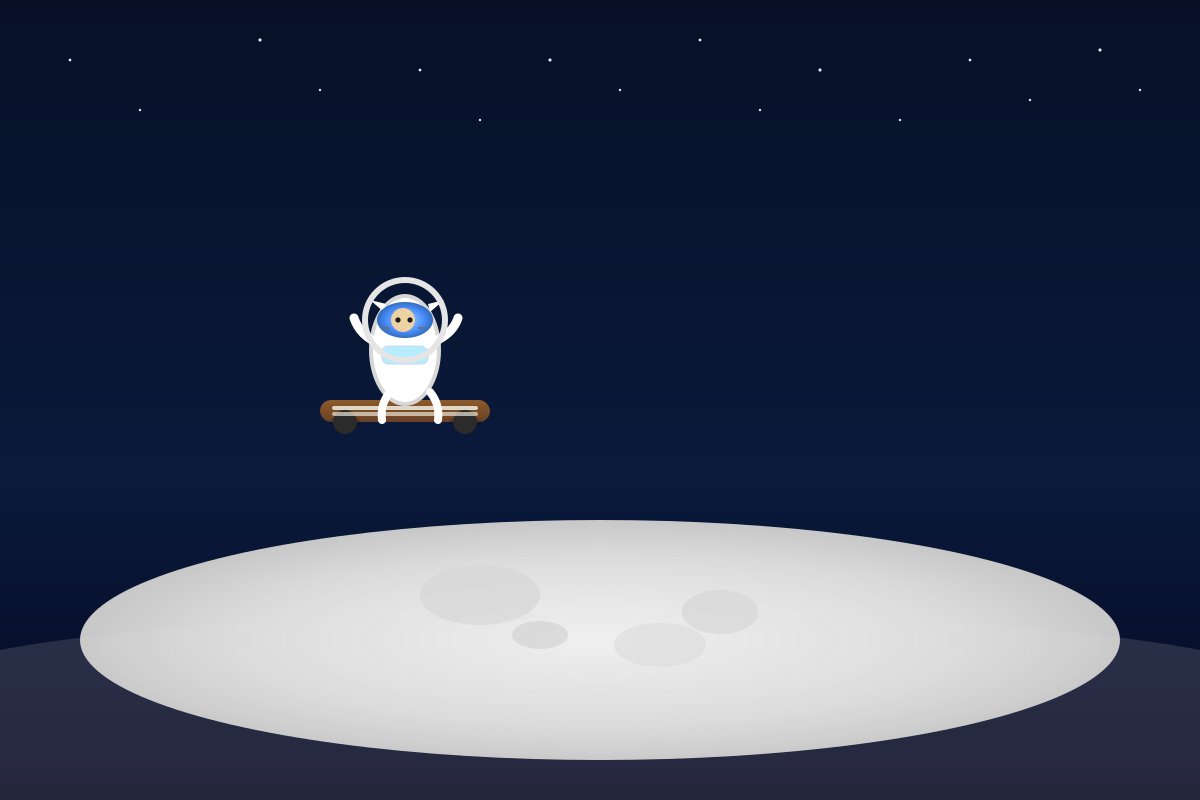
<svg xmlns="http://www.w3.org/2000/svg" viewBox="0 0 1200 800" width="100%" height="100%" role="img" aria-label="Astronaut cat skateboarding on the moon">
  <defs>
    <!-- Sky gradient -->
    <linearGradient id="sky" x1="0" y1="0" x2="0" y2="1">
      <stop offset="0%" stop-color="#071027"/>
      <stop offset="60%" stop-color="#0a1a3b"/>
      <stop offset="100%" stop-color="#050720"/>
    </linearGradient>

    <!-- Moon glow / ground gradient -->
    <radialGradient id="moon" cx="50%" cy="50%" r="60%">
      <stop offset="0%" stop-color="#f0f0f0"/>
      <stop offset="60%" stop-color="#d8d8d8"/>
      <stop offset="100%" stop-color="#b8b8b8"/>
    </radialGradient>

    <!-- Skateboard deck gradient -->
    <linearGradient id="board" x1="0" y1="0" x2="0" y2="1">
      <stop offset="0%" stop-color="#8c5a2a"/>
      <stop offset="100%" stop-color="#6a4126"/>
    </linearGradient>

    <!-- Visor tint -->
    <radialGradient id="visor" cx="50%" cy="50%" r="60%">
      <stop offset="0%" stop-color="#9ad6ff"/>
      <stop offset="60%" stop-color="#3b82f6"/>
      <stop offset="100%" stop-color="#1b4f8a"/>
    </radialGradient>
  </defs>

  <!-- Background Sky -->
  <rect width="100%" height="100%" fill="url(#sky)"/>

  <!-- Stars (background) -->
  <g fill="#ffffff" opacity="0.9">
    <circle cx="70" cy="60" r="1.4"/>
    <circle cx="140" cy="110" r="1.2"/>
    <circle cx="260" cy="40" r="1.6"/>
    <circle cx="320" cy="90" r="1.2"/>
    <circle cx="420" cy="70" r="1.4"/>
    <circle cx="480" cy="120" r="1.2"/>
    <circle cx="550" cy="60" r="1.6"/>
    <circle cx="620" cy="90" r="1.2"/>
    <circle cx="700" cy="40" r="1.4"/>
    <circle cx="760" cy="110" r="1.2"/>
    <circle cx="820" cy="70" r="1.6"/>
    <circle cx="900" cy="120" r="1.2"/>
    <circle cx="970" cy="60" r="1.4"/>
    <circle cx="1030" cy="100" r="1.2"/>
    <circle cx="1100" cy="50" r="1.6"/>
    <circle cx="1140" cy="90" r="1.2"/>
  </g>

  <!-- Moon ground / surface -->
  <ellipse cx="600" cy="640" rx="520" ry="120" fill="url(#moon)"/>
  <!-- Moon craters -->
  <ellipse cx="480" cy="595" rx="60" ry="30" fill="#d6d6d6" opacity="0.9"/>
  <ellipse cx="720" cy="612" rx="38" ry="22" fill="#d6d6d6" opacity="0.9"/>
  <ellipse cx="540" cy="635" rx="28" ry="14" fill="#cfcfcf" opacity="0.8"/>
  <ellipse cx="660" cy="645" rx="46" ry="22" fill="#dadada" opacity="0.8"/>

  <!-- Foreground moon edge for depth -->
  <path d="M0,650 C260,600 940,600 1200,650 L1200,800 L0,800Z" fill="#e0e0e0" opacity="0.15"/>

  <!-- Self-contained astronaut cat skateboarding on the moon -->
  <g id="scene" transform="translate(0,0)">
    <!-- Cat on skateboard group -->
    <g id="cat" transform="translate(320,260)">
      <!-- Skateboard deck (top) -->
      <g transform="translate(0,140)">
        <rect x="0" y="0" width="170" height="22" rx="11" fill="url(#board)" />
        <!-- Wheel shadows -->
        <ellipse cx="25" cy="22" rx="16" ry="6" fill="#000" opacity="0.15"/>
        <ellipse cx="145" cy="22" rx="16" ry="6" fill="#000" opacity="0.15"/>
        <!-- Wheels -->
        <circle cx="25" cy="22" r="12" fill="#2b2b2b"/>
        <circle cx="145" cy="22" r="12" fill="#2b2b2b"/>
        <!-- Board grip stripes -->
        <rect x="12" y="6" width="146" height="4" rx="2" fill="#e8e6d9" opacity="0.9"/>
        <rect x="12" y="12" width="146" height="4" rx="2" fill="#e8e6d9" opacity="0.7"/>
      </g>

      <!-- Body / suit -->
      <ellipse cx="85" cy="90" rx="34" ry="54" fill="#ffffff" stroke="#d7d7d7" stroke-width="4"/>
      <!-- Chest panel hint -->
      <rect x="62" y="86" width="46" height="18" rx="6" fill="rgba(180,235,255,0.95)" stroke="#cbd8e5" stroke-width="1"/>

      <!-- Arms (gloves) peeking from torso -->
      <path d="M60,84 q-20,-8 -26,-26" fill="none" stroke="#ffffff" stroke-width="9" stroke-linecap="round" />
      <path d="M108,84 q24,-8 30,-26" fill="none" stroke="#ffffff" stroke-width="9" stroke-linecap="round" />

      <!-- Head with helmet -->
      <!-- Ears outside helmet for cuteness -->
      <path d="M64,52 L50,40 L66,44 Z" fill="#ffffff"/>
      <path d="M110,52 L124,40 L108,44 Z" fill="#ffffff"/>

      <!-- Helmet ring around head -->
      <circle cx="85" cy="60" r="40" fill="none" stroke="#e5e5e5" stroke-width="6"/>
      <!-- Visor (tinted) -->
      <ellipse cx="85" cy="60" rx="28" ry="18" fill="url(#visor)" opacity="0.95"/>

      <!-- Head circle behind visor to suggest face tint -->
      <circle cx="83" cy="60" r="12" fill="#f5d3a0" opacity="0.95"/>

      <!-- Eyes peeking through visor -->
      <circle cx="78" cy="60" r="2.6" fill="#1a1a1a"/>
      <circle cx="90" cy="60" r="2.6" fill="#1a1a1a"/>

      <!-- Whiskers hint (on helmet front) -->
      <path d="M70,68 h-8" stroke="#6b6b6b" stroke-width="1.5" />
      <path d="M98,68 h8" stroke="#6b6b6b" stroke-width="1.5" />

      <!-- Lower legs / feet on board (simple) -->
      <path d="M70,132 q-10,12 -8,28" fill="none" stroke="#ffffff" stroke-width="8" stroke-linecap="round"/>
      <path d="M110,132 q10,12 8,28" fill="none" stroke="#ffffff" stroke-width="8" stroke-linecap="round"/>
    </g>
  </g>

  <!-- A subtle glow around the moon for ambiance -->
  <radialGradient id="moonGlow" cx="50%" cy="50%" r="60%">
    <stop offset="0%" stop-color="#f7f7f7" stop-opacity="0.6"/>
    <stop offset="100%" stop-color="#ffffff" stop-opacity="0"/>
  </radialGradient>
  <ellipse cx="600" cy="640" rx="520" ry="120" fill="url(#moonGlow)" opacity="0.25" />

</svg>
Reasoning trace (7,360 tokens)
**Considering SVG design**

I’m thinking about adding subtle animation to the SVG featuring a cartoon cat in an astronaut suit on a skateboard, with a background of stars and a ground crater. Since it’s self-contained on the moon, I’ll use CSS animations within the SVG. The prompt emphasizes that it should be visually appealing and accessible, so I’ll include a viewBox and make sure it’s responsive. I also need to ensure that there are no errors in the console, although that mainly applies to HTML and JS.**Designing the SVG**

I’m planning to create a single SVG document that features a moon crater, an astronaut cat on a skateboard, and a dark blue space gradient background with stars. I'll design the moon surface using light gray and beige crater shapes. The cat will have a rounded body in a white spacesuit with orange or blue accents, and the helmet will be a circle showing the cat's face. I want to embed some slight parallax or bobbing animation using SMIL or CSS inside the SVG for a lively touch.**Creating the moon scene**

I’m envisioning the moon surface with a curved light gray ground path and darker crater circles at the bottom. For the astronaut cat, I’ll position it near the center-left. The cat’s body will be an ellipse with a circle for the head, triangles for ears, and a white helmet with a blue visor. The spacesuit will consist of a rectangle for the torso and arms, while the skateboard will be a rounded rectangle with circular wheels. I could add a simple bobbing animation using SMIL, but I need to consider browser support, as SMIL has had some inconsistencies in recent years.**Switching to CSS animations**

I remember that Chrome had removed SMIL support gradually, recommending CSS animations instead, although I'm not entirely confident about the details for 2024. To be safer, I’ll use CSS animations for the SVG elements by assigning IDs and applying keyframes. I can make the entire cat group bob or even rotate the wheels. By wrapping the cat in a `<g id="cat">`, I can animate the `transform translateY`. For CSS animations on SVG elements, I need to set the animation property, ensuring the transform origin is defined correctly.**Building the cat astronaut SVG**

I’m creating the moon base with a large ellipse for the moon surface and adding crater shapes. The cat group will be positioned on a skateboard beneath its paws, and I’ll set precise coordinates for clarity. I'll make the skateboard a rounded rectangle with wheels below its deck.

The cat will have a simple silhouette with the head as a circle, ears as triangles, and a helmet that encloses its head with a transparent visor to show the facial features. I’ll layer everything carefully to ensure visibility. The design will focus on symmetry and clarity to represent the astronaut cat effectively.**Simplifying the astronaut cat design**

I’m organizing the cat astronaut design by layering the ears outside the helmet. To simplify, I’ll create a stylized cat wearing a spacesuit perched on a skateboard. The cat silhouette should be clear alongside the helmet.

I'll implement a simple circular helmet around the head, with cat features visible. The body will be an ellipse, arms as rounded rectangles, and the skateboard will be its own group positioned beneath. I’ll keep the shapes loose for clarity, aiming for a coherent look rather than hyper-realistic details. Finally, I’ll craft a clean SVG output showcasing this cute astronaut cat on its skateboard!**Refining the cat astronaut design**

I’m restructuring the astronaut cat's legs since they’re tricky to produce. Instead, I’ll position the cat standing on its board with one leg visible. I plan to use simple shapes, such as a rounded rectangle for the legs.

To clarify, the cat will feature a simple body, a circular head with a helmet, and ears as triangles. I’ll also add a skateboard underneath. I want to ensure everything is visually coherent and ends up looking cute. Now, let’s create the SVG code for this whimsical scene!