GPT-6.1 Terra
by OpenAIReasoningClean
Running live in a sandboxed frame. Click inside it before using the keyboard.
How it went
- Total time
- 8 min 53 s
- Cost
- $0.200
- Output tokens
- 39,960
- Spent thinking
- 31,780 tokens
- Speed
- 76.2 tok/s
- Console errors
- 0
- First token after
- 9.0 s
- First visible text after
- 7 min 35 s
- Prompt tokens
- 522
- Code size
- 20.3 KB
- Finish reason
- stop
- Served by
- OpenAI
- Model id
openai/gpt-6.1-terra- Reasoning sent
{"effort":"max"}- Max output
- 128,000 tokens
- Generated
- Nov 12, 2026
What it was asked
The prompt
Create a standalone SVG illustration of a fox sitting on a hill, looking at the moon on a starry night, with a few subtle animations. Requirements: - Output a single valid .svg file (```svg code block) with a viewBox of 0 0 800 600. - Hand-written shapes and paths only: no embedded raster images, no external references, no JavaScript. - The fox must be clearly recognizable (pointy ears, snout, bushy tail with a white tip). - Include the moon with a soft glow, many stars, the hill and some background elements (trees, distant hills). - Use a coherent color palette and at least one gradient. - Animations (SMIL or CSS inside the SVG), all looping seamlessly: stars twinkling, the fox's tail swaying gently, and a shooting star crossing the sky every 4 seconds (the first one within 2 seconds).
System prompt, sent with every prompt
You are generating a self-contained web demo. It will be rendered automatically in a sandboxed iframe and compared side by side with the output of other AI models given the exact same task.

Output rules:
- Reply with exactly ONE fenced code block containing the complete file: ```html (or ```svg when the task asks for an SVG). No text before or after the code block.
- Everything must be inline: CSS in <style>, JavaScript in <script>. No external files, images, fonts or network requests, except the CDN URLs explicitly allowed by the task.
- Do not use localStorage, sessionStorage, cookies, IndexedDB, alert(), confirm(), prompt() or window.open(): they are blocked in the sandbox and will throw.
- The page must look right in a 1280×800 viewport and adapt gracefully down to 375px wide. No horizontal scrollbar.
- Something meaningful must be visible on first paint: a screenshot is taken automatically about 3 seconds after load, without any interaction.
- Everything that makes the demo interesting must be visible within the first seconds: nothing hidden behind a high score, a later level or a long play session.
- Games must start in a self-playing demo mode (a simple AI plays) behind a "Click or press a key to start" message, so the game can be judged in action without playing.
- The iframe only receives keyboard events after the user clicks it: if the demo uses the keyboard, display a clear "Click or press a key to start" message.
- The code must run with zero errors in the console of the latest Chrome.
Code run-1.svg · 326 lines
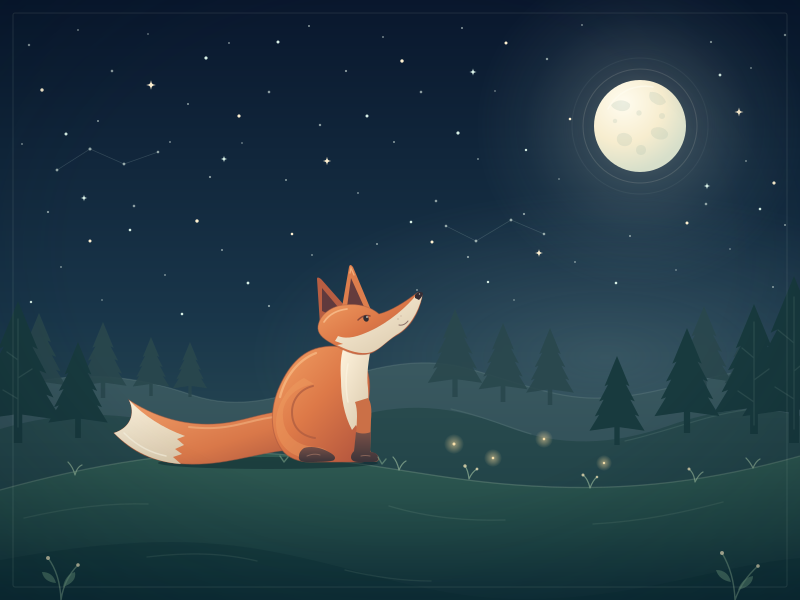
<svg xmlns="http://www.w3.org/2000/svg" width="100%" height="100%" viewBox="0 0 800 600" preserveAspectRatio="xMidYMid meet" role="img" aria-labelledby="title description" style="background:#0a1b2d;display:block">
  <title id="title">A quiet moment under the moon</title>
  <desc id="description">A fox sits on a grassy hill, looking up at the moon. Stars twinkle over distant wooded hills, and a shooting star glides across the sky.</desc>

  <defs>
    <linearGradient id="sky" x1="0" y1="0" x2="0" y2="1">
      <stop offset="0" stop-color="#09172d"/>
      <stop offset=".53" stop-color="#19364a"/>
      <stop offset="1" stop-color="#365b5c"/>
    </linearGradient>
    <radialGradient id="moonGlow">
      <stop offset="0" stop-color="#f7edce" stop-opacity=".34"/>
      <stop offset=".32" stop-color="#d8e8d6" stop-opacity=".17"/>
      <stop offset=".7" stop-color="#badbd3" stop-opacity=".05"/>
      <stop offset="1" stop-color="#badbd3" stop-opacity="0"/>
    </radialGradient>
    <radialGradient id="haze">
      <stop offset="0" stop-color="#b7d4c8" stop-opacity=".17"/>
      <stop offset="1" stop-color="#b7d4c8" stop-opacity="0"/>
    </radialGradient>
    <radialGradient id="moonSurface" cx="32%" cy="25%" r="75%">
      <stop offset="0" stop-color="#fffcef"/>
      <stop offset=".58" stop-color="#f7edcf"/>
      <stop offset="1" stop-color="#d7dfca"/>
    </radialGradient>
    <clipPath id="moonClip">
      <circle cx="640" cy="126" r="46"/>
    </clipPath>
    <linearGradient id="meteorTrail" x1="0" y1="0" x2="84" y2="-44" gradientUnits="userSpaceOnUse">
      <stop offset="0" stop-color="#fff9e5" stop-opacity=".95"/>
      <stop offset=".28" stop-color="#d7f0e3" stop-opacity=".7"/>
      <stop offset="1" stop-color="#b8e1db" stop-opacity="0"/>
    </linearGradient>
    <radialGradient id="meteorGlow">
      <stop offset="0" stop-color="#fff8dd" stop-opacity=".8"/>
      <stop offset="1" stop-color="#d5f3e8" stop-opacity="0"/>
    </radialGradient>
    <linearGradient id="farHill" x1="0" y1="0" x2="0" y2="1">
      <stop offset="0" stop-color="#3a5960"/>
      <stop offset="1" stop-color="#284650"/>
    </linearGradient>
    <linearGradient id="middleHill" x1="0" y1="0" x2="0" y2="1">
      <stop offset="0" stop-color="#294b4e"/>
      <stop offset="1" stop-color="#193b42"/>
    </linearGradient>
    <linearGradient id="frontHill" x1="0" y1="0" x2="0" y2="1">
      <stop offset="0" stop-color="#315c53"/>
      <stop offset=".55" stop-color="#204746"/>
      <stop offset="1" stop-color="#103039"/>
    </linearGradient>
    <linearGradient id="foxFur" x1="0" y1="0" x2="1" y2="1">
      <stop offset="0" stop-color="#f3a366"/>
      <stop offset=".48" stop-color="#dd7948"/>
      <stop offset="1" stop-color="#ad503c"/>
    </linearGradient>
    <linearGradient id="tailFur" x1="0" y1="0" x2="1" y2="1">
      <stop offset="0" stop-color="#f2a06a"/>
      <stop offset=".6" stop-color="#d97849"/>
      <stop offset="1" stop-color="#a9533d"/>
    </linearGradient>
    <linearGradient id="creamFur" x1="0" y1="0" x2=".8" y2="1">
      <stop offset="0" stop-color="#fff4de"/>
      <stop offset="1" stop-color="#dbcaad"/>
    </linearGradient>
    <linearGradient id="paws" x1="0" y1="0" x2="0" y2="1">
      <stop offset="0" stop-color="#785047"/>
      <stop offset="1" stop-color="#3c3439"/>
    </linearGradient>
    <radialGradient id="fireflyGlow">
      <stop offset="0" stop-color="#f7d99b" stop-opacity=".55"/>
      <stop offset="1" stop-color="#f7d99b" stop-opacity="0"/>
    </radialGradient>
    <radialGradient id="vignette" cx="50%" cy="42%" r="75%">
      <stop offset=".55" stop-color="#00111d" stop-opacity="0"/>
      <stop offset="1" stop-color="#00111d" stop-opacity=".3"/>
    </radialGradient>

    <path id="sparkle" d="M0-6 C.7-1.6 1.6-.7 6 0 C1.6.7 .7 1.6 0 6 C-.7 1.6-1.6.7-6 0 C-1.6-.7-.7-1.6 0-6Z"/>
    <path id="pine" d="M-3 100V80 L-31 84 L-20 66 L-25 68 L-15 49 L-20 51 L-10 32 L-14 34 L0 0 L14 34 L10 32 L20 51 L15 49 L25 68 L20 66 L31 84 L3 80 V100Z"/>
  </defs>

  <!-- Night sky and moonlight -->
  <rect width="800" height="600" fill="url(#sky)"/>
  <ellipse cx="605" cy="357" rx="355" ry="167" fill="url(#haze)"/>
  <circle cx="640" cy="126" r="165" fill="url(#moonGlow)"/>

  <!-- Fine constellation lines -->
  <g fill="none" stroke="#bfd9d2" stroke-width=".7" opacity=".19">
    <path d="M57 170 L90 149 L124 164 L158 152"/>
    <path d="M446 226 L476 241 L511 220 L544 234"/>
  </g>
  <g fill="#d9e9df" opacity=".65">
    <circle cx="57" cy="170" r="1.4"/><circle cx="90" cy="149" r="1.5"/>
    <circle cx="124" cy="164" r="1.4"/><circle cx="158" cy="152" r="1.3"/>
    <circle cx="446" cy="226" r="1.3"/><circle cx="476" cy="241" r="1.4"/>
    <circle cx="511" cy="220" r="1.4"/><circle cx="544" cy="234" r="1.3"/>
  </g>

  <!-- Small, steady stars -->
  <g fill="#cfdfd9" opacity=".65">
    <circle cx="29" cy="45" r="1.2"/><circle cx="78" cy="30" r=".9"/>
    <circle cx="112" cy="71" r="1.3"/><circle cx="148" cy="34" r=".8"/>
    <circle cx="188" cy="104" r="1"/><circle cx="229" cy="43" r=".9"/>
    <circle cx="269" cy="92" r="1.3"/><circle cx="309" cy="26" r="1"/>
    <circle cx="346" cy="71" r="1.1"/><circle cx="383" cy="37" r=".9"/>
    <circle cx="421" cy="92" r="1.3"/><circle cx="462" cy="28" r="1"/>
    <circle cx="495" cy="91" r=".8"/><circle cx="547" cy="59" r="1.2"/>
    <circle cx="582" cy="25" r=".9"/><circle cx="711" cy="42" r="1.1"/>
    <circle cx="751" cy="68" r=".9"/><circle cx="785" cy="35" r="1.2"/>
    <circle cx="22" cy="144" r=".9"/><circle cx="48" cy="212" r="1.1"/>
    <circle cx="98" cy="121" r="1"/><circle cx="134" cy="206" r="1.3"/>
    <circle cx="170" cy="142" r=".9"/><circle cx="210" cy="177" r="1.1"/>
    <circle cx="242" cy="143" r=".8"/><circle cx="286" cy="180" r="1"/>
    <circle cx="320" cy="125" r="1.2"/><circle cx="358" cy="193" r=".9"/>
    <circle cx="394" cy="142" r="1"/><circle cx="436" cy="201" r="1.3"/>
    <circle cx="478" cy="159" r=".9"/><circle cx="524" cy="214" r="1.1"/>
    <circle cx="559" cy="179" r=".8"/><circle cx="706" cy="204" r="1.3"/>
    <circle cx="746" cy="161" r=".9"/><circle cx="785" cy="225" r="1"/>
    <circle cx="61" cy="267" r=".9"/><circle cx="102" cy="300" r=".8"/>
    <circle cx="165" cy="275" r=".9"/><circle cx="222" cy="250" r="1"/>
    <circle cx="269" cy="306" r="1.1"/><circle cx="312" cy="255" r=".9"/>
    <circle cx="377" cy="244" r="1"/><circle cx="417" cy="290" r=".9"/>
    <circle cx="468" cy="257" r="1.1"/><circle cx="514" cy="300" r=".8"/>
    <circle cx="575" cy="262" r=".9"/><circle cx="630" cy="236" r="1"/>
    <circle cx="676" cy="270" r=".8"/><circle cx="730" cy="249" r=".8"/>
    <circle cx="773" cy="287" r="1"/>
  </g>

  <!-- Two gently alternating groups of twinkling stars -->
  <g fill="#fff1d1">
    <circle cx="42" cy="90" r="1.7"/><circle cx="239" cy="116" r="1.6"/>
    <circle cx="402" cy="61" r="1.7"/><circle cx="506" cy="43" r="1.5"/>
    <circle cx="570" cy="119" r="1.3"/><circle cx="774" cy="183" r="1.6"/>
    <circle cx="90" cy="241" r="1.5"/><circle cx="197" cy="221" r="1.7"/>
    <circle cx="292" cy="234" r="1.3"/><circle cx="432" cy="242" r="1.5"/>
    <circle cx="687" cy="223" r="1.5"/>
    <use href="#sparkle" transform="translate(151 85) scale(.8)"/>
    <use href="#sparkle" transform="translate(327 161) scale(.7)"/>
    <use href="#sparkle" transform="translate(539 253) scale(.65)"/>
    <use href="#sparkle" transform="translate(739 112) scale(.75)"/>
    <animate attributeName="opacity" values=".4;1;.4" keyTimes="0;.5;1" dur="3.6s" calcMode="spline" keySplines=".45 0 .55 1;.45 0 .55 1" repeatCount="indefinite"/>
  </g>
  <g fill="#d8f0e6">
    <circle cx="66" cy="134" r="1.5"/><circle cx="130" cy="230" r="1.3"/>
    <circle cx="206" cy="58" r="1.6"/><circle cx="278" cy="42" r="1.5"/>
    <circle cx="367" cy="116" r="1.5"/><circle cx="458" cy="133" r="1.6"/>
    <circle cx="526" cy="150" r="1.2"/><circle cx="720" cy="75" r="1.4"/>
    <circle cx="760" cy="209" r="1.3"/><circle cx="31" cy="302" r="1.2"/>
    <circle cx="182" cy="314" r="1.3"/><circle cx="248" cy="283" r="1.4"/>
    <circle cx="411" cy="222" r="1.3"/><circle cx="488" cy="282" r="1.2"/>
    <circle cx="616" cy="283" r="1.3"/>
    <use href="#sparkle" transform="translate(84 198) scale(.55)"/>
    <use href="#sparkle" transform="translate(224 159) scale(.55)"/>
    <use href="#sparkle" transform="translate(473 72) scale(.6)"/>
    <use href="#sparkle" transform="translate(707 186) scale(.55)"/>
    <animate attributeName="opacity" values=".95;.35;.95" keyTimes="0;.5;1" dur="4.7s" calcMode="spline" keySplines=".45 0 .55 1;.45 0 .55 1" repeatCount="indefinite"/>
  </g>

  <!-- The moon -->
  <circle cx="640" cy="126" r="57" fill="none" stroke="#f7f0d7" stroke-opacity=".14"/>
  <circle cx="640" cy="126" r="68" fill="none" stroke="#e6efd9" stroke-opacity=".06"/>
  <circle cx="640" cy="126" r="46" fill="url(#moonSurface)"/>
  <g clip-path="url(#moonClip)" fill="#a6bbab" opacity=".23">
    <path d="M611 105 C616 99 625 99 630 104 C631 108 627 112 620 111 C616 110 612 108 611 105Z"/>
    <path d="M650 92 C657 91 664 96 666 102 C663 106 658 106 654 103 C650 101 648 97 650 92Z"/>
    <path d="M652 129 C658 125 666 128 668 133 C669 138 663 141 657 139 C652 137 649 133 652 129Z"/>
    <path d="M618 135 C622 131 630 133 632 138 C633 143 629 147 623 146 C618 145 615 140 618 135Z"/>
    <circle cx="641" cy="150" r="5"/>
    <circle cx="639" cy="113" r="2.7"/>
    <circle cx="615" cy="121" r="2.2"/>
    <circle cx="662" cy="116" r="3"/>
  </g>
  <path d="M608 109 C618 90 637 84 653 87" fill="none" stroke="#fffdf0" stroke-opacity=".55" stroke-width="1.5" stroke-linecap="round"/>

  <!-- One crossing every four seconds; the first begins before one second. -->
  <g opacity="0">
    <circle r="11" fill="url(#meteorGlow)"/>
    <path d="M0 0 C22-15 52-32 83-44 C58-28 27-9 0 2Z" fill="url(#meteorTrail)"/>
    <path d="M0 0 L83-44" fill="none" stroke="url(#meteorTrail)" stroke-width="1.2" stroke-linecap="round"/>
    <circle r="2.2" fill="#fff9e6"/>
    <use href="#sparkle" fill="#fff9e6" transform="scale(.6)"/>
    <animateMotion path="M555 38 L280 182" dur="4s" keyPoints="0;0;1;1" keyTimes="0;.20;.84;1" calcMode="linear" repeatCount="indefinite"/>
    <animate attributeName="opacity" values="0;0;1;1;0;0" keyTimes="0;.20;.25;.77;.84;1" dur="4s" repeatCount="indefinite"/>
  </g>

  <!-- Distant hills and woodland -->
  <path d="M0 390 C77 368 134 375 192 395 C240 411 279 398 329 382 C383 364 426 356 473 370 C523 384 559 400 604 398 C671 396 733 360 800 371 V600 H0Z" fill="url(#farHill)"/>
  <path d="M0 390 C77 368 134 375 192 395 C240 411 279 398 329 382 C383 364 426 356 473 370 C523 384 559 400 604 398 C671 396 733 360 800 371" fill="none" stroke="#a2bbb0" stroke-opacity=".17" stroke-width="1.2"/>
  <g fill="#29474d" opacity=".9">
    <use href="#pine" transform="translate(39 313) scale(.86)"/>
    <use href="#pine" transform="translate(103 322) scale(.76)"/>
    <use href="#pine" transform="translate(151 337) scale(.59)"/>
    <use href="#pine" transform="translate(190 342) scale(.55)"/>
    <use href="#pine" transform="translate(455 309) scale(.88)"/>
    <use href="#pine" transform="translate(503 323) scale(.79)"/>
    <use href="#pine" transform="translate(550 328) scale(.77)"/>
    <use href="#pine" transform="translate(704 306) scale(.9)"/>
    <use href="#pine" transform="translate(749 317) scale(.79)"/>
  </g>

  <path d="M0 429 C65 410 124 410 189 430 C248 447 289 440 342 421 C405 399 455 407 505 426 C560 448 613 445 668 426 C715 409 760 405 800 416 V600 H0Z" fill="url(#middleHill)"/>
  <path d="M195 430 C248 447 289 440 342 421 M451 409 C482 416 505 426 531 434 M625 441 C678 429 727 406 774 409" fill="none" stroke="#7c9c91" stroke-opacity=".2" stroke-width="1.2" stroke-linecap="round"/>
  <g fill="#183a3e">
    <use href="#pine" transform="translate(18 301) scale(1.42)"/>
    <use href="#pine" transform="translate(78 342) scale(.96)"/>
    <use href="#pine" transform="translate(617 356) scale(.89)"/>
    <use href="#pine" transform="translate(687 328) scale(1.05)"/>
    <use href="#pine" transform="translate(754 304) scale(1.3)"/>
    <use href="#pine" transform="translate(794 276) scale(1.67)"/>
  </g>
  <g fill="none" stroke="#81a296" stroke-opacity=".18" stroke-width="1.3" stroke-linecap="round">
    <path d="M18 319 V427 M18 360 L7 352 M18 378 L32 369 M18 399 L3 390"/>
    <path d="M754 322 V425 M754 358 L742 348 M754 380 L769 369 M754 402 L738 391"/>
    <path d="M794 297 V429 M794 343 L778 330 M794 371 L810 358 M794 399 L775 387"/>
  </g>

  <!-- The hill in the foreground -->
  <path d="M0 490 C90 465 189 447 276 454 C374 462 441 481 532 486 C632 492 714 480 800 456 V600 H0Z" fill="url(#frontHill)"/>
  <path d="M0 490 C90 465 189 447 276 454 C374 462 441 481 532 486 C632 492 714 480 800 456" fill="none" stroke="#a4bda5" stroke-opacity=".26" stroke-width="1.3"/>
  <path d="M0 560 C104 541 184 536 264 550 C366 568 430 601 536 599 C642 597 724 564 800 558 V600 H0Z" fill="#0b2d34" opacity=".34"/>
  <g fill="none" stroke="#98b6a0" stroke-opacity=".14" stroke-width="1.3" stroke-linecap="round">
    <path d="M24 518 C72 507 111 503 148 504"/>
    <path d="M389 506 C429 518 468 521 505 520"/>
    <path d="M593 524 C644 521 681 513 723 502"/>
    <path d="M147 557 C189 552 223 553 257 561"/>
    <path d="M345 570 C374 577 404 581 431 581"/>
  </g>
  <g fill="none" stroke="#9cbc9d" stroke-opacity=".65" stroke-width="1.2" stroke-linecap="round">
    <path d="M75 475 Q73 467 68 462 M75 475 Q77 467 82 465"/>
    <path d="M202 455 Q200 447 196 444 M202 455 Q204 448 208 446"/>
    <path d="M399 470 Q397 461 393 457 M399 470 Q402 463 406 461"/>
    <path d="M469 479 Q468 470 465 466 M469 479 Q472 472 477 469"/>
    <path d="M590 488 Q588 479 583 475 M590 488 Q593 480 597 477"/>
    <path d="M695 482 Q694 473 689 469 M695 482 Q699 474 703 472"/>
    <path d="M753 468 Q750 462 746 458 M753 468 Q756 461 760 459"/>
  </g>
  <g fill="#e5d9af" opacity=".8">
    <circle cx="465" cy="466" r="1.7"/><circle cx="477" cy="469" r="1.4"/>
    <circle cx="583" cy="475" r="1.5"/><circle cx="597" cy="477" r="1.3"/>
    <circle cx="689" cy="469" r="1.5"/>
  </g>

  <!-- A little shadow anchors the fox to the hill -->
  <ellipse cx="268" cy="463" rx="110" ry="6" fill="#071f28" opacity=".45"/>

  <!-- Bushy tail, swaying about its hidden base -->
  <g>
    <path d="M301 411 C270 409 249 420 225 423 C195 427 161 421 129 400 C136 414 130 428 114 433 C132 452 154 463 185 464 C225 466 255 453 289 450 C304 449 315 438 312 426 C310 418 306 414 301 411Z" fill="url(#tailFur)" stroke="#9d533e" stroke-opacity=".45" stroke-width="1"/>
    <path d="M129 400 C136 414 130 428 114 433 C132 451 154 462 181 464 L173 457 L182 454 L175 449 L184 445 L177 439 L185 436 C163 428 144 416 129 400Z" fill="url(#creamFur)"/>
    <path d="M124 433 C138 447 152 453 166 456" fill="none" stroke="#fff9e9" stroke-opacity=".55" stroke-width="1.5" stroke-linecap="round"/>
    <path d="M291 416 C263 416 247 424 225 427 C210 429 198 428 189 427" fill="none" stroke="#ffd3a0" stroke-opacity=".37" stroke-width="2" stroke-linecap="round"/>
    <animateTransform attributeName="transform" type="rotate" values="-2.3 294 426;2.3 294 426;-2.3 294 426" keyTimes="0;.5;1" dur="5.4s" calcMode="spline" keySplines=".45 0 .55 1;.45 0 .55 1" repeatCount="indefinite"/>
  </g>

  <!-- Seated fox -->
  <path d="M323 347 C301 350 287 368 278 390 C269 413 271 435 282 450 C288 458 299 462 310 462 H359 C371 462 373 455 369 449 C364 441 363 429 365 418 C369 400 373 381 365 365 C358 349 339 344 323 347Z" fill="url(#foxFur)" stroke="#a6533c" stroke-opacity=".5" stroke-width="1.1"/>
  <path d="M316 353 C298 360 285 377 280 397" fill="none" stroke="#ffd09a" stroke-opacity=".5" stroke-width="2.3" stroke-linecap="round"/>
  <path d="M314 384 C294 387 281 401 283 418 C284 435 297 446 315 447 C323 447 330 451 330 456 L304 458 C286 454 276 441 276 423 C276 404 289 385 304 378Z" fill="#f0a063" opacity=".4"/>
  <path d="M313 386 C300 389 292 400 292 412 C292 428 302 436 315 438" fill="none" stroke="#ab5a40" stroke-opacity=".7" stroke-width="2" stroke-linecap="round"/>
  <path d="M343 349 C352 354 363 354 371 347 C369 359 366 375 368 388 C369 402 368 415 364 425 L360 432 L356 425 L352 430 C344 415 341 397 341 380 C340 366 341 356 343 349Z" fill="url(#creamFur)"/>
  <path d="M348 364 C345 377 346 392 348 402" fill="none" stroke="#fff8e6" stroke-opacity=".5" stroke-width="1.5" stroke-linecap="round"/>

  <!-- Paws and front leg -->
  <path d="M304 448 C310 446 319 447 327 451 C333 454 337 457 334 460 C332 462 316 462 306 462 C301 462 298 460 299 456 C299 453 301 450 304 448Z" fill="url(#paws)"/>
  <path d="M355 402 C358 410 357 422 356 435 L354 451 C351 454 351 458 354 461 L373 462 C378 462 380 460 378 456 C377 454 374 453 370 452 L371 420 C372 409 371 402 368 398Z" fill="#cb7047"/>
  <path d="M356 432 Q363 435 371 432 L370 452 Q376 452 378 456 Q380 462 373 462 H359 Q351 462 351 457 Q351 454 354 451Z" fill="url(#paws)"/>
  <g fill="none" stroke="#c78f75" stroke-opacity=".48" stroke-width="1" stroke-linecap="round">
    <path d="M307 456 Q314 453 320 455"/>
    <path d="M361 456 Q365 455 370 456"/>
  </g>

  <!-- Pointed ears -->
  <path d="M320 325 L317 279 Q317 276 321 279 L344 305 L347 326Z" fill="#b85e42"/>
  <path d="M322 311 L322 288 L338 307 L339 319Z" fill="#603a3d"/>
  <path d="M341 313 L349 267 Q350 263 353 267 L371 310 L366 325Z" fill="#dd7e4d"/>
  <path d="M347 307 L351 278 L365 309 L358 316Z" fill="#653c3d"/>
  <path d="M350 273 L351 268 L354 275" fill="none" stroke="#ffc18b" stroke-opacity=".7" stroke-width="1.3" stroke-linecap="round"/>

  <!-- Lifted face and long cream muzzle -->
  <path d="M318 326 C320 314 332 306 344 305 C359 303 371 307 379 314 C391 311 405 302 417 293 C420 291 423 293 422 297 C419 312 411 327 397 335 C386 341 378 352 368 354 C354 357 341 349 331 343 C322 338 317 333 318 326Z" fill="url(#foxFur)" stroke="#a95a40" stroke-opacity=".4" stroke-width="1"/>
  <path d="M338 336 C348 340 359 336 370 331 C388 323 407 307 417 294 C420 292 422 293 422 297 C418 313 409 328 396 335 C384 343 378 352 367 353 C356 354 345 349 337 345 L343 344 L335 341Z" fill="url(#creamFur)"/>
  <path d="M324 322 C329 314 338 310 347 309" fill="none" stroke="#ffd0a0" stroke-opacity=".6" stroke-width="1.7" stroke-linecap="round"/>
  <path d="M358 320 Q364 314 370 316" fill="none" stroke="#8b4939" stroke-width="1.5" stroke-linecap="round"/>
  <ellipse cx="366" cy="318.5" rx="2.6" ry="3.3" transform="rotate(-24 366 318.5)" fill="#302e34"/>
  <circle cx="367" cy="317" r=".8" fill="#fff8e5"/>
  <path d="M415 295 Q419 290 423 293 Q423 296 419 300 L415 298Z" fill="#342d35"/>
  <circle cx="419.5" cy="294" r=".7" fill="#fff4dd" opacity=".75"/>
  <path d="M399 325 Q404 326 408 321" fill="none" stroke="#8a6f67" stroke-width="1" stroke-linecap="round"/>
  <g fill="#aa8d7a" opacity=".65">
    <circle cx="398" cy="319" r=".7"/><circle cx="401" cy="316" r=".6"/>
  </g>

  <!-- Glimmering fireflies above the grass -->
  <g>
    <circle cx="454" cy="444" r="10" fill="url(#fireflyGlow)"/>
    <circle cx="493" cy="458" r="9" fill="url(#fireflyGlow)"/>
    <circle cx="544" cy="439" r="9" fill="url(#fireflyGlow)"/>
    <circle cx="604" cy="463" r="8" fill="url(#fireflyGlow)"/>
    <g fill="#f6dfaa">
      <circle cx="454" cy="444" r="1.5"/><circle cx="493" cy="458" r="1.3"/>
      <circle cx="544" cy="439" r="1.3"/><circle cx="604" cy="463" r="1.2"/>
    </g>
    <animate attributeName="opacity" values=".35;.9;.35" keyTimes="0;.5;1" dur="4.4s" calcMode="spline" keySplines=".45 0 .55 1;.45 0 .55 1" repeatCount="indefinite"/>
  </g>

  <!-- Foreground leaves and grasses -->
  <g fill="none" stroke="#82a78c" stroke-opacity=".55" stroke-width="1.4" stroke-linecap="round">
    <path d="M61 600 Q60 574 48 558 M61 600 Q64 579 78 565"/>
    <path d="M735 600 Q734 573 722 553 M735 600 Q742 580 758 566"/>
    <path d="M284 462 L280 456 M284 462 L288 457"/>
    <path d="M382 464 L378 457 M382 464 L386 459"/>
  </g>
  <g fill="#6a987c" opacity=".55">
    <path d="M56 583 Q44 582 42 572 Q53 572 56 583Z"/>
    <path d="M63 587 Q65 575 75 572 Q77 582 63 587Z"/>
    <path d="M731 582 Q719 580 716 570 Q728 570 731 582Z"/>
    <path d="M738 590 Q742 578 753 576 Q753 586 738 590Z"/>
  </g>
  <g fill="#e9dfb9" opacity=".8">
    <circle cx="48" cy="558" r="2"/><circle cx="78" cy="565" r="1.8"/>
    <circle cx="722" cy="553" r="2"/><circle cx="758" cy="566" r="1.8"/>
  </g>

  <rect width="800" height="600" fill="url(#vignette)" pointer-events="none"/>
  <rect x="13" y="13" width="774" height="574" rx="2" fill="none" stroke="#e1ead4" stroke-opacity=".1" pointer-events="none"/>
</svg>
Reasoning trace (31,780 tokens)
**Exploring SVG animation options**

I'm considering two CSS keyframe animation alternatives for an SVG auto screenshot. I need to position the initial starting point and use the `animateMotion` feature, which Chrome supports. The duration is 4 seconds, repeating indefinitely with specific keyTimes and keyPoints. I want to ensure a shooting star is visible when I take the screenshot at around 3 seconds. It seems crucial that everything interesting in the demo is visible early on, preferably in the first few seconds!**Designing moon visuals**

I'm thinking about creating moon visuals, focusing on gradients and small crater ring shapes. I want a friendly but subtle look, avoiding cartoonish vibes. The moon should be a full circle, bright, with a radial gradient for that glowing effect. I’ll include soft dark spots and an outer ring with a low-opacity white stroke, possibly dashed. The overall composition will be 800x600, ensuring the terrain looks comfortable, with a night sky that takes up about two-thirds, filled with varied stars for a twinkling effect.**Animating star groups**

I’m thinking about animating star groups by adjusting their opacity, which SMIL supports. For larger stars, I could set a specific radius. I’d use the code `<g fill="#f6eccd">... <animate attributeName="opacity" values=".35;1;.35" dur="3.8s" repeatCount="indefinite"/>` to create a twinkling effect. I’ll have another group filled with white at an opacity of 0.6. This approach should create a lovely animation that enhances the night sky scene!**Optimizing SVG animation**

I need to avoid duplicating the weird parts when taking a screenshot due to transforms. For the SVG AnimateMotion, the key attributes I should focus on are `path`, `dur`, `repeatCount`, `calcMode`, `keyPoints`, and `keyTimes`. Specifically, using `keyPoints="0;0;1;1"` along with `keyTimes` defines the timing and movement. The opacity settings also matter for visibility during the animation cycle, which should seamlessly reset without gaps.**Assessing design elements**

I’m considering how to arrange various elements in a scene, especially with different saturation levels for hills and trees. I need to position pines in the background to create depth while keeping recognizable silhouttes like slender spruces. The user mentioned focusing on handwritten shapes and paths only, so I need to figure out how to incorporate reusable shapes without external references. Creating multiple custom paths for the trees should work, ensuring the overall scene geometry fits the fox in the foreground without overlap.**Positioning scene elements**

I’m thinking about placing the fox a little left of center, around x340 for its body. The moon could be positioned upper right at x628, which might create a nice balance. The ground crest should sit around y484 near the fox, and the main foreground hill might need to slope up at x0. I’m considering how to sketch these elements in words to describe the scene clearly and effectively for the user.**Considering visual backdrop**

I’m thinking about the right backdrop for the tree at coordinates x575 and y341. The ridge is around x575 and y405, so I might need to translate it with a scale adjustment. The tree should have a dark appearance against the distant hill, but I'm uncertain about the leaves' detail. I'll need to refine my approach to ensure the contrast is visually appealing and fits well within the scene.**Designing the fox character**

I’m adjusting the fox specifications: its tail should extend back, and I need to ensure its body is clearly visible, especially with the head looking up at the moon. The design needs to be anthropomorphic and stylized, focusing on angular features. I'm planning the geometry carefully! The fox should be sitting in a three-quarter view with pointy ears and a majestic orange coat, creating a silhouette that captures its unique attributes effectively.**Crafting the fox composition**

I’m planning the main fox to occupy about 30-48% of the width, with the moon positioned in the upper right. The silhouette will feature an animated tail that rotates smoothly around its base at specific coordinates without disrupting the connection to the body. The tail will be fluffy and elegantly curled, starting from the base and arching to the left. Additionally, I want the tail to create a horizontal flow across the hill, with a white tip for added detail.**Finalizing tail design**

I’m refining the tail design: the tip will be positioned to the left at coordinates (124, 441) with a distinct white patch. I need the tail to be long and bushy, about 53 units wide at the base, originating from the body at x300. The white tip needs to be clearly visible and aimed to finish pointed left and upwards. It’s all about making the tail look dynamic and elegant in the overall composition.**Considering scene composition**

I’m thinking about how to create a scene with positive rotation in SVG, placing the tail upward and ensuring the max bottom aligns properly. I want to make the tail appear submerged or grounded with overlapping hills and shadows for depth. The moon's size and glow will add to the atmosphere while ensuring there’s enough spacing between the fox and moon. I'll also include small details like constellations and flowers to make it engaging, avoiding a blank space.**Evaluating image rendering**

It seems the task is focused on rendering an image, specifically a screenshot. I need to ensure the quality is high while being explicit with all coordinates. The composition should be visually rich, yet harmonious. I’m also considering the idea of adding an outer frame to enhance the overall look. This could bring everything together nicely, but I want to make sure it doesn’t overcrowd or detract from the main elements.**Exploring SVG Rendering**

I’m looking into how SVG is rendered when displayed in an iframe at 1280x800 resolution. If the user requests the SVG code, I need to compare the aspect ratio of the embedded SVG with a side-by-side view. The viewport aspect ratio of 800x600 is 4:3, while 1280x800 has an aspect ratio of 1.6. Depending on the settings like `width="100%" height="100%"`, the SVG should ideally fill the whole area while maintaining the aspect ratio, but I need to ensure it renders correctly with the default margins and scaling in the browser.**Adjusting SVG for Viewports**

The developer specifies an SVG screenshot at 1280x800, needing to adapt down to 375 without a scrollbar while maintaining an expected size of 800x600. To achieve this, I could add `width="100%" height="100%"` and set a background color using inline CSS. However, it seems that CSS styles might not extend outside the viewport while preserving the aspect ratio. To ensure the SVG's artwork is maximized, I need to weigh whether to use `width="800" height="600"` or the scaling option with `preserveAspectRatio="xMidYMid meet"` to seamlessly fill space with a matching background.**Designing landscape elements**

I’m focusing on creating a midground tree layout, positioning one on the left at x24 and another on the right at x770, with layers of detailed greens and lighter edges. The far hills will start at y385, and I’m contemplating mid hills at y423. I'm trying to ensure trees don’t overlap with the moon center and add some asymmetry. The color choices for ridges and forests need to blend well, maintaining visual distinctiveness while enhancing the overall environment.**Assessing tree placement**

I'm wondering if the tree at y280 is too distracting, but it actually looks nice. I’m using a `<g>` element with various transformations to properly position the trees. One tree is partially clipped, which could affect the overall look. The background might get cluttered near the fox tail, but the tonal darkness seems okay. I'm also thinking about enhancing the spruce trunk outlines for a more natural appearance. Maybe I could layer mountains for a cinematic effect, adding gentle highlights and a fine tree line on the horizon.**Refining gradients and scene planning**

I need to refine the fox’s fur gradients and specify X coordinates for them. I’m thinking about distinct orange for the head and different shades for the tail and body. I should also consider adding a body shadow using a large ellipse.

Starting to plan out the scene with an SVG format, making sure to focus on hand-drawn shapes only, avoiding CSS, and sticking to SMIL for seamless animations. It feels like there’s a lot to juggle here!**Analyzing facial proportions**

I’m evaluating the position of facial features, like the eye at (366, 319) and the nose at (420, 293), noticing the slope is -0.48. The moon reference gives a value of -0.7 when scaled by 640,130. That's good. It seems the tip is very high, close to the ear's front point, but the nose sits 27 pixels lower than the ear tip. Overall, it looks nice and balanced!**Exploring starry effects**

I'm considering creating a starry streak effect that isn't centered. Even if older readers might not support it, the latest version of Chrome does. I could start with opacity set to zero; if it’s not supported, the shooting star would just be hidden. Luckily, since the latest supports it, I should be in good shape. The tail rotation doesn't seem too complex either. Let’s see how this comes together!**Crafting the composition**

I'm thinking about enriching the silhouette with a light line and integrating a moon glow across the hill slopes. I could create a `linearGradient` with a dark-to-light orientation that captures a dawn vibe. The composition might evoke a Disney storybook style, which sounds appealing.

Also, it might be a good idea to enlarge the fox body for better visibility, especially at different resolutions. I want to be mindful of the tail's positioning and ensure the SVG is carefully drafted with all necessary details for high quality.**Addressing SVG concerns**

I’m noticing a potential problem with using `width="100%"` and `height="100%"` alongside a `viewBox`. In a standalone iframe, the browser might load the SVG at 100% dimensions, which could cause issues if the graphic isn't centered. The `style` attribute for background could create dark bars if not managed well. I also want to make sure there's no unnecessary text for accessibility since the user prefers illustration without text.

I'll focus on precise SVG elements like ellipses, circles, and gradients while keeping accessibility in mind.**Evaluating SVG animations**

I’m considering potential issues with pure SVG `animateMotion` when using `keyPoints` with `calcMode="linear"`. The SVG spec indicates that keyPoints must require keyTimes. Using pair values like 0,0,1,1 works, and Chrome supports this.

I’m looking at the trail gradient orientation matching the animation's motion. The comet's glow is created with a `radialGradient`, and I’m designing its sparkle using transformations and subtle opacity effects. Everything seems to be heading in the right direction!**Considering visual framing**

I'm thinking about adding a subtle visual frame with a patterned crescent between trees to achieve a polished poster look without text. A border might create an illustrated card finish, and while the user didn't specifically ask for it, it could elevate the piece like a framed postcard. However, I'm mindful that the lines might feel too UI-like. A thin, low-opacity frame could enhance the screenshot but could be omitted for a more immersive natural scene.**Refining visual elements**

I've decided that a more subtle border with an opacity of .12 will work better since the previous design felt too ornamental. I need to ensure that the visual hierarchy places the foreground at least 20% vertically. The fox’s body should be positioned around x300 and y350, with its tail at y460 and ears at y266 to create the right silhouette. I need to refine aspects like the eyes and face, ensuring it looks like a seated fox, with the path for the nose carefully defined.**Analyzing star visuals**

I'm focusing on visuals near stars, noting that they should be prominent. The first star becomes visible at 0.8 seconds and has a repeat cycle every 4 seconds, which is interesting since everything can be seen within 3 seconds. The tail rotation is at 2.3 degrees near one end. I’m considering CSS adjustments like `preserveAspectRatio` and `overflow:hidden` to improve the presentation, ensuring seamless scaling without horizontal scroll on mobile devices.**Refining visual shapes**

I’m thinking about the gradients and how they require references to define the shapes, especially for the fox tail. I notice the current shape seems too geometric and not bushy enough. To improve this, I could add zigzags along the outer edge for a more natural fur texture. I’ll ensure the main silhouette remains smooth, with a white overlay that has fur notches rather than jagged points extending beyond the shape. This should give a fuller appearance to the tail!**Adding textures and details**

I’m planning to add darker and lighter feathered fur strokes along the boundaries. For instance, I could use a white fur highlight with a specific stroke and opacity, plus an orange gradient for the tail. I want the tip to fade smoothly too.

In terms of ground texture, I’ll include tiny grass lines in groups while avoiding clutter. I think I can also add small flowers and delicate hill stars as foreground elements to create a more natural look!**Describing moon surface glow**

I'm thinking about the moon's surface gradient and how it transitions from #fffbe9 to #f8eed0 and finally to #d8dfc8. It’s interesting that the moon can appear white and brighter than any star, making it a real focal point in the night sky. The glow it casts is truly captivating, and I want to capture that essence, emphasizing its brightness and the gradients that make up its surface!**Analyzing the shooting star trajectory**

I’m considering the trajectory of a shooting star that crosses the sky every four seconds. It travels across about 205 pixels, representing 25% of the width. The path extends, from x545 to x340, and I see how it positions itself near the fox's ear horizontally. The tail extends wider, creating a more impactful visual. The diagonal crossing gives a nice effect as it spans both horizontal and vertical distances effectively, giving it a dynamic presence in the scene.**Outlining leg details**

I need to clearly outline the sitting leg using the coordinates given: `M313 386 C300 389 292 400 292 412 C292 428 302 436 315 438`. I think the precise details in that coordinate system are really important for layout. It's all about getting it just right! So, I’m focusing on ensuring accuracy in translating these coordinates, which should help me visualize or create the desired shape. Let’s make sure it’s all set!**Reviewing calculations and design elements**

I'm double-checking all my calculations related to the design. The far trees seem correctly positioned and scaled. The body shape looks good, and the animation details for the stars and the shooting star are clear. I see no conflicts in opacity settings, and I’m considering enhancements to the fox's tail and body. I want to ensure the design elements look right, so I’ll draft a final response and evaluate everything carefully after writing.