GPT-6 Luna
by OpenAIReasoningClean
Running live in a sandboxed frame. Click inside it before using the keyboard.
How it went
- Total time
- 4 min 49 s
- Cost
- $0.018
- Output tokens
- 36,710
- Spent thinking
- 30,269 tokens
- Speed
- 133.6 tok/s
- Console errors
- 0
- First token after
- 14.6 s
- First visible text after
- 4 min 11 s
- Prompt tokens
- 522
- Code size
- 16.7 KB
- Finish reason
- stop
- Served by
- OpenAI
- Model id
openai/gpt-6-luna- Reasoning sent
{"effort":"max"}- Max output
- 64,000 tokens
- Generated
- Nov 10, 2026
What it was asked
The prompt
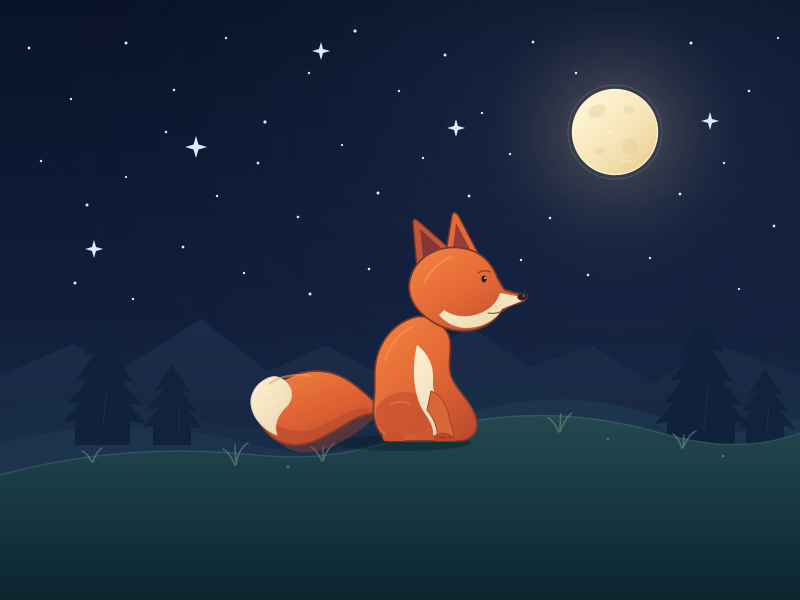
Create a standalone SVG illustration of a fox sitting on a hill, looking at the moon on a starry night, with a few subtle animations. Requirements: - Output a single valid .svg file (```svg code block) with a viewBox of 0 0 800 600. - Hand-written shapes and paths only: no embedded raster images, no external references, no JavaScript. - The fox must be clearly recognizable (pointy ears, snout, bushy tail with a white tip). - Include the moon with a soft glow, many stars, the hill and some background elements (trees, distant hills). - Use a coherent color palette and at least one gradient. - Animations (SMIL or CSS inside the SVG), all looping seamlessly: stars twinkling, the fox's tail swaying gently, and a shooting star crossing the sky every 4 seconds (the first one within 2 seconds).
System prompt, sent with every prompt
You are generating a self-contained web demo. It will be rendered automatically in a sandboxed iframe and compared side by side with the output of other AI models given the exact same task.

Output rules:
- Reply with exactly ONE fenced code block containing the complete file: ```html (or ```svg when the task asks for an SVG). No text before or after the code block.
- Everything must be inline: CSS in <style>, JavaScript in <script>. No external files, images, fonts or network requests, except the CDN URLs explicitly allowed by the task.
- Do not use localStorage, sessionStorage, cookies, IndexedDB, alert(), confirm(), prompt() or window.open(): they are blocked in the sandbox and will throw.
- The page must look right in a 1280×800 viewport and adapt gracefully down to 375px wide. No horizontal scrollbar.
- Something meaningful must be visible on first paint: a screenshot is taken automatically about 3 seconds after load, without any interaction.
- Everything that makes the demo interesting must be visible within the first seconds: nothing hidden behind a high score, a later level or a long play session.
- Games must start in a self-playing demo mode (a simple AI plays) behind a "Click or press a key to start" message, so the game can be judged in action without playing.
- The iframe only receives keyboard events after the user clicks it: if the demo uses the keyboard, display a clear "Click or press a key to start" message.
- The code must run with zero errors in the console of the latest Chrome.
Code run-1.svg · 308 lines
<svg xmlns="http://www.w3.org/2000/svg" width="800" height="600" viewBox="0 0 800 600" preserveAspectRatio="xMidYMid meet" role="img" aria-labelledby="title desc">
  <title id="title">Fox beneath the moon</title>
  <desc id="desc">A russet fox sits on a quiet hill, looking toward a glowing full moon in a starry night sky.</desc>

  <defs>
    <linearGradient id="nightSky" x1="0%" y1="0%" x2="0%" y2="100%">
      <stop offset="0%" stop-color="#091329"/>
      <stop offset="52%" stop-color="#111e3b"/>
      <stop offset="100%" stop-color="#1d3551"/>
    </linearGradient>
    <radialGradient id="skyBloom" cx="77%" cy="19%" r="77%">
      <stop offset="0%" stop-color="#495276" stop-opacity=".3"/>
      <stop offset="48%" stop-color="#29385c" stop-opacity=".13"/>
      <stop offset="100%" stop-color="#0a1429" stop-opacity="0"/>
    </radialGradient>
    <radialGradient id="moonGlow">
      <stop offset="0%" stop-color="#ffe8ae" stop-opacity=".23"/>
      <stop offset="34%" stop-color="#f7d995" stop-opacity=".13"/>
      <stop offset="70%" stop-color="#e7d092" stop-opacity=".045"/>
      <stop offset="100%" stop-color="#e7d092" stop-opacity="0"/>
    </radialGradient>
    <linearGradient id="moonSurface" x1="10%" y1="8%" x2="90%" y2="95%">
      <stop offset="0%" stop-color="#fff6d8"/>
      <stop offset="58%" stop-color="#f6e4b6"/>
      <stop offset="100%" stop-color="#e8ce91"/>
    </linearGradient>
    <linearGradient id="farRidge" x1="0%" y1="0%" x2="0%" y2="100%">
      <stop offset="0%" stop-color="#1b2b49"/>
      <stop offset="100%" stop-color="#13233c"/>
    </linearGradient>
    <linearGradient id="middleHill" x1="0%" y1="0%" x2="0%" y2="100%">
      <stop offset="0%" stop-color="#1d344e"/>
      <stop offset="100%" stop-color="#173149"/>
    </linearGradient>
    <linearGradient id="nearHill" x1="0%" y1="0%" x2="0%" y2="100%">
      <stop offset="0%" stop-color="#244950"/>
      <stop offset="40%" stop-color="#193b45"/>
      <stop offset="100%" stop-color="#0b252f"/>
    </linearGradient>
    <linearGradient id="foxCoat" x1="8%" y1="0%" x2="92%" y2="100%">
      <stop offset="0%" stop-color="#f58243"/>
      <stop offset="48%" stop-color="#e46a35"/>
      <stop offset="100%" stop-color="#bd492d"/>
    </linearGradient>
    <linearGradient id="tailCoat" x1="12%" y1="0%" x2="80%" y2="100%">
      <stop offset="0%" stop-color="#f38443"/>
      <stop offset="55%" stop-color="#dc6032"/>
      <stop offset="100%" stop-color="#b8472d"/>
    </linearGradient>
    <linearGradient id="creamFur" x1="0%" y1="0%" x2="100%" y2="100%">
      <stop offset="0%" stop-color="#fff1d3"/>
      <stop offset="100%" stop-color="#e9d5ad"/>
    </linearGradient>
    <linearGradient id="meteorTrail" x1="0%" y1="0%" x2="100%" y2="0%">
      <stop offset="0%" stop-color="#9cc9ff" stop-opacity="0"/>
      <stop offset="55%" stop-color="#a9d8ff" stop-opacity=".52"/>
      <stop offset="100%" stop-color="#fff8df" stop-opacity=".96"/>
    </linearGradient>
    <radialGradient id="meteorHead">
      <stop offset="0%" stop-color="#ffffff"/>
      <stop offset="55%" stop-color="#d8efff"/>
      <stop offset="100%" stop-color="#91caff"/>
    </radialGradient>
    <clipPath id="moonClip">
      <circle cx="615" cy="132" r="42.5"/>
    </clipPath>
    <filter id="softBlur" x="-60%" y="-100%" width="220%" height="300%">
      <feGaussianBlur stdDeviation="3"/>
    </filter>
  </defs>

  <style><![CDATA[
    .twinkle {
      transform-box: fill-box;
      transform-origin: center;
      animation: twinkle 3.6s ease-in-out infinite;
    }
    .twinkle.a { animation-duration: 3.2s; animation-delay: -1.1s; }
    .twinkle.b { animation-duration: 4.1s; animation-delay: -2.4s; }
    .twinkle.c { animation-duration: 2.9s; animation-delay: -0.6s; }
    .twinkle.d { animation-duration: 3.8s; animation-delay: -1.9s; }
    @keyframes twinkle {
      0%, 100% { opacity: .32; transform: scale(.78); }
      50% { opacity: 1; transform: scale(1.18); }
    }
  ]]></style>

  <rect width="800" height="600" fill="url(#nightSky)"/>
  <rect width="800" height="600" fill="url(#skyBloom)"/>
  <path d="M-20 278 C125 239 243 250 355 282 C485 318 639 276 820 225"
        fill="none" stroke="#8392bd" stroke-width="25" opacity=".035" filter="url(#softBlur)"/>
  <circle cx="615" cy="132" r="124" fill="url(#moonGlow)"/>

  <!-- A scattered field of cold, tiny stars -->
  <g fill="#dce9ff">
    <circle class="twinkle a" cx="29" cy="48" r="1.4"/>
    <circle class="twinkle b" cx="71" cy="99" r="1.2"/>
    <circle class="twinkle c" cx="126" cy="43" r="1.5"/>
    <circle class="twinkle d" cx="174" cy="90" r="1.3"/>
    <circle class="twinkle b" cx="226" cy="38" r="1.2"/>
    <circle class="twinkle a" cx="265" cy="122" r="1.6"/>
    <circle class="twinkle c" cx="309" cy="73" r="1.2"/>
    <circle class="twinkle d" cx="355" cy="31" r="1.6"/>
    <circle class="twinkle a" cx="399" cy="91" r="1.2"/>
    <circle class="twinkle b" cx="445" cy="55" r="1.5"/>
    <circle class="twinkle c" cx="482" cy="113" r="1.2"/>
    <circle class="twinkle d" cx="533" cy="42" r="1.4"/>
    <circle class="twinkle a" cx="576" cy="73" r="1.3"/>
    <circle class="twinkle c" cx="691" cy="43" r="1.5"/>
    <circle class="twinkle b" cx="749" cy="91" r="1.3"/>
    <circle class="twinkle d" cx="778" cy="38" r="1.1"/>

    <circle class="twinkle c" cx="41" cy="161" r="1.2"/>
    <circle class="twinkle a" cx="87" cy="205" r="1.5"/>
    <circle class="twinkle b" cx="126" cy="177" r="1.1"/>
    <circle class="twinkle d" cx="166" cy="132" r="1.3"/>
    <circle class="twinkle c" cx="217" cy="196" r="1.2"/>
    <circle class="twinkle a" cx="258" cy="163" r="1.4"/>
    <circle class="twinkle d" cx="298" cy="217" r="1.3"/>
    <circle class="twinkle b" cx="342" cy="145" r="1.1"/>
    <circle class="twinkle c" cx="378" cy="193" r="1.5"/>
    <circle class="twinkle a" cx="423" cy="158" r="1.2"/>
    <circle class="twinkle d" cx="469" cy="196" r="1.4"/>
    <circle class="twinkle b" cx="510" cy="154" r="1.2"/>
    <circle class="twinkle c" cx="550" cy="218" r="1.3"/>
    <circle class="twinkle a" cx="680" cy="194" r="1.4"/>
    <circle class="twinkle d" cx="724" cy="163" r="1.2"/>
    <circle class="twinkle b" cx="774" cy="226" r="1.4"/>
    <circle class="twinkle c" cx="650" cy="258" r="1.2"/>
    <circle class="twinkle a" cx="588" cy="275" r="1.3"/>
    <circle class="twinkle d" cx="521" cy="260" r="1.2"/>
    <circle class="twinkle b" cx="310" cy="294" r="1.5"/>
    <circle class="twinkle c" cx="244" cy="273" r="1.2"/>
    <circle class="twinkle a" cx="183" cy="247" r="1.4"/>
    <circle class="twinkle d" cx="133" cy="299" r="1.2"/>
    <circle class="twinkle b" cx="75" cy="283" r="1.5"/>
    <circle class="twinkle c" cx="445" cy="261" r="1.2"/>
    <circle class="twinkle a" cx="369" cy="269" r="1.3"/>
    <circle class="twinkle d" cx="739" cy="289" r="1.1"/>

    <path class="twinkle b" d="M196 136 L198.5 144.5 L207 147 L198.5 149.5 L196 158 L193.5 149.5 L185 147 L193.5 144.5 Z"/>
    <path class="twinkle c" d="M321 42 L323 49 L330 51 L323 53 L321 60 L319 53 L312 51 L319 49 Z"/>
    <path class="twinkle a" d="M456 119 L458 126 L465 128 L458 130 L456 137 L454 130 L447 128 L454 126 Z"/>
    <path class="twinkle d" d="M710 112 L712 119 L719 121 L712 123 L710 130 L708 123 L701 121 L708 119 Z"/>
    <path class="twinkle b" d="M94 240 L96 247 L103 249 L96 251 L94 258 L92 251 L85 249 L92 247 Z"/>
  </g>

  <!-- Distant, quiet mountain silhouettes -->
  <path d="M0 376 L73 344 L123 368 L201 319 L268 372 L326 345 L392 381 L469 326 L531 367 L591 345 L654 383 L716 344 L800 376 L800 600 L0 600 Z"
        fill="url(#farRidge)"/>
  <path d="M0 410 C69 392 139 399 204 421 C270 443 324 411 386 391 C462 367 532 377 596 410 C663 444 735 395 800 400 L800 600 L0 600 Z"
        fill="#172d47"/>
  <path d="M0 444 C101 416 174 424 255 445 C326 463 382 444 445 421 C527 391 603 393 676 423 C727 444 764 427 800 418 L800 600 L0 600 Z"
        fill="url(#middleHill)"/>

  <!-- Moon and its faint crater marks -->
  <circle cx="615" cy="132" r="47" fill="none" stroke="#f4e5ba" stroke-width="1" opacity=".16"/>
  <circle cx="615" cy="132" r="42.5" fill="url(#moonSurface)" stroke="#fff2cb" stroke-width="1.4"/>
  <g clip-path="url(#moonClip)">
    <ellipse cx="597" cy="111" rx="9.5" ry="6" transform="rotate(-26 597 111)" fill="#d9c58d" opacity=".34"/>
    <ellipse cx="629" cy="110" rx="5.8" ry="4.4" transform="rotate(22 629 110)" fill="#ddca94" opacity=".3"/>
    <circle cx="630" cy="146" r="8" fill="#d9c58d" opacity=".27"/>
    <ellipse cx="600" cy="151" rx="5.3" ry="3.2" transform="rotate(-20 600 151)" fill="#d5c18a" opacity=".28"/>
    <path d="M586 128 Q591 123 597 126 M621 163 Q626 159 632 162 M614 96 Q618 93 622 96"
          fill="none" stroke="#fff8df" stroke-width="1.2" opacity=".45" stroke-linecap="round"/>
    <circle cx="610" cy="132" r="2.1" fill="#fff9e4" opacity=".4"/>
  </g>

  <!-- One slow, luminous meteor: a four-second loop, beginning just after takeoff -->
  <g opacity="0">
    <path d="M-82 -39 L0 0" fill="none" stroke="#83bbff" stroke-width="7" stroke-linecap="round" opacity=".2" filter="url(#softBlur)"/>
    <path d="M-82 -39 L0 0" fill="none" stroke="url(#meteorTrail)" stroke-width="2.6" stroke-linecap="round"/>
    <path d="M-55 -26 L-2 -1" fill="none" stroke="#f1f8ff" stroke-width="1" stroke-linecap="round" opacity=".75"/>
    <circle cx="0" cy="0" r="3.1" fill="url(#meteorHead)"/>
    <animateTransform attributeName="transform" type="translate" values="58 48;492 252" dur="4s" begin="0.25s" repeatCount="indefinite"/>
    <animate attributeName="opacity" values="0;0.88;0.84;0" keyTimes="0;0.08;0.82;1" dur="4s" begin="0.25s" repeatCount="indefinite"/>
  </g>

  <!-- Pines along the far ridge -->
  <g fill="#102139">
    <path d="M75 445 L75 420 L63 423 L80 402 L68 404 L88 379 L76 381 L96 352 L83 355 L103 321 L126 355 L113 352 L133 382 L121 380 L141 405 L128 403 L145 423 L130 421 L130 445 Z"/>
    <path d="M153 445 L153 426 L143 428 L158 408 L147 410 L164 389 L154 391 L172 365 L190 392 L180 390 L197 411 L187 409 L203 429 L191 427 L191 445 Z" opacity=".88"/>
    <path d="M667 445 L667 422 L655 424 L674 402 L663 404 L683 379 L671 381 L693 350 L680 353 L702 319 L725 353 L712 350 L733 382 L721 380 L742 405 L729 403 L750 424 L735 422 L735 445 Z"/>
    <path d="M746 445 L746 426 L737 428 L751 410 L741 411 L757 392 L748 394 L765 369 L783 395 L773 392 L789 412 L779 410 L796 429 L784 426 L784 445 Z" opacity=".8"/>
  </g>
  <g fill="none" stroke="#375068" stroke-width="1" opacity=".28" stroke-linecap="round">
    <path d="M103 427 L107 388 M179 430 L179 404 M704 429 L708 387 M767 430 L769 405"/>
  </g>

  <!-- Foreground hill -->
  <path d="M0 475 C92 450 174 447 257 455 C326 462 367 449 424 432 C502 409 583 411 657 432 C722 451 763 446 800 433 L800 600 L0 600 Z"
        fill="url(#nearHill)"/>
  <path d="M0 475 C92 450 174 447 257 455 C326 462 367 449 424 432 C502 409 583 411 657 432 C722 451 763 446 800 433"
        fill="none" stroke="#6c9690" stroke-width="1.5" opacity=".26"/>

  <!-- Sparse grass catches the moonlight -->
  <g fill="none" stroke="#85a993" stroke-width="1.5" stroke-linecap="round" opacity=".46">
    <path d="M235 465 Q229 452 223 449 M236 465 Q238 449 248 443 M236 465 Q235 451 235 445"/>
    <path d="M322 461 Q316 449 311 447 M323 461 Q327 448 335 443 M323 461 L323 447"/>
    <path d="M559 432 Q553 420 548 418 M560 432 Q565 418 572 413 M560 432 Q560 419 561 414"/>
    <path d="M682 448 Q678 437 673 434 M683 448 Q688 435 696 431 M683 448 L684 435"/>
    <path d="M92 462 Q87 453 82 451 M93 462 Q96 452 102 448"/>
  </g>
  <g fill="#b9c69a" opacity=".42">
    <circle cx="288" cy="467" r="1.2"/>
    <circle cx="608" cy="439" r="1.1"/>
    <circle cx="723" cy="456" r="1.3"/>
  </g>

  <!-- Grounding shadow -->
  <ellipse cx="402" cy="443" rx="69" ry="8" fill="#071a23" opacity=".43"/>

  <!-- Fox: bushy tail behind a seated, moon-gazing silhouette -->
  <g transform="translate(402 439)">
    <g transform="translate(-8 -24)">
      <g>
        <path d="M4 1
                 C-16 -5 -29 -26 -50 -37
                 C-75 -51 -107 -43 -126 -23
                 C-144 -4 -133 20 -111 28
                 C-89 36 -65 19 -45 7
                 C-28 -3 -12 -5 4 5 Z"
              fill="url(#tailCoat)" stroke="#71372d" stroke-width="1.8" stroke-linejoin="round"/>
        <path d="M-137 -6 C-119 14 -96 21 -76 12 C-55 3 -34 -15 -13 -3
                 C-25 8 -37 19 -53 27 C-75 39 -97 42 -115 28 C-130 18 -139 7 -137 -6 Z"
              fill="#a9432e" opacity=".42"/>
        <path d="M-128 -36 C-138 -31 -144 -21 -143 -11 C-142 2 -131 15 -117 20
                 C-121 8 -115 -1 -108 -8 C-100 -16 -101 -26 -108 -33
                 C-114 -39 -121 -40 -128 -36 Z"
              fill="url(#creamFur)" stroke="#e5d5b7" stroke-width=".8"/>
        <path d="M-125 -31 C-116 -38 -101 -42 -84 -39" fill="none" stroke="#f8a15e" stroke-width="2" opacity=".58" stroke-linecap="round"/>
        <path d="M-127 -19 Q-119 -25 -112 -26 M-126 -10 Q-118 -15 -111 -16" fill="none" stroke="#fff1d5" stroke-width="1" opacity=".52" stroke-linecap="round"/>
        <animateTransform attributeName="transform" type="rotate"
          values="-2.2 0 0;2.8 0 0;-2.2 0 0" keyTimes="0;0.5;1"
          keySplines="0.42 0 0.58 1;0.42 0 0.58 1" calcMode="spline"
          dur="4.2s" repeatCount="indefinite"/>
      </g>
    </g>

    <!-- Body and folded haunch -->
    <path d="M-20 -4
             C-27 -11 -30 -25 -28 -39
             C-26 -56 -29 -67 -25 -82
             C-20 -101 -7 -115 10 -121
             C23 -126 39 -118 46 -105
             C51 -95 46 -81 48 -68
             C50 -54 63 -44 70 -31
             C77 -18 77 -7 69 -2
             Q65 2 56 2 L-12 2
             Q-20 2 -20 -4 Z"
          fill="url(#foxCoat)" stroke="#74382d" stroke-width="1.7" stroke-linejoin="round"/>
    <path d="M-25 -32 C-15 -48 7 -51 21 -42 C33 -34 31 -18 20 -5 L-11 -3 C-23 -8 -29 -19 -25 -32 Z"
          fill="#c95431" opacity=".78"/>
    <path d="M15 -94 C27 -85 32 -72 31 -58 C30 -44 39 -33 45 -21
             Q50 -10 45 -4 L31 -4 C32 -16 23 -23 18 -34
             C11 -51 10 -74 15 -94 Z"
          fill="url(#creamFur)"/>
    <path d="M29 -48 C39 -44 45 -34 47 -22 L52 -4 Q53 1 47 1 L35 1
             C37 -8 32 -21 25 -29 Z"
          fill="#d86636" stroke="#9d452e" stroke-width="1" stroke-linejoin="round"/>
    <path d="M-15 -6 C-8 -9 0 -7 3 -1 L3 2 L-18 2 Q-20 -1 -15 -6 Z"
          fill="#ca522f"/>
    <path d="M34 -5 C41 -8 49 -6 53 -1 L53 2 L32 2 Q31 -1 34 -5 Z"
          fill="#b8492d"/>
    <path d="M37 -2 Q41 -1 44 -2 M46 -2 Q49 -1 51 -2" fill="none" stroke="#78382e" stroke-width=".85" stroke-linecap="round"/>
    <path d="M-17 -79 C-12 -95 -2 -107 10 -112" fill="none" stroke="#f89555" stroke-width="2" opacity=".62" stroke-linecap="round"/>
    <path d="M-12 -34 Q-2 -40 8 -35" fill="none" stroke="#f28a4d" stroke-width="1.5" opacity=".5" stroke-linecap="round"/>

    <!-- Pointed ears -->
    <path d="M15 -171 L11 -216 Q11 -222 16 -218 L48 -190 L43 -174 Z"
          fill="#c55533" stroke="#75362c" stroke-width="1.4" stroke-linejoin="round"/>
    <path d="M21 -182 L18 -210 L39 -191 Z" fill="#74313a" opacity=".82"/>
    <path d="M43 -181 L50 -223 Q51 -229 56 -224 L78 -182 L66 -172 Z"
          fill="#e36a37" stroke="#75362c" stroke-width="1.4" stroke-linejoin="round"/>
    <path d="M51 -190 L54 -216 L69 -188 Z" fill="#81333a" opacity=".82"/>

    <!-- Profile, cream muzzle, and bright attentive eye -->
    <path d="M7 -153
             C8 -168 17 -181 31 -187
             C43 -193 58 -193 71 -188
             C83 -183 91 -173 95 -162
             C98 -157 100 -152 103 -149
             L121 -144 Q126 -142 122 -138
             L100 -130
             C94 -117 79 -108 62 -108
             C42 -108 25 -118 14 -132
             C9 -139 7 -146 7 -153 Z"
          fill="url(#foxCoat)" stroke="#74382d" stroke-width="1.7" stroke-linejoin="round"/>
    <path d="M42 -129
             C54 -121 68 -121 81 -127
             C90 -131 96 -139 98 -146
             L120 -142 Q123 -141 120 -138
             L100 -130
             C94 -118 79 -111 64 -111
             C52 -111 43 -117 37 -124 Z"
          fill="url(#creamFur)"/>
    <path d="M22 -155 C27 -168 37 -177 49 -182" fill="none" stroke="#f99a5d" stroke-width="2" opacity=".62" stroke-linecap="round"/>
    <path d="M76 -166 Q82 -170 88 -167" fill="none" stroke="#8d422e" stroke-width="1.4" stroke-linecap="round"/>
    <ellipse cx="82" cy="-160" rx="2.5" ry="3.4" fill="#241b22"/>
    <circle cx="83" cy="-161" r=".9" fill="#fff0cd"/>
    <path d="M86 -126 Q97 -124 106 -132" fill="none" stroke="#9a4b36" stroke-width="1.1" stroke-linecap="round"/>
    <path d="M117 -145 Q123 -147 126 -143 Q124 -138 118 -139 Q114 -141 117 -145 Z"
          fill="#29212a" stroke="#6d342d" stroke-width=".7"/>
    <circle cx="121.6" cy="-143" r=".7" fill="#f4d9b8"/>
    <circle cx="94" cy="-132" r=".8" fill="#d8946a" opacity=".72"/>
    <circle cx="98" cy="-134" r=".7" fill="#d8946a" opacity=".64"/>
  </g>
</svg>
Reasoning trace (30,269 tokens)
**Designing fox silhouette**

I'm working on placing the fox silhouette with precise coordinates: centered at x416 and y488 for the feet, and the head at x454 and y350. The body should end at y460. The big tail will extend left to x282 and y466, curling nicely. I need to ensure I get the shape just right, with the fox facing right and its ears pointing. I'll also set a static transformation for the group and consider animating the tail gently swaying around its joint.**Describing a landscape**

I'm picturing a scene with a main hill where the foreground path curves slightly across it. The color gradient is a mix of deep green and teal, specifically from #173b43 to #092328. There's also a back hill with a path winding around the horizon. This visual is bringing to mind a peaceful and serene landscape that could be quite inviting! It feels like there's more here that I can explore in my description.**Considering SVG CSS for stars**

I’m confirming that the CSS var property can indeed be defined on SVG elements. It looks like I could use opacity values for animations—specifically for a `<circle>` where CSS animations can override opacity. I think I need to create multiple stars, maybe around 48, with some being static and a few twinkling. I can enumerate around 40 circles plus add decorative stars to meet the twinkling requirement. This sounds like a fun project!**Evaluating animation parameters**

I’m working through the animation attributes for opacity and movement. They begin together at .25 seconds, which is good for syncing. The fade-in starts at .14 seconds and completes at .76 seconds, while the transform ends at .93 seconds, which means it transitions from 0 to 215 and then stays put as the opacity fades out. The moon's positioning and the potential for a shooting star are also considerations in this setup. Overall, it seems well thought out!**Positioning the fox and moon**

I’m adjusting the fox's positioning, translating the group and setting specific coordinates for the features like the eyes, nose, and mouth. The moon's center is also crucial, as it’s aligned with the fox's gaze at a slight upward angle, ensuring accuracy in direction. The body and head dimensions are coming together nicely, and I need to ensure the tree sizes don’t overshadow the fox. Overall, everything seems to be meticulously falling into place!**Considering star classes**

I’m thinking about how star classes can be categorized as either static or twinkling. There’s something intriguing about how some stars maintain a constant brightness while others flicker or twinkle, often due to atmospheric effects. I wonder how these classifications affect our understanding of stars and their lifecycles. Exploring this topic further could reveal fascinating insights into the universe!**Considering shooting star animation**

I'm thinking about how to make a shooting star visible at around 2.7 to 3 seconds, with an interval of 4 seconds. The requirement is for it to cross the sky every 4 seconds, with the first one appearing within 2 seconds. I wonder if I can animate it twice, and maintain the visibility long enough so that if someone takes a screenshot at 3 seconds, it has the right motion. It's a challenge, but I want to get it just right!**Rethinking shooting star timing**

I'm grappling with the requirement that the first shooting star must appear within 2 seconds. It seems like capturing a screenshot at 3 seconds might not give enough time to evaluate things properly. Maybe I could have the shooting star visible during cycles of about 0.4 to 1.6 seconds, and then possibly again at 2.3 seconds? Though, if I do that, it won't fit the "every 4 seconds" guideline. It's a tricky balance!**Evaluating shooting star animation**

I'm thinking about how a shooting star could cross the sky every four seconds. If it travels over one second, it should be visible for about 1.8 seconds. Starting at 0.4 seconds and disappearing at 2.2 makes sense for a screenshot at three seconds. If stars are animated, capturing them mid-flight at three seconds could be tricky. I wonder if I could implement a slow but plausible transition, with opacity fading for the shooting stars throughout the animation.**Designing shooting star animation**

I'm considering how a shooting star could move at around 60 pixels per second, making it appear slow, like a comet. A typical streak takes about 0.8 seconds. I could use two animated stars, with one offset every four seconds, ensuring visibility at three seconds. The first star could appear at 0.5 seconds, and if I keep the opacity low, it remains visible during the entire cycle. I'll have it travel diagonally for about 3.7 seconds while still looking like a shooting star in a static screenshot.**Refining shooting star speed**

I'm thinking of setting the shooting star speed at around 120 pixels per second over a distance of 450 pixels in about 3.7 seconds. The streak could measure 80 pixels, making it visible at three seconds during the animation. I don't need it to be overly realistic, so I could extend the crossing to 520 pixels in four seconds, which means adjusting the pace to about 130 pixels per second. That could provide a nice effect for the animation!**Optimizing shooting star animation**

I'm considering how to create a shooting star that crosses every 4 seconds. It could appear with opacity and a low blur effect, giving it a thin streak for the tail. Animating the translation with easing acceleration could enhance the shooting effect. I need to designate a duration of 4 seconds, with it repeating indefinitely. The CSS already has the necessary components, allowing for a pathway animation to create that bright, gradient tail. Overall, it feels like I'm on the right track!**Refining animation timing**

I need to focus on the timing for my animation, specifically using keyframe values like 9 at 0.75, then 0 at 0.94, and maintaining 0 at 1. I want this to be smooth, so I’m thinking about implementing `calcMode=spline` for a better effect. The keySplines will help to achieve the desired acceleration and deceleration in the animation. This process is quite interesting, and I'm excited to see how it will all come together!**Considering CSS Opacity**

I’m thinking about using CSS keyframes for opacity. The base attribute for opacity seems fine, but I might need to pay attention to class overrides. I’m considering using a class for twinkling effects, like twinkle a/b/c. I guess I should think about grouping the whole effect to keep things organized. It sounds like a fun way to create some visual interest! I’m curious to see how it all comes together in practice.**Considering CSS transforms**

I’m thinking about applying a `transform: scale(.72)` to `<path>` elements to adjust the star geometry. There are some static stars that won’t be animated. I wonder if constellations would look nice with thin lines connecting four stars on the left; I could add a `path` line with opacity .1 for some charm, but it's not a must. I'm planning the order of elements: background, glow, mountains, then stars, with the moon layered strategically to create depth.**Designing the moon and stars**

I’m considering how some star positions behind the moon disc might not be very noticeable. I can create a circle with a `fill=url(#moonDisc)` and some internal marks clipped, while possibly adding a faint glow to the moon. A subtle orbital halo isn’t necessary but could be nice. The moon could be a pale circle with craters, using <clipPath> for the shape. I’m also thinking of adding meteor groups and maybe some wispy clouds around the moon to enhance the scene.**Considering aurora ribbons**

I’m thinking about adding aurora ribbons in the upper left, using broad, low-opacity curved shapes. I could make them two translucent bands in a cold violet-blue with a gradient, which would enrich the background. But then I wonder if they might distract from the moon's focus — is that a concern? A starry night usually has a deep gradient with the moon, but I think keeping it simple might be better. I'll weigh the options carefully!**Sketching a scene with stars and mountains**

I'm thinking about how to arrange stars and mountains. If I draw stars in the sky, they can be overlaid by distant hills. It makes sense to create the order as: sky, radial overlay, stars, distant mountains, and then rolling hills, leading to trees and foreground hills. The moon should be placed above the mountains to avoid overlap. I might draw the moon after the hills, with shooting stars above the background hills.**Arranging elements in a scene**

I'm figuring out how to organize elements for a scene. The flying object ends at y245, so it shouldn't interfere. If I draw the stars after the trees, they might overlap, but at y<250, it should be fine. I want the moon's glow over the sky but behind the stars. My sequence will include background elements like the radial sky, moon glow, and star groups before the hills. I must ensure the moon is above the ridges yet not behind the trees.**Designing the scene layers**

I'm considering defining a `clipPath id=skyOnly` for the upper area, which helps create an easier order of layers: sky first, then stars, and finally the hills. The stars will be behind the hills, while the moon and meteor should be placed after them to avoid overlap. I want the moon to be drawn atop the hills at y132 with its glow visible. I'll add star twinkles and maybe some sparkles on either side of the moon, ensuring some stars near the disc get covered.**Creating star shapes**

I'm starting on making some star shapes. This specific one uses a four-point design, and I need to apply CSS classes to affect the shape. I'll set the fill to currentColor, which should help with the styling. I’m wondering if I should place the stars outside of the moon since there will be several surrounding it. Balancing all these elements should create a nice visual effect!**Considering design elements**

I'm thinking about whether to add low rocks or tiny mushrooms. It seems like tiny mushrooms could create a night fairy mood, but since the user didn't ask for that, I should avoid it. I'm focusing on creating a shadow and path for a fox's tail, making sure the outline shape is distinct and distinct. The tail tip should be white for clarity. I want to achieve a nice gradient effect, especially at the tip, to emphasize the design.**Exploring animation and paths**

I'm considering grouping polygons and perhaps adding a base trunk path behind the pine branches. I don't think I need to use transforms; I could just write direct paths. For the main hill, I want to fill the top gradient and keep the stroke path similar. I'll apply the initial curve for the path exactly as before but fill it completely, with strokes for grass paths and the fox shadow. I'm thinking about how to animate the fox tail with specific attributes.**Evaluating shooting star animation**

I'm working on a shooting star animation that appears every four seconds, starting at 0.25 seconds. It reaches full visibility at 0.32 seconds and travels a distance of 420 pixels in that time. The star should be visible after three seconds. I'm calculating its path and coordinates, ensuring the tail starts off-canvas and the animation smoothly transitions down to the right. I want to make sure it blends well with the background, creating a nice effect!**Considering starting coordinates**

I'm thinking that the starting position for the element could be at global coordinates x32,y44. I need to ensure this spot is visually appealing and fits within the overall design. It’s important to check how this placement interacts with other elements on the screen. I'll keep the movement and animation in mind as I work to ensure everything flows nicely. This way, I can create a more engaging experience for users!