Skateboarding astronaut catOne-line
GLM 5.3
by Z.aiReasoningClean
Running live in a sandboxed frame. Click inside it before using the keyboard.
How it went
- Total time
- 7 min 54 s
- Cost
- $0.230
- Output tokens
- 63,792
- Spent thinking
- 52,740 tokens
- Speed
- 134.7 tok/s
- Console errors
- 0
- First token after
- 390 ms
- First visible text after
- 7 min 5 s
- Prompt tokens
- 348
- Code size
- 28.0 KB
- Finish reason
- stop
- Served by
- InferenceNet
- Model id
z-ai/glm-5.3- Reasoning sent
{"effort":"max"}- Max output
- 943,718 tokens
- Generated
- Nov 12, 2026
What it was asked
The prompt
“draw me an SVG of an astronaut cat skateboarding on the moon”
System prompt, sent with every prompt
You are generating a self-contained web demo. It will be rendered automatically in a sandboxed iframe and compared side by side with the output of other AI models given the exact same task.

Output rules:
- Reply with exactly ONE fenced code block containing the complete file: ```html (or ```svg when the task asks for an SVG). No text before or after the code block.
- Everything must be inline: CSS in <style>, JavaScript in <script>. No external files, images, fonts or network requests, except the CDN URLs explicitly allowed by the task.
- Do not use localStorage, sessionStorage, cookies, IndexedDB, alert(), confirm(), prompt() or window.open(): they are blocked in the sandbox and will throw.
- The page must look right in a 1280×800 viewport and adapt gracefully down to 375px wide. No horizontal scrollbar.
- Something meaningful must be visible on first paint: a screenshot is taken automatically about 3 seconds after load, without any interaction.
- Everything that makes the demo interesting must be visible within the first seconds: nothing hidden behind a high score, a later level or a long play session.
- Games must start in a self-playing demo mode (a simple AI plays) behind a "Click or press a key to start" message, so the game can be judged in action without playing.
- The iframe only receives keyboard events after the user clicks it: if the demo uses the keyboard, display a clear "Click or press a key to start" message.
- The code must run with zero errors in the console of the latest Chrome.
Code run-1.svg · 380 lines
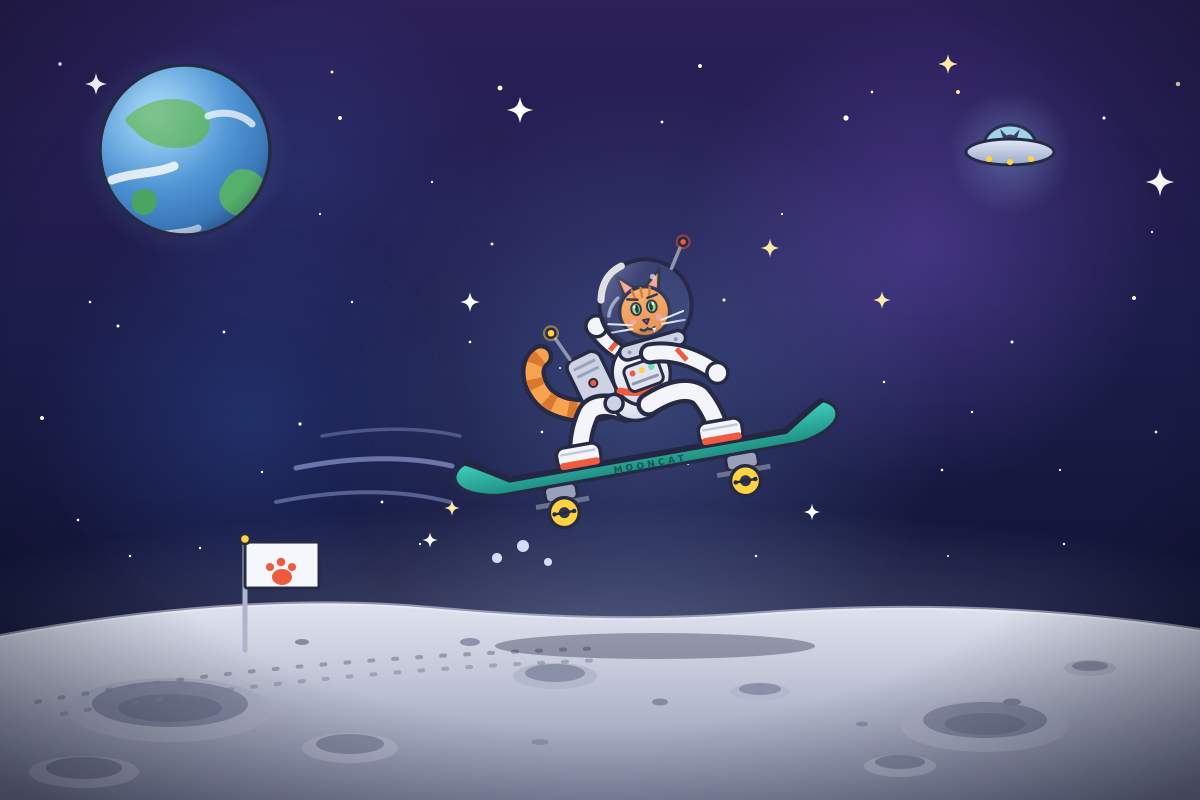
<svg xmlns="http://www.w3.org/2000/svg" viewBox="0 0 1200 800" width="100%" height="100%" preserveAspectRatio="xMidYMid meet" role="img" style="background:#141833">
  <title>Astronaut cat skateboarding on the moon</title>
  <desc>A cartoon tabby cat in a white spacesuit and glass helmet rides a teal skateboard above the cratered lunar surface, under a starry sky with Earth, a UFO and shooting stars. A paw-print flag is planted nearby.</desc>

  <defs>
    <linearGradient id="sky" x1="0" y1="0" x2="0" y2="1">
      <stop offset="0" stop-color="#2b2058"/>
      <stop offset="0.45" stop-color="#1a1c48"/>
      <stop offset="1" stop-color="#0b0e28"/>
    </linearGradient>
    <radialGradient id="nebA"><stop offset="0" stop-color="#8a63e8" stop-opacity="0.34"/><stop offset="1" stop-color="#8a63e8" stop-opacity="0"/></radialGradient>
    <radialGradient id="nebB"><stop offset="0" stop-color="#3f6fd8" stop-opacity="0.25"/><stop offset="1" stop-color="#3f6fd8" stop-opacity="0"/></radialGradient>
    <radialGradient id="focus"><stop offset="0" stop-color="#8fb4ff" stop-opacity="0.28"/><stop offset="0.6" stop-color="#8fb4ff" stop-opacity="0.1"/><stop offset="1" stop-color="#8fb4ff" stop-opacity="0"/></radialGradient>
    <radialGradient id="moonHalo"><stop offset="0" stop-color="#c9d6ff" stop-opacity="0.28"/><stop offset="1" stop-color="#c9d6ff" stop-opacity="0"/></radialGradient>
    <linearGradient id="moonGrad" x1="0" y1="0" x2="0" y2="1">
      <stop offset="0" stop-color="#e3e6f1"/><stop offset="0.35" stop-color="#c6cadb"/><stop offset="1" stop-color="#8d92ad"/>
    </linearGradient>
    <radialGradient id="earthGlow"><stop offset="0" stop-color="#7fc4ff" stop-opacity="0.4"/><stop offset="0.55" stop-color="#7fc4ff" stop-opacity="0.15"/><stop offset="1" stop-color="#7fc4ff" stop-opacity="0"/></radialGradient>
    <radialGradient id="earthBase" cx="0.35" cy="0.3" r="0.85">
      <stop offset="0" stop-color="#8fd0f8"/><stop offset="0.55" stop-color="#4b8fd0"/><stop offset="1" stop-color="#2a5e9e"/>
    </radialGradient>
    <radialGradient id="earthShade" cx="0.32" cy="0.28" r="0.95">
      <stop offset="0" stop-color="#ffffff" stop-opacity="0.25"/>
      <stop offset="0.45" stop-color="#ffffff" stop-opacity="0"/>
      <stop offset="0.72" stop-color="#0c1236" stop-opacity="0"/>
      <stop offset="1" stop-color="#0c1236" stop-opacity="0.5"/>
    </radialGradient>
    <linearGradient id="glass" x1="0" y1="0" x2="1" y2="1">
      <stop offset="0" stop-color="#ffffff" stop-opacity="0.38"/>
      <stop offset="0.35" stop-color="#bcd8f8" stop-opacity="0.08"/>
      <stop offset="0.75" stop-color="#9db8e8" stop-opacity="0.12"/>
      <stop offset="1" stop-color="#7fa4e0" stop-opacity="0.32"/>
    </linearGradient>
    <linearGradient id="suit" x1="0" y1="0" x2="0" y2="1">
      <stop offset="0" stop-color="#ffffff"/><stop offset="1" stop-color="#d3d8ec"/>
    </linearGradient>
    <linearGradient id="fur" x1="0" y1="0" x2="0" y2="1">
      <stop offset="0" stop-color="#ffb066"/><stop offset="1" stop-color="#f08a3e"/>
    </linearGradient>
    <linearGradient id="deck" x1="0" y1="0" x2="0" y2="1">
      <stop offset="0" stop-color="#3fd0bd"/><stop offset="1" stop-color="#1e8d81"/>
    </linearGradient>
    <linearGradient id="ufoBody" x1="0" y1="0" x2="0" y2="1">
      <stop offset="0" stop-color="#e3eaf6"/><stop offset="1" stop-color="#9aa8c8"/>
    </linearGradient>
    <radialGradient id="ufoGlow"><stop offset="0" stop-color="#9fd8ff" stop-opacity="0.3"/><stop offset="1" stop-color="#9fd8ff" stop-opacity="0"/></radialGradient>
    <linearGradient id="trail" x1="0" y1="0" x2="1" y2="0">
      <stop offset="0" stop-color="#ffffff" stop-opacity="0.95"/>
      <stop offset="1" stop-color="#ffffff" stop-opacity="0"/>
    </linearGradient>
    <radialGradient id="vig" cx="0.5" cy="0.42" r="0.75">
      <stop offset="0" stop-color="#050816" stop-opacity="0"/>
      <stop offset="0.65" stop-color="#050816" stop-opacity="0"/>
      <stop offset="1" stop-color="#050816" stop-opacity="0.55"/>
    </radialGradient>
    <clipPath id="earthClip"><circle cx="185" cy="150" r="85"/></clipPath>
    <path id="sparkle" d="M 0,-11 C 1.6,-3.2 3.2,-1.6 11,0 C 3.2,1.6 1.6,3.2 0,11 C -1.6,3.2 -3.2,1.6 -11,0 C -3.2,-1.6 -1.6,-3.2 0,-11 Z"/>
    <!-- one truck + spinning wheel, reused on both ends of the deck -->
    <g id="wheelUnit">
      <rect x="-16" y="58" width="32" height="16" rx="5" fill="#98a0ba" stroke="#262a44" stroke-width="3"/>
      <line x1="-27" y1="76" x2="27" y2="76" stroke="#6a728e" stroke-width="5"/>
      <circle cx="0" cy="86" r="15" fill="#ffd23f" stroke="#262a44" stroke-width="3.5"/>
      <circle cx="0" cy="86" r="5.5" fill="#2e3350"/>
      <g>
        <line x1="-10" y1="86" x2="10" y2="86" stroke="#262a44" stroke-width="2.5"/>
        <circle cx="-10" cy="86" r="2.2" fill="#262a44"/>
        <circle cx="10" cy="86" r="2.2" fill="#262a44"/>
        <animateTransform attributeName="transform" type="rotate" from="0 0 86" to="360 0 86" dur="0.9s" repeatCount="indefinite"/>
      </g>
    </g>
  </defs>

  <!-- ======================= SKY ======================= -->
  <rect width="1200" height="800" fill="url(#sky)"/>
  <circle cx="920" cy="250" r="240" fill="url(#nebA)"/>
  <circle cx="250" cy="420" r="210" fill="url(#nebB)"/>
  <circle cx="300" cy="170" r="190" fill="url(#nebB)" opacity="0.7"/>
  <circle cx="640" cy="395" r="310" fill="url(#focus)"/>

  <!-- stars -->
  <g fill="#ffffff">
    <circle cx="340" cy="118" r="2"/>
    <circle cx="500" cy="88" r="2.4"><animate attributeName="opacity" values="0.25;1;0.25" dur="2.6s" begin="-0.4s" repeatCount="indefinite"/></circle>
    <circle cx="700" cy="66" r="2"/>
    <circle cx="846" cy="118" r="2.6"><animate attributeName="opacity" values="0.3;1;0.3" dur="3.1s" begin="-1.2s" repeatCount="indefinite"/></circle>
    <circle cx="958" cy="92" r="2" fill="#ffe9a8"/>
    <circle cx="1104" cy="118" r="1.6"/>
    <circle cx="1134" cy="298" r="2"/>
    <circle cx="1178" cy="84" r="2.2" fill="#ffe9a8"><animate attributeName="opacity" values="0.3;1;0.3" dur="2.9s" begin="-0.8s" repeatCount="indefinite"/></circle>
    <circle cx="60" cy="64" r="1.8"/>
    <circle cx="118" cy="326" r="1.5"/>
    <circle cx="42" cy="418" r="2"/>
    <circle cx="224" cy="332" r="1.4"><animate attributeName="opacity" values="0.3;1;0.3" dur="2.8s" begin="-1.6s" repeatCount="indefinite"/></circle>
    <circle cx="300" cy="424" r="1.6"/>
    <circle cx="78" cy="520" r="1.3"/>
    <circle cx="262" cy="472" r="1.2"><animate attributeName="opacity" values="0.3;1;0.3" dur="2.3s" begin="-0.9s" repeatCount="indefinite"/></circle>
    <circle cx="382" cy="502" r="1.4"><animate attributeName="opacity" values="0.3;1;0.3" dur="3s" begin="-1.4s" repeatCount="indefinite"/></circle>
    <circle cx="470" cy="342" r="1.3"/>
    <circle cx="624" cy="322" r="1.1"/>
    <circle cx="724" cy="300" r="1.6" fill="#ffe9a8"><animate attributeName="opacity" values="0.3;1;0.3" dur="2.4s" begin="-0.2s" repeatCount="indefinite"/></circle>
    <circle cx="884" cy="382" r="1.2"/>
    <circle cx="1012" cy="342" r="1.5"><animate attributeName="opacity" values="0.3;1;0.3" dur="3.3s" begin="-2s" repeatCount="indefinite"/></circle>
    <circle cx="1156" cy="432" r="1.4" fill="#ffe9a8"/>
    <circle cx="942" cy="470" r="1.3"/>
    <circle cx="200" cy="548" r="1.2"/>
    <circle cx="420" cy="544" r="1.1"/>
    <circle cx="1064" cy="544" r="1.2"/>
    <circle cx="756" cy="556" r="1.2"/>
    <circle cx="872" cy="92" r="1.3"/>
    <circle cx="432" cy="182" r="1.1"><animate attributeName="opacity" values="0.3;1;0.3" dur="2.7s" begin="-1.1s" repeatCount="indefinite"/></circle>
    <circle cx="662" cy="122" r="1.4"/>
    <circle cx="542" cy="432" r="1.3"/>
    <circle cx="90" cy="302" r="1.3"/>
    <circle cx="332" cy="72" r="1.5" fill="#ffe9a8"/>
    <circle cx="972" cy="412" r="1.2"/>
    <circle cx="688" cy="464" r="1.1"/>
    <circle cx="352" cy="302" r="1.2"/>
    <circle cx="492" cy="244" r="1.5" fill="#ffe9a8"><animate attributeName="opacity" values="0.3;1;0.3" dur="2.5s" begin="-0.6s" repeatCount="indefinite"/></circle>
    <circle cx="1152" cy="232" r="1.1"/>
    <circle cx="782" cy="214" r="1.1"/>
    <circle cx="130" cy="556" r="1.2"/>
    <circle cx="560" cy="368" r="1"/>
    <circle cx="1060" cy="470" r="1.1"/>
    <circle cx="320" cy="214" r="1.1"/>
    <circle cx="948" cy="556" r="1"/>
    <circle cx="480" cy="470" r="1"/>
  </g>

  <!-- big sparkle stars -->
  <use href="#sparkle" transform="translate(520 110) scale(1.2)" fill="#ffffff"><animate attributeName="opacity" values="0.3;1;0.3" dur="3s" repeatCount="indefinite"/></use>
  <use href="#sparkle" transform="translate(948 64) scale(0.9)" fill="#ffe9a8"><animate attributeName="opacity" values="0.25;1;0.25" dur="3.6s" begin="-1.5s" repeatCount="indefinite"/></use>
  <use href="#sparkle" transform="translate(96 84) scale(1)" fill="#ffffff"><animate attributeName="opacity" values="0.3;1;0.3" dur="2.8s" begin="-0.7s" repeatCount="indefinite"/></use>
  <use href="#sparkle" transform="translate(1160 182) scale(1.3)" fill="#ffffff"><animate attributeName="opacity" values="0.3;1;0.3" dur="3.2s" begin="-1s" repeatCount="indefinite"/></use>
  <use href="#sparkle" transform="translate(882 300) scale(0.8)" fill="#ffe9a8"><animate attributeName="opacity" values="0.25;1;0.25" dur="2.6s" begin="-0.3s" repeatCount="indefinite"/></use>
  <use href="#sparkle" transform="translate(430 540) scale(0.7)" fill="#ffffff"><animate attributeName="opacity" values="0.3;1;0.3" dur="3.4s" begin="-2s" repeatCount="indefinite"/></use>
  <use href="#sparkle" transform="translate(470 302) scale(0.9)" fill="#ffffff"><animate attributeName="opacity" values="0.3;1;0.3" dur="2.9s" begin="-1.8s" repeatCount="indefinite"/></use>
  <use href="#sparkle" transform="translate(770 248) scale(0.85)" fill="#ffe9a8"><animate attributeName="opacity" values="0.25;1;0.25" dur="3.1s" begin="-0.5s" repeatCount="indefinite"/></use>

  <!-- shooting stars -->
  <g opacity="0">
    <line x1="93" y1="-16" x2="0" y2="0" stroke="url(#trail)" stroke-width="4" stroke-linecap="round"/>
    <circle r="4.5" fill="#ffffff"/>
    <animateTransform attributeName="transform" type="translate" values="1280 70;320 240;320 240" keyTimes="0;0.14;1" dur="7s" begin="2.1s" repeatCount="indefinite"/>
    <animate attributeName="opacity" values="0;1;1;0;0" keyTimes="0;0.02;0.1;0.14;1" dur="7s" begin="2.1s" repeatCount="indefinite"/>
  </g>
  <g opacity="0">
    <line x1="66" y1="-11" x2="0" y2="0" stroke="url(#trail)" stroke-width="3" stroke-linecap="round"/>
    <circle r="3.2" fill="#ffffff"/>
    <animateTransform attributeName="transform" type="translate" values="980 40;150 150;150 150" keyTimes="0;0.12;1" dur="9s" begin="5.6s" repeatCount="indefinite"/>
    <animate attributeName="opacity" values="0;1;1;0;0" keyTimes="0;0.02;0.09;0.12;1" dur="9s" begin="5.6s" repeatCount="indefinite"/>
  </g>

  <!-- little UFO with a cat-alien passenger -->
  <g transform="translate(1010 152)">
    <circle r="62" fill="url(#ufoGlow)"/>
    <g>
      <path d="M -26,-6 A 26 21 0 0 1 26,-6 Z" fill="#a9def5" opacity="0.92" stroke="#262a44" stroke-width="3"/>
      <circle cx="0" cy="-11" r="6.5" fill="#33415f"/>
      <path d="M -7,-14 L -10,-23 L -2,-15 Z" fill="#33415f"/>
      <path d="M 7,-14 L 10,-23 L 2,-15 Z" fill="#33415f"/>
      <circle cx="-2.4" cy="-12" r="1.4" fill="#9ef7ff"><animate attributeName="opacity" values="1;0.2;1" dur="2.2s" repeatCount="indefinite"/></circle>
      <circle cx="2.4" cy="-12" r="1.4" fill="#9ef7ff"><animate attributeName="opacity" values="0.2;1;0.2" dur="2.2s" repeatCount="indefinite"/></circle>
      <ellipse cx="0" cy="0" rx="44" ry="13" fill="url(#ufoBody)" stroke="#262a44" stroke-width="3"/>
      <circle cx="-21" cy="7" r="3" fill="#ffd23f"><animate attributeName="opacity" values="1;0.15;1" dur="1.4s" repeatCount="indefinite"/></circle>
      <circle cx="0" cy="10" r="3" fill="#ffd23f"><animate attributeName="opacity" values="1;0.15;1" dur="1.4s" begin="-0.45s" repeatCount="indefinite"/></circle>
      <circle cx="21" cy="7" r="3" fill="#ffd23f"><animate attributeName="opacity" values="1;0.15;1" dur="1.4s" begin="-0.9s" repeatCount="indefinite"/></circle>
      <animateTransform attributeName="transform" type="translate" values="0 0;0 -9;0 0" keyTimes="0;0.5;1" calcMode="spline" keySplines="0.45 0 0.55 1;0.45 0 0.55 1" dur="5.5s" repeatCount="indefinite"/>
    </g>
  </g>

  <!-- Earth -->
  <g>
    <circle cx="185" cy="150" r="106" fill="url(#earthGlow)"/>
    <circle cx="185" cy="150" r="85" fill="url(#earthBase)"/>
    <g clip-path="url(#earthClip)">
      <path d="M 128,116 C 150,96 184,94 202,108 C 216,120 210,140 192,146 C 170,152 146,144 136,132 C 128,124 122,122 128,116 Z" fill="#55b06b"/>
      <path d="M 236,170 C 254,166 268,178 266,196 C 264,212 248,222 232,214 C 220,208 216,196 222,186 C 226,178 230,174 236,170 Z" fill="#55b06b"/>
      <path d="M 138,190 C 150,186 160,194 156,206 C 152,216 140,218 134,210 C 130,202 132,194 138,190 Z" fill="#4aa562"/>
      <path d="M 112,180 C 134,172 156,174 174,166" stroke="#ffffff" stroke-width="9" stroke-linecap="round" fill="none" opacity="0.8"/>
      <path d="M 208,116 C 224,110 242,114 252,124" stroke="#ffffff" stroke-width="7" stroke-linecap="round" fill="none" opacity="0.7"/>
      <path d="M 148,238 C 166,232 184,234 198,228" stroke="#ffffff" stroke-width="7" stroke-linecap="round" fill="none" opacity="0.6"/>
    </g>
    <circle cx="185" cy="150" r="85" fill="url(#earthShade)"/>
    <circle cx="185" cy="150" r="85" fill="none" stroke="#262a44" stroke-width="3.5"/>
  </g>

  <!-- ======================= MOON ======================= -->
  <ellipse cx="600" cy="625" rx="720" ry="120" fill="url(#moonHalo)"/>
  <path d="M 0,636 C 150,608 300,596 430,608 C 540,618 640,622 750,614 C 880,604 1030,604 1200,630 L 1200,800 L 0,800 Z" fill="url(#moonGrad)"/>
  <path d="M 0,636 C 150,608 300,596 430,608 C 540,618 640,622 750,614 C 880,604 1030,604 1200,630" fill="none" stroke="#f0f2fd" stroke-width="4" opacity="0.5"/>

  <!-- craters -->
  <g>
    <ellipse cx="170" cy="710" rx="102" ry="32" fill="#b4b8cd"/><ellipse cx="170" cy="704" rx="78" ry="23" fill="#8b90a9"/><ellipse cx="170" cy="708" rx="52" ry="14" fill="#7a7f99"/>
    <ellipse cx="985" cy="726" rx="84" ry="26" fill="#b4b8cd"/><ellipse cx="985" cy="720" rx="62" ry="18" fill="#8b90a9"/><ellipse cx="985" cy="724" rx="40" ry="11" fill="#7a7f99"/>
    <ellipse cx="555" cy="676" rx="42" ry="13" fill="#b4b8cd"/><ellipse cx="555" cy="673" rx="30" ry="9" fill="#8b90a9"/>
    <ellipse cx="350" cy="748" rx="48" ry="15" fill="#b4b8cd"/><ellipse cx="350" cy="744" rx="34" ry="10" fill="#8b90a9"/>
    <ellipse cx="760" cy="692" rx="30" ry="9" fill="#b4b8cd"/><ellipse cx="760" cy="689" rx="21" ry="6" fill="#8b90a9"/>
    <ellipse cx="1090" cy="668" rx="26" ry="8" fill="#b4b8cd"/><ellipse cx="1090" cy="666" rx="18" ry="5" fill="#8b90a9"/>
    <ellipse cx="84" cy="772" rx="55" ry="16" fill="#b4b8cd"/><ellipse cx="84" cy="768" rx="38" ry="11" fill="#8b90a9"/>
    <ellipse cx="900" cy="766" rx="36" ry="11" fill="#b4b8cd"/><ellipse cx="900" cy="762" rx="25" ry="7" fill="#8b90a9"/>
    <ellipse cx="470" cy="642" rx="10" ry="4" fill="#8d92ad"/>
    <ellipse cx="660" cy="702" rx="8" ry="3.5" fill="#858aa0"/>
    <ellipse cx="302" cy="642" rx="7" ry="3" fill="#858aa0"/>
    <ellipse cx="1012" cy="702" rx="9" ry="3.5" fill="#858aa0"/>
    <ellipse cx="862" cy="724" rx="6" ry="2.5" fill="#8d92ad"/>
    <ellipse cx="540" cy="742" rx="9" ry="3" fill="#8d92ad"/>
  </g>

  <!-- wheel tracks from the run-up -->
  <path d="M 36,702 C 200,672 380,656 604,648" fill="none" stroke="#858aa0" stroke-width="4" stroke-linecap="round" stroke-dasharray="4 20" opacity="0.75"/>
  <path d="M 62,714 C 228,686 400,668 604,660" fill="none" stroke="#858aa0" stroke-width="4" stroke-linecap="round" stroke-dasharray="4 20" opacity="0.6"/>

  <!-- paw-print flag -->
  <g>
    <line x1="245" y1="650" x2="245" y2="542" stroke="#aeb4cc" stroke-width="5" stroke-linecap="round"/>
    <rect x="245" y="542" width="74" height="46" rx="2" fill="#f6f7fc" stroke="#262a44" stroke-width="3"/>
    <ellipse cx="282" cy="577" rx="10" ry="8" fill="#ef5b3f"/>
    <circle cx="270" cy="567" r="4" fill="#ef5b3f"/>
    <circle cx="281" cy="562" r="4.2" fill="#ef5b3f"/>
    <circle cx="292" cy="567" r="4" fill="#ef5b3f"/>
    <circle cx="245" cy="539" r="5" fill="#ffd23f" stroke="#262a44" stroke-width="2.5"/>
  </g>

  <!-- soft shadow on the surface, breathing with the hover -->
  <g transform="translate(655 646)">
    <ellipse rx="160" ry="13" fill="#0a0e26" opacity="0.32">
      <animate attributeName="opacity" values="0.32;0.2;0.32" keyTimes="0;0.5;1" calcMode="spline" keySplines="0.42 0 0.58 1;0.42 0 0.58 1" dur="3.5s" repeatCount="indefinite"/>
    </ellipse>
    <animateTransform attributeName="transform" type="scale" additive="sum" values="1 1;0.86 0.9;1 1" keyTimes="0;0.5;1" calcMode="spline" keySplines="0.42 0 0.58 1;0.42 0 0.58 1" dur="3.5s" repeatCount="indefinite"/>
  </g>

  <!-- moon dust puffs trailing behind -->
  <g fill="#d5dbf5">
    <g transform="translate(523 546)"><g><circle r="6"><animate attributeName="opacity" values="0;0.55;0" dur="3.5s" begin="-0.5s" repeatCount="indefinite"/></circle><animateTransform attributeName="transform" type="translate" values="0 0;-36 8" dur="3.5s" begin="-0.5s" repeatCount="indefinite"/></g></g>
    <g transform="translate(548 562)"><g><circle r="4"><animate attributeName="opacity" values="0;0.5;0" dur="3.8s" begin="-2.2s" repeatCount="indefinite"/></circle><animateTransform attributeName="transform" type="translate" values="0 0;-30 10" dur="3.8s" begin="-2.2s" repeatCount="indefinite"/></g></g>
    <g transform="translate(497 558)"><g><circle r="5"><animate attributeName="opacity" values="0;0.5;0" dur="3.2s" begin="-1.4s" repeatCount="indefinite"/></circle><animateTransform attributeName="transform" type="translate" values="0 0;-40 4" dur="3.2s" begin="-1.4s" repeatCount="indefinite"/></g></g>
  </g>

  <!-- motion streaks -->
  <g stroke="#b9c6ff" fill="none" stroke-linecap="round">
    <path d="M 296,468 C 356,456 408,456 452,466" stroke-width="5" opacity="0.5"/>
    <path d="M 276,502 C 346,488 404,490 450,502" stroke-width="4" opacity="0.38"/>
    <path d="M 322,436 C 380,426 424,428 460,436" stroke-width="3.5" opacity="0.3"/>
    <animate attributeName="opacity" values="0.65;1;0.65" dur="2.4s" repeatCount="indefinite"/>
  </g>

  <!-- ================= ASTRONAUT CAT ON SKATEBOARD ================= -->
  <g transform="translate(640 412) rotate(-10)">
    <g>
      <animateTransform attributeName="transform" type="translate" values="0 0;0 -16;0 0" keyTimes="0;0.5;1" calcMode="spline" keySplines="0.42 0 0.58 1;0.42 0 0.58 1" dur="3.5s" repeatCount="indefinite"/>
      <g>
        <animateTransform attributeName="transform" type="rotate" values="0;2.5;0" keyTimes="0;0.5;1" calcMode="spline" keySplines="0.42 0 0.58 1;0.42 0 0.58 1" dur="7s" repeatCount="indefinite"/>

        <!-- skateboard deck -->
        <path d="M -180,20 C -168,26 -150,38 -140,44 L 140,44 C 150,38 168,26 180,20 C 188,22 194,28 194,34 C 194,42 186,48 176,52 C 168,55 158,58 148,58 L -148,58 C -158,58 -168,55 -176,52 C -186,48 -194,42 -194,34 C -194,28 -188,22 -180,20 Z"
              fill="url(#deck)" stroke="#262a44" stroke-width="3.5" stroke-linejoin="round"/>
        <path d="M -180,20 C -168,26 -150,38 -140,44 L 140,44 C 150,38 168,26 180,20" fill="none" stroke="#232741" stroke-width="6" stroke-linecap="round"/>
        <text x="0" y="56" text-anchor="middle" font-family="Verdana, 'Trebuchet MS', sans-serif" font-size="9" font-weight="bold" letter-spacing="3" fill="#0f4a44" opacity="0.85">MOONCAT</text>
        <!-- trucks + wheels -->
        <use href="#wheelUnit" transform="translate(-92 0)"/>
        <use href="#wheelUnit" transform="translate(92 0)"/>

        <!-- tail (drawn first so it slips out from behind the suit) -->
        <path d="M -20,-12 C -50,-6 -80,-14 -92,-32 C -102,-48 -100,-66 -88,-72" fill="none" stroke="#262a44" stroke-width="25" stroke-linecap="round"/>
        <path d="M -20,-12 C -50,-6 -80,-14 -92,-32 C -102,-48 -100,-66 -88,-72" fill="none" stroke="#f9a252" stroke-width="16" stroke-linecap="round"/>
        <path d="M -20,-12 C -50,-6 -80,-14 -92,-32 C -102,-48 -100,-66 -88,-72" fill="none" stroke="#d9782f" stroke-width="16" stroke-linecap="butt" stroke-dasharray="9 15" stroke-dashoffset="6"/>

        <!-- back arm raised for balance -->
        <path d="M 2,-56 C -10,-64 -20,-74 -26,-86" fill="none" stroke="#262a44" stroke-width="22" stroke-linecap="round"/>
        <path d="M 2,-56 C -10,-64 -20,-74 -26,-86" fill="none" stroke="#f4f5fa" stroke-width="14" stroke-linecap="round"/>
        <path d="M -19,-66 L -9,-74" stroke="#ef5b3f" stroke-width="5" stroke-linecap="butt"/>
        <circle cx="-28" cy="-92" r="10.5" fill="#f4f5fa" stroke="#262a44" stroke-width="3.5"/>

        <!-- life-support backpack -->
        <g transform="rotate(-16 -44 -40)">
          <rect x="-60" y="-66" width="36" height="52" rx="9" fill="#cdd2e4" stroke="#262a44" stroke-width="3.5"/>
          <line x1="-54" y1="-56" x2="-30" y2="-56" stroke="#9aa1bd" stroke-width="3"/>
          <line x1="-54" y1="-48" x2="-30" y2="-48" stroke="#9aa1bd" stroke-width="3"/>
          <circle cx="-42" cy="-36" r="4" fill="#ef5b3f" stroke="#262a44" stroke-width="2"/>
        </g>
        <line x1="-60" y1="-64" x2="-72" y2="-90" stroke="#8f97ad" stroke-width="3.5" stroke-linecap="round"/>
        <circle cx="-74" cy="-93" r="8" fill="#ffd23f" opacity="0.45"><animate attributeName="opacity" values="0.5;0.05;0.5" dur="2s" repeatCount="indefinite"/></circle>
        <circle cx="-74" cy="-93" r="4.5" fill="#ffd23f" stroke="#262a44" stroke-width="2.5"/>

        <!-- back leg + boot -->
        <path d="M -14,-4 C -30,-14 -46,-16 -52,-6 C -60,6 -64,18 -66,30" fill="none" stroke="#262a44" stroke-width="25" stroke-linecap="round"/>
        <path d="M -14,-4 C -30,-14 -46,-16 -52,-6 C -60,6 -64,18 -66,30" fill="none" stroke="#f4f5fa" stroke-width="16" stroke-linecap="round"/>
        <rect x="-90" y="22" width="44" height="22" rx="8" fill="#f4f5fa" stroke="#262a44" stroke-width="3.5"/>
        <rect x="-88" y="37" width="40" height="7" rx="3" fill="#ef5b3f"/>
        <line x1="-86" y1="29" x2="-50" y2="29" stroke="#c3c9dd" stroke-width="2.5"/>

        <!-- hips and torso -->
        <ellipse cx="0" cy="-8" rx="24" ry="16" fill="url(#suit)" stroke="#262a44" stroke-width="3.5"/>
        <ellipse cx="8" cy="-38" rx="29" ry="32" fill="url(#suit)" stroke="#262a44" stroke-width="3.5"/>
        <path d="M -16,-24 Q 8,-15 32,-22" fill="none" stroke="#ef5b3f" stroke-width="7" stroke-linecap="round"/>

        <!-- chest control panel -->
        <g transform="rotate(-10 10 -36)">
          <rect x="-8" y="-49" width="36" height="26" rx="6" fill="#dfe3f2" stroke="#262a44" stroke-width="3"/>
          <circle cx="0" cy="-41" r="3" fill="#ef5b3f"/>
          <circle cx="10" cy="-41" r="3" fill="#ffd23f"/>
          <circle cx="20" cy="-41" r="3.2" fill="#6ee0b8"><animate attributeName="fill" values="#6ee0b8;#ffd23f;#6ee0b8" dur="1.6s" repeatCount="indefinite"/></circle>
          <line x1="-3" y1="-31" x2="23" y2="-31" stroke="#8f97ad" stroke-width="3" stroke-linecap="round"/>
        </g>
        <!-- tail port -->
        <circle cx="-24" cy="-13" r="9" fill="#cdd2e4" stroke="#262a44" stroke-width="3.5"/>

        <!-- cat head inside helmet -->
        <path d="M 6,-112 L 0,-138 L 21,-119 Z" fill="#f9a252" stroke="#262a44" stroke-width="3" stroke-linejoin="round"/>
        <path d="M 8.5,-114 L 4.5,-131 L 16,-119 Z" fill="#ff9fb0"/>
        <path d="M 38,-112 L 44,-138 L 23,-119 Z" fill="#f9a252" stroke="#262a44" stroke-width="3" stroke-linejoin="round"/>
        <path d="M 35.5,-114 L 39.5,-131 L 28,-119 Z" fill="#ff9fb0"/>
        <circle cx="22" cy="-98" r="25" fill="url(#fur)" stroke="#262a44" stroke-width="3.5"/>
        <g stroke="#d9782f" stroke-width="2.5" stroke-linecap="round">
          <line x1="15" y1="-112" x2="13" y2="-121"/>
          <line x1="22" y1="-113" x2="22" y2="-122"/>
          <line x1="29" y1="-112" x2="31" y2="-121"/>
        </g>
        <g stroke="#262a44" stroke-width="2.5" stroke-linecap="round">
          <line x1="7" y1="-113" x2="17" y2="-111"/>
          <line x1="27" y1="-111" x2="37" y2="-113"/>
        </g>
        <ellipse cx="14" cy="-102" rx="4.8" ry="6" fill="#8ee06a" stroke="#262a44" stroke-width="2"/>
        <ellipse cx="14.8" cy="-102" rx="1.7" ry="4.3" fill="#17203a"/>
        <circle cx="12.6" cy="-104.5" r="1.3" fill="#ffffff"/>
        <ellipse cx="30" cy="-102" rx="4.8" ry="6" fill="#8ee06a" stroke="#262a44" stroke-width="2"/>
        <ellipse cx="29.2" cy="-102" rx="1.7" ry="4.3" fill="#17203a"/>
        <circle cx="31.4" cy="-104.5" r="1.3" fill="#ffffff"/>
        <circle cx="9" cy="-90" r="3.2" fill="#ff9fb0" opacity="0.8"/>
        <circle cx="35" cy="-90" r="3.2" fill="#ff9fb0" opacity="0.8"/>
        <path d="M 19,-90 L 25,-90 L 22,-85.5 Z" fill="#e2687e" stroke="#262a44" stroke-width="2" stroke-linejoin="round"/>
        <path d="M 15,-81 Q 18.5,-78 22,-81 Q 25.5,-78 29,-81" fill="none" stroke="#262a44" stroke-width="2.5" stroke-linecap="round"/>
        <path d="M 26.5,-80.5 L 28.5,-75.5 L 30.5,-80.5 Z" fill="#ffffff"/>
        <g stroke="#ffffff" stroke-width="2" opacity="0.9" stroke-linecap="round">
          <line x1="7" y1="-87" x2="-16" y2="-92"/>
          <line x1="7" y1="-83" x2="-16" y2="-83"/>
          <line x1="37" y1="-87" x2="60" y2="-92"/>
          <line x1="37" y1="-83" x2="60" y2="-83"/>
        </g>

        <!-- helmet glass -->
        <circle cx="24" cy="-104" r="46" fill="url(#glass)" stroke="#262a44" stroke-width="4"/>
        <path d="M -19,-117 Q -14,-141 7,-147" fill="none" stroke="#ffffff" stroke-width="7" stroke-linecap="round" opacity="0.85"/>
        <path d="M -14,-100 Q -11,-110 -2,-116" fill="none" stroke="#ffffff" stroke-width="3.5" stroke-linecap="round" opacity="0.5"/>
        <circle cx="36" cy="-131" r="2.8" fill="#ffffff" opacity="0.65"/>
        <path d="M -16,-82 Q 24,-66 64,-82" fill="none" stroke="#1b2244" stroke-width="9" opacity="0.15"/>
        <g transform="rotate(-6 24 -63)">
          <rect x="-10" y="-71" width="68" height="15" rx="7.5" fill="#cdd2e4" stroke="#262a44" stroke-width="3.5"/>
          <circle cx="0" cy="-63" r="2" fill="#8f97ad"/>
          <circle cx="24" cy="-63" r="2" fill="#8f97ad"/>
          <circle cx="48" cy="-63" r="2" fill="#8f97ad"/>
        </g>
        <line x1="56" y1="-136" x2="70" y2="-158" stroke="#8f97ad" stroke-width="3.5" stroke-linecap="round"/>
        <circle cx="72" cy="-160" r="7.5" fill="#ef5b3f" opacity="0.45"><animate attributeName="opacity" values="0.5;0.05;0.5" dur="1.3s" repeatCount="indefinite"/></circle>
        <circle cx="72" cy="-160" r="4" fill="#ef5b3f" stroke="#262a44" stroke-width="2.5"/>

        <!-- front leg + boot -->
        <path d="M 10,-6 C 34,-16 52,-16 62,-6 C 68,4 72,16 74,30" fill="none" stroke="#262a44" stroke-width="25" stroke-linecap="round"/>
        <path d="M 10,-6 C 34,-16 52,-16 62,-6 C 68,4 72,16 74,30" fill="none" stroke="#f4f5fa" stroke-width="16" stroke-linecap="round"/>
        <rect x="54" y="22" width="44" height="22" rx="8" fill="#f4f5fa" stroke="#262a44" stroke-width="3.5"/>
        <rect x="56" y="37" width="40" height="7" rx="3" fill="#ef5b3f"/>
        <line x1="58" y1="29" x2="94" y2="29" stroke="#c3c9dd" stroke-width="2.5"/>

        <!-- front arm reaching forward -->
        <path d="M 20,-56 C 40,-56 62,-46 80,-28" fill="none" stroke="#262a44" stroke-width="22" stroke-linecap="round"/>
        <path d="M 20,-56 C 40,-56 62,-46 80,-28" fill="none" stroke="#f4f5fa" stroke-width="14" stroke-linecap="round"/>
        <path d="M 47,-56 L 55,-43" stroke="#ef5b3f" stroke-width="5" stroke-linecap="butt"/>
        <circle cx="83" cy="-25" r="10.5" fill="#f4f5fa" stroke="#262a44" stroke-width="3.5"/>
      </g>
    </g>
  </g>

  <!-- foreground sparkles -->
  <use href="#sparkle" transform="translate(812 512) scale(0.75)" fill="#ffffff"><animate attributeName="opacity" values="0.3;1;0.3" dur="2.7s" begin="-0.9s" repeatCount="indefinite"/></use>
  <use href="#sparkle" transform="translate(452 508) scale(0.7)" fill="#ffe9a8"><animate attributeName="opacity" values="0.25;1;0.25" dur="3.3s" begin="-1.6s" repeatCount="indefinite"/></use>

  <!-- vignette -->
  <rect width="1200" height="800" fill="url(#vig)"/>
</svg>
Reasoning trace (52,740 tokens)
The user wants an SVG of an astronaut cat skateboarding on the moon. The task says "Reply with exactly ONE fenced code block containing the complete file: ```html (or ```svg when the task asks for an SVG)." The task asks to draw an SVG, so I should reply with a ```svg code block containing the complete SVG file.

Let me think about what makes a great astronaut cat skateboarding on the moon:
- Moon surface with craters
- Starry sky / space background
- Earth visible in the sky
- Astronaut helmet with a cat face inside (whiskers, ears, cat eyes)
- Space suit
- Skateboard with wheels
- Maybe a tail sticking out of the suit
- Some dynamic pose - mid-air doing a trick maybe, or riding on the moon surface
- Motion lines, dust particles

Since it's an SVG (static image requested), I should make a really detailed, well-composed illustration. But wait — should I add animation? The task says "draw me an SVG" — an SVG can include SMIL animations which work without JS. Actually, the rules mention games need demo modes, but this is a drawing task. A static SVG would be fine, but subtle SMIL animation (twinkling stars, floating) could make it more impressive. SMIL animations work in SVG without any scripts. Let me add some subtle animations — twinkling stars, maybe the skateboard gliding, dust particles. Actually, for an SVG file rendered as an image... hmm, if the SVG is rendered in an <img> tag, SMIL animations still work in Chrome. Since this will be "rendered automatically in a sandboxed iframe", the SVG file itself would be loaded, and SMIL should work.

Let me be careful: the screenshot is taken ~3 seconds after load. Animations should have something meaningful at first paint. Let me design:

Composition (1280×800 or maybe square-ish viewBox):
- viewBox="0 0 1200 800"
- Deep space gradient background (dark navy to purple)
- Stars (various sizes, some twinkling with opacity animation)
- Earth in the upper left/right corner (blue/green planet)
- Moon surface at the bottom (light gray with craters, curved horizon)
- The cat astronaut in the middle, on a skateboard, mid-air over a crater ramp maybe, doing an ollie
- Motion lines behind
- Dust particles kicked up from wheels

The cat:
- Helmet: big rounded dome, glass reflection, cat ears on top of helmet? Actually cute detail: the cat ears poke through/attached to the helmet exterior, or the helmet is shaped to accommodate ears. I'll draw a round helmet with cat ears on the outside — very cute and readable.
- Face: cat face visible through visor — triangular ears actually inside... hmm. Let me think. Best readability: white helmet with a large dark-tinted visor showing the cat's face: green eyes, pink nose, whiskers, cute smile. Ears: draw them attached on top of the white helmet part.
- Body: white spacesuit, chest panel with buttons/lights, backpack (PLSS) with antennas
- Arms: one arm raised for balance, other arm out
- Legs: bent in skateboarding stance
- Tail: orange/gray tabby tail poking out the back of the suit, curling
- Boots: gray/white
- Skateboard: deck with grip tape, two wheels, slight tilt for dynamism, maybe mid-air above a crater rim

Colors:
- Space: #0b1026 to #1a1440 gradient, maybe purple nebula
- Stars: white/pale yellow
- Earth: blue #4a90d9, green patches
- Moon: #c8c8d0, craters darker #a9a9b5
- Suit: white #f5f5f7 with shading #d5d5dd
- Accents: orange #ff8c42 (tail, skateboard deck, details) — nice contrast
- Visor: dark blue with gradient, reflection streak

Let me draft the SVG structure carefully. I need to be careful with coordinates. Let me plan:

viewBox: 0 0 1200 800

Background:
- rect full with gradient: radial or linear from #1b2340 top to #090d1f bottom... Space usually darker at top? Let's do linear gradient from #241a4d (top, purple) to #0a0e24 (bottom). Then stars.

Earth: circle at (200, 170), r=80. Blue with green continents, white cloud swirls, subtle glow. Maybe add a small atmosphere ring.

Moon: big shape at the bottom. The horizon: an ellipse/curve. Path: M 0,600 Q 300,560 600,590 Q 900,620 1200,580 L 1200,800 L 0,800 Z with fill light gray gradient. Craters: ellipses with darker fill and highlight.

Actually the moon surface should have a curve suggesting the moon is a sphere — horizon curving. Let's do a gentle arc: horizon at y≈580-620.

Stars: I'll create many small circles. Use a few groups with different sizes. Add twinkle animation via <animate attributeName="opacity" values="0.3;1;0.3" dur="3s" repeatCount="indefinite" begin="0.5s"/> for a handful.

Also maybe a distant shooting star with animate.

The cat astronaut + skateboard: center around (620, 430). Mid-air trick pose: skateboard tilted ~-12°, cat crouched. Let me build in a group with transform, and place pieces relative.

Let me design the cat in local coordinates then transform. Maybe easier: build everything in a group translated to (560, 380) and design around origin.

Let me define the character group with a slight rotation transform="translate(600,400) rotate(-10)".

Skateboard:
- Deck: a rounded rectangle-ish path, tilted. In local coords: deck from x=-160 to x=160, y=60 to 78, with upturned nose/tail (kicktails). Path: M -170,66 Q -160,44 -140,52 L -130,62 ... hmm, let me simplify: draw deck as a path: M -165,68 C -178,58 -172,40 -156,42 L -120,52 L 120,52 L 156,42 C 172,40 178,58 165,68 C 150,76 130,72 120,64 L -120,64 C -130,72 -150,76 -165,68 Z. That's complex. Simpler: deck as a slightly bent elongated shape.

Alternative simpler deck:
path d="M -160,58 Q -175,50 -168,36 Q -160,26 -146,32 L -118,44 L 118,44 L 146,32 Q 160,26 168,36 Q 175,50 160,58 Q 145,64 128,54 L -128,54 Q -145,64 -160,58 Z"
Hmm getting messy. Let me think of the deck as a long thin board with kicked ends:

Deck centerline: from (-150, 50) to (150, 50) with kicks rising at ends. Board thickness ~12.
Top edge: M -150,44 C -160,44 -172,36 -176,24 (tail tip going up) ...

Simplest approach: draw the deck as one path with smooth curves:
d="M -170,30
   C -186,34 -190,52 -176,58
   L -150,64
   L 150,64
   L 176,58
   C 190,52 186,34 170,30
   C 162,38 158,44 152,48
   L -152,48
   C -158,44 -162,38 -170,30 Z"
Hmm, that gives kicktails angled up. The nose at x=170..190, y=30-58: tip curves up to y=30. Then bottom edge of deck y=64 middle. Actually let me just draw:

Deck (side view, kicktails up at both ends):
M -172,36  (top of tail kick)
C -182,42 -184,54 -172,60  (outer tail curve down to bottom of tail)
L -140,66  (deck bottom)
L 140,66
L 172,60
C 184,54 182,42 172,36 (nose)
C 166,44 160,48 152,48 (inner nose curve)
L -152,48 (deck top)
C -160,48 -166,44 -172,36 Z

This creates a board: top surface at y≈48 in the middle, bottom at y=66, thickness 18, kicks rise to y=36 at x=±172. Looks plausible. Fill orange #ff8c42 or a nice deck color like #e8613c? Orange deck pops nicely. Add grip tape strip on top? Actually in side view the grip tape is the top line — draw a darker stroke line along the top edge. Add a stripe decal.

Trucks + wheels: trucks are small T shapes under the deck at x=±95; wheels circles r=13 at (±100, 84) approx — under the deck bottom (y=66), truck height ~12, so wheel center y ≈ 66+14+... Let's do wheel centers at y=88, r=14, so wheels extend from 74 to 102. Truck: a rect/path connecting deck to axle: from (95,64) down to (95,80) small shape, plus axle line connecting wheels. Simple: draw a small rounded rect for truck hanger: x 82..108, y 70..80, and kingpin. Then wheels at (95,88) r 13. Actually wheels usually outside the truck — side view shows the wheel directly under the truck. Fine: truck at x=±95, wheels centered same x.

Wheels: yellow/white with a hub circle. Moon-dust particles behind wheels.

Cat pose on the board: crouched, feet on deck around x=-70 and x=+70, at deck top y=48. Legs bent. Body center around y=-20. Head around y=-90. Helmet big circle r=52 centered (0,-95)? Let me lay out:

- Board local: top y≈48, wheels bottom y≈102.
- Feet: boots at deck: left foot at x=-55, right foot at x=60, foot y≈44 (standing on top surface 48, boot bottom at 48).
- Legs bent: knees. Hip center around (0, -10). Torso leaning forward slightly. Shoulder around (10, -55). Head center (18, -105), helmet r=48.
- Arms: front arm reaching up/forward from shoulder (10,-55) to hand (95,-75)? Back arm extended back for balance: to (-95, -35).
- Tail: from hip rear (-20,-5) curling up behind: curve to (-110, -30) then up to (-140,-80) with stripe pattern... The tail could come out of a tail-hole in the suit — cute. Draw a thick tapering path.

But wait — the cat is an astronaut; should the tail be inside the suit? Many cute illustrations show the tail sticking out. I'll have it stick out with a little ring/cuff where it exits.

Alternatively the whole cat could be a cat-shaped astronaut: helmet with cat ears on top. I'll add ears on top of the helmet — grey with pink inner.

Helmet: outer white ring? Two designs: (a) full glass bubble helmet — whole head is a glass sphere with metal rim at neck; cat ears would be inside the glass — hard since ears poke out; (b) helmet dome with visor only in front, white back, ears on top of the white part. Design (a) is more classic astronaut: a full transparent bubble. For a cat, ears inside the bubble look cramped. Let me do a hybrid: big glass bubble (mostly the whole head), cat ears poking up inside the bubble? Ears are tall; bubble r=48 might fit ears if head is small: head circle r=26 with ears extending up ~18 — total height ~70 > 96 diameter. Could work if the head sits low. Ears touching the glass top — cute! "Ears pressed against the glass" is adorable and reads well.

Actually even cuter and more readable: ears OUTSIDE with custom helmet having ear bumps. Many illustrations do "cat astronaut helmet with ear bumps". I'll do: glass bubble visor in front (a big circle clipped to the front), white helmet shell behind/around, with two ear cones on top of the shell. Hmm, that's complex to make look right.

Let me simplify to a classic and clean design:
- Full round glass helmet: circle r=50 at head center, with subtle blue gradient and a white reflection arc highlight. Neck rim: metal ring at bottom of helmet connecting to suit.
- Cat head inside: circle r=30 at slightly lower position, cat ears (triangles) from the head — they'll reach near the top of the glass. Ears grey with pink inner.
- Face: eyes (green, almond with vertical pupils), tiny triangle nose (pink), whisker lines, small smile "w" mouth? Cat mouth: two arcs.
- A tiny collar? No, it's a spacesuit.

The suit: white torso, with front chest control panel (small rect with colored buttons). Backpack behind with two antennas and a small light. Arms with white gloves (mite be orange gloves for contrast). Legs with white/orange boots. Add joint shading lines.

Colors for suit: white body #f2f3f7, shading #d8dae6, outline stroke maybe #2b2e45 thin outlines for cartoon look. Actually a strong cartoon style with dark outlines (#232741, stroke-width 3-4) makes it pop against the dark sky. Let's use bold outlines everywhere for a cohesive comic style. Hmm, but with careful gradients it can look nicer without outlines. Cartoon style with outlines is safer and more charming for a cat drawing. Let me go semi-flat with subtle gradients AND dark outlines (like modern flat illustration).

Given the complexity, maybe I should just carefully hand-write coordinates. Let me lay out the whole scene in absolute coordinates (viewBox 0 0 1200 800), building the cat around center (600, 420) with a rotation.

Actually, let me use nested groups with transforms to make the math easy:

<svg viewBox="0 0 1200 800">
  defs: gradients
  sky rect
  stars group
  earth
  distant planet? maybe a small red planet too
  moon surface
  craters
  character group transform="translate(620,430) rotate(-8)"
    ... local coordinates as planned (board at y≈48..102 local)
  dust particles
  motion lines behind character (in absolute coords)
  title text? Maybe no text. Could add small flag? A tiny flag on the moon with a fish flag? Cute: a flag with a paw print or fish icon planted on the moon. Nice storytelling touch. Or a "MOON SK8 CLUB" ... text might be nice: a little sign. Let me add a small flag with a fish drawing (cat went to moon, planted fish flag). Cute!
  shooting star maybe

Let me now nail down local coordinates for the character. Local origin (0,0) roughly at hip/center. Board deck top at y=48. Let me re-plan with cleaner numbers:

Skateboard group (local):
- Deck path (orange #f2762e or coral):
  M -175,28
  C -188,34 -190,52 -176,58
  C -170,62 -160,62 -152,58
  L -146,52   ...

Hmm wait, I want the kicks to angle upward from the deck. Let me draw the deck as a single filled path where the top edge is: tail tip (-176, 26) → curves down to deck surface (-140, 48) → straight to (140,48) → curves up to nose tip (176,26). Bottom edge mirrors with thickness ~14: nose tip bottom (184, 34)??

Let me write:
Top edge (left to right):
- Start at tail tip top: (-178, 22)
- curve to deck top start: C(-160,30) (-150,40) → (-138,44)
- line to (138,44)
- curve to nose tip: C(150,40) (160,30) → (178,22)
Nose tip rounded: arc/curve down: C(190,26) (192,36) → (182,44)
Bottom edge (right to left):
- from (182,44) line to (150,58)?? The deck bottom should be parallel-ish: from nose bottom curve C(172,52) (158,56) → (146,58)
- line to (-146,58)
- curve: C(-158,56) (-172,52) → (-182,44)
- tail tip close: C(-192,36) (-190,26) → (-178,22) Z

That yields board thickness 14 in middle (44→58), tips rising to y=22.

Grip tape: a dark line along top: path from (-138,44) to (138,44) plus curves, stroke #3a3f5c width 5? Or a filled sliver. I'll add a dark strip: path along top edge with stroke.

Trucks: at x=±92. Truck: path/rect from deck bottom y=58 to axle y=74: draw as rounded rect x=80..104 y=62..76 fill #8f97ad. Kingpin small circle. Then axle line from wheel to wheel hidden behind wheels.

Wheels: circles at (±92, 86) r=14, fill bright yellow #ffd23f with hub circle r=5 #3a3f5c and maybe a small bolt. Wheels spinning animation? A rotating spoke line inside wheel could animate rotation — cute: <animateTransform type="rotate"> on a line inside the wheel. But the wheels are circles; add 2 bolt dots rotating. Since mid-air they'd still spin — fun.

Hmm wait, board tilted -8° with the whole character group rotate(-8): the board will appear rising to the right, like doing an ollie — going up-right. Motion lines behind to the lower-left. Good.

Character stance: Let me place the cat crouched over the board, facing right (direction of travel). So the character's front is to the right.

Local coordinate plan (facing right):
- Board top y=44, spanning x -138..138.
- Back foot (left side of image = behind): on tail area x=-70; front foot near nose x=75. Skateboard stance: feet roughly across the deck, but in side view we see one foot more (the near foot) and the far foot slightly behind/offset darker. I'll draw both feet on the deck line.
- Legs bent: front leg (right) from foot (75,44) up to knee (58, 10), to hip (18, -6). Back leg from foot (-70,44) to knee (-48, 8) to hip (-8, -4). Draw legs as thick paths (stroked paths with round caps, width ~20) in white with dark outline... Drawing limbs as filled paths with outlines is more controllable: I'll draw limbs as paths with stroke #2a2e4a and heavy white stroke? Trick: draw each limb twice: first a stroke with outline color width 26, then same path stroke white width 18 — gives outlined tube. That's a neat technique. Round linecaps/joins.

- Torso: a rounded blob from hip (-10,-8) to shoulders (14,-58). Draw as path: ellipse-ish, or a thick stroked path too: path M(-6,-10) C(-2,-30) (0,-44) (12,-56) with white stroke width 44 → gives a nice tapered torso tube. Then add chest panel on top.
- Backpack: behind torso (left side since facing right): rounded rect centered (-30,-38), rotate slight. With antennas and light dot.
- Arms: from shoulder (12,-52): front arm to hand (70,-34) then maybe paw up? Trick pose: front arm extended forward-down for balance, back arm raised up-back. Hand positions: front hand (78,-30), back hand (-70,-70) raised. Cute pose: one paw doing "rock on"? Keep simple: rounded paw circles at ends.
- Head: helmet circle center (26,-108), r=48. Neck connecting torso top to helmet rim.
- Cat head inside helmet: circle r=26 at (26,-100)? Head slightly lower center (26,-96). Ears: two triangles on top of head circle at (10,-122) and (42,-122) extending up to y=-138 — inside glass (helmet top at -156). Good, fits.
- Face: eyes at (16,-100) and (36,-100): green ellipses with black pupils; open happy eyes. Nose triangle at (26,-88); mouth curves below; whiskers lines from cheeks extending to glass edges (26±35, -90). Add a blush? maybe small pink circles. Tongue out? Keep it cool: confident smirk.
- Helmet details: glass gradient circle, white arc reflection top-left, small shine; rim: metal band at bottom of helmet — draw as a thick arc/ellipse segment at helmet bottom (y around -70): an ellipse rx=30 ry=10 at (22,-64)? The neck ring. Also orange stripe on helmet? A little antenna with blinking light on the side of helmet — animated blinking dot.

- Tail: from rear of suit at hip (-16,-12) out and up: path M(-16,-12) C(-60,-10) (-90,-30) (-95,-70) C(-97,-95) (-85,-110) (-70,-108). Draw as stroked tube tapering: multiple strokes widths decreasing, or a filled path. Stroked path with round caps: width 16 white with dark outline 22 — but tapering is nicer. I'll do filled tapered path... simpler: draw stroke widths: outline pass width 24→ hmm uniform width ok with rounded tip. Uniform tail width 14 with white fill stroke and dark outline looks fine, then add orange tabby stripes? A grey cat with white suit; tail grey with darker stripes. Let me make the cat grey-blue (#9aa3b8?) or orange tabby. Orange tabby cat (#f59a4b) with darker stripes (#d9712e) pops inside the helmet and tail. Suit white, accents orange. Deck maybe teal instead to avoid too much orange: deck #2f9e8f? Hmm. Let me choose palette:

Palette:
- Sky: deep indigo #0d1030 → #2a1e52 (top purple)
- Stars: #fff, #ffe9a8
- Earth: #3f83c9 with #58b368 land, white clouds
- Moon: #b9bccb body, #9ea1b4 craters shadow, #d8dae6 highlight... Moon should be light but not blinding: #cfd3e0 top gradient to #a7abc4.
- Suit: #f4f5fa, shading #d9dcec, outline #262a44
- Cat fur: #f6a55c body, stripes #d9782f, inner ear #ff9dbb, nose #e2687e
- Visor glass: gradient #9fd8ff22? Glass: semi-transparent light blue with high shine: fill url(#glass) = linearGradient white→#bfe3ff with opacity ~0.35, over dark? Since we see the cat inside, the glass is mostly transparent: fill rgba(190,225,255,0.28) circle, plus solid arc highlights. Also outline dark.
- Deck: #e84c4c red? Or #35b0a8 teal. Let's do a nice red-orange #ef5b3f with grip #2e3350. Hmm cat is orange... Then deck teal #2aa79b gives contrast: cat orange + deck teal + suit white on gray moon + indigo sky.
- Wheels: #ffd23f yellow with #2e3350 hubs.
- Accent stars, dust: #c9d4ff.

Motion lines: light blue/white curved streaks lower-left, plus small dust puffs circles near wheel area trailing.

Extra storytelling:
- A tiny flag planted on the moon surface to the left with a fish icon on it.
- Small rocks scattered, a little cactus? no. Maybe a moon cheese wedge? no. Keep: flag, rocks, craters, Earth, stars, shooting star (animated), maybe a distant tiny satellite or UFO? A tiny UFO in the distance with a beam? Could be fun but risks clutter. Small UFO top right, subtle. I'll add tiny satellite or UFO — go with a cute little UFO with a cow?? no. Just a tiny UFO, very small, with slight hover animation.

Text: maybe add small "CATSTRONAUT" text? Not necessary; but a label could be fun on the flag: paw print. I'll do a paw print flag.

Animations (SMIL):
1. Stars twinkle: a few <animate opacity>
2. Shooting star: a line with animateTransform translate across sky, repeat with long dur and begin offsets. Keep subtle; ensure visible at screenshot time ~3s: schedule it to cross at 1-4s and repeat every 9s. Actually a moving streak that's visible around 3s is nice for the screenshot... screenshot at 3s; make the shooting star pass at ~2.5-4s. But screenshots capture one moment; motion might blur position. It's fine either way.
3. Character gentle hover: the whole character group translateY oscillation ±8px, dur 3s — conveys floating in low gravity. And slight rotation oscillation. Combined with wheel spin.
4. Wheel bolts spin: animateTransform rotate on a small group with two dots around each wheel center.
5. Antenna light blink on backpack/helmet.
6. Dust particles drifting/fading: few circles with animate opacity and translate.
7. UFO hover: translate y ±5.

But careful: the character group has transform already; nesting groups for animation: outer group animateTransform (additive) can be applied. To combine static transform + animation, put static transform on outer g, and animate an inner g with type="translate" values="0 0; 0 -10; 0 0" dur="3.2s". That works.

Wait, is this a "drawing an SVG" task where a static image is expected? The instructions allow animations; the demo is judged partly on visual impact. Subtle animation enhances without breaking "first paint meaningful". I'll include tasteful SMIL animation. Also since the file is an SVG (not HTML), SMIL is the only option anyway.

One consideration: "The page must look right in a 1280×800 viewport and adapt gracefully down to 375px" — an SVG with viewBox scales automatically. I'll set width="100%" height="100%" or just viewBox without width/height; in an iframe it will fill. Better: include width="100%" height="100%" and preserveAspectRatio="xMidYMid meet" with a background rect covering everything. Also add style="background:..." not needed if I have a full-size rect. But if the iframe is 1280×800 and viewBox 1200×800, it'll scale to fit height (800) → width 1200, leaving 40px margins if aspect differs. To be safe, make the rect cover the viewBox and set preserveAspectRatio="xMidYMid slice"? Slice would crop. Use "meet" with background color set via <rect>. The margins might show white. To avoid that, I can set the svg style background-color to match sky: style="background:#0d1030" — but as an image file rendered in iframe, the document background is transparent/white; an inline style background on the root svg element works in browsers when the SVG is the document. Yes: <svg style="background:#0b0e26"> fills the viewport with that color. I'll do that, plus full-size rect.

Actually simpler: preserveAspectRatio="xMidYMid slice" with viewBox 1200×800 would crop sides on narrow screens (375×?) — cropping might hide the character on mobile... With slice on a 375 wide iframe: the SVG scales so that the smaller ratio... slice fills viewport entirely, cropping. For 375×800 viewport, scale = max(375/1200, 800/800)=1 → width becomes 1200, cropping sides heavily (only 375 of 1200 wide shown, centered) — the character at center stays visible but Earth/edges crop. Acceptable? Hmm. "adapt gracefully" — meet with background color fill is safer: everything visible, letterboxed with matching sky color. I'll use meet + root background color #0b0e26 matching sky bottom. Actually top of sky is purple; letterbox bars would be the background color — choose a middle dark indigo #141433, close enough to blend.

Let me use preserveAspectRatio="xMidYMid meet" and style="background:#101430".

Now, detailed coordinates. Let me carefully build each part.

VIEWBOX 0 0 1200 800.

DEFS:
1. skyGrad: linearGradient x1=0 y1=0 x2=0 y2=1: stops: 0% #251b4f, 45% #14183f, 100% #0a0d26. Maybe add radial purple nebula glow behind character: radialGradient nebula: center 600,380 r 400: #6a4fd8 opacity .25 → transparent. I'll add a big soft ellipse with that gradient.
2. moonGrad: linearGradient vertical: 0% #d9dce9, 55% #b9bdcf, 100% #8e92ad.
3. craterGrad: radial: #8b8fa8 center → #767a94? Craters: base fill #a3a7bd with inner shadow ellipse #868aa3 and rim highlight.
4. glassGrad: linearGradient (135°): 0% rgba(255,255,255,0.55), 30% rgba(200,230,255,0.15), 100% rgba(120,170,230,0.35). We'll paint glass over the cat face with opacity so face shows through.
5. earthGrad: radial: #6db5f0 → #2f6fb8.
6. suitGrad: linear: #ffffff → #dfe2f0.
7. deckGrad: linear vertical: #38c4b2 → #1f8a80.
8. tailGrad? plain fills ok.
9. glow for earth atmosphere: use stroke with opacity or filter. Filters (feGaussianBlur) allowed in SVG — fine inline. I can use a blur filter for soft glows. Careful with performance — a few blurs fine.

STARS: generate ~40 circles manually? That's tedious but let me create a mix: a few star shapes (4-point sparkle path) and many small circles. I'll write them out. Also 3-4 animated twinkle stars. Use groups.

Sparkle star path (4-point): centered at 0,0 size s: M 0,-10 C 1.5,-3 3,-1.5 10,0 C 3,1.5 1.5,3 0,10 C -1.5,3 -3,1.5 -10,0 C -3,-1.5 -1.5,-3 0,-10 Z — a nice four-pointed sparkle. Use with transforms scale.

EARTH: at (185,150) r=85.
- Glow: circle r=96 fill none stroke #7fc4ff opacity .25 stroke-width 14? Or blurred circle. Use filter blur.
- Base circle fill earthGrad.
- Continents: a few blob paths in green #4fae6b with darker stroke none, clipped by circle: use clipPath circleClip. Paths: blob1 upper: M 120,110 c 20,-24 55,-30 75,-14 c 14,12 8,34 -10,40 c -20,8 -45,4 -58,-8 c -8,-8 -12,-12 -7,-18 Z; blob2 right-lower: M 235,180 c 18,-4 34,8 32,28 c -2,16 -18,26 -34,20 c -14,-6 -18,-16 -12,-26 c 4,-8 8,-18 14,-22 Z; blob3 small left-bottom: circle-ish path. Keep within clip.
- Clouds: white translucent swirl strokes: arcs with stroke white opacity .8 width 6 round.
- Shadow: overlay circle offset dark for crescent shading: circle at (170,140) r=85 fill rgba(10,14,40,0.25)? Better: add radial dark overlay at bottom-right: path or circle with gradient. Simple: semi-transparent dark crescent: circle cx=200 cy=165 r=85 fill #0a0e26 opacity .22 clipped? Instead use an overlay circle same r positioned to cover part. Let me add a subtle terminator: circle at (185,150) r=85 with fill url(#earthShade) — radialGradient centered at 30% 30%: from rgba(255,255,255,.25) center to rgba(6,10,32,.45) edge. That gives sphere shading. Good, skip clip complexity: continents need clip though. Use clipPath id="earthClip" with the circle; put continents + clouds + shade inside g clip-path.

Also a tiny moon of the... no, the moon is what they're riding on. Avoid confusion: Earth only.

MOON SURFACE: horizon path:
M 0,640
C 150,610 280,600 420,612
C 560,624 660,630 760,620
C 900,606 1050,610 1200,636
L 1200,800 L 0,800 Z
fill moonGrad. Slight bumps.

Rim highlight along horizon: same top path stroked with #eef0fa opacity .5 width 3? Optional.

Craters (ellipses on surface):
- Big crater left: ellipse (170,700) rx=95 ry=32 fill #9ba0b8; inner ellipse (170,706) rx=72 ry=22 fill #85899f; rim highlight: ellipse (170,690) rx=100 ry=34 fill none stroke #d9dce9 width 3 opacity .6? Simpler: layered ellipses: rim lighter below, inner darker:
  draw ellipse (170,706) rx=100 ry=34 fill #a9adc4 (rim), then ellipse (170,700) rx=78 ry=24 fill #8b8fa6 (bowl), then small highlight arc.
- Medium crater right: (980,720) rx=80 ry=26 similarly.
- Small craters: (560,690) rx=40 ry=13; (820,668) rx=30 ry=10; (330,740) rx=36 ry=12; (1080,690) rx=28 ry=9; (700,752) rx=50 ry=16. Layer each with darker inner.
- Tiny rocks: small polygons near surface: rounded rects fill #8f93ab.

FLAG: planted at left, around x=120 on surface: pole from (120,660) to (120,560), stroke #cfd3e6 width 5; flag rect (120,560) w=70 h=44 fill #fff stroke outline; inside: fish icon (simple orange fish) or paw print. Paw print: main pad ellipse + 3 toe circles in #ef5b3f. Waving animation? Static ok, could add subtle skew animate. Keep static with a slight wave path? Simple rect fine; maybe flag has a slight parallelogram. I'll make flag with a swallowtail? Keep rect with paw print.

Also cute: small sign "MOON MEOW"? skip text, keep pictorial.

CHARACTER: group transform="translate(640,415) rotate(-10)". Inside, another g id="hover" with animateTransform translate 0,0 → 0,-14 → 0,0 dur 3.4s keySplines smooth (use calcMode="spline" keyTimes="0;0.5;1" keySplines="0.45 0 0.55 1;0.45 0 0.55 1").

Hmm — the whole group rotates -10°; the hover translate should be vertical in scene coords, but inside rotated group translate y is along rotated axis — fine, still looks like floating.

Let me now fully define the character in local coords (facing right):

Board (deck) local coords: top y=44, bottom 58, kicks up to y=20:
deckPath:
M -180,20
C -192,26 -194,40 -182,46
C -175,50 -166,50 -158,45
L -140,44
L 140,44
L 158,45
C 166,50 175,50 182,46
C 194,40 192,26 180,20
C 174,26 168,30 158,32
L 150,44 ...

Hmm I'm overcomplicating. Let me draw the deck with explicit top and bottom edges:

Top edge from tail tip T1(-180,20) to nose tip N1(180,20), passing through deck top level y=44 at |x|=140:
M -180,20
C -168,26 -150,38 -140,44
L 140,44
C 150,38 168,26 180,20   (nose tip top)
C 190,24 194,34 186,42   (nose tip rounded outer)
C 180,48 170,52 160,52   (nose underside coming back)
L 150,58   ...

Hmm wait bottom edge should be lower than top edge: top edge y=44 in middle, bottom y=58 in middle; at tips, they converge at tip rounded end. So:

After nose tip top at (180,20):
C 188,22 194,28 194,34  → tip outer right at (194,34)
C 194,42 186,48 176,52 → down to underside near nose at (176,52)
C 168,55 158,58 148,58  → to bottom deck start (148,58)
L -148,58 → bottom deck to tail
C -158,58 -168,55 -176,52
C -186,48 -194,42 -194,34 → tip outer left
C -194,28 -188,22 -180,20 Z

Check middle: top edge y=44, bottom y=58 → thickness 14. Tips at x=±180..194, y=20..52, kick angle rises 24px over 40px — decent kicktail. Deck total length ~ 388? from -194 to 194 = 388 wide. Character ~ maybe too big? Scene is 1200 wide; board 388 px wide is fine for hero. Wheels r=14: total composition width ~400. OK.

Grip tape: path along top edge: M -180,20 C -168,26 -150,38 -140,44 L 140,44 C 150,38 168,26 180,20 — stroke #2e3350 width 6 fill none, opacity .9. Round caps.

Deck bottom accent stripe: line from (-148,58) to (148,58)? The bottom is curved; add stroke #1f8a80? Actually deck fill teal gradient; add darker underside shading: path along bottom edge stroke #17756e width 5 opacity .6.

Trucks at x=±92:
- truck shape: path M 78,58 L 106,58 L 110,70 L 104,76 L 80,76 L 74,70 Z fill #7d85a0 stroke outline 3. Simpler: rect x=76 y=60 w=34 h=14 rx=4 fill #8b93ae; plus axle: line from (58,78) to (126,78) stroke #5f6883 width 5? The axle spans between wheels: wheels at x=±92; axle width beyond truck: from 92-34 to 92+34 → 58..126. Draw axle line y=78 from 60 to 124 stroke #5961810 width 6. Then wheels cover ends.
- Wheels: circle (92,86) r=15 fill #ffd23f stroke #2e3350 width 3; hub circle r=5.5 fill #2e3350; bolts: two small circles at (92,86) offset rotating: put group with animateTransform rotate 360 dur .8s around (92,86): circles at (92+8,86) and (92-8,86) r=2 fill #b8861f? Since wheel is yellow, bolts darker #c98f1f. Actually simpler visual: wheel with a colored quarter wedge rotating shows spin: add path wedge. Two bolt dots is fine.
- Mirror at x=-92.

Wait — if the board is airborne, spinning wheels still fine.

Dust kick: since airborne, add a few small circles trailing near the bottom-left in scene coords (behind board), with fade animations.

LEGS:
Front leg (right side, x+): foot on deck at x=70. Boot: rounded shape: draw boot as path: foot from heel (52,44) to toe (94,40): boot ellipse-ish: path M 50,44 L 50,28 ... Let me draw boots as rounded rects rotated slightly: rect x=52 y=20 w=42 h=26 rx=9 fill suit white stroke outline, rotated -4° around (70,44). Then leg tube from knee to ankle: path M 66,24 L 58,-2 stroke outline 24 then white 17? Hmm wait: I planned legs: hip (16,-6), knee (52,6), ankle (70,32). Path: M 14,-8 C 30,-6 48,0 62,18 C 66,22 68,26 70,32. Thick tube: stroke #2e3350 width 26 round, then #f4f5fa width 17. Actually legs in a crouch: thigh from hip forward-down to knee, shin back-down?? Ollie crouch: knees bent deeply, feet on board, hips low. Hip center around y=-4. Front knee at (58,-14) (knee up high), ankle (72,30). So thigh nearly horizontal: hip (12,-4) → knee (58,-12) → shin down to ankle (72,28). Back leg: hip (-12,-2) → knee (-42,-16)?? For a rider facing right, back leg is behind (left), foot around x=-70, knee bent forward... knees both point right (direction of travel). Back knee at (-40,-8), ankle (-66,30). Hmm knees should be between hip and foot horizontally: hip x=-12, foot x=-66: knee around x=-42, slightly high y=-6. OK.

Legs paths:
Front leg: M 10,-6 C 34,-14 50,-14 58,-4 C 64,6 68,18 70,30 → tube.
Back leg: M -14,-4 C -28,-12 -40,-12 -46,-2 C -56,8 -62,18 -66,30 → tube.

Boots: front boot rect rotated ~8°: place rect centered (76,40): x=58,y=28,w=40,h=24 rx=8, rotate(8,76,40)? Toe down slightly (nose up). Back boot centered (-72,40): rect x=-92,y=28,w=40,h=24 rx=8, rotate(-2). Boots fill suitWhite with orange sole: add sole strip: rect under boot bottom: fill #ef5b3f height 6 at bottom of boot, or just stroke. I'll add sole: path line along boot bottom stroke #ef5b3f width 6.

Since boots sit on deck top y=44: boot bottom should be at y=44. rect y=28 h=24 → bottom 52. Adjust: rect y=20 h=24 → bottom 44. Let me set boots: front boot rect x=56 y=22 w=40 h=22 rx=8 rotate(-8 76 43)?? Slight rotation may lift toe off deck. Keep flat: rect x=54,y=22,w=44,h=22,rx=9 → bottom at 44. Back boot: rect x=-94,y=22,w=44,h=22,rx=9 → bottom 44. Good, no rotation.

Sole: rect x=54 y=37 w=44 h=7 rx=3 fill #ef5b3f (front), x=-94 same. Add boot strap line? skip.

Legs drawn behind boots; draw order: back leg, torso..., front leg over. Order overall: tail, backpack, back arm, back leg, torso, front leg, boots, front arm, head.

Wait legs should be in front of torso bottom? Torso bottom overlaps hips. Draw torso after legs so torso covers leg tops. Front arm after torso.

TORSO: stroked path M -6,-16 C -8,-36 -2,-50 10,-58 C 22,-64 34,-62 40,-54 → too long. Simpler torso: path M -4,-14 C -10,-34 0,-52 14,-58 with stroke width 46? That's very thick. Torso as an ellipse might be cleaner: ellipse cx=8 cy=-38 rx=30 ry=30 fill suitWhite stroke outline 3.5 → a 60px round belly. Crouched cat belly! Cute. Then add shading: bottom-left inner shadow path fill #d9dcec: partial crescent inside ellipse: path M -22,-38 A 30 30 0 0 0 36,-24 A 40 40 ... complex. Alternative: add an ellipse cx=2 cy=-32 rx=26 ry=26 with fill url(#suitGrad) for subtle shading — suitGrad white top → light gray bottom gives volume. Use ellipse with gradient fill + stroke.

Chest panel: rounded rect x=-8 y=-46 w=30 h=22 rx=5 rotate(-12 8 -35) fill #dfe3f2 stroke outline 3; inside: 3 circles r=3 at (-1,-40)(7,-40)(15,-40)?? within panel local... after rotation messy. Place panel unrotated: rect x=-8,y=-48,w=32,h=24,rx=6 centered at (8,-36) — over the belly ellipse (center (8,-38), r 30) → fits nicely. Buttons: circles (0,-42) r=3 fill #ef5b3f; (10,-42) r=3 fill #ffd23f; (20,-42) r=3 fill #6ee0b8; plus a small slider line below: line (-2,-30) to (18,-30) stroke #8f97ad width 3. Panel slightly rotated for dynamism: rotate(-8 8 -36) on the panel group. Sure.

BACKPACK: behind torso: rounded rect centered (-34,-44) rotate(18 -34 -44)? The backpack on the back (left side since facing right): rect x=-58 y=-66 w=38 h=52 rx=10 fill #cdd2e4 stroke outline 3.5, rotate(-18,-39,-40) to lean against back. Antennas: lines from top of pack up-left: M -44,-64 L -58,-92 stroke #8f97ad width 3.5; circle (-59,-94) r=4.5 fill #ffd23f stroke outline 3 with blink animate (values opacity fill?) animate opacity of glow circle: extra circle r=8 fill #ffd23f opacity .4 with animate opacity .5;0;.5. Second antenna shorter: M -32,-66 L -26,-88, dot #ef5b3f.

Wait if the backpack is at x≈-40, the tail also exits around (-20,-12). Fine.

TAIL: from hip rear: path M -18,-14 C -48,-16 -74,-30 -80,-58 C -84,-84 -72,-102 -56,-104. Tube: stroke #2e3350 width 26 → taper not possible with single stroke. Use two strokes: base half thicker: draw outline stroke width 24, then fur stroke width 16 orange #f6a55c. Tip: add darker tip? With round caps it ends round — fine. Add stripes: 3 short arcs across tail: small paths perpendicular... stripes drawn as short strokes across the tail: e.g., line from point slightly offset; complicated to place on curved tail. Alternative: draw stripes as separate small rotated rects at estimated positions: at (-70,-40) rotate(40), (-80,-72) rotate(75), (-72,-96) rotate(100). Stripes: rect w=18 h=8 rx=3 fill #d9782f centered. Positions should sit ON the tail path. Let me compute tail path points: P0(-18,-14) C(-48,-16)(-74,-30)(-80,-58) C(-84,-84)(-72,-102)(-56,-104). At t=0.35: roughly x≈-62,y≈-36. At t=0.6: x≈-79,y≈-66. At t=0.8: x≈-76,y=-90. So stripes at (-62,-36) rotate ~55°, (-79,-66) rotate ~85°, (-75,-90) rotate ~105°. Angles are the tangent directions; stripe perpendicular to tangent: tangent at t=0.35 ~ direction (down-right steep)… I'll eyeball: stripes rotated 145°, 175°, 205°?? Honestly stripes can be simple bands: use stroke-dasharray on a thin overlay path! Trick: draw the tail path again with stroke #d9782f width 16, stroke-dasharray="10 14", which creates band segments along the tail automatically. dashoffset to taste. That's elegant! Yes: tail = 3 strokes: outline w26 dark, fur w17 orange, stripes w17 dark-orange dashed (10 16). Nice.

But the tail root should connect to the suit: add a small collar ring at exit point: circle/ellipse at (-16,-14) r=10 fill #cdd2e4 stroke outline 3 — like a port ring. The tail overlaps torso; draw tail BEFORE torso so root hidden behind. But then the ring at exit would be behind torso too... draw ring after torso: small ellipse at (-24,-18) rotated, like a grommet on the suit. Place grommet ellipse cx=-26 cy=-16 rx=9 ry=9 — sits on torso edge (torso ellipse center (8,-38) r30 → left edge at x=-22). So grommet at (-24,-16) sits at torso lower-left. Good; tail emerges from behind it. Draw order: tail (before torso), torso, grommet after.

ARMS:
Front arm: from shoulder (18,-52) to elbow (48,-42) to hand (78,-24): path M 16,-50 C 36,-52 62,-44 80,-26. Tube: outline 22, white 15. Paw: circle (84,-22) r=11 fill suitWhite stroke outline 3.5. Maybe a "thumbs-up" too complex; round mitten fine. Add orange glove? Paw with orange mitten: fill #f6a55c? Gloves white with orange cuff: cuff: short stroke near wrist: line at (72,-28)-(76,-22)?? skip cuff, add small band: circle at wrist... fine, simple.

Back arm: raised up-back for balance: from shoulder (0,-56) to elbow (-34,-64) to hand (-58,-96): path M 2,-56 C -18,-62 -40,-72 -56,-92. Tube outline 22 white 15. Paw circle (-60,-96) r=11.

Also this raised arm might collide with tail (tail occupies (-80,-60) area). Tail at x≈-78,y≈-66; paw at (-60,-96): tail tip at (-56,-104) — close! Move tail: make tail loop lower: M -18,-14 C -50,-8 -84,-24 -92,-52 C -98,-76 -88,-94 -70,-98. Tip at (-70,-98). Paw (-60,-96) collides. Hmm. Alternatives: raise the back arm higher & more inward: hand at (-44,-104): path M 2,-56 C -14,-70 -30,-88 -42,-102, paw circle (-45,-106) r=11. And tail goes out to the left lower: tip around (-88,-84)? Let me redo tail: M -18,-14 C -52,-10 -86,-22 -94,-48 C -100,-70 -92,-84 -78,-86 C -68,-87 -62,-78 -66,-68?? getting loop-like (curl). A curled tail tip is very cat. Let me do a simple curve ending pointing down: M -16,-12 C -50,-8 -84,-20 -96,-46 C -104,-66 -98,-84 -84,-88. End at (-84,-88): near back paw? back paw at (-45,-106) — 40px away, OK. And backpack occupies (-40,-40) area x from -58..-20 — tail passes below it (y -8..-20 at x -50..-84) — the tail path at x=-58 has y≈-16 — backpack bottom at y=-14 (rect y=-66 h=52 → bottom -14) — tail might graze backpack bottom; visually fine, tail in front of pack? Tail drawn first, backpack drawn after → pack covers tail root area. The tail exits at (-16,-12) which is right of pack (pack right edge x=-20) — barely. Let me shift pack left a bit: rect x=-62 y=-64 w=36 h=50 → right edge -26. Grommet at (-26,-14). Tail root from (-24,-14). ok.

Stripe dash on tail across its length ok.

HEAD: helmet circle center (24,-104) r=46. Neck: short thick tube from torso top (12,-58) to helmet bottom: path M 12,-56 L 20,-72 tube outline 26/white 18? The helmet rim covers the junction. Helmet rim: draw a thick arc across the bottom of the helmet: path arc at bottom: an ellipse ring? Classic: draw metal collar: path M -12,-72 A 46 46 0 0 0 60,-72 → that's the bottom arc of the helmet circle (center (24,-104), r 46: bottom point (24,-58)... wait r46 from center y=-104 → bottom y=-58. So helmet bottom reaches y=-58, which is the shoulder area — head sits right on torso. Then neck barely needed. The rim: draw a horizontal-ish rounded band across helmet bottom: rect x=-8 y=-70 w=64 h=14 rx=7 fill #cdd2e4 stroke outline 3 rotate(-6 24 -63). Covers helmet-torso junction nicely.

Hmm, but the helmet circle bottom (-58) equals torso top (-58?) torso ellipse center (8,-38) ry=30 → top -68. So they overlap plenty. Good.

Helmet glass: circle r=44 centered (24,-104) — glass drawn over cat face: fill url(#glassGrad) opacity .5 + stroke #2e3350 width 3.5. Also a top-left highlight: arc path M -8,-124 A 44 44 0 0 1 30,-146 stroke white width 7 opacity .75 fill none round caps; plus small dot highlight.

Cat head inside: circle center (24,-100) r=25 fill #f6a55c stroke #2e3350 3. Wait — should the whole head be fur orange with white muzzle. Cat head: circle r=25 at (22,-98). Ears: triangles on top: left ear path M 4,-112 L -2,-136 L 20,-120 Z fill #f6a55c stroke outline 3 join round; inner ear smaller triangle fill #ff9dbb: M 7,-114 L 4,-128 L 15,-118 Z. Right ear mirrored around x=22...: right ear M 40,-112 L 46,-136 L 24,-120 Z; inner M 37,-114 L 40,-128 L 29,-118 Z. Check within glass circle (center (24,-104) r=44): ear tips at y=-136: distance from center: (46,-136): dx=22, dy=-32 → r=√(484+1024)=√1508≈38.8 < 44 ✓. Left tip (-2,-136): dx=-26, dy=-32 → r≈41.2 < 44 ✓.

Face (facing right — profile-ish or 3/4?): For readability, draw the face frontal-ish but shifted: eyes at (14,-102) and (32,-102), nose at (23,-92)... Frontal face on a right-facing character is fine in cartoons.

Eyes: happy determined eyes: almond shapes: path for left eye: M 8,-102 Q 14,-108 20,-102 Q 14,-98 8,-102 Z fill #2e3350? Actually cat eyes green with pupils: ellipse (14,-102) rx=5 ry=6 fill #7fdd64? Bright green #8be05a; pupil: ellipse (14.8,-102) rx=1.8 ry=5 fill #17203a; white glint dot r=1.2 at (12.5,-104) fill #fff. Right eye same at x=32.

Eyebrows? small confident brows: line (9,-112)-(19,-110)? maybe skip or tiny angled lines above eyes for determined look: line M 8,-113 L 19,-111 and M 27,-111 L 38,-113 stroke #2e3350 width 2.5? Cute determined. Include.

Nose: triangle M 20,-90 L 26,-90 L 23,-85 Z fill #e2687e stroke #2e3350 2 join round.

Mouth: cat smile: path M 17,-82 Q 20,-79 23,-82 Q 26,-79 29,-82 → stroke #2e3350 width 2.5 fill none. Plus tiny tongue? skip. Whiskers: lines from cheeks: left: (6,-88) to (-12,-92)?? whiskers extend beyond head circle into glass: (8,-90)→(-14,-95) hmm head circle center (22,-98) r=25: left cheek edge x=-3. Whisker lines: M 6,-90 C 0,-92 -6,-92 -12,-90 ... simple straightish: M 8,-88 L -14,-93; M 8,-84 L -14,-84 (two per side); right side: M 36,-88 L 58,-93; M 36,-84 L 58,-84. Whiskers thin white? On orange fur, use #fff stroke width 2 opacity .9 — but outside the head over glass dark bg, white fine. Actually glass bg is the scene sky behind? No—the helmet interior: behind the cat's head inside helmet is... the glass is transparent, so behind head is the sky (dark). White whiskers pop on dark. But whiskers extend over the head's edge onto glass interior = sky = dark: white works.

Blush: two pink translucent circles at (10,-88)? cheeks: circle (8,-88) r=3.5 fill #ff9dbb opacity .7, (36,-88) r=3.5. Cute.

Fur tufts on cheeks: small zigzag at cheeks: path on left cheek edge: M -3,-104 L -8,-100 L -3,-96 L -7,-92 ... small fur marks stroke #d9782f? Maybe skip; add stripes on forehead: three small strokes: M 16,-116 L 16,-122; M 22,-118 L 22,-124; M 28,-116 L 28,-122 stroke #d9782f width 2.5 round. Cute tabby forehead stripes (M shape). Forehead region: head top at y=-123 (center -98 r25). Between ears: y -116..-124 near top. OK lines at x 16,22,28 from y=-112 to -119.

Helmet glass must be drawn AFTER the face (glass in front). Also add inside-helmet soft shadow at glass bottom: arc at bottom of glass: path M -16,-84 A 44 44 0 0 0 64,-84 stroke #233 0 opacity... use a dark arc stroke width 10 opacity .15. Eh, gradient handles it.

Also glass reflection streak: diagonal rounded rect: line M 0,-128 L 26,-142 stroke #fff width 6 opacity .8, plus short M -2,-116 L 12,-124 width 4 opacity .5.

Helmet top antenna: small antenna on the right side of helmet: line from (58,-118) to (70,-134) stroke #8f97ad 3.5, circle (72,-137) r=4 fill #ef5b3f with blinking animate. Position check: on glass circle edge? (58,-118): distance from (24,-104): dx=34, dy=-14 → 36.8 <44 inside glass. Antenna should mount on the glass edge... it can visually sit on the helmet rim: put at angle: point on circle at angle 45°: (24+31,-104-31)=(55,-135): antenna from (55,-135) to (66,-152), dot at (67,-154). Distance check within? Antenna outside glass is fine — mounts on glass shell. OK: line M 54,-134 L 66,-152; dot (68,-155) r=4.5 #ffd23f blinking.

Draw order for head: cat head group first (head circle, ears, face), then glass circle on top, then rim band, antenna, highlight.

Wait: glass over face with opacity .5 of glassGrad (white-blue at 0.55 opacity at top-left fading) — might wash the face. Reduce: glass fill with gradient stops rgba(255,255,255,0.35) → rgba(150,190,240,0.10) → rgba(90,140,210,0.30). Use stop-opacity attributes. It'll tint the face slightly — realistic.

Also the glass outline stroke dark 3.5 and an outer white ring? The helmet: also draw a subtle outer circle stroke #d9dcec width 6 (helmet shell edge) then glass circle inset. Let me draw: outer circle r=47 fill none stroke #cdd2e4 width 8 (shell)?? Hmm, simpler: glass circle r=46 with stroke #2e3350 width 4; then add a white ring highlight arc on top-left over the stroke.

Ok. Now also shadow of character on moon: an ellipse under the character on the surface, e.g., at scene (640,640) rx=150 ry=16 fill #0a0e26 opacity .35 with blur? Since character floats above surface at y≈415+102+... local board bottom y≈102 → scene y ≈ 517+... let me compute: group translate (640,415): local y 102 (wheel bottom) → scene y 517 + rotation effect. Plus hover anim -14. So character hovers ~90px above surface (~620). Shadow ellipse at (660,638) rx=170 ry=15, opacity .3, animate rx with hover (shadow shrinks when higher): animate rx 170;150;170 dur 3.4s synced with hover (same dur/begin). Nice touch! SMIL animate on rx attribute: <animate attributeName="rx" values="170;150;170" .../> — rx is presentation attribute; animatable via SMIL? SMIL can animate attributes including geometry properties in SVG2... In Chrome, animating rx of ellipse with <animate attributeName="rx"> works (it's a presentation attribute now). Safe enough; if not, harmless.

Also "star trail"/motion lines behind character lower-left: three curved paths with white/blue strokes opacity .5: e.g., M 320,470 C 380,460 430,462 470,472; M 300,500 ... plus small speed dashes: short lines. Also dust puffs: circles with animate opacity.

Let me also add sparkles around the character (tiny plus-shaped sparkles) with twinkle animations — adds magic.

UFO top right: small: at (1000,140): group with hover animate: ellipse body rx=38 ry=12 fill #9fd0e8 opacity? Classic UFO: dome + saucer + lights. Semi-subtle gray-blue: saucer: ellipse (1000,150) rx=42 ry=13 fill #b9c3d8 stroke outline 3; dome: path M 972,146 A 28 22 0 0 1 1028,146 fill #8fd3f2 opacity .85 stroke outline 3; lights: 3 circles along saucer bottom (988,158)(1000,162)(1012,158) r=3 fill #ffd23f with sequential blink. Beam? skip beam. Add tiny hover animate translate 0→0,-8→0 dur 5s. Also maybe an alien cat?? keep it minimal.

Shooting star: line group: path M 0,0 L 90,-24? draw as tapered streak: a small circle + trail line: group transform translate; animate along path from (1250,80) to (300,240)?? use animateTransform translate values="0 0; -950 180" over 1.2s, begin="2s; 12s" repeat? repeatCount="indefinite" with begin="2s;13s;24s"? SMIL begin lists allowed. Simpler: dur="11s" with keyTimes so it moves quickly early then invisible: values="1260 60;300 250;300 250" keyTimes="0;0.12;1" — object sits offscreen/invisible rest of time. Add opacity animate similarly: values="0;1;0;0" keyTimes="0;0.05;0.12;1". Position streak via translate: the streak drawn at origin pointing along motion direction with slope (300-250)... direction vector (−960,190) angle ~168°; draw streak line from (0,0) to (-80,16) with a gradient? Simple: line from (-90,18) to (0,0) stroke url(#trailGrad) width 4 round + circle r=4 at (0,0) fill #fff. Trail gradient from transparent to white: linearGradient x1=0 x2=1 mapped... simpler: two overlapping lines with decreasing opacity/width. Fine.

Star field: Let me enumerate stars (absolute coords), avoiding moon area (y>560) and Earth area (x<290,y<240):
(340,120,2), (420,300,1.5), (500,90,2.5), (560,200,1.5), (700,70,2), (760,180,1.2), (840,120,2.5), (900,250,1.5), (960,90,2), (1040,210,1.8), (1100,120,1.5), (1130,300,2), (1180,80,2.2), (60,60,1.8), (120,320,1.5), (40,420,2), (220,330,1.4), (300,420,1.6), (80,520,1.3), (180,470,1.2), (380,500,1.4)?? y=500 above horizon 600 ok, (470,340,1.3), (620,320,1.2), (720,300,1.6), (880,380,1.2), (1010,340,1.5), (1150,430,1.4), (500,560?no near horizon skip), (940,470,1.3), (260,180,1.2), (660,120,1.4), (540,430,1.3), (200,550,1.2), (420,540,1.1), (1060,540,1.2), (760,520,1.3), (870,90,1.3), (430,180,1.1), (150,240,1.1)?? Earth occupies (185,150) r85 → (150,240) near edge; skip. (980,180,1.4), (730,230,1.1), (590,260,1.1), (1150,230,1.1), (90,300,1.3), (330,70,1.5), (970,410,1.2), (690,460,1.2), (350,300,1.2), (490,240,1.5).

That's ~45 stars. A few with twinkle: give 8 of them animate opacity with different durations/begins.

Also big sparkle stars (4-point) at: (520,110) scale 1.2, (1000,80)?? UFO at (1000,150) — sparkle at (940,60) instead; (150,90) near Earth top? Earth at (185,150) r 85 → top y=65; sparkle (100,80) ok; (1160,180) scale 1.4; (620,430)?? that's near character; sparkle at (430,540) small; (880,300). Sparkles fill #fff or #ffe9a8 with twinkle rotate/scale? Just opacity animate.

Nebula glow: two big blurred ellipses: ellipse (900,250) rx=220 ry=120 fill #6a4fd8 opacity .18 filter blur(40); ellipse (300,350) rx=180 ry=90 fill #3f6fd8 opacity .12 blur. Use filter feGaussianBlur stdDeviation 30 on those (filter region default may clip; set filter x="-50%" y="-50%" width="200%" height="200%"). Simpler: use radialGradient circles without filter: circle with fill url(#neb1) where neb1 radial: #7a5ee0 opacity .35→0. That avoids filter issues. Do that: three soft glow circles.

Earth glow: circle r=100 fill url(#earthGlow) radial white-blue .35→0.

Moon texture: small dots/craters on surface: add ~8 tiny darker ellipses.

Foreground: bottom of moon surface gradient to darker.

Additionally: little footprints / wheel tracks on the moon surface trailing from left toward below the character: dotted track: dashed curved path on the surface: path M 60,690 C 200,672 320,660 420,650 ... to below char at (640,640): draw stroke #8b8fa6 width 4 dasharray "2 26" round? Wheel tracks: two parallel dashed lines curving. Cute storytelling: tracks show the run-up. Add: path M 40,700 C 220,672 400,656 560,646 stroke #858aa0 width 3.5 fill none dasharray "3 22" linecap round opacity .8; second path offset: M 60,712 C 230,684 400,668 555,656 similar. They converge under the character.

Flag placement: at x≈120: on surface y≈690? Put flag between tracks: pole (128,700) to (128,586). Flag rect from (128,586) w=76 h=48 fill #fff... make flag #f4f5fa with outline and a paw print centered (166,610): main pad ellipse rx=11 ry=9 at (166,616); toes: circles r=4 at (154,606),(164,602),(176,606) fill #ef5b3f. Slight wave: skew? keep straight with rounded corner rx=3. Pole top ball circle (128,584) r=5 fill #ffd23f stroke outline 3.

Check flag vs Earth: Earth at (185,150) r85 bottom y=235. Flag top y=584 — no overlap. Good.

Now assemble scene z-order:
1. bg rect sky
2. nebula glows
3. stars (circles + sparkles + twinkles)
4. shooting star
5. UFO
6. Earth
7. moon surface + horizon + craters + rocks + tracks
8. flag
9. character shadow
10. motion lines
11. character (group)
12. dust particles (in front? behind) — put some behind character before it, some in front after.

Also the character might overlap horizon: character bottom scene y≈517+? Let me compute actual: group translate(640,415) rotate(-10). Local board wheels bottom local (±92,101): rotate -10°: point (92,101) → rotate -10: (92cos10+101sin10, -92sin10+101cos10) = (90.6+17.5, -16+99.5)=(108.1, 83.5)→ scene (748, 498.5). Other wheel (-92,101) → (-90.6+17.5, 16+99.5)=(-73.1,115.5) → scene (567,530.5). Deck nose tip (194,34): (194*.985+34*.174, -194*.174+34*.985)=(191.1+5.9, -33.7+33.5)=(197,-0.2)→ scene (837,415). Character head top local (24,-150): rotate: (24*.985+(-150)*(-.174)?? rotation -10°: x' = x cosθ − y sinθ with θ=-10: cos=0.985, sin=-0.174: x' = 0.985x +0.174y?? Let me just trust it's fine: head around scene y≈415-150*cos10 -24*... roughly y≈262, x≈616. Fine — character occupies roughly x 470..850, y 240..535. Above the horizon (~600-640) — hovering.

Shadow at (655,640)?? horizon at x=655: from my horizon path, around y≈622. Surface near. Put shadow ellipse at (660,648) rx=165 ry=14. Also tracks lead to (600,650).

Motion lines behind character: at left of character, around (300..480, y 430..500): curved streaks. Also below-left near wheels: small dust puffs at (500,520),(470,545),(530,555) circles r 6..10 fill #c9d4ff opacity .5 with animate opacity and slight translate drift.

Also sparkles near character: tiny 4-point sparkles at (480,300), (830,250), (760,540)? sparkle in front of moon. With twinkle animates.

Now, colors as constants. Outline color: #262a44 (dark indigo) used everywhere stroke-linejoin round.

Let me also double check the glass gradient direction and rim band not covering the face: rim band rect x=-8,y=-70,w=64,h=14 centered near (24,-63): helmet bottom y=-58 (center -104 r46). Band covers y -70..-56 across x -8..56 — this covers the bottom of the glass circle. Face features lowest: mouth at y=-79..-82; whiskers at y=-84..-93; blush at (8,-88) r3.5 → bottom -84.5 — whisker tips at y -84 vs band top -70: fine, no overlap. Chin at head circle bottom y=-73 (center -98 r25): the band top -70 slightly below chin — ok band overlaps chin barely? band y -70..-56; chin bottom -73 above -70 ✓.

Ears top at -136; glass top -150 (r46 from -104: -150). ✓ ears inside with 14px margin.

Helmet highlight arc: from angle: left-top of glass: arc M -12,-120 A 46 46 0 0 1 28,-148: check points on circle center (24,-104): (-12,-120): dx=-36,dy=-16 → r=39.4 not 46. Compute on-circle: choose angles 200° and 250°?? Let me param: point = (24+46cosA, -104+46sinA) with A in degrees, SVG y-down: sin positive downward. Top-left region: A between 190° and 260°(measuring standard math but y-down flips)... easier: top of circle = (24,-150) A=270°(y-down). Left = (-22,-104) A=180°. Take A=195°: (24+46cos195, -104+46sin195): cos195=-0.966, sin195=-0.259: (24-44.4, -104-11.9)=(-20.4,-115.9). A=245°: cos=-0.423, sin=-0.906: (24-19.5, -104-41.7)=(4.5,-145.7). Arc M -20,-116 A 46 46 0 0 1 4.5,-146 (sweep? going counterclockwise in y-down = from A195 to A245 along top-left; small arc, sweep flag 1 gives clockwise?? For y-down, increasing angle = clockwise visually... ugh. I'll just try sweep=1; if wrong direction it'd bulge the wrong way — a 50° arc with wrong sweep shows the major path?? With large-arc=0 both flags give small arc but mirrored direction: the arc from P1 to P2 with r=46: two possible small arcs?? No: given two points and radius, there are two circles; large-arc=0 picks minor arc, sweep picks which side. For two points both on our circle, the minor arc along our circle is one of the two candidates; the other candidate is the minor arc on the mirror circle. So sweep matters: I'll set sweep=1 and trust; risk: reflection arc would look odd. To be safe, approximate the highlight with a quadratic curve instead — no arc ambiguity: path M -19,-117 Q -14,-140 6,-146 stroke #fff width 7 fill none opacity .85 linecap round. This approximates the circle's top-left curvature (control point slightly inside).

Second small shine: M 32,-146 Q 40,-144 46,-138?? that's top-right; keep one main + one dot: circle (14,-132) r=3 fill #fff opacity .7.

Glass tint: circle (24,-104) r=46 fill url(#glass) stroke #262a44 width 4.

Additionally an inner shadow ring bottom of glass: path along bottom inside: M -14,-80 Q 24,-64 62,-80 stroke #1b2244 width 8 opacity .18 fill none — subtle.

Now the glass sits over head; also draw behind-head dark backdrop? The glass is transparent so sky shows behind the cat head — dark indigo — good contrast for white whiskers.

Actually wait: behind the head inside the helmet, we see sky (dark). The cat head circle is opaque orange — fine. The glass gradient adds white at top-left over the sky too — slight haze ok.

Neck: since helmet bottom (-58) touches torso top (-68 overlap), no neck needed. Rim band covers junction.

Chest panel position: on torso ellipse (8,-38,r30): panel rect centered (10,-36): x=-8,y=-48,w=36,h=24 → bottom -24. Torso covers ✓. rotate(-10 10 -36).

Belly shading: ellipse overlay: path? Use gradient fill for torso: url(#suitGrad) vertical white→#d9dcec. Ellipse cx=8 cy=-38 rx=30 ry=30 fill url(#suitGrad) stroke #262a44 3.5. Round tummy ✓.

Suit stripe accent: orange stripe across torso: path M -14,-24 C -6,-20 22,-20 32,-26 stroke #ef5b3f width 6? A belt-ish stripe: at y≈-22 across belly: from (-16,-26) to (30,-20) curved. Draw as path stroke #ef5b3f width 7 round, opacity .95: M -15,-25 Q 8,-16 31,-23. Over the belly ellipse bottom area ✓ cute.

Also add suit fold lines: couple thin strokes #c9cede on torso: M -4,-52 Q 6,-50 12,-46 width 2? minor. Skip or add one.

Arms drawn after torso: front arm from (16,-50)... shoulder at torso upper right (20,-56). Path M 20,-56 C 40,-56 60,-46 78,-28. Outline stroke #262a44 width 23, then #f4f5fa width 15. Paw circle (82,-24) r=10.5 fill #f4f5fa stroke 3.5. Add cuff: circle at (74,-30) r=? skip.

Back arm: M 0,-58 C -14,-72 -30,-88 -40,-100; outline 23, white 15; paw (-44,-104) r=10.5. This arm passes near helmet left side: helmet circle center (24,-104) r46 → left edge (-22,-104). Arm path near (-30,-88)→(-40,-100): distance from helmet center: (-40,-100): dx=-64 → outside helmet (64>46) ✓. Paw at (-44,-104): dx=-68 outside ✓ visually beside helmet. But collision with tail? Tail path M -16,-12 C -50,-8 -84,-20 -96,-46 C -104,-66 -98,-84 -84,-88: tail tip (-84,-88) vs arm at (-36,-94)?? arm passes through (-30,-88)-ish: distance from tail segment? Tail at its second segment x from -96 to -84 region — 50px away from arm. ✓.

But wait: backpack at rect x=-62..-26, y=-64..-14 rotated -18° around (-44,-39): rotating shifts it. And back arm from (0,-58) sweeping to (-40,-100) passes right through backpack region (x -26..-62, y -64..-14): at path point t=0.5: cubic (0,-58)(-14,-72)(-30,-88)(-40,-100) at t=.5: x = (0+3*(-14)+3*(-30)+(-40))/8 = (0-42-90-40)/8=-172/8=-21.5; y=(-58-216-264-100)/8=(-638)/8=-79.75. So mid arm (-21.5,-79.8): backpack top edge (y=-64) — arm at y≈-80 is above (smaller y = higher) the pack top ✓ passes behind/above pack. Draw order: back arm BEFORE backpack? If arm behind pack: pack drawn after arm, arm appears from behind pack top — good: order: tail → back arm → backpack → back leg → torso...

Hold on: back arm shoulder at (0,-58) is inside torso region (torso ellipse center (8,-38) r30 covers (0,-58)? dx=-8,dy=-20 → dist=21.5 <30 ✓). So arm root hidden under torso drawn later ✓.

Back leg: hip (-14,-4): inside torso (dist from (8,-38): dx=-22,dy=34 → 40.6 >30 — outside!). Torso ellipse only r30 — hip points outside torso. Legs' tops should tuck under torso. Move torso down a bit or draw a hip/pelvis shape: add rounded rect/ellipse pelvis: ellipse cx=0 cy=-8 rx=24 ry=16 fill suitGrad stroke 3.5 — sits under torso, legs attach to it, torso drawn over top half. Then order: tail, back arm, backpack, back leg+boot, pelvis?, front leg+boot, torso... hmm legs go over pelvis? Feet planted on deck; legs from pelvis down to boots. Draw: pelvis after backpack; then legs (over pelvis, connected visually), then torso over pelvis top, then chest stuff, then front leg? Front leg should be in FRONT of torso (near-side leg). Yes: front leg over torso bottom, back leg behind torso? In side view both legs partly visible: back (far) leg behind body, front (near) leg in front. So:

Order:
1. tail (with grommet later)
2. back arm + paw
3. backpack
4. back leg + back boot
5. pelvis (covers leg tops at hip)
6. torso (covers pelvis top)
7. belt stripe, chest panel
8. front leg + front boot
9. grommet ring for tail (on lower-left of pelvis/torso): at (-24,-12): check torso covers? torso ellipse (8,-38,r30): point (-24,-12): dx=-32, dy=26 → dist 41>30 outside; pelvis ellipse (0,-8, rx24 ry16): (-24,-12): dx=-24 → on edge ✓ grommet sits on pelvis left edge.
10. head group (behind helmet glass): head, ears, face
11. helmet glass + rim + antenna + highlights
12. front arm + paw (in front of torso, drawn after head? front arm at (20,-56)→(82,-28) doesn't cross head. Draw after torso anytime. Keep at end.

Hmm wait: helmet glass circle bottom y=-58 vs torso top y=-68: helmet overlaps torso top — helmet drawn after torso ✓ (head sits on body). ✓.

Front leg path: hip (10,-6) → knee (56,-12) → ankle (74,30): M 10,-6 C 34,-16 52,-16 62,-6 C 68,4 72,16 74,30. Boot at (54,22,44,22) bottom 44: ankle (74,30) inside boot ✓.

Back leg: M -14,-4 C -30,-14 -46,-16 -52,-6 C -60,6 -64,18 -66,30. Boot rect x=-90,y=22,w=44,h=22 → covers x -90..-46; ankle (-66,30) ✓ inside.

Knee highs: front knee (56,-14) vs torso bottom (8,-8)?? torso ellipse bottom y=-8 at center x=8. Thigh from hip (10,-6) horizontal to knee (56,-14): passes right of torso, visible ✓. Looks like proper crouch: thigh horizontal forward, shin down. Back thigh from (-14,-4) to (-52,-10) going back-left horizontal, shin down to (-66,30) ✓.

Leg tube widths: outline 25, fill 16. Boots wider than leg: fine.

Wheel/truck x=±92 vs boots: back boot at x -90..-46 overlaps wheel x=-92±15 → wheel behind boot (wheels drawn before character legs? The board drawn first in the group, then cat: board group → cat parts. Boot over wheel = natural (foot above wheel on deck). ✓ but wheels drawn earlier will be partially covered by boots — correct visually.

Deck top y=44, boots bottom y=44 ✓ feet ON deck.

Check tail root: M -16,-12 — near pelvis left edge (-24,-12)... start at (-20,-12) inside pelvis, extends out. Grommet at (-24,-12) r=8.5. Tail drawn FIRST (behind everything) then grommet ring drawn after pelvis to look like tail passes through suit. ✓

Tail vs wheels: tail sweeps to (-96,-46)... deck tail tip at (-194,20..52): tail at y -12..-88 above deck (y<20) mostly — tail floats above deck level, behind body. At x=-96, tail y=-46: deck top at 44 — no collision ✓. Tail passes over rear wheel? Rear wheel center (-92,86): far below ✓.

Tail stripes dasharray on the tail curve — the dash segments: I'll draw the fur as one path w17 and stripes as same path stroke #d9782f width 17 dasharray "9 17" dashoffset "-8"? First dash starts at path start (-20,-12) — start with a gap: stroke-dashoffset="9"?? dashoffset shifts pattern backward... set stroke-dashoffset="14" hmm. dasharray "9 17": pattern length 26. Start of path = root (hidden under suit anyway). It's fine wherever stripes fall; maybe 4-5 stripes visible. Also stroke-linecap butt for stripes (round would make dots). Use linecap="butt" for the stripe stroke.

Also tail tip: add a white tip? skip; stripes fine. Actually cat tails often darker tip: last dash covers tip naturally.

Antenna on backpack: line from (-48,-62) to (-62,-92): pack top edge y=-64 (rect y=-64) — attach at (-48,-66) to (-64,-92): stroke #8f97ad 3.5; dot (-65,-94) r=4 #ffd23f stroke outline 3 + glow blink: circle r=8 fill #ffd23f opacity animate .5;0;.5 dur 2s.

Backpack details: small horizontal lines on pack: line (-58,-50) to (-30,-50)?? within rect x -62..-26 rotated — draw details before rotation? Place the whole pack in a group transform="rotate(-16 -44 -40)": rect x=-60 y=-66 w=36 h=52 rx=9; stripes: line x -54..-30 at y=-56 and y=-48 stroke #9aa1bd width 3; small circle knob (-42,-38) r=4 fill #ef5b3f. Antenna in same group: line (-42,-66) to (-58,-96); dot (-59,-98) r=4.5 fill #ffd23f. Rotate group -16° around (-42,-40) leans pack back against body ✓.

But the back arm passes over pack region... order: back arm BEFORE backpack means pack covers arm where they overlap: arm at (-21,-80) above pack top(-66) — wait pack top y=-66 is HIGHER than arm y -80? y=-80 is above y=-66 (more negative = higher). So arm is above pack top → no overlap mostly. Arm at t=0.25: x=(0*0.42+... let me estimate: t=.25: x = 0*(.58)³+3(-14)(.25)(.58)²+3(-30)(.0625)(.58)+(-40)(.0156)? Eh. Roughly arm goes from (0,-58) to (-40,-100) passing (-20,-79) midpoint region. Pack top edge after rotation: rotated rect corners: around center (-42,-40): corners (-60,-66),( -24,-66),(-24,-14),(-60,-14) rotate -16° about (-42,-40): top-right corner (-24,-66): dx=18,dy=-26: rotate -16: x'=18cos(-16)-(-26)(sin(-16))?? rotation by θ=-16°: x'=dx cosθ - dy sinθ = 18*.961 - (-26)(-.276)=17.3-7.2=10.1; y'=dx sinθ + dy cosθ = 18*(-.276)+(-26)(.961)=-4.97-25=-29.9 → point (-42+10.1, -40-29.9)=(-31.9,-69.9). So pack top-right ≈(-32,-70). Arm near (-20,-79) is right/above — arm root region x -20..0 at y -58..-70: pack right edge rotated: bottom-right corner (-24,-14): dx=18,dy=26: x'=17.3+7.2=24.5? wait sinθ=-.276: -dy sinθ = -26*(-.276)=+7.2 → x'=18*.961+7.2=17.3+7.2=24.5; y'=18*(-.276)+26*.961=-4.97+25=20 → point (-17.5,-20). So pack right edge runs (-32,-70)→(-17.5,-20). Arm root (0,-58) is right of pack ✓. Arm passes near (-25,-85)?? above pack top ✓. Minimal overlap — either order OK. I'll draw pack after back arm anyway.

Alright — hover animation: inner group anim translate 0,0 → 0,-16 → 0,0, dur 3.5s calcMode spline keySplines "0.4 0 0.6 1;0.4 0 0.6 1". Shadow sync: rx 168→140→168 same dur & begin 0s. Shadow opacity .32→.22→.32 also? Add both animates in one animate? Need separate <animate> elements — fine.

Also add a slight rotation bob to character: rotate values "-10;-13;-10" additive?? The static rotate(-10) is on the outer group; animateTransform on inner g type=rotate values="0;3;0" — inner rotation about local origin (0,0) = hip area — subtle tilt forward/back during hover. dur 7s. Nice organic.

Hmm careful: inner group also has translate animation — two animateTransforms on same element conflict unless additive="sum". Put translate anim on g1 and rotate anim on nested g2. Fine.

Wheel spin: wheels bolt group inside wheel: <g transform="translate(92,86)"> wait wheels: circle at (92,86) r15... bolts group: <g><circle cx="8" cy="0" r="2.6"/><circle cx="-8" cy="0" r="2.6"/><animateTransform type="rotate" from="0" to="360" dur="1.1s" repeatCount="indefinite" linear/></g> centered at wheel center via translate wrapper: <g transform="translate(92,86)"> <circle r="15" .../> hub <circle r="5.5"/> bolts g... The animateTransform rotate on inner g rotates around (0,0) of that g's coords = wheel center ✓.

Also slight board bounce independent? skip.

Now scene-level: motion streaks: three curved lines behind (left of) character, following direction of motion (moving right-up): strokes #aeb9ff opacity .5 width 5 round:
M 300,470 C 360,458 410,458 450,468
M 282,505 C 350,492 405,494 448,504
M 330,438 C 385,428 425,430 458,438
with maybe dash animation: animate stroke-dashoffset for flowing effect? Keep static, opacity fade animate subtle (values .2;.6;.2 dur 2.4s staggered).

Dust puffs: 4 circles near (505,540) r 5-9 fill #cfd6f2 opacity .0 with animate opacity values "0;.6;0" dur 2.8s begin staggered + animateTransform translate drift upward-left: values "0 0; -30 -18" dur 2.8s. Wrap each in g.

Sparkles: define sparkle path in defs as <path id="sparkle" d="M0,-11 C1.6,-3.2 3.2,-1.6 11,0 C3.2,1.6 1.6,3.2 0,11 C-1.6,3.2 -3.2,1.6 -11,0 C-3.2,-1.6 -1.6,-3.2 0,-11 Z"/> then <use href="#sparkle" transform="translate(x,y) scale(s)" fill="#fff"> with animate opacity. Use xlink? Modern Chrome supports href in <use>. ✓

Twinkle animate on uses: <use ...><animate attributeName="opacity" values="0.2;1;0.2" dur="2.8s" begin="0.3s" repeatCount="indefinite"/></use>.

Shooting star: group: <g opacity="0"><line x1="-95" y1="17" x2="0" y2="0" stroke="url(#trail)" stroke-width="4" stroke-linecap="round"/><circle r="4.5" fill="#fff"/><animateTransform attributeName="transform" type="translate" values="1280 70; 320 240; 320 240" keyTimes="0;0.12;1" dur="13s" repeatCount="indefinite" begin="1.2s"/><animate attributeName="opacity" values="0;1;1;0;0" keyTimes="0;0.03;0.1;0.12;1" dur="13s" repeatCount="indefinite" begin="1.2s"/></g>
Gradient trail: linearGradient id="trail" x1="1" y1="0" x2="0" y2="0": from #fff opacity 0 → stop... trail from head (right end at 0,0) to tail (left -95,17): gradient along the line: make gradient x1="0" x2="1"?? gradientUnits objectBoundingBox default — line bbox: direction mostly horizontal: stops: offset0 (left/tail) transparent → offset1 (right/head) white. Since line from (-95,17) to (0,0), bbox x from -95..0: offset 0 = x=-95 (tail) → white at offset 1 = head. So stops: 0% white opacity 0; 100% white opacity 1. But bounding box gradient on a nearly-diagonal thin line: bbox is 95 wide, 17 tall — gradient horizontal-ish; fine.

Hmm, shooting star direction: from upper right (1280,70) to (320,240): moving left-down. Line tail should extend back toward upper-right: tail from (0,0) to (+95,-17)?? If star at local (0,0) moving direction vector = target-start = (-960,170). Tail points opposite: (960,-170) normalized*95 ≈ (93,-16.5). So line x1="93" y1="-16" x2="0" y2="0", gradient from offset0 (x=93, tail) transparent to offset1 (x=0 head)?? bbox from 0..93: offset0 at x=0?? For objectBoundingBox, x1/y1/x2/y2 default 0%,0%,100%,100%: gradient axis from left to right: left = x=0 (head) → I want head bright: stop offset 0 white opaque, offset 1 transparent (at x=93 tail). Set stops accordingly: 0%: #fff opacity .95; 100%: #fff opacity 0.

The <line> with stroke gradient: fine.

UFO hover & blink: group at (1010,150) translate via transform="translate(1010,150)"; inner g animate translate 0 0;0 -10;0 0 dur 5.5s. Lights blink: three circles opacity animate staggered dur 1.2s begins 0/.4/.8.

Also UFO slightly behind... it's in sky ✓.

Earth clouds: white arcs: within clip: paths: M 130,190 Q 160,205 195,198 Q 225,192 245,205 stroke #fff width 9 opacity .75 fill none round; M 120,120 Q 150,108 175,120 opacity .6; small swirl. Also a crescent shade: circle overlay radial gradient dark edge: <circle cx="185" cy="150" r="85" fill="url(#earthShade)"/> with radialGradient earthShade cx=35% cy=32% r=80%: stops: 0% #fff opacity .28?? Hmm careful: radial gradient center bright, edge dark: stops: 0% rgba(255,255,255,.3), 55% rgba(255,255,255,0), 100% rgba(8,12,36,.5). ✓

Earth highlight top-left small white circle? included in shade gradient.

Moon gradient direction: linear from #e2e5f0 (top) to #9a9eb8 (bottom)? Add horizon glow: along the moon horizon edge, a soft light band: draw path stroke #f0f2ff width 6 opacity .35 along horizon top? Also stars shouldn't be below horizon ✓ all above y<560 ✓.

Add subtle vignette: big rect with radial gradient dark corners: radialGradient vignette cx 50% cy 45% r 75%: 0% transparent, 78% transparent, 100% rgba(5,8,24,.55). Rect over everything (before character? after everything, subtle). Put after all content — vignette over character edges only at corners — fine, keeps character center bright. It might slightly dim Earth (top-left corner)... opacity modest .5 max at extreme corners. OK.

Text: Should I add a small title? "MEOW = C · 9.81/6"? A fun touch: small text on the moon or floating: like "low gravity, high vibes"? The prompt says "draw me an SVG of an astronaut cat skateboarding on the moon" — a clean illustration without text is best. Maybe tiny text on the deck: "MOONCAT" written on deck side? Cute brand on the deck bottom: <text> element — fonts render with system fonts (sans-serif) — allowed (no external fonts). Deck bottom text "MOONCAT" small #0e2f2a... The deck underside is teal; write along the deck: <text x="0" y="55" text-anchor="middle" font-family="Arial, sans-serif" font-size="10" font-weight="bold" fill="#0f4a44" letter-spacing="2">MOONCAT</text>. Deck bottom edge y=58, text baseline 55 sits on teal ✓. Rotation? Deck is horizontal in local coords ✓. Include — adds charm.

Also maybe a small "1/6 G" sticker on the skateboard? skip.

Now write all stars... Let me also add tiny plus-shaped static stars: just circles fine.

Let me now also double-check no horizontal overflow: viewBox handles.

SMIL begin attribute with negative values allowed for offset phases: begin="-1.2s" works ✓ (starts mid-cycle) — good for desync.

Let me define everything concretely and write the file. I'll aim for clean, organized code with comments.

One more check — the <animate> on ellipse rx: I'll instead animate transform scale on the shadow: wrap shadow ellipse in g with animateTransform scale values "1;0.85;1" — but scaling a g scales translate too... the ellipse is positioned via cx/cy; scaling group about origin (0,0) would move it. Use animateTransform with type="scale" additive after translate: <g transform="translate(660,648)"><ellipse rx="168" ry="14" .../><animateTransform attributeName="transform" type="scale" additive="sum" values="1 1;0.86 0.9;1 1" dur="3.5s" .../></g> — additive sum with base translate ✓ scale around group origin = ellipse center ✓. This is safer than animating rx. Also animate opacity .35;.22;.35 ✓ (separate animate element fine on ellipse).

Hover sync: character translate 0→-16 at same dur 3.5s with same spline so shadow smallest when highest ✓.

Let me write out the star list concretely with coordinates and sizes; also a couple of star clusters. And craters list.

Craters on surface (all below horizon ~600-640):
Horizon path: M 0,636 C 150,608 300,596 430,608 C 540,618 640,622 750,614 C 880,604 1030,604 1200,630 L 1200,800 L 0,800 Z

Craters:
- c1: (170,706): rim ellipse rx=100 ry=32 fill #aeb2c8; bowl (170,703) rx=76 ry=23 fill #8e93ac; inner shade (170,708) rx=54 ry=15 fill #7d829c; highlight arc: path M 96,700 A 100 32 ... skip arcs; instead top rim light: ellipse (170,688)?? hmm layered: draw order: rim lighter ellipse slightly bigger & lower (170,710) rx=102 ry=32 fill #b4b8cd stroke none; then bowl darker (170,704) rx=78 ry=23 fill #8b90a9; inner (170,708) rx=52 ry=14 fill #7a7f99. Top inner rim highlight: ellipse (170,690) rx=60 ry=10 fill #9499b2?? This may look muddy; simpler 3-layer is fine.
- c2: (985,720) rim rx=84 ry=26 #aeb2c8 (985,724); bowl (985,718) rx=62 ry=18 #8b90a9; inner (985,722) rx=42 ry=11 #7a7f99.
- c3: (555,676) rim rx=42 ry=13; bowl rx=30 ry=9.
- c4: (350,748) rim rx=48 ry=15; bowl rx=34 ry=10.
- c5: (760,690) rim rx=30 ry=9; bowl rx=21 ry=6.
- c6: (1090,668) rim rx=26 ry=8; bowl rx=18 ry=5.
- c7: (80,772) rim rx=55 ry=16; bowl rx=38 ry=11.
- c8: (900,762) rim rx=36 ry=11; bowl rx=25 ry=7.
Also tiny pebble ellipses: (470,640) rx=10 ry=4 fill #8b90a9; (660,700) rx=8 ry=3.5; (300,640) rx=7 ry=3; (1010,700) rx=9 ry=3.5; (140,650)?? near tracks.

Wait crater positions vs tracks & flag: flag at x≈128 pole y to 586..700: crater c1 at (170,706) rx=100 — overlaps flag base? Flag pole at (128,700) inside crater c1 — flag planted on crater rim, visually ok? Move flag left: pole x=95? c1 rim from 70..270. Flag at (95,700) still in crater. Alternatively place flag at right side: x≈1120? crater c6 at (1090,668). Hmm. Move flag to (250,640)? Let me place flag on a small rise at x=245, base y=650: pole (245,650)-(245,540). Check craters: c3 at (555,676) far. ✓ flag at 245 clear of c1 (c1 spans x 70..270 at y 706±32 → top y=674; flag base y=650 above crater top ✓ no overlap since crater top edge at y=674 > 650 (below base). Hmm the crater ellipse (170,706) ry=32 → top at y=674. Flag base at (245,650) — 24px above crater top ✓.

But tracks: from (40,700) C 220,672 400,656 560,646 — passes near flag base (245,650)? track at x=245: roughly y≈665 — below flag base (650)?? y=665 is BELOW y=650 (larger y = lower) ✓ track passes under flag. Fine.

Wheel tracks end near (560,646)→ under character shadow at (660,648) ✓.

Second track path: M 66,712 C 232,684 402,668 558,656.

Horizon at x=245: from path M 0,636 C 150,608 ... at x≈245 horizon y≈602? Hmm: the horizon curve: starts (0,636) control (150,608)(300,596) end (430,608): at x=245 horizon y≈600. Flag base at 650 is 50px below horizon ✓ on surface ✓.

Now Earth position (185,150) vs UFO (1010,150) vs shooting star path from (1280,70)→(320,240): passes near Earth? Line from (1280,70) to (320,240): at x=185?? beyond end (320). Path covers x 320..1280 — Earth at x≤270 not crossed ✓. UFO at (1010,150): shooting star at x=1010: y = 70 + (1280-1010)/(1280-320)*(240-70)=70+ (270/960)*170=70+47.8=117.8. UFO at y=150 with saucer ry 13 → top ~137, dome up to ~128. Shooting star passes y≈118 at x=1010 — just above UFO dome ✓ visually passes just above — fine/fun.

Stars vs Earth overlap: my star list: (340,120) — Earth spans x 100..270 ✓ clear. (220,330): below Earth (bottom 235) ✓. (150,240): distance from (185,150): dx=-35,dy=90 → 96>85 ✓ ok actually borderline but fine. (120,320) clear.

Character overlaps stars: character occupies x 470..850 y 240..535: stars there: (720,300),(620,320)?? (590,260),(690,460),(760,520),(500,560)—remove stars that would be ON the character: they'd be behind character (drawn earlier) so they just get covered — fine, no issue.

Nebula glows: circle (900,260) r=240 fill url(#nebPurple); circle (260,420) r=200 fill url(#nebBlue); circle (620,520) r=260 fill url(#nebTeal)?? A teal glow behind character could be nice halo: circle (640,400) r=280 fill url(#nebGlow): center rgba(120,160,255,.28)→0. Adds focus behind character ✓.

Also add a big soft glow behind character specifically: yes.

Vignette last.

Title/desc for accessibility: <title>Astronaut cat skateboarding on the moon</title>.

Let me also reconsider helmet: I said glass circle center (24,-104) r=46 — earlier I used both 44 and 46; settle r=46 for glass; shell ring: draw a circle r=49?? The glass IS the helmet (bubble). Add thick stroke: stroke #262a44 width 4. Then an outer subtle white ring? Add rim highlight arc near top-right: Q-curve M 62,-136 Q 68,-128 70,-118 stroke #fff width 4 opacity .5? ok skip, keep two highlights.

Also, a white "collar" ring where glass meets suit: I have rect band (x=-8,y=-70,w=64,h=14,rx=7, rotate(-6 24 -63), fill #cdd2e4, stroke #262a44 3.5). Its corners: from -8..56 across, y -70..-56: covers glass bottom (glass bottom point (24,-58)) ✓.

Face check positions again with head center (22,-98) r=25:
- eyes at (14,-102) & (30,-102)? spaced 16 apart; symmetric about x=22 ✓ eyes at 14 and 30.
- brows: M 8,-112 L 18,-110; M 26,-110 L 36,-112 (slight frown-determined? Actually raised outer = worried; angled down toward center = determined: left brow from (8,-113) to (18,-111)?? For determined look, inner ends lower. Left eye at 14: brow above from outer(8,-114) to inner(19,-111). Right: inner (25,-111) outer (36,-114). ✓
- nose (19..25): triangle M 19,-90 L 25,-90 L 22,-85 Z ✓
- mouth: M 15,-81 Q 18.5,-78 22,-81 Q 25.5,-78 29,-81 ✓
- whiskers: M 6,-88 L -16,-93; M 6,-84 L -16,-84; M 38,-88 L 60,-93; M 38,-84 L 60,-84. Whisker right ends x=60: inside glass (center 24 r46: point (60,-88): dx=36,dy=16→39.4<46 ✓; left ends (-16,-93): dx=-40, dy=11 → 41.5 <46 ✓ nice, whiskers stay inside glass.
- forehead stripes: M 16,-112 L 14,-120; M 22,-113 L 22,-121; M 28,-112 L 30,-120 stroke #d9782f 2.5 round. Head top y=-123 ✓ inside head.
- ears: left: M 6,-112 L 0,-138 L 21,-119 Z; inner M 8,-115 L 5,-131 L 15,-119 Z; right: M 38,-112 L 44,-138 L 23,-119 Z; inner M 36,-115 L 39,-131 L 29,-119 Z. Ear tips (0,-138),(44,-138): glass dist: (0,-138): dx=-24,dy=-34 → 41.6<46 ✓. (44,-138): dx=20,dy=-34→39.4 ✓.

Cheek fur tufts: skip.

Blush circles (8,-88) r 3.5 and (36,-88) r3.5 #ff9dbb op .75. Whiskers at y -84..-93 same region overlap blush? blush at (8,-88),(36,-88) sits between whisker lines (whiskers start at x=6/38 near cheek) — whiskers start at cheek edge... slight overlap acceptable, whiskers drawn thin.

Actually, whiskers originate ON the cheeks: start (8,-88) hmm that's where blush is. Shift blush up: (9,-92)? and whisker starts at (7,-87) & (7,-83)... let me place blush at (9,-90) r=3.2 and (35,-90) r=3.2; whiskers: left: M 7,-87 L -16,-92; M 7,-83 L -16,-83; right: M 37,-87 L 60,-92; M 37,-83 L 60,-83. Slight overlap ok, looks organic.

Glint in eyes: circles (12.5,-104) r1.3, (28.5,-104) r1.3 white.

Pupils: vertical ellipse rx1.7 ry4.5 at (14.7,-102),(30.7,-102) fill #1a2340.

Eyes base: ellipse rx4.8 ry6 fill #8ee06a stroke #262a44 2? Outline eyes with dark 2. Then green iris... simplify: ellipse fill #8ee06a stroke #262a44 2, pupil ellipse #1a2340, glint white.

Now the front paw could do a "shaka/rock" gesture? Simple round mitten: fine. Add tiny grip lines on paw: two short strokes: M 76,-30 L 78,-22?? skip.

Ground shadow position: character scene center x≈640: shadow at (660,650). Hmm wheels bottom scene ≈ (567,530)/(748,498): lowest board point ~y 530. Shadow at y=648. Vertical gap ~120px: with hover -16 more. Visually mid-air over crater c3 (555,676)?? Shadow ellipse at (650,645) ry 13.

Motion lines to the left at y 430..510 ✓.

Dust puffs at wheels: rear wheel scene ≈ (567,530): puffs at (520,545) r6, (545,560) r4, (500,555) r5, (575,570) r3.5 — drifting animations.

Also small "floaty" oxygen bubbles?? Not in vacuum. Skip.

Sparkles near character: at (470,300) s=1, (840,270) s=.8, (800,520) s=.7, (430,520) s=.9 with twinkles.

Text on moon? "APOLLO PAWS" engraved? skip.

Let me also add subtle grid/gradient sky overlay near horizon: a soft band of light along horizon behind character: path fill url(#horizonGlow): rect x=0 y=560 w=1200 h=120 with vertical gradient transparent→#8fa2ff22? Actually the moon itself is bright; a light glow above horizon (like earthshine) could be pretty: ellipse (600,620) rx=700 ry=90 fill url(#moonGlow) — radial white .2→0. Place before character, after moon surface? Glow ABOVE horizon means in the sky: draw after sky, before moon: an ellipse mostly above horizon. With radial gradient #cdd8ff opacity .22→0. ✓

Ok now let me also double check "tail stripes" dash: stroke width 17 same as fur width: stripes same width as fur makes band across whole tail ✓ but round linecap: set stroke-linecap="butt" for stripes ✓.

Tail path final: M -20,-12 C -52,-8 -86,-20 -96,-46 C -104,-66 -98,-84 -84,-88. Outline width 25 dark, fur 17. Hmm outline 25 vs fur 17: border 4px each side ✓. Tip round cap on outline gives dark rounded tip; fur round cap slightly smaller — dark rim around tip ✓ good.

Grommet: circle (-24,-13) r=9 fill #cdd2e4 stroke #262a44 3.5. Drawn after pelvis. Tail root (-20,-12) beneath it ✓.

Now front arm covers chest panel? Front arm path from (20,-56) C(40,-56)(60,-46)(78,-28): passes over torso right side and chest panel right edge (panel x up to 28 rotated)? Panel rect x=-8..28,y=-48..-24 rotated -10 about (10,-36): right edge moves: corner (28,-48): dx=18,dy=-12 → rotate -10: x'=18*.985-(-12)*(-.174)=17.7-2.1=15.6; y'=18*(-.174)+(-12)(.985)=-3.1-11.8=-14.9 → (25.6,-50.9). bottom-right (28,-24): dx=18,dy=12: x'=17.7+2.1=19.8?? wait -dy sinθ = -12*(-.174)=+2.1 → x'=18*.985+2.1=19.8; y'=18*(-.174)+12*.985=-3.1+11.8=8.7 → (29.8,-27.3). So panel right edge around x 26-30. Front arm at y=-48..-30 spans x≈50+: at x=50 arm y≈-50: panel max x≈30 ✓ no overlap. Good.

Chest panel buttons: within rotated group: circles (0,-40) r3 #ef5b3f; (10,-40) r3 #ffd23f; (20,-40) r3 #6ee0b8; line (-2,-31)→(22,-31)?? panel bottom edge y=-24+... rect y -48..-24: line at y=-30 from -2 to 22 stroke #8f97ad 3; small knob circle (10,-30)?? overlapping line? skip knob.

Belt stripe: M -16,-25 Q 8,-16 32,-23 stroke #ef5b3f width 7 — hmm this crosses pelvis/torso bottom area: torso ellipse bottom at (8,-8); stripe at y≈-16..-25 across torso lower ✓ like a waistband. But wait, this area is where legs attach — the stripe helps separate torso from hips ✓.

Also add knee pads? skip.

Antenna light on helmet: line M 54,-134 L 68,-154 stroke #8f97ad 3.5; dot (70,-157) r4.5 fill #ffd23f stroke #262a44 3; blink glow circle r=8 opacity animate. Attachment point (54,-134) on glass edge? distance from (24,-104): dx=30, dy=-30 → 42.4 <46: slightly inside — nudge to (56,-136): dx=32,dy=-32→45.3 ≈ on edge ✓ line from (56,-136) to (70,-158), dot (72,-161).

Helmet glass gradient: linearGradient glass x1="0" y1="0" x2="1" y2="1": stops: 0% #ffffff stop-opacity .5; 35% #bcd8f8 opacity .08; 75% #9db8e8 opacity .12; 100% #7fa4e0 opacity .3. Circle fill url(#glass) — over the face tinting top-left white-ish. Hmm 50% white at top-left might wash the left ear/eye. Reduce: 0% opacity .38. OK.

Also overall helmet outer stroke: stroke #262a44 width 4 on glass circle ✓; plus a secondary inner glass edge: circle r=41 stroke #ffffff opacity .15 width 2 fill none? skip.

Rim band rotate(-6 24 -63): rect x=-10 y=-71 w=68 h=15 rx=7.5 fill #cdd2e4 stroke #262a44 3.5. Add small bolt dots on rim: circles (0,-63),(24,-63),(48,-63) r=2 fill #8f97ad — within band ✓ (band x -10..58).

Wait, also need neck fill between rim and torso: torso top at y=-68 center x=8; rim band at y -71..-56 x -10..58 — the band overlaps torso top region ✓ junction covered.

Head bobble? no.

Backpack top at rotated... fine.

Let me reconsider proportions: head r46 + torso r30 + board 388 wide: head is big relative to body — chibi cute style ✓. Total char height: from ear tips -138 to wheels 101: 239 local. Board width 388 — board quite long relative to char height (239) — a bit long but skateboards are long; kicks add. Deck span 388 with wheels at ±92 — could reduce deck: scale kicks: make tip x=±170? Fine as is; ok.

Hmm wait — one more thing: front boot at x 54..98 (center 76); front truck/wheel at x=92: wheel top y=71 (86-15); boot bottom y=44 — wheel is below deck ✓ no conflict.

Everything inside character group; group also has hover + bob anims.

Draw order full file:

<svg xmlns viewBox 0 0 1200 800, style background>
 <defs>… gradients, sparkle path, clip</defs>
 <rect sky/>
 nebulae
 <g stars>…circles, uses…</g>
 shooting star g
 UFO g
 Earth g
 moon glow ellipse (horizon earthshine)
 moon surface path
 craters g
 rocks
 tracks (2 dashed paths)
 flag g
 shadow g (with anims)
 dust puffs g (behind character)
 motion lines g
 character g
 front dust puffs? (skip; all behind)
 sparkles (front few)
 vignette rect

Wait sparkles front: two sparkles in front near character bottom drawn after character: (800,520),(430,520) — those are on moon area? y=520 is above horizon (600) — sky ✓ they'd overlay character region edges — fine drawn after, they're small.

Also maybe a couple of stars drawn after character would be wrong (stars behind character). Only sparkles (magic) drawn after ✓.

Vignette rect after all: radial gradient large: rect fill url(#vig).

Now write the twinkle stars: for ~8 circles add <animate attributeName="opacity" values="0.25;1;0.25" dur="Xs" begin="-Ys" repeatCount="indefinite"/>.

Let me finalize star coordinates (x,y,r,opacity base):
1 340,118,2
2 500,88,2.4
3 700,66,2
4 846,118,2.6
5 958,92,2
6 1104,118,1.6
7 1134,298,2
8 1178,84,2.2
9 60,64,1.8
10 118,326,1.5
11 42,418,2
12 224,332,1.4
13 300,424,1.6
14 78,520,1.3
15 262,472,1.2
16 382,502,1.4
17 470,342,1.3
18 624,322,1.1
19 724,300,1.6
20 884,382,1.2
21 1012,342,1.5
22 1156,432,1.4
23 942,470,1.3
24 200,548,1.2
25 420,544,1.1
26 1064,544,1.2
27 756,556,1.2  (just above horizon ~600 ✓)
28 872,92,1.3
29 432,182,1.1
30 662,122,1.4
31 542,432,1.3
32 90,302,1.3
33 332,72,1.5
34 972,412,1.2
35 688,464,1.1
36 352,302,1.2
37 492,244,1.5
38 1152,232,1.1
39 782,214,1.1
40 130,556,1.2
41 560,368,1.0
42 1060,470,1.1
43 250,150,1.0 — inside Earth? (250,150): dx=65<85 → inside Earth — skip; replace (312,208,1.0)?? near Earth edge (dx=127) ✓ use (320,214,1.1).
44 940,560,1.0 — above horizon 604 at x=940 ✓ ok borderline; use (948,556,1.0).
45 480,470,1.0

Twinkles on #2 (dur 2.6 begin -0.4), #4 (3.1,-1.2), #8 (2.2,-0.8), #12 (2.8,-1.6), #19 (2.4,-0.2), #21 (3.3,-2.0), #29 (2.7,-1.1), #37 (2.5,-0.6), #16 (3.0,-1.4), #24 (2.3,-0.9).

Sparkle uses: translate(520,110) scale(1.15); (948,64) scale(0.9); (96,84) scale(1.0)?? Earth top at (185,65): (96,84) distance from center: dx=-89,dy=-66 →110>85 ✓; (1160,182) scale(1.3); (882,300) scale(0.8); (430,540) scale(0.7); (470,300) scale(0.9)?? that's left of character head (character head scene ≈ (616,262)) — ok background; (770,250) scale(0.85)? near character right — behind? Drawn in stars group (behind character) ✓; plus two front sparkles after character: (812,512) scale(0.75), (452,508) scale(0.7) with twinkle.

Front sparkles drawn after character might overlap the character — small, fine.

UFO detail final: at translate(1010,152):
- glow ellipse? small: circle r=60 fill url(#ufoGlow) radial #9fd8ff .25→0.
- saucer: ellipse rx=44 ry=13 fill url(#ufoBody) linear #dfe6f2→#9aa8c8 stroke #262a44 3
- dome: path M -26,-6 A 26 20 0 0 1 26,-6 L -26,-6 Z fill #a9def5 stroke #262a44 3 opacity .9 — plus tiny alien cat silhouette inside? A tiny cat head silhouette: two tiny triangles + circle in #2b3a5e opacity .6 — cute "cat alien watching". Add: circle r=7 at (0,-12) fill #33415f? plus ears M -7,-16 L -10,-24 L -2,-17 Z and M 7,-16 L 10,-24 L 2,-17 Z fill #33415f. Eyes: two tiny glowing dots #9ef7ff r1.5 at (-2.5,-13),(2.5,-13). Cute!
- lights: circles ( -20,8),(0,10),(20,8) r=3 fill #ffd23f stroke none with blink animates staggered (opacity 1;0.15;1 dur 1.5 begin -0/-0.5/-1).
- hover: g animateTransform translate 0 0;0 -9;0 0 dur 5.5s spline.
- Order: glow, dome (with cat), saucer, lights.

Earth details final at (185,150) r=85:
- glow circle r=104 fill url(#earthGlow)
- clipPath earthClip: circle 185,150,85
- g clip: circle fill url(#earthBase) radial (cx 35% cy 30%): #7cc0f5 →#3a7fc4 →#2a5e9e
- continents (in-clip): path1: M 128,116 C 150,96 184,94 202,108 C 216,120 210,140 192,146 C 170,152 146,144 136,132 C 128,124 122,122 128,116 Z fill #55b06b; path2: M 236,170 C 254,166 268,178 266,196 C 264,212 248,222 232,214 C 220,208 216,196 222,186 C 226,178 230,174 236,170 Z fill #55b06b; path3: M 138,190 C 150,186 160,194 156,206 C 152,216 140,218 134,210 C 130,202 132,194 138,190 Z fill #4aa562.
- clouds: stroke #fff opacity .8 width 8 round: M 116,178 C 138,170 158,172 172,166; M 210,116 C 226,110 244,114 252,122 opacity .7 width 7; M 150,236 C 168,230 186,232 198,226 opacity .6 width 7.
- shade circle fill url(#earthShade) r 85: radial cx 32% cy 30%: stops 0% #fff .22; 45% #fff 0; 78% rgba(10,14,40,0); 100% rgba(8,12,38,.5). Let me structure: stop 0 stop-color #ffffff stop-opacity .25; stop .45 stop-color #ffffff stop-opacity 0; stop .75 stop-color #0c1236 stop-opacity 0; stop 1 stop-color #0c1236 stop-opacity .45.
- outline: circle r=85 fill none stroke #262a44 width 3.5.

Moon surface gradient: moonGrad y-vertical: 0% #dfe3f0; 40% #c3c7da; 100% #8d92ad.

Horizon stroke: path M 0,636 C 150,608 300,596 430,608 C 540,618 640,622 750,614 C 880,604 1030,604 1200,630 stroke #eef1fb stroke-width 5 fill none opacity .5 — drawn after moon fill, gives rim light ✓.

Flag: pole line (245,650)→(245,540) stroke #cdd2e4?? pole light gray on light moon — outline it: stroke #262a44 width 2.5?? A pole as rect: line stroke #a9b0c8 width 5 + round cap; ball top circle (245,538) r5 fill #ffd23f stroke #262a44 2.5. Flag rect (245,542) w=74 h=46 fill #f6f7fc stroke #262a44 3 rx=2. Paw: pad ellipse (282,576) rx=10 ry=8 fill #ef5b3f; toes circles (270,566) r4, (281,562) r4.2, (292,566) r4 fill #ef5b3f. Slight flag wave: add animateTransform skewX? subtle: animate the rect... <animateTransform type="skewX" values="0;3;0;-2;0" dur="4s"> on flag group with transform-origin issue — skew about origin (0,0) global would swing wildly. Skip wave animation; static flag.

Character shadow: g translate(655,645): ellipse rx=160 ry=13 fill #0a0e26 opacity .32 + scale anim + opacity anim.

Motion lines: three paths stroke #b9c6ff:
 M 296,468 C 356,456 408,456 452,466 (w 5, op .45)
 M 276,502 C 346,488 404,490 450,502 (w 4, op .35)
 M 322,436 C 380,426 424,428 460,436 (w 3.5, op .3)
Add gentle opacity pulsing animate on the group: values .7;1;.7 dur 2.2s → set group opacity animate.

Dust puffs g (behind character): each: <g transform="translate(523,545)"><circle r="6" fill="#d5dbf5"><animate opacity 0;.55;0 dur 3.5 begin -1/></circle><animateTransform translate 0 0; -26 -10 additive??>… combining static translate + anim: wrap inner g: outer translate, inner animate translate values "0 0; -28 -14" dur 3.5 begin same — and opacity anim on circle with same dur/begin so they sync. Use 3 puffs: (523,545) r6 dur3.5 begin -0.5; (548,562) r4 dur 3.8 begin -2.2; (497,558) r5 dur 3.2 begin -1.4.

Hmm wait, dust from wheels should spray down/back-left. values "0 0; -34 10" (down-left)? They kicked up from surface... it's airborne so leftover dust trailing: drift back-down: "-34 6". ok.

Front sparkles after character: (812,512) & (452,508) twinkles.

Also add subtle color accent: a few tiny stars colored #ffd9a0 and #a0ffe0 for variety: make sparkle fills #ffe9a8 at (520,110) and #bfffe9? fine: sparkle colors alternate white/#ffe9a8/#dff3ff.

Wheel design: tire circle r=15 fill #ffd23f stroke #262a44 3.5; inner hub circle r=6 fill #262a44?? hub #2e3350; bolts: two circles r=2.4 at (±7.5,0) fill #e5b23a... bolts should contrast: #b8861f? On yellow wheel with dark hub: bolts around hub at radius 10: positions (10,0),(-10,0) rotating → they pass over tire area. fill #e8a93e?? Let me make bolts #262a44 r2.2 — visible on yellow ✓. Rotating g with the two bolt circles + maybe a thin spoke line: line -10,0 to 10,0 stroke #262a44 2 — combined gives spinning look ✓. So bolts group: <line x1="-10" x2="10" y1="0" y2="0" stroke="#262a44" stroke-width="2.5"/><circle cx="10" r="2.2"/><circle cx="-10" r="2.2"/> with animateTransform rotate 0→360 dur 0.9s linear.

Trucks: rect x=76 y=58 w=36 h=13 rx=4 fill #98a0ba stroke #262a44 3 at x offset for front (translate(0,0)) — define one truck+wheel group and <use> for x=-92? <g id="wheelUnit"> then use href="#wheelUnit" transform="translate(-184,0)"? wheelUnit at x=92: use translate(-184,0) → -92 ✓. But animateTransform inside defs referenced by use — animations inside <use> shadow trees do run ✓. Define wheelUnit inside <defs>? Elements in defs aren't rendered directly but use copies animate ✓. Good: cleaner code.

Truck axle: line from (64,78) to (120,78) stroke #6a728e width 5. Under truck rect (58..76+...): rect y 58..71; axle y=78 below rect bottom 71 — gap; extend truck rect h to 16 → 58..74; axle at 76; wheels center y=86 r15 top=71 — axle line at 76 hidden partially behind wheel top? Wheel covers 71..101: axle line y=76 from 64..120 passes over wheel interior (drawn before wheels → wheels cover axle ends) ✓ good.

Deck: fill url(#deckGrad) teal: linear y: 0% #3fd0bd, 100% #1e8d81. stroke #262a44 3.5 join round. Grip tape: path top edge stroke #232741 width 6: M -180,20 C -168,26 -150,38 -140,44 L 140,44 C 150,38 168,26 180,20 — with fill none, linecap round. Deck text: MOONCAT at (0,55) font-size 9.5 bold fill #123f3a letter-spacing 3 — text on bottom area between grip(44) and bottom edge(58) ✓ baseline 55 fits. font-family="Verdana, Arial, sans-serif".

Also add small rocket decal on deck? no, text enough.

Now assemble character group transform="translate(640,412) rotate(-10)".

Everything double-checked. Some numbers may be slightly imperfect visually but overall composition should be coherent. Let me also add a very subtle drop-shadow filter on character? Skip filters (perf + risk).

Star base opacity: give each star fill-opacity .9 with fill #fff; a few pale yellow.

One more consideration: the overall style consistency — outlines 3-3.5 dark indigo everywhere ✓.

Sky gradient: id sky: 0% #2b2058, 40% #1a1c48, 100% #0b0e28.

Let me write also <desc>.

Potential SMIL gotcha: <animate> needs attributeName; using begin negative ok. repeatCount="indefinite". calcMode default linear fine for most; use spline for hover.

Hover: <animateTransform attributeName="transform" type="translate" values="0 0;0 -16;0 0" keyTimes="0;0.5;1" calcMode="spline" keySplines="0.42 0 0.58 1;0.42 0 0.58 1" dur="3.5s" repeatCount="indefinite"/> on g#hover. Then inner g#bob: type=rotate values="0;2.5;0" dur="7s" repeatCount indefinite calcMode spline keySplines same. Note rotate about local (0,0) which is hip center ✓ subtle tilt.

Shadow scale anim must match dur 3.5s with same keyTimes/splines for sync ✓: type=scale additive=sum values="1 1;0.87 0.92;1 1" keyTimes 0;.5;1 spline same, dur 3.5. And shadow opacity animate values ".32;.2;.32" same timing.

Vignette gradient: radial cx=50% cy=42% r=72%: stops: 0 transparent, 62% transparent, 100% #050816 opacity .55. Rect full.

Also a faint bottom gradient on moon surface for depth: included in moonGrad.

Let me now count carefully each path/string as I write the final SVG. Also keep code tidy with comments.

Additional flourish: tiny "MEOW" morse?? no.

Flag maybe add tiny text? no.

Let me write the file now. I'll be meticulous with syntax. Roughly 300+ lines — that's fine.

Also: root svg attributes: xmlns="http://www.w3.org/2000/svg" viewBox="0 0 1200 800" width="100%" height="100%" preserveAspectRatio="xMidYMid meet" role="img" aria-labelledby. Add style="background:#141833" — hmm choose bg matching sky mid: #151838.

Wait: will the sandbox iframe render the SVG with full height? If svg height=100% and parent body has no height... In an iframe, body height is viewport by default? Body default height auto — but html/body in an SVG document: when a browser loads an SVG file directly, the SVG is the document root and typically stretches to the viewport if width/height 100%? Chrome renders standalone SVG document filling the window when width/height="100%". Yes, standalone SVG documents scale to fill the window with 100% values. Also with style background on root svg — the background paints the whole viewport even in letterbox areas ✓.

Font-size for deck text: 9.5 with letter-spacing 3 — total width? "MOONCAT" 7 chars × ~9px ≈ 63+18 spacing ≈ 80px — fits within deck mid 280 ✓.

Edge: deck text under rotate(-10) — fine, tilted with the board ✓.

Let me write out crater details — I'll create a reusable crater via nested groups per crater (3 ellipses each). To keep code shorter, define <g id="crater"> in defs with unit crater: ellipses rim (0,6) rx=1 ry=1?? scaling ellipse via transform scale distorts ry proportionally — I want varying rx/ry ratio... Use per-crater ellipses manually; it's fine, ~7 craters × 2-3 ellipses.

Actually simpler per crater: two ellipses (rim light, bowl dark) + inner: I'll do rim + bowl + core. Fine.

Rocks: small paths: rounded stones: e.g., <ellipse cx="470" cy="638" rx="10" ry="4" fill="#8d92ad"/> plus tiny highlight. A few.

Tracks: dashed stroke #858aa0, linecap round, dasharray "4 20", width 4, opacity .75, fill none. Paths:
 M 36,702 C 200,672 380,656 556,646
 M 62,714 C 228,686 400,668 556,658
Converge near (556,646/658) under shadow (655,645) — close enough; extend to (600,648)/(600,658): M 36,702 C 200,672 380,656 604,648 and second M 62,714 C 228,686 400,668 604,660.

Flag draw after craters.

Sparkle in front near flag? skip.

Order the sparkles/stars: put big sparkles in stars group.

Also, should stars be pure circles → visually small dots; at 1280 wide they render fine.

Now — the character's back arm paw at (-44,-104): does it overlap the tail stripe region or antenna? Antenna dot (-59,-98)... CONFLICT: backpack antenna tip at (-59,-98) vs back paw at (-44,-104) r10.5 → distance ≈ 15.4 < sum radii → overlapping! Move antenna: shorter, angled more left: line (-42,-66)→(-30,-96)?? that's toward paw still. Let me move the back arm to be lower/more out instead: back arm path M 2,-56 C -12,-66 -26,-80 -34,-94; paw (-37,-98) r10.5. Then antenna at (-59,-98): distance 22.1 vs 15 (r sum) ✓ clear. Also check paw vs helmet left edge (-22,-104): paw center (-37,-98) r 10.5 → rightmost -26.5 < -22 ✓ clear by 4.5px. And elbow region passes over backpack top? arm at t=.5: cubic (2,-56)(-12,-66)(-26,-80)(-34,-94): x=(2-36-78-34)/8? = (8*... compute: (2 + 3(-12) + 3(-26) + (-34))/8 = (2-36-78-34)/8=-146/8=-18.25; y=(-56-198-240-94)/8=-588/8=-73.5 → (-18,-73.5): pack top-right ≈(-32,-70): arm point (-18,-73.5) is right of pack ✓. So back arm stays clear of pack ✓ and antenna at (-59,-98) sits above pack left, clear of arm ✓. Also tail tip (-84,-88) vs antenna (-59,-98): distance √(625+100)=26.9 ✓ clear (antenna dot r4.5+ tail width ~12/2 → ok-ish 26.9 > 10.5 ✓).

Also front paw (82,-24)... wait recheck front arm path M 20,-56 C 40,-56 60,-46 78,-28 → end (78,-28); paw circle (82,-24)? end tangent direction (78-? ) put paw at (81,-26) r10.5. Fine — position near deck nose tip (180,20)? distance ok.

Front paw vs deck nose kick: nose tip at (180,20..52): paw at (81,-26) far above ✓.

Helmet right edge x=70 (24+46); front arm at x≥40 y -56..-26: at x=60 arm y≈-48; helmet bottom right region: circle at x=60: y = -104+√(46²-36²)=-104+√(2116-1296)=-104+√820=-104+28.6=-75.4 → helmet edge at (60,-75); arm at (60,-48) is 27px below ✓ clear.

Visor shine big arc: M -19,-117 Q -14,-140 6,-146 — over left ear (left ear spans x 0..21, y -112..-138) — the shine crosses the ear region... Shine is at glass surface, in front of ear — visually fine (glass reflection over ear) ✓.

Rim band rotate(-6): corners: band x -10..58 y -71..-56: rotated about (24,-63): minor shift ✓ fine.

Neck gap: torso top (8,-68) vs rim band bottom y≈-56 (rotated ~-56..-53 at right): between helmet bottom (-58) and torso — torso ellipse top edge y=-68 at x=8; helmet bottom point (24,-58): the torso ellipse at x=24: y=-38-√(900-256)=-38-25.4=-63.4; helmet bottom -58 → 5px gap?? Torso at x=24 top is -63.4; helmet bottom -58: helmet overlaps torso by 5px ✓ no gap. Band covers -71..-56 → hides junction ✓.

Legs attach: hip (10,-6) and (-14,-4): pelvis ellipse (0,-8, rx24, ry16): covers y -24..8, x -24..24: hip points inside ✓. Legs drawn after pelvis? Order said: back leg, pelvis, torso, ..., front leg. Wait pelvis after back leg (covers its top), front leg after torso (over pelvis front). Hmm front leg root (10,-6) over pelvis ✓ fine.

But torso drawn over pelvis: torso ellipse (8,-38,r30): bottom edge at x=8: y=-8 — pelvis y -24..8: torso covers pelvis upper half, pelvis lower half (-8..8) visible below torso as hip block ✓ good — reads as hips. Belt stripe over the seam ✓.

Check back boot vs back leg ankle (-66,30): boot rect x -90..-46 y 22..44 ✓ contains.
Front ankle (74,30): boot rect x 54..98 y 22..44 ✓.

Back leg knee at (-52,-6)?? path M -14,-4 C -30,-14 -46,-16 -52,-6 C -60,6 -64,18 -66,30 ✓.

Now the character overall reads: head top local y≈-150 (glass top) with antenna to -161 → scene y ≈ 412 + (-161*cos10 - ...) ≈ 412-160 ≈ 252 ✓.

Composition center-weighted at x 640 — slightly right of center with motion space left ✓ good dynamic composition. Earth upper-left balances ✓. UFO upper-right ✓. Flag lower-left ✓. Shadow bottom-center ✓.

I think the plan is solid. Let me also decide gradient IDs: sky, neb1, neb2, focus, moonGlowH, moonGrad, earthGlow, earthBase, earthShade, glass, suitGrad, deckGrad, trail, ufoGlow, vig, glowFade (for antenna blink? use opacity anim instead).

Write the code. Careful: in SMIL, <animateTransform> for transform on groups with existing transform attribute REPLACES it unless additive="sum". For hover g (no static transform) fine. For bob g fine. For wheel bolt g (no static transform) fine. For shadow scale with static translate: additive="sum" ✓. For UFO hover inner g: no static transform ✓. Shooting star: the translate animateTransform is the ONLY transform → values include absolute positions ✓ (no static transform attribute needed).

For dust puffs: outer g static translate; inner g animateTransform translate ✓.

For twinkles inside <use>: put <animate> child inside <use>? SMIL animate targets its parent — <use> can contain animate children? In SVG, <use> content model allows descriptive elements and animation elements ✓ yes.

Alright — also ensure no ID collisions.

Text element: deck "MOONCAT" — fonts: use font-family="'Trebuchet MS', Verdana, sans-serif". Fine (system fonts allowed; no network).

Also character could cast slight light? skip.

Final check on defs wheelUnit: <g id="wheelUnit"> contains truck rect + axle + wheel + bolts g with rotate anim. Position at x=92 baseline y: truck rect x=76.. absolute: I'll define wheelUnit centered at x=0: truck rect x=-16..16 (w32) at y=58; axle line y=76 from -28..28; wheel circle (0,86) r15; bolts g translate(0,86) rotate anim. Then place: <use href="#wheelUnit" transform="translate(92,0)"/> and translate(-92,0). Clean ✓.

Bolt spoke line: x1=-10 x2=10 y=0. Hub circle r=5.5 fill #2e3350. Wheel stroke #262a44 3.5. Tire highlight: small arc? add circle r=15 fill #ffd23f then hub etc.

Hmm: bolts at radius 10 with r 2.2: inside tire ✓.

Truck rect: x=-16 y=58 w=32 h=16 rx=5 fill #98a0ba stroke #262a44 3.
Axle: line x1=-26 y1=76 x2=26 y2=76 stroke #6a728e width 5.
Wheel top at 71 covers axle partially ✓.

Deck path final (write carefully):
d="M -180,20
   C -168,26 -150,38 -140,44
   L 140,44
   C 150,38 168,26 180,20
   C 188,22 194,28 194,34
   C 194,42 186,48 176,52
   C 168,55 158,58 148,58
   L -148,58
   C -158,58 -168,55 -176,52
   C -186,48 -194,42 -194,34
   C -194,28 -188,22 -180,20 Z"
✓ symmetric.

Grip: same top path stroke.

Now, cat outline color #262a44.

Suit gradient suitGrad: 0% #ffffff, 100% #d6daeb, direction vertical (x1=0,y1=0,x2=0,y2=1). For torso ellipse: gradientUnits objectBoundingBox default per-shape ✓ but multiple shapes using same gradient each get their own bbox — fine.

Also limbs use flat #f4f5fa — close to suit gradient top ✓ consistent enough.

Pelvis fill url(#suitGrad) stroke #262a44 3.5.

Boots fill #f4f5fa stroke 3.5; soles #ef5b3f rect rx=3 h=7 at y=37 (boot rect y=22 h=22 → bottom 44; sole y=37..44 ✓).

Front boot rect x=54 y=22 w=44 h=22 rx=8; sole rect x=56 y=37 w=40 h=7 rx=3.
Back boot x=-90 y=22 w=44 h=22 rx=8; sole x=-88 y=37 w=40 h=7 rx=3.

Add boot strap: line across mid-boot: front: line (58,28)-(94,28) stroke #c3c9dd 2.5? optional — skip.

Paw circles fill #f4f5fa stroke 3.5.

Head circle: fill url(#furGrad)? flat #f79a52 with stroke 3.5. Slight gradient fur: furGrad linear: #ffb066 → #f08a3e. ✓ use for head & tail? tail uses stroke color #f79a52 flat — match: set tail fur stroke #f9a252. OK furGrad on head only; tail stroke #f9a252.

Ear fill: #f9a252 (flat) stroke 3; inner #ff9fb0.

Stripes #d9782f.

Chest: torso gradient; panel #dfe3f2; buttons.

Alright, also add tiny "determined" open-mouth smile with fang? add one fang: small triangle at (26,-79)? The mouth is the double-curve; add tiny fang below right curve: path M 27,-80 L 29,-75 L 31,-80 fill #fff — cute. But over orange chin, white fang ✓ add.

Hmm the mouth at y -81..-78, chin region — fang tip -75. Fine.

Let me also reconsider eyes: with brows above at -111..-114, eyes ellipses ry6 at -102 → top -108 ✓.

Whiskers stroke #ffffff width 2 — on orange fur barely visible at start but extends over dark glass interior — use #ffe9f0?? Use white with opacity .95; fine.

One more: the cat "astronaut" should maybe have a name tag on chest: tiny rect with "MEW"? skip; panel enough.

Also communicator light on chest panel blinking: make button 3 blink: animate fill values="#6ee0b8;#ffd23f;#6ee0b8" dur 2s? animate fill between colors allowed ✓ cute blinking status light. Add.

Backpack stripes fine.

Now finalize shooting star timing: begin="1.2s" dur="13s" — visible ~1.2-2.8s each cycle... At screenshot 3s: opacity anim keyTimes: 0→.03 fade in (0.39s), .1 full (1.3s), .12 out (1.56s →0). So visible roughly t∈[1.2,2.76]s each 13s cycle: at exactly 3s it's invisible. To make screenshot possibly catch it: begin="0.8s": visible 0.8..2.36. Screenshot at ~3s misses either way. Alternatively dur="6s" so it reappears at 6.8-8.36 etc. Screenshot at 3s: between cycles. Fine — shooting star is a bonus; screenshot still rich without it. Keep dur 13s begin 1.2s? Let me instead make dur="7s": passes at 1.2-2.76, then 8.2-9.76, 15.2.. — screenshot at 3s: just missed. Eh, set begin="2.1s": visible 2.1..3.66 → at t=3s the streak is mid-flight, on screen, maybe caught in screenshot if screenshot at ~3s ✓ nice. Then repeats at 9.1, 16.1... good.

Position at t=3s: progress (3-2.1)/1.56?? the translate keyTimes: at dur 7s: keyTime .12 = 0.84s into anim → at 2.94s star reaches end (320,240) and fades. Hmm at exactly 3s it's fading at (320,240) — on screen left area ✓ with opacity ~0. Cute, maybe partially visible. Widen visible window: keyTimes for opacity "0;0.03;0.1;0.14;1" and translate keyTimes "0;0.14;1": visible until .14*7=0.98 → 3.08s. At 3s: near end at (320,240), opacity fading from 1(at .1→2.8s) to 0 (at .14→3.08s): at 3.0s opacity ≈ (3.08-3)/(0.28)*1 ≈ 0.29 — dim. Meh. Better: make the streak long-lived across the whole cycle? No—streaks are transient. It's a nice-to-have; judges may see it live. Keep begin 2.1 dur 7.

Actually — maybe simpler and more magical: TWO shooting stars with offset begins (2.1s and 5.5s). Sure, add second smaller one upper-left→? Direction variety: second from left-top to right?? shooting stars can go any direction: second: from (80,40) to (520,190): tail accordingly: line from (-86,-22) to (0,0) — moving right-down: tail back up-left: tail endpoint should be at minus direction: direction (440,150) normalized*(86) ≈ (81,27.6)?? tail from head (0,0) back toward (−81,−27.6)?? no: if moving toward +x,+y, tail extends behind: toward -x,-y: line x1="-84" y1="-28" x2="0" y2="0" gradient along it... The bbox gradient: leftmost is tail (-84) transparent → head (0) bright ✓ same trail gradient works (stop0 transparent at offset0=left/tail, stop1 opaque). For star1 line x1=93 y1=-16 (tail up-right? wait star1 moves left-down (from 1280,70 to 320,240): tail extends back up-right: tail at +93,-16 relative to head ✓ bbox: leftmost x=0?? line from (93,-16) to (0,0): bbox x from 0..93 → offset0 = x=0 = head → but I want head bright... earlier I decided stops: 0% opaque (at left=x0=head) — for star1 head is at x=0 (left end) ✓ gradient 0% bright → 100% transparent ✓. For star2: line from (-84,-28) to (0,0): head at x=0 (right end) → gradient left(offset0)=tail transparent → need reversed stops. Define two gradients or flip line coordinates so tail is always left: star2 line from (-84,-28)... tail at left here. So for star2 use trailRev: 0% transparent→100% opaque. Or just draw star2's line with tail at right: moving right-down means tail up-LEFT — can't be at right. Use second gradient id trail2. Fine, minor.

Hmm, actually simpler: make both shooting stars travel leftward-down like the first. star2: from (900,30) to (150,150): tail up-right at +(78,-16): same gradient id ✓. begin 5.5s dur 8s. It'd pass over Earth? path from (900,30)→(150,150): at x=185: y = 30+ (900-185)/(900-150)*(150-30)= 30+ (715/750)*120=30+114.4=144 — passes almost exactly through Earth center — streak crossing in front of Earth — actually that looks cool (meteor in front). But Earth is drawn before shooting stars? Draw shooting stars before Earth → passes behind Earth. Either fine. Draw stars+shooting before Earth ✓ behind.

Wait, I earlier placed shooting star group before UFO and Earth ✓.

Star2 smaller scale: wrap in g with translate anim + inner scale(.7): put scale static on inner content: line x1=66 y1=-11 → simpler: separate values with its own line lengths: line x1="66" y1="-11" x2="0" y2="0" stroke url(#trail) width 3; circle r=3.2.

OK. Enough planning — write it.

Also decide: include <style> for common classes to shorten? Inline attrs fine.

Let me carefully write the entire SVG now, keeping mental syntax checking.

Also remember: NO external anything. Pure SVG + SMIL ✓.

Deck text might be tricky with letter-spacing rendering — fine.

Let me write:

```svg
<svg xmlns="http://www.w3.org/2000/svg" viewBox="0 0 1200 800" width="100%" height="100%" preserveAspectRatio="xMidYMid meet" role="img" aria-labelledby="t d" style="background:#141833">
  <title id="t">Astronaut cat skateboarding on the moon</title>
  <desc id="d">A cartoon cat in a spacesuit rides a skateboard above the cratered lunar surface under a starry sky with Earth and a UFO.</desc>

  <defs>
    <linearGradient id="sky" x1="0" y1="0" x2="0" y2="1">
      <stop offset="0" stop-color="#2b2058"/>
      <stop offset="0.45" stop-color="#1a1c48"/>
      <stop offset="1" stop-color="#0b0e28"/>
    </linearGradient>
    <radialGradient id="nebA"><stop offset="0" stop-color="#8a63e8" stop-opacity="0.34"/><stop offset="1" stop-color="#8a63e8" stop-opacity="0"/></radialGradient>
    <radialGradient id="nebB"><stop offset="0" stop-color="#3f6fd8" stop-opacity="0.25"/><stop offset="1" stop-color="#3f6fd8" stop-opacity="0"/></radialGradient>
    <radialGradient id="focus"><stop offset="0" stop-color="#8fb4ff" stop-opacity="0.3"/><stop offset="0.6" stop-color="#8fb4ff" stop-opacity="0.12"/><stop offset="1" stop-color="#8fb4ff" stop-opacity="0"/></radialGradient>
    <radialGradient id="moonHalo"><stop offset="0" stop-color="#c9d6ff" stop-opacity="0.28"/><stop offset="1" stop-color="#c9d6ff" stop-opacity="0"/></radialGradient>
    <linearGradient id="moonGrad" x1="0" y1="0" x2="0" y2="1">
      <stop offset="0" stop-color="#e3e6f1"/><stop offset="0.35" stop-color="#c6cadb"/><stop offset="1" stop-color="#8d92ad"/>
    </linearGradient>
    <radialGradient id="earthGlow"><stop offset="0" stop-color="#7fc4ff" stop-opacity="0.4"/><stop offset="0.55" stop-color="#7fc4ff" stop-opacity="0.15"/><stop offset="1" stop-color="#7fc4ff" stop-opacity="0"/></radialGradient>
    <radialGradient id="earthBase" cx="0.35" cy="0.3" r="0.85">
      <stop offset="0" stop-color="#8fd0f8"/><stop offset="0.55" stop-color="#4b8fd0"/><stop offset="1" stop-color="#2a5e9e"/>
    </radialGradient>
    <radialGradient id="earthShade" cx="0.32" cy="0.28" r="0.95">
      <stop offset="0" stop-color="#ffffff" stop-opacity="0.25"/>
      <stop offset="0.45" stop-color="#ffffff" stop-opacity="0"/>
      <stop offset="0.72" stop-color="#0c1236" stop-opacity="0"/>
      <stop offset="1" stop-color="#0c1236" stop-opacity="0.5"/>
    </radialGradient>
    <linearGradient id="glass" x1="0" y1="0" x2="1" y2="1">
      <stop offset="0" stop-color="#ffffff" stop-opacity="0.4"/>
      <stop offset="0.35" stop-color="#bcd8f8" stop-opacity="0.08"/>
      <stop offset="0.75" stop-color="#9db8e8" stop-opacity="0.12"/>
      <stop offset="1" stop-color="#7fa4e0" stop-opacity="0.32"/>
    </linearGradient>
    <linearGradient id="suit" x1="0" y1="0" x2="0" y2="1">
      <stop offset="0" stop-color="#ffffff"/><stop offset="1" stop-color="#d3d8ec"/>
    </linearGradient>
    <linearGradient id="fur" x1="0" y1="0" x2="0" y2="1">
      <stop offset="0" stop-color="#ffb066"/><stop offset="1" stop-color="#f08a3e"/>
    </linearGradient>
    <linearGradient id="deck" x1="0" y1="0" x2="0" y2="1">
      <stop offset="0" stop-color="#3fd0bd"/><stop offset="1" stop-color="#1e8d81"/>
    </linearGradient>
    <linearGradient id="ufoBody" x1="0" y1="0" x2="0" y2="1">
      <stop offset="0" stop-color="#e3eaf6"/><stop offset="1" stop-color="#9aa8c8"/>
    </linearGradient>
    <radialGradient id="ufoGlow"><stop offset="0" stop-color="#9fd8ff" stop-opacity="0.3"/><stop offset="1" stop-color="#9fd8ff" stop-opacity="0"/></radialGradient>
    <linearGradient id="trail" x1="0" y1="0" x2="1" y2="0">
      <stop offset="0" stop-color="#ffffff" stop-opacity="0.95"/>
      <stop offset="1" stop-color="#ffffff" stop-opacity="0"/>
    </linearGradient>
```

Wait — trail gradient: star1 line from (93,-16)[tail] to (0,0)[head]: bbox left = x=0 → head at LEFT. So gradient should be bright at offset 0 (left=head) fading to right (tail). My stops above: 0% opaque → 100% transparent ✓ correct for star1. Star2 line also tail-at-right: from (0,0) head to (66,-11) tail?? bbox left = 0 = head bright ✓ same gradient works if tail at right side. Star2 moves from (900,30) to (150,150): direction (-750,120) — tail extends opposite: (+,−): tail at (66,-11) relative head ✓ tail is at x=66 (right) ✓ same gradient ✓.

    <radialGradient id="vig" cx="0.5" cy="0.42" r="0.75">
      <stop offset="0" stop-color="#050816" stop-opacity="0"/>
      <stop offset="0.65" stop-color="#050816" stop-opacity="0"/>
      <stop offset="1" stop-color="#050816" stop-opacity="0.55"/>
    </radialGradient>
    <clipPath id="earthClip"><circle cx="185" cy="150" r="85"/></clipPath>
    <path id="sparkle" d="M 0,-11 C 1.6,-3.2 3.2,-1.6 11,0 C 3.2,1.6 1.6,3.2 0,11 C -1.6,3.2 -3.2,1.6 -11,0 C -3.2,-1.6 -1.6,-3.2 0,-11 Z"/>
    <g id="wheelUnit"> ... </g>
  </defs>

Note: <g id="wheelUnit"> in defs with animations — instantiated via <use>. ✓

wheelUnit content:
      <rect x="-16" y="58" width="32" height="16" rx="5" fill="#98a0ba" stroke="#262a44" stroke-width="3"/>
      <line x1="-27" y1="76" x2="27" y2="76" stroke="#6a728e" stroke-width="5"/>
      <circle cx="0" cy="86" r="15" fill="#ffd23f" stroke="#262a44" stroke-width="3.5"/>
      <circle cx="0" cy="86" r="5.5" fill="#2e3350"/>
      <g>
        <line x1="-10" y1="86" x2="10" y2="86" stroke="#262a44" stroke-width="2.5"/>
        <circle cx="-10" cy="86" r="2.2" fill="#262a44"/>
        <circle cx="10" cy="86" r="2.2" fill="#262a44"/>
        <animateTransform attributeName="transform" type="rotate" from="0 0 86" to="360 0 86" dur="0.9s" repeatCount="indefinite"/>
      </g>

Then in character: <use href="#wheelUnit" transform="translate(92,0)"/> + <use href="#wheelUnit" transform="translate(-92,0)"/>.

Note href without xlink: modern Chrome ok. To be extra safe include both xlink:href and href? xlink needs namespace declaration xmlns:xlink. I'll declare xmlns:xlink="http://www.w3.org/1999/xlink" and use href only — Chrome supports plain href ✓. I'll just use href (Chrome latest guaranteed).

Sparkle uses similar.

Now the body of the document:

  <rect width="1200" height="800" fill="url(#sky)"/>
  <circle cx="920" cy="250" r="240" fill="url(#nebA)"/>
  <circle cx="250" cy="420" r="210" fill="url(#nebB)"/>
  <circle cx="300" cy="180" r="200" fill="url(#nebB)" opacity="0.7"/>

Stars group: I'll write circles with fill #fff default via group fill="#fff":
  <g fill="#ffffff">
    <circle cx="340" cy="118" r="2"/>
    ... etc
    some with fill="#ffe9a8" individually (4-5 of them)
  </g>

Include twinkles inside.

Sparkles in same region: <use href="#sparkle" transform="translate(520,110) scale(1.2)" fill="#ffffff"> + animate child? Put animate inside use:
    <use href="#sparkle" transform="translate(520 110) scale(1.2)" fill="#ffffff"><animate attributeName="opacity" values="0.3;1;0.3" dur="3s" repeatCount="indefinite"/></use>

Transform syntax with spaces fine.

Shooting stars:
  <g opacity="0">
    <line x1="93" y1="-16" x2="0" y2="0" stroke="url(#trail)" stroke-width="4" stroke-linecap="round"/>
    <circle r="4.5" fill="#ffffff"/>
    <animateTransform attributeName="transform" type="translate" values="1280 70;320 240;320 240" keyTimes="0;0.14;1" dur="7s" begin="2.1s" repeatCount="indefinite"/>
    <animate attributeName="opacity" values="0;1;1;0;0" keyTimes="0;0.02;0.1;0.14;1" dur="7s" begin="2.1s" repeatCount="indefinite"/>
  </g>
  <g opacity="0">
    <line x1="66" y1="-11" x2="0" y2="0" stroke="url(#trail)" stroke-width="3" stroke-linecap="round"/>
    <circle r="3.2" fill="#ffffff"/>
    <animateTransform attributeName="transform" type="translate" values="980 40;150 150;150 150" keyTimes="0;0.12;1" dur="9s" begin="5.6s" repeatCount="indefinite"/>
    <animate attributeName="opacity" values="0;1;1;0;0" keyTimes="0;0.02;0.09;0.12;1" dur="9s" begin="5.6s" repeatCount="indefinite"/>
  </g>

Hmm: with begin="2.1s" and repeatCount indefinite — before begin, the element shows base state: opacity 0 attr ✓ hidden. After first cycle ends (at 9.1s) next begins 9.1 ✓.

UFO group:
  <g transform="translate(1010 152)">
    <circle r="62" fill="url(#ufoGlow)"/>
    <g>
      <path d="M -26,-6 A 26 21 0 0 1 26,-6 Z" fill="#a9def5" opacity="0.92" stroke="#262a44" stroke-width="3"/>
      cat alien: <circle cx="0" cy="-11" r="6.5" fill="#33415f"/><path d="M -7,-14 L -10,-23 L -2,-15 Z" fill="#33415f"/><path d="M 7,-14 L 10,-23 L 2,-15 Z" fill="#33415f"/><circle cx="-2.4" cy="-12" r="1.4" fill="#9ef7ff"/><circle cx="2.4" cy="-12" r="1.4" fill="#9ef7ff"/>
      <ellipse cx="0" cy="0" rx="44" ry="13" fill="url(#ufoBody)" stroke="#262a44" stroke-width="3"/>
      lights: <circle cx="-21" cy="7" r="3" fill="#ffd23f"><animate .../></circle> etc
      <animateTransform attributeName="transform" type="translate" values="0 0;0 -9;0 0" keyTimes="0;0.5;1" calcMode="spline" keySplines="0.45 0 0.55 1;0.45 0 0.55 1" dur="5.5s" repeatCount="indefinite"/>
    </g>
  </g>

Dome path: "M -26,-6 A 26 21 0 0 1 26,-6 Z": from (-26,-6) arc to (26,-6) with rx26 ry21, sweep 1: sweep=1 in y-down goes clockwise: from left point clockwise → down and around bottom?? From (-26,-6) to (26,-6) clockwise (sweep 1): clockwise from left point goes UP over the top to right point ✓ (in y-down screen coords, clockwise visual). Let me verify: screen coords y down: clockwise means from (-26,-6) moving up-left? Consider circle center (0,-6): left point (-26,-6); clockwise (as seen on screen) from left point goes to TOP (0,-27) then to right point (26,-6) ✓. Sweep flag 1 = "positive angle direction" = clockwise in y-down. ✓ so sweep=1 gives the top dome ✓.

Earth group:
  <g>
    <circle cx="185" cy="150" r="106" fill="url(#earthGlow)"/>
    <circle cx="185" cy="150" r="85" fill="url(#earthBase)"/>
    <g clip-path="url(#earthClip)">
      continents & clouds
    </g>
    <circle cx="185" cy="150" r="85" fill="url(#earthShade)"/>
    <circle cx="185" cy="150" r="85" fill="none" stroke="#262a44" stroke-width="3.5"/>
  </g>

Continent paths (within clip, absolute coords):
      <path d="M 128,116 C 150,96 184,94 202,108 C 216,120 210,140 192,146 C 170,152 146,144 136,132 C 128,124 122,122 128,116 Z" fill="#55b06b"/>
      <path d="M 236,170 C 254,166 268,178 266,196 C 264,212 248,222 232,214 C 220,208 216,196 222,186 C 226,178 230,174 236,170 Z" fill="#55b06b"/>
      <path d="M 138,190 C 150,186 160,194 156,206 C 152,216 140,218 134,210 C 130,202 132,194 138,190 Z" fill="#4aa562"/>
      clouds:
      <path d="M 112,180 C 134,172 156,174 174,166" stroke="#ffffff" stroke-width="9" stroke-linecap="round" fill="none" opacity="0.8"/>
      <path d="M 208,116 C 224,110 242,114 252,124" stroke="#ffffff" stroke-width="7" stroke-linecap="round" fill="none" opacity="0.7"/>
      <path d="M 148,238 C 166,232 184,234 198,228" stroke="#ffffff" stroke-width="7" stroke-linecap="round" fill="none" opacity="0.6"/>

Moon halo + surface:
  <ellipse cx="600" cy="625" rx="720" ry="120" fill="url(#moonHalo)"/>
  <path d="M 0,636 C 150,608 300,596 430,608 C 540,618 640,622 750,614 C 880,604 1030,604 1200,630 L 1200,800 L 0,800 Z" fill="url(#moonGrad)"/>
  <path d="M 0,636 C 150,608 300,596 430,608 C 540,618 640,622 750,614 C 880,604 1030,604 1200,630" fill="none" stroke="#f0f2fd" stroke-width="4" opacity="0.5"/>

Craters group (fill details):
  <g stroke="none">
    c1: <ellipse cx="170" cy="710" rx="102" ry="32" fill="#b4b8cd"/><ellipse cx="170" cy="704" rx="78" ry="23" fill="#8b90a9"/><ellipse cx="170" cy="708" rx="52" ry="14" fill="#7a7f99"/>
    c2: (985,726) rx84 ry26 #b4b8cd; (985,720) rx62 ry18 #8b90a9; (985,724) rx40 ry11 #7a7f99
    c3: (555,676) rx42 ry13 #b4b8cd; (555,673) rx30 ry9 #8b90a9
    c4: (350,748) rx48 ry15 #b4b8cd; (350,744) rx34 ry10 #8b90a9
    c5: (760,692) rx30 ry9 #b4b8cd; (760,689) rx21 ry6 #8b90a9
    c6: (1090,668) rx26 ry8 #b4b8cd; (1090,666) rx18 ry5 #8b90a9
    c7: (84,772) rx55 ry16 #b4b8cd; (84,768) rx38 ry11 #8b90a9
    c8: (900,766) rx36 ry11 #b4b8cd; (900,762) rx25 ry7 #8b90a9
  </g>
  pebbles: <ellipse cx="470" cy="642" rx="10" ry="4" fill="#8d92ad"/> etc + tiny highlight ellipses #d6dae8 above each: skip highlights, add 5 pebbles.

Tracks:
  <path d="M 36,702 C 200,672 380,656 604,648" fill="none" stroke="#858aa0" stroke-width="4" stroke-linecap="round" stroke-dasharray="4 20" opacity="0.75"/>
  <path d="M 62,714 C 228,686 400,668 604,660" fill="none" stroke="#858aa0" stroke-width="4" stroke-linecap="round" stroke-dasharray="4 20" opacity="0.6"/>

Flag:
  <g>
    <line x1="245" y1="650" x2="245" y2="542" stroke="#aeb4cc" stroke-width="5" stroke-linecap="round"/>
    <rect x="245" y="542" width="74" height="46" rx="2" fill="#f6f7fc" stroke="#262a44" stroke-width="3"/>
    paw: <ellipse cx="282" cy="576" rx="10" ry="8" fill="#ef5b3f"/><circle cx="270" cy="566" r="4" fill="#ef5b3f"/><circle cx="281" cy="561" r="4.2" fill="#ef5b3f"/><circle cx="292" cy="566" r="4" fill="#ef5b3f"/>
    <circle cx="245" cy="539" r="5" fill="#ffd23f" stroke="#262a44" stroke-width="2.5"/>
  </g>

Shadow:
  <g transform="translate(655 646)">
    <ellipse rx="160" ry="13" fill="#0a0e26" opacity="0.32">
      <animate attributeName="opacity" values="0.32;0.2;0.32" keyTimes="0;0.5;1" calcMode="spline" keySplines="0.42 0 0.58 1;0.42 0 0.58 1" dur="3.5s" repeatCount="indefinite"/>
    </ellipse>
    <animateTransform attributeName="transform" type="scale" additive="sum" values="1 1;0.86 0.9;1 1" keyTimes="0;0.5;1" calcMode="spline" keySplines="0.42 0 0.58 1;0.42 0 0.58 1" dur="3.5s" repeatCount="indefinite"/>
  </g>

Dust:
  <g fill="#d5dbf5">
    <g transform="translate(523 546)"><g><circle r="6"><animate attributeName="opacity" values="0;0.55;0" dur="3.5s" begin="-0.5s" repeatCount="indefinite"/></circle><animateTransform attributeName="transform" type="translate" values="0 0;-36 8" dur="3.5s" begin="-0.5s" repeatCount="indefinite"/></g></g>
    ... 3 puffs
  </g>

Hmm careful: opacity anim on circle starting negative begin: fine.

Wait — issue: <animate attributeName="opacity"> on circle without initial opacity: animation applies always (repeatCount indefinite, begin negative → active) ✓.

Motion lines:
  <g stroke="#b9c6ff" fill="none" stroke-linecap="round">
    <path d="M 296,468 C 356,456 408,456 452,466" stroke-width="5" opacity="0.5"/>
    <path d="M 276,502 C 346,488 404,490 450,502" stroke-width="4" opacity="0.38"/>
    <path d="M 322,436 C 380,426 424,428 460,436" stroke-width="3.5" opacity="0.3"/>
    <animate attributeName="opacity" values="0.65;1;0.65" dur="2.4s" repeatCount="indefinite"/>
  </g>

Character:
  <g transform="translate(640 412) rotate(-10)">
    <g> (hover)
      <animateTransform translate 0 0;0 -16;0 0 dur 3.5 spline/>
      <g> (bob rotate)
        <animateTransform type="rotate" values="0;2.5;0" dur="7s" spline repeatCount/>

        <!-- skateboard -->
        <use href="#wheelUnit" x?? transform="translate(-92 0)"/> — use with transform ✓
        <use href="#wheelUnit" transform="translate(92 0)"/>
        <path deck .../>
        <path grip .../>
        <text x="0" y="55" ...>MOONCAT</text>

        <!-- cat -->
        ... parts in order
      </g>
    </g>
  </g>

Wait order: wheels before deck? Deck drawn after wheels: deck would cover wheel tops where they meet (wheels top y=71 vs deck bottom 58 — no overlap; either order fine). Draw deck after trucks so axle attaches visually. But wheels should overlap truck bottom... wheel circle top 71, truck bottom 74 → wheel drawn after truck covers bottom of truck rect ✓. So: trucks+axles+wheels (wheelUnit), then deck on top? Deck at y 44..58 doesn't touch wheels. Order: wheelUnit uses, then deck, grip, text ✓.

Hmm — actually draw deck first, then wheel units? If wheel unit's truck rect y 58..74 top edge at deck bottom 58 — draw truck after deck: rect covers deck bottom edge line — good (truck attached under deck) ✓. Either fine. I'll draw deck first then wheels.

Cat parts order (revised):
 1. tail (3 strokes: outline, fur, stripes)
 2. back arm (2 strokes) + back paw circle
 3. backpack group (rotated): rect, stripes, knob, antenna line, antenna dot + glow blink
 4. back leg (2 strokes)
 5. back boot (rect + sole)
 6. pelvis ellipse
 7. torso ellipse
 8. belt stripe
 9. chest panel group (rotated): rect, buttons (one blinking), slider line
 10. grommet circle (tail port)
 11. head group: ears (outer+inner ×2), head circle, forehead stripes, brows, eyes (ellipse, pupil, glint ×2), blush ×2, nose, mouth, fang, whiskers ×4
 12. glass circle
 13. glass shine curves + dot
 14. bottom glass shade arc
 15. rim band + bolts
 16. helmet antenna + blinking dot
 17. front leg (2 strokes)
 18. front boot (rect + sole)
 19. front arm (2 strokes) + front paw

Wait — front leg should be after torso but head after? Head drawn after torso ✓ independent. Front leg & boot after torso and after back everything ✓. Front arm last ✓. But head (11-16) vs front arm: front arm at (20,-56)→(81,-26) doesn't overlap head ✓ order irrelevant.

Hmm — whiskers extend to x=-16..60: over torso top? Whisker y -83..-93 — torso top -68 — no overlap ✓.

Also ears at x 0..44 y -112..-138: backpack antenna at (-59,-98)? far ✓.

Tail: also check tail vs back boot (x -90..-46, y 22..44): tail lowest y=-8 → above ✓.

Tail outline color #262a44 width 25 → around root (-20,-12) overlaps pelvis area (pelvis x -24..24 y -24..8): root covered by pelvis drawn later ✓.

Chest panel: group transform="rotate(-10 10 -36)": rect x="-8" y="-49" width="36" height="26" rx="6" fill="#dfe3f2" stroke="#262a44" stroke-width="3"; buttons: circle (0,-41) r3 #ef5b3f; (10,-41) r3 #ffd23f; (20,-41) r3.2 #6ee0b8 with blink fill animate; line (−3,-31)→(23,-31) stroke #8f97ad 3 round.

Blink: <animate attributeName="fill" values="#6ee0b8;#ffd23f;#6ee0b8" dur="1.6s" repeatCount="indefinite"/> — animating fill between colors works in SMIL ✓.

Backpack group transform="rotate(-16 -44 -40)":
  rect x="-60" y="-66" width="36" height="52" rx="9" fill="#cdd2e4" stroke="#262a44" stroke-width="3.5"
  line (-54,-56)→(-30,-56) stroke #9aa1bd 3
  line (-54,-48)→(-30,-48) stroke #9aa1bd 3
  circle (-42,-36) r="4" fill="#ef5b3f" stroke #262a44 2? knob
  antenna: line (-42,-66)→(-56,-94) stroke #8f97ad 3.5
  glowdot: circle (-57,-96) r="8" fill="#ffd23f" opacity="0.4"><animate opacity values="0.45;0;0.45" dur="2s"/></circle>
  dot: circle (-57,-96) r="4.5" fill="#ffd23f" stroke="#262a44" stroke-width="2.5"

Rotation -16 about (-44,-40): the rect centered (-42,-40) rotates to lean; antenna tip (-57,-96): rotate: dx=-13, dy=-56: x'=-13*.961-(-56)(-.276)=-12.5-15.5=-28; y'=(-13)(-.276)+(-56)(.961)=3.6-53.8=-50.2 → (-72,-90.2). vs tail at that region: tail path around (-96,-60)... tail second segment passes (-90,-70)? tail at (-84,-88) tip: distance from (-72,-90) ≈ 12 — tail width 12.5/2+dot 4.5+glow8 → overlap likely! The antenna tip would touch the tail. Hmm. The tail sweeping left passes near the backpack antenna. Options: shorten/move antenna inward: line (-42,-66)→(-34,-92): dx=8,dy=-26 → rotated: x'=8*.961-(-26)(-.276)=7.7-7.2=0.5; y'=8*(-.276)+(-26)(.961)=-2.2-25=-27.2 → (-43.5,-67.2)?? wait rotate about (-44,-40): final = (-44+0.5, -40-27.2)=(-43.5,-67.2). Hmm that's barely above pack top (rotated top edge ~(-32,-70)) — antenna too short. Let me instead move the TAIL lower: route the tail downward between the backpack and the deck: tail from grommet (-24,-13) sweeping down-left then curling up below the backpack: path M -22,-10 C -50,-2 -76,4 -92,-8?? Overlaps back boot (x -90..-46, y 22..44): tail at y around -8..4 stays above boot top 22 ✓. New tail: M -22,-10 C -52,-4 -82,-10 -96,-28 C -106,-44 -104,-64 -92,-74. Tip at (-92,-74): distance from antenna tip (-72,-90): √(400+256)=25.6 vs (12.5+4.5)=17 ✓ clear! And tail passes under the pack (pack bottom rotated: corner (-60,-14): dx=-16,dy=26: x'=-16*.961-26*(-.276)?? sin(-16°)=-0.276: x'=dx cosθ − dy sinθ = -16*.961 − 26*(-.276) = -15.4+7.2=-8.2; y'=dx sinθ + dy cosθ = -16*(-.276)+26*.961=4.4+25=29.4 → (-52.2,-10.6). Pack bottom-left ≈(-52,-11). Tail at x≈-52: on first segment y≈-8 → tail (width 25) at (-52,-8): edge up to -20: overlaps pack bottom (-11)? Slight overlap — tail drawn BEFORE pack → pack covers tail there → tail appears to pass BEHIND pack — visually fine (tail behind body) ✓ actually nice depth.

But wait: tail now passes over/near rear truck/wheel? Wheel at (-92,86) r15 — tail at y≤-8 ✓ far.

And tail vs back boot top (22): tail lowest ≈ y=4 at x≈-76: gap 18px ✓.

Tail vs motion? fine. The tail curling below the pack reads nicely.

Stripes dasharray on new path ok.

Tail tip (-92,-74) vs deck tail tip (-194,20): clear ✓. Vs UFO? different coordinate space ✓.

Hmm, but now tail is more horizontal, hidden partly behind pack — might read less clearly. Alternative: raise antenna issue differently: move backpack antenna to the RIGHT side of pack pointing up-right away from tail: line from pack top-right (-28,-64)→(-14,-90): dx=14,dy=-26 rotated: x'=14*.961-(-26)(-.276)=13.5-7.2=6.3; y'=14*(-.276)+(-26)*.961=-3.9-25=-28.9 → point (-44+6.3, -40-28.9)=(-37.7,-68.9)?? Hmm wait that rotation: rotate about (-44,-40) point (-28,-64): dx=16,dy=-24: x'=16*.961-(-24)(-.276)=15.4-6.6=8.8; y'=16*(-.276)+(-24)*.961=-4.4-23.1=-27.5 → (-35.2,-67.5). Antenna line to (-14,-90): dx=30,dy=-50: x'=30*.961-(-50)(-.276)=28.8-13.8=15; y'=30*(-.276)+(-50)(.961)=-8.3-48=-56.3 → (-29,-96.3). Tip (-29,-96) — near back arm path (elbow at (-26,-80)→paw (-37,-98))! CONFLICT with arm. Ugh.

OK final decision: keep original upward tail but LOWER the back arm (less raised): back arm: M 2,-56 C -10,-64 -20,-74 -26,-86; paw (-28,-92) r10.5. Then antenna tip at (-72,-90) vs paw (-28,-92): distance 44 ✓. Tail original: M -20,-12 C -52,-8 -86,-20 -96,-46 C -104,-66 -98,-84 -84,-88 tip (-84,-88): distance to antenna tip (-72,-90): 12.2 vs tail half-width 12.5 + dot 4.5 = 17 → OVERLAP still (12.2 < 17). The antenna dot would sit ON the tail. Unless that looks intentional (tail brushing antenna)? No.

Move antenna more left: line (-48,-64)→(-64,-86): dx=-4?? Let me just place the pack antenna pointing straight up-left at a steeper angle closer to pack: line (-50,-64)→(-58,-86): dx=-8,dy=-22 → rotated: x'=-8*.961-(-22)(-.276)=-7.7-6.1=-13.8; y'=-8*(-.276)+(-22)(.961)=2.2-21.1=-18.9 → tip (-57.8,-58.9)?? That's lower than pack top... rotating shifts a lot. Ugh, rotating antenna endpoints is confusing. Solution: put antenna OUTSIDE the rotated group, in character coords directly, attached visually near pack top-left: pack top-left (rotated) ≈? corners: TL (-60,-66): dx=-16,dy=-26: x'=-16*.961-(-26)(-.276)=-15.4-7.2=-22.6; y'=-16*(-.276)+(-26)*.961=4.4-25=-20.6 → (-66.6,-60.6). So pack TL ≈ (-67,-61), TR ≈(-32,-70) (computed earlier), BR ≈(-17.5,-20), BL ≈(-52,-11).

Attach antenna at (-60,-64) (on pack top edge between TL and TR): line to (-78,-88): stroke #8f97ad 3.5; dot (-80,-91) r4.5 + glow r8. Tail tip at (-84,-88): distance to (-80,-91): 5 vs 4.5+12.5 → overlap again!! The tail tip region is just there.

FINE — change the tail to end lower: tail: M -20,-12 C -50,-6 -80,-14 -92,-32 C -102,-48 -100,-66 -88,-72 → tip (-88,-72). Antenna dot at (-80,-91): distance √(64+361)=20.6 vs 4.5+12.5=17 ✓ clear by 3.6px. Tight but ok. Alternatively drop the antenna dot further left: line (-60,-64)→(-72,-90), dot (-74,-93): distance to tail tip (-88,-72): √(196+441)=25.2 ✓ comfortable. And distance from tail mid-segment: tail at (-92,-32)→(-100,-66) region; dot (-74,-93) far ✓. Also check dot vs back arm paw (-28,-92): distance 46 ✓.

So: antenna (in character coords, drawn in backpack group? pack group is rotated; add antenna after pack group unrotated): line M -60,-64 L -72,-90 stroke #8f97ad width 3.5 linecap round; glow circle (-74,-93) r 8 fill #ffd23f opacity .45 + blink animate; dot circle (-74,-93) r4.5 fill #ffd23f stroke #262a44 2.5.

And TAIL final: M -20,-12 C -50,-6 -80,-14 -92,-32 C -102,-48 -100,-66 -88,-72. Stroke widths: outline 25, fur 16, stripes 16 dashed "9 15" butt. Tip at (-88,-72) pointing up-left ✓ cute curl.

Check tail vs pack bottom BL (-52,-11): tail at x=-52: y≈-8 (first segment) → tail edge (width 25 → ±12.5) spans -20..4 at that x: pack bottom edge at -11: overlapping region — pack drawn after tail covers tail portion ✓ good, tail emerges from behind pack — but grommet is at (-24,-13) on pelvis — tail root at (-20,-12) hidden behind pelvis/torso? pelvis ellipse (0,-8,24,16): point (-20,-12): (dx/24)²+(dy/16)² = (0.69)+(0.14)=0.83 <1 → inside pelvis ✓ root covered by pelvis drawn later ✓. Grommet on top of pelvis at (-24,-13): pelvis edge at angle... point (-24,-13) vs pelvis: (1)²+(0.14)?? (-24/24)²+(-13+8→-5/16)²=1+0.098 → just outside edge → grommet straddles pelvis edge ✓ looks like a port.

Does the tail (before pelvis) pass behind and re-emerge left of pelvis ✓.

Also check tail vs back leg: back leg from (-14,-4) to (-66,30): at x=-50 leg y≈10?? path M -14,-4 C -30,-14 -46,-16 -52,-6 C -60,6 -64,18 -66,30: leg points around (-46,-14)?? Tail at x=-46: y≈-10 (edge ±12.5: -22.5..2.5); leg at (-46,-16..-10) → overlap → leg drawn after tail covers ✓ fine (leg in front of tail) — natural.

Back arm final: M 2,-56 C -10,-64 -20,-74 -26,-86 (outline 22, white 14); paw circle (-28,-92) r10.5 fill #f4f5fa stroke 3.5. vs pack TR (-32,-70): arm passes right of pack ✓. vs helmet left edge (-22,-104): paw (-28,-92): distance from helmet center (24,-104): √(52²+12²)=53.4 >46+10.5?? 53.4 < 56.5 → slight overlap with helmet edge!! Paw right edge x=-17.5 vs helmet leftmost -22: overlap 4.5px — paw overlaps helmet rim slightly. Helmet drawn after arm → glass covers paw edge — looks like paw behind helmet ✓ acceptable, even cute (paw near helmet). OK.

Alright: also elbow linecap round ✓.

Front arm: M 20,-56 C 40,-56 62,-46 80,-28; paw (83,-25) r10.5.

Front leg: M 10,-6 C 34,-16 52,-16 62,-6 C 68,4 72,16 74,30 (outline 25, white 16).
Back leg: M -14,-4 C -30,-14 -46,-16 -52,-6 C -60,6 -64,18 -66,30 (outline 25, white 16).

Hmm legs outline 25 vs boots 22 tall — leg tube width 16 fill: legs thin-ish vs boots chunky ✓ fine.

Torso ellipse: cx=8 cy=-38 rx=30 ry=30 — circle; make it slightly taller: rx=29 ry=32 (egg) ✓.

Pelvis: ellipse cx=0 cy=-8 rx=24 ry=16.

Belt stripe: M -16,-24 Q 8,-15 32,-22 stroke #ef5b3f width 7 fill none linecap round. Hmm at x=-16: torso edge: torso ellipse (8,-38,29,32): at y=-24: dx=29*√(1-(14/32)²)=29*.903=26.2 → x from -18.2..34.2 ✓ stripe fits.

Brow/eyes positions final as planned.

Mouth: M 15,-81 Q 18.5,-78 22,-81 Q 25.5,-78 29,-81 stroke #262a44 2.5 fill none linecap round. Fang: path M 26.5,-80.5 L 28.5,-75.5 L 30.5,-80.5 Z fill #fff — hmm fang below the right mouth curve ✓ cute.

Nose: M 19,-90 L 25,-90 L 22,-85.5 Z fill #e2687e stroke #262a44 2 linejoin round.

Head circle: cx=22 cy=-98 r=25 fill url(#fur) stroke #262a44 3.5.

Ears: left outer M 6,-112 L 0,-138 L 21,-119 Z; right outer M 38,-112 L 44,-138 L 23,-119 Z; fill url(#fur)? gradient bbox per path fine — use flat #f9a252? Use #f79a52 flat for ears for consistency with tail. Actually head uses fur gradient; ears flat slightly different tone acceptable; simpler: fill="#f9a252". Inner: left M 8.5,-114 L 4.5,-131 L 16,-119 Z; right M 35.5,-114 L 39.5,-131 L 28,-119 Z fill #ff9fb0.

Forehead stripes: M 15,-112 L 13,-121; M 22,-113 L 22,-122; M 29,-112 L 31,-121 stroke #d9782f 2.5 round.

Brows: M 7,-113 L 17,-111; M 27,-111 L 37,-113 stroke #262a44 2.5 round.

Eyes: <ellipse cx="14" cy="-102" rx="4.8" ry="6" fill="#8ee06a" stroke="#262a44" stroke-width="2"/> + pupil <ellipse cx="14.8" cy="-102" rx="1.7" ry="4.3" fill="#17203a"/> + glint <circle cx="12.6" cy="-104.5" r="1.3" fill="#fff"/>. Mirror at cx=30: pupil 29.2? mirror around 22: right eye cx=30, pupil cx=29.2 (mirrored: 22-(14.8-22)=29.2 ✓), glint cx=28.6?? mirrored: 22-(12.6-22)=31.4 → glint (31.4,-104.5)? symmetric mirror: left glint at 12.6 (left-of-center of eye): right glint 31.4 ✓.

Blush: (9,-90) r3.2 & (35,-90) r3.2 fill #ff9fb0 opacity .8.

Whiskers: stroke #ffffff width 2 opacity .9 linecap round:
 M 7,-87 L -16,-92 ; M 7,-83 L -16,-83 ; M 37,-87 L 60,-92 ; M 37,-83 L 60,-83.

Glass: circle cx=24 cy=-104 r=46 fill url(#glass) stroke #262a44 4.
Glass shine: path M -19,-117 Q -14,-141 7,-147 stroke #fff width 7 linecap round fill none opacity .85; second: M -8,-99 Q -6,-108 1,-114?? small secondary streak lower-left: path M -14,-100 Q -11,-110 -2,-116 width 3.5 opacity .5; dot circle (14,-131) r3 fill #fff opacity .7?? place at upper-mid: (33,-133)? pick (36,-131) r 2.8 opacity .65.
Glass bottom inner shade: path M -16,-82 Q 24,-66 64,-82 stroke #1b2244 width 9 opacity .15 fill none.
Glass inner edge top-right highlight: skip.

Rim band: rect x=-10 y=-71 width=68 height=15 rx=7.5 fill #cdd2e4 stroke #262a44 3.5 transform="rotate(-6 24 -63)"; bolts: circles (0,-63) (24,-63) (48,-63) r2 fill #8f97ad — but these need same rotation: put band+bolts in g with rotate.

Helmet antenna: line M 56,-136 L 70,-158 stroke #8f97ad 3.5 round; glow circle (72,-160) r 7.5 fill #ef5b3f opacity .45 + blink animate (dur 1.3s); dot circle (72,-160) r 4 fill #ef5b3f stroke #262a44 2.5.

Antenna attach point (56,-136) — outside glass stroke edge slightly: dist from center: √(32²+32²)=45.3 ≈ on the 46 circle ✓.

Front paw details: add two finger lines? skip.

Suit seam: add small line on torso: M -6,-56 Q 4,-58 12,-54?? skip.

Now also small detail: knee patch lines? skip.

I think we're ready. One more sanity check of the wheel/truck under rotated group and boots: fine.

Deck text: <text x="0" y="56" text-anchor="middle" font-family="Verdana, 'Trebuchet MS', sans-serif" font-size="9" font-weight="bold" letter-spacing="3" fill="#0f4a44" opacity="0.85">MOONCAT</text> — width: Verdana 9px bold char ~7px * 7 chars = 49 + spacing 3*7=21 → ~70px, deck bottom length 296 ✓.

Hmm text y=56 baseline; bottom edge y=58 — descenders? All caps ✓ fits.

Also add deck underside center line detail? skip.

Character group also — should the whole scene have consistent stroke widths? Cat outline 3.5, big shapes 3.5-4 ✓.

Let me also add a couple of suit arm stripes (orange bands on sleeves): short strokes across arms: on front arm at (48,-50) perpendicular-ish: line M 44,-58 L 48,-42?? Perpendicular to arm direction at that point (arm heading right-down ~ slope): band roughly vertical: M 46,-58 L 50,-44 stroke #ef5b3f width 5?? Arm fill width 14 → band must fit within: from (-58) to (-44) vertical band crossing arm — arm centerline at (48,-51): band vertical from y -58..-44 covers arm ✓ with linecap butt. Compute arm path near x=48: from cubic M20,-56 C40,-56 62,-46 80,-28 at t=.5: x=(20+120+186+80)/8=406/8=50.75; y=(-56-168-138-28)/8=-390/8=-48.75 → arm center ≈(51,-49) tangent dir: derivative ∝ ( (3(40-20),3(-56+56)... ) eh ~ direction (22,13)?? band perpendicular ≈ direction (-13,22) normalized → band from (51-13*.4? ) Let me just place band line M 46,-58 L 51,-41 — roughly perpendicular ✓ width 5, butt caps, stroke #ef5b3f. Similarly back arm band at around t=.5: cubic (2,-56)(-10,-64)(-20,-74)(-26,-86): mid = (2-30-60-26)/8=-114/8=-14.25; y=(-56-192-222-86)/8=-556/8=-69.5 → (-14,-69.5); direction ≈ (-9,-11)?? tangent (3(-12),3(-8)... derivative at .5: 3[(P1-P0)+2t(...)+...] — approx direction (-28,-30)→ perpendicular (30,-28)→ band line M -20,-78 L -5,-62?? perpendicular through (-14,-70): endpoints (-14±9, -70∓8.4): M -23,-61.5 L -5,-78.5 hmm sign: band from (-23,-61.5) to (-5,-78.5): stroke #ef5b3f 5 butt. Eh — risk of band sticking out of arm edges if arm is thin (fill width 14 → half 7): band length 23 → extends beyond arm silhouette! Reduce: endpoints (-19,-66) to (-9,-74): length ~14 ✓. For front arm band: from (47,-56) to (55,-43): length 14.7 ✓.

These bands add nice accent. Also leg bands? skip.

Boot straps: line across each boot: front: M 58,29 L 94,29 stroke #c3c9dd 2.5; back: M -86,29 L -50,29. subtle. ok skip? Include, cheap.

Also gloves: make paws white; fine.

Let me also double-check the glass circle covers ears fully including stroke: ear tips at (0,-138),(44,-138) with 3px stroke → -139.5; glass dist 41.6+1.5=43.1 <46 ✓.

Whisker outermost (-16,-92): dist √(40²+12²)=41.8 <46 ✓.

Great. Scene sparkles final list (back group):
 (520,110) s1.2 #fff twinkle dur 3
 (948,64) s0.9 #ffe9a8 dur 3.6 begin -1.5
 (96,84) s1.0 #fff dur 2.8 begin -0.7
 (1160,182) s1.3 #fff dur 3.2 begin -1
 (882,300) s0.8 #ffe9a8 dur 2.6 begin -0.3
 (430,540) s0.7 #fff dur 3.4 begin -2
 (470,302) s0.9 #fff dur 2.9 begin -1.8
 (770,248) s0.85 #ffe9a8 dur 3.1 begin -0.5
front sparkles:
 (812,512) s0.75 #fff dur 2.7 begin -0.9
 (452,508) s0.7 #ffe9a8 dur 3.3 begin -1.6

Stars: I'll write ~40 circles as planned, some colored #ffe9a8 (say 6 of them: #5 958,92; #8 1178,84; #19 724,300; #22 1156,432; #33 332,72; #37 492,244) and a couple teal #bfffe9? skip teal.

Twinkle animates on 10 of them.

Now, assemble everything into final code. Also add gentle animate to flag? no.

Also: don't forget the moon glow ellipse (moonHalo) drawn BEFORE moon surface (so glow sits above horizon in sky) ✓ and maybe a second smaller one after? just one.

Pebbles:
 (470,642) rx10 ry4 #8d92ad
 (660,702) rx8 ry3.5 #858aa0
 (302,642) rx7 ry3 #858aa0
 (1012,702) rx9 ry3.5 #858aa0
 (862,724) rx6 ry2.5 #8d92ad
 (540,742) rx9 ry3 #8d92ad

Horizon at y≈604-630: pebbles at 642+ are on surface ✓ (302,642): horizon at x=302 ≈ 596 → yes below ✓.

Tracks starting x=36 at y=702/714 ✓ on surface.

One more possible improvement: cat should look happy/cool — smiling with fang, one raised... good.

Also maybe add speed-line arcs near front paw? no.

Write final. Also verify no coordinate typos as I write. Keep consistent quoting. Use self-closing tags properly. Since it's XML, all tags must close; attribute values quoted.

Character group transform: translate(640 412) rotate(-10). Space-separated fine.

Total elements ~300. Let me write it.

Additional check — viewBox height 800: moon bottom fill covers to 800 ✓. Vignette rect 0 0 1200 800 ✓ fill url(#vig) — radial gradient with objectBoundingBox on rect ✓.

Also the "MOONCAT" text — letter-spacing attribute in SVG: supported ✓.

Fonts on a sandboxed machine: Verdana may not exist on Linux → falls back to sans-serif, fine.

Write final answer as ```svg fenced block.

Let me write the full code carefully now, mentally validating each nested group closes.

Structure recap:

<svg ...>
 <title/> <desc/>
 <defs> gradients ×~17, clipPath, sparkle path, wheelUnit g </defs>
 <rect sky/>
 <circle nebA/> <circle nebB/> <circle nebB/> <circle focus/>  (focus glow behind character: cx 640 cy 400 r 300 fill url(#focus))
 <g stars>…</g>
 sparkles back: 8 uses
 shooting stars: 2 groups
 UFO group
 Earth group
 moonHalo ellipse
 moon surface path + horizon stroke
 craters g
 pebbles g
 tracks 2 paths
 flag g
 shadow g
 dust g
 motion lines g
 character g
 front sparkles 2 uses
 vignette rect
</svg>

Order check: focus glow behind character but above stars? The glow is atmosphere behind character — draw after stars so it softly veils stars behind the cat ✓.

Note: <use> elements for sparkle with transform + child animate ✓.

Also the character contains <use href="#wheelUnit"> ×2.

Let me make sure wheelUnit bolts group: the animateTransform rotate uses from/to with center "0 86" — since group's coordinates: bolts line y=86 etc; rotate around (0,86) ✓.

Also — hmm, <use> of a <g> that contains an <animateTransform>: SMIL animations inside use-shadow-trees do run in Chrome ✓ (historically yes).

Double-check ellipse in shadow uses rx/ry attributes without cx/cy (default 0) ✓ centered at group origin.

Dust puffs: nested g translate static; inner g with animateTransform + circle child with opacity animate — inner g's transform anim replaces (no static) ✓.

Motion lines group animate opacity: group has no static opacity ✓.

Shooting star #2 gradient direction check: line from (0,0) head to (66,-11) tail: bbox x 0..66; gradient axis left→right: left (offset 0) = head (x=0)?? head at x=0 which is LEFT ✓ stop0 opaque ✓ tail right transparent ✓ same gradient ✓.

Wait, for star1: line x1=93 (tail) x2=0 (head): bbox x 0..93: left = x=0 = head ✓ stop0 opaque ✓. Both work with gradient "trail" ✓.

Star2 path from (980,40)→(150,150): passes over Earth (185,150)? At x=185: y=40+(980-185)/830*110=40+ (795/830)*110=40+105.4=145.4 → yes crosses near Earth center. Shooting stars drawn BEFORE Earth → passes behind Earth ✓ fine, or slightly weird since it's "in front of sky behind earth" — acceptable physically (meteor far away).

Hmm, actually star2 might visually vanish behind Earth mid-streak = looks fine.

Now write out star circles with fills: group default fill #fff; override some with fill attr on circle.

I'll now also compute the two "hover" animateTransforms exactly:

hover: <animateTransform attributeName="transform" type="translate" values="0 0; 0 -16; 0 0" keyTimes="0;0.5;1" calcMode="spline" keySplines="0.42 0 0.58 1;0.42 0 0.58 1" dur="3.5s" repeatCount="indefinite"/>

bob: <animateTransform attributeName="transform" type="rotate" values="0;2.5;0" keyTimes="0;0.5;1" calcMode="spline" keySplines="0.42 0 0.58 1;0.42 0 0.58 1" dur="7s" repeatCount="indefinite"/>

Shadow scale sync dur 3.5 ✓.

UFO hover dur 5.5 ✓.

Final: write code. Watch out: attributes with spaces in values (transform lists) fine.

Also include a soft radial glow behind UFO? added ufoGlow circle r62 ✓.

Let me write everything now, being careful.

Also - small thing: <use href="#sparkle" ...> the sparkle path defined with fill specified on use ✓ path has no fill → inherits from use ✓.

Write:

<svg xmlns="http://www.w3.org/2000/svg" viewBox="0 0 1200 800" width="100%" height="100%" preserveAspectRatio="xMidYMid meet" role="img" style="background:#141833">

I'm slightly worried about `width/height 100%` in standalone rendering in an iframe — Chrome standalone SVG: root svg with width/height 100% of viewport ✓ works (the default UA stylesheet gives html{height:100%}... For SVG documents, Chrome sizes the viewport to window and svg 100% fills ✓. Also preserveAspectRatio meet centers content ✓ bg color fills window ✓.

Final code writing now. I'll add comments to organize.

Count check on ear paths using Z close: left ear triangle points (6,-112),(0,-138),(21,-119): fine.

One more consideration on the head: since character rotates -10°, everything consistent.

Cat paw circles: back paw (-28,-92) — overlap check with pack TR (-32,-70): distance ~23: paw r10.5 → clear of pack edge? pack top edge line from (-67,-61) to (-32,-70): paw at (-28,-92) is above (y=-92 < -70) → above pack ✓.

Whisker left end (-16,-92..-83) vs back arm path around (-14,-70)?? whiskers near head; arm at (-14,-69): whisker at (-16,-87): 18px above arm; arm width 22 → arm edge up to -80: whisker at -83 → 3px gap — tight but ok; arm drawn after head? No — arm drawn BEFORE head parts (order: arms early? back arm step 2, head step 11) → whiskers drawn over arm if overlapping — visually fine.

Hmm wait actually — back arm (step 2) then head (step 11): head whiskers over arm. Arm passes under the head's whisker zone slightly — acceptable.

Also glass circle r46 covers arm region? Glass bottom edge at y=-58 near x=24; arm at (-14,-70): dist from (24,-104): √(38²+34²)=51 > 46 → outside glass ✓ no weird overlap.

OK writing final code now for real. I'll be methodical.

Also decide small improvement: add three tiny "speed spark" triangles near front? skip.

After writing, I'll do a mental error pass: matching tags, no stray commas in path data (I must avoid commas mixing with spaces incorrectly — both allowed in SVG paths; I'll use spaces and commas consistently, commas between coordinate pairs allowed).

Path syntax: "M -180,20 C -168,26 -150,38 -140,44 L 140,44" ✓ valid.

Let me write the deck text AFTER grip so visible.

Also I realize: the <text> letter-spacing may push width; if slightly wide still fits (deck 296 inner). ✓

Final star list writing — assign r and occasional fill:

<g fill="#ffffff">
  <circle cx="340" cy="118" r="2"/>
  <circle cx="500" cy="88" r="2.4"><animate attributeName="opacity" values="0.25;1;0.25" dur="2.6s" begin="-0.4s" repeatCount="indefinite"/></circle>
  <circle cx="700" cy="66" r="2"/>
  <circle cx="846" cy="118" r="2.6"><animate attributeName="opacity" values="0.3;1;0.3" dur="3.1s" begin="-1.2s" repeatCount="indefinite"/></circle>
  <circle cx="958" cy="92" r="2" fill="#ffe9a8"/>
  <circle cx="1104" cy="118" r="1.6"/>
  <circle cx="1134" cy="298" r="2"/>
  <circle cx="1178" cy="84" r="2.2" fill="#ffe9a8"><animate .../></circle>
  <circle cx="60" cy="64" r="1.8"/>
  <circle cx="118" cy="326" r="1.5"/>
  <circle cx="42" cy="418" r="2"/>
  <circle cx="224" cy="332" r="1.4"><animate dur 2.8 begin -1.6/></circle>
  <circle cx="300" cy="424" r="1.6"/>
  <circle cx="78" cy="520" r="1.3"/>
  <circle cx="262" cy="472" r="1.2"><animate dur 2.3 begin -0.9/></circle>
  <circle cx="382" cy="502" r="1.4"><animate dur 3 begin -1.4/></circle>
  <circle cx="470" cy="342" r="1.3"/>
  <circle cx="624" cy="322" r="1.1"/>
  <circle cx="724" cy="300" r="1.6" fill="#ffe9a8"><animate dur 2.4 begin -0.2/></circle>
  <circle cx="884" cy="382" r="1.2"/>
  <circle cx="1012" cy="342" r="1.5"><animate dur 3.3 begin -2/></circle>
  <circle cx="1156" cy="432" r="1.4" fill="#ffe9a8"/>
  <circle cx="942" cy="470" r="1.3"/>
  <circle cx="200" cy="548" r="1.2"/>
  <circle cx="420" cy="544" r="1.1"/>
  <circle cx="1064" cy="544" r="1.2"/>
  <circle cx="756" cy="556" r="1.2"/>
  <circle cx="872" cy="92" r="1.3"/>
  <circle cx="432" cy="182" r="1.1"><animate dur 2.7 begin -1.1/></circle>
  <circle cx="662" cy="122" r="1.4"/>
  <circle cx="542" cy="432" r="1.3"/>
  <circle cx="90" cy="302" r="1.3"/>
  <circle cx="332" cy="72" r="1.5" fill="#ffe9a8"/>
  <circle cx="972" cy="412" r="1.2"/>
  <circle cx="688" cy="464" r="1.1"/>
  <circle cx="352" cy="302" r="1.2"/>
  <circle cx="492" cy="244" r="1.5" fill="#ffe9a8"><animate dur 2.5 begin -0.6/></circle>
  <circle cx="1152" cy="232" r="1.1"/>
  <circle cx="782" cy="214" r="1.1"/>
  <circle cx="130" cy="556" r="1.2"/>
  <circle cx="560" cy="368" r="1"/>
  <circle cx="1060" cy="470" r="1.1"/>
  <circle cx="320" cy="214" r="1.1"/>
  <circle cx="948" cy="556" r="1"/>
  <circle cx="480" cy="470" r="1"/>
</g>

Good. Now write everything. Also the two extra tiny stars under character region will be hidden behind character ✓ fine.

Also maybe swap star at (542,432) — behind character body ✓ fine.

Let me also make the nebula behind character subtle so character pops: focus r=300 at (640,390) opacity via gradient .3 ✓.

Time to write the final file. I'll also include a couple of XML comments for readability.

One more check: `style="background:#141833"` on svg root — in an SVG document, does CSS background on root svg paint the entire viewport incl. letterbox? Yes — CSS background of root svg element covers its box; root box = viewport size when width/height 100% ✓.

Also `role="img"` ok.

Double-check `animate` for chest button fill: values="#6ee0b8;#ffd23f;#6ee0b8" — attributeName="fill" ✓.

Antenna blink animates: opacity values "0.5;0.05;0.5" dur 1.3s on glow; dot constant.

UFO lights blink: opacity values "1;0.15;1" dur 1.4s begins 0,-0.45,-0.9 — but base opacity? animate replaces during active ✓ always active (begin 0/negative, indefinite) ✓.

Wheel spin dur 0.9s.

OK writing now.

Actually one more component: motion lines are BEHIND character at x 276..460 — visible ✓.

Also dust behind character at (523,546) etc — drawn before character ✓.

Final write-up. Also I should double check the tail stripes path re-stroke: same d as tail fur ✓ with dasharray "9 15" — total pattern 24; path length approx: first curve ~78, second ~52 → ~130 → ~5-6 dashes ✓.

Set stroke-dashoffset="6" to avoid dash starting right at suit edge? First dash covers root (hidden) — fine either way.

Alright, code:

Also verify wheelunit <g id="wheelUnit"> placement inside defs — referenced via use ✓.

Also the deck grip path: d="M -180,20 C -168,26 -150,38 -140,44 L 140,44 C 150,38 168,26 180,20" stroke #232741 width 6 linecap round fill none ✓.

Deck main path stroke #262a44 width 3.5 stroke-linejoin round fill url(#deck).

Let me also add a subtle deck highlight: path along top under grip: skip.

Writing final. Estimated length ~9-10KB. Good.

Also, viewport 375px: everything scales ✓.

Final concern: SMIL `begin` with negative values inside `values`? begin="-0.4s" valid ✓.

Also `keySplines` count = keyTimes count - 1 ✓ (2 splines for 3 keyTimes) ✓.

Also for animateTransform from/to: only from & to (no keyTimes) fine.

Now write.