Skateboarding astronaut catOne-line
Nemotron 3 Nano Omni (free)
by NVIDIAReasoningClean
Running live in a sandboxed frame. Click inside it before using the keyboard.
How it went
- Total time
- 27.0 s
- Cost
- $0
- Output tokens
- 2,198
- Spent thinking
- 1,383 tokens
- Speed
- 82.2 tok/s
- Console errors
- 0
- First token after
- 269 ms
- First visible text after
- 17.5 s
- Prompt tokens
- 366
- Code size
- 1.8 KB
- Finish reason
- stop
- Served by
- Nvidia
- Model id
nvidia/nemotron-3-nano-omni-30b-a3b-reasoning:free- Reasoning sent
model default- Max output
- 32,000 tokens
- Generated
- Nov 9, 2026
What it was asked
The prompt
“draw me an SVG of an astronaut cat skateboarding on the moon”
System prompt, sent with every prompt
You are generating a self-contained web demo. It will be rendered automatically in a sandboxed iframe and compared side by side with the output of other AI models given the exact same task.

Output rules:
- Reply with exactly ONE fenced code block containing the complete file: ```html (or ```svg when the task asks for an SVG). No text before or after the code block.
- Everything must be inline: CSS in <style>, JavaScript in <script>. No external files, images, fonts or network requests, except the CDN URLs explicitly allowed by the task.
- Do not use localStorage, sessionStorage, cookies, IndexedDB, alert(), confirm(), prompt() or window.open(): they are blocked in the sandbox and will throw.
- The page must look right in a 1280×800 viewport and adapt gracefully down to 375px wide. No horizontal scrollbar.
- Something meaningful must be visible on first paint: a screenshot is taken automatically about 3 seconds after load, without any interaction.
- Everything that makes the demo interesting must be visible within the first seconds: nothing hidden behind a high score, a later level or a long play session.
- Games must start in a self-playing demo mode (a simple AI plays) behind a "Click or press a key to start" message, so the game can be judged in action without playing.
- The iframe only receives keyboard events after the user clicks it: if the demo uses the keyboard, display a clear "Click or press a key to start" message.
- The code must run with zero errors in the console of the latest Chrome.
Code run-1.svg · 42 lines
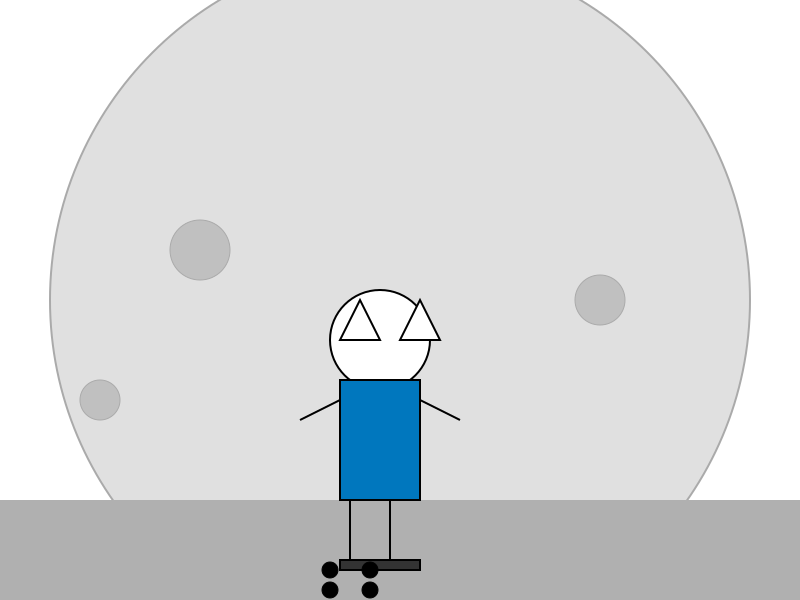
<svg xmlns="http://www.w3.org/2000/svg" viewBox="0 0 800 600" preserveAspectRatio="xMidYMid meet">
  <style>
    .moon { fill:#e0e0e0; stroke:#aaa; stroke-width:2; }
    .crater { fill:#c0c0c0; stroke:#aaa; stroke-width:1; }
    .ground { fill:#b0b0b0; }
    .astronaut { fill:#fff; stroke:#000; stroke-width:2; }
    .cat-ears { fill:#fff; stroke:#000; stroke-width:2; }
    .suit { fill:#0077be; stroke:#000; stroke-width:2; }
    .skateboard { fill:#333; stroke:#000; stroke-width:2; }
    .wheel { fill:#000; stroke:#000; stroke-width:1; }
  </style>

  <!-- Moon -->
  <circle class="moon" cx="400" cy="300" r="350"/>
  <!-- Craters -->
  <circle class="crater" cx="200" cy="250" r="30"/>
  <circle class="crater" cx="600" cy="300" r="25"/>
  <circle class="crater" cx="100" cy="400" r="20"/>
  <!-- Ground -->
  <rect class="ground" x="0" y="500" width="800" height="100"/>
  <!-- Astronaut cat -->
  <!-- Head -->
  <circle class="astronaut" cx="380" cy="340" r="50"/>
  <!-- Ears -->
  <polygon class="cat-ears" points="360,300 340,340 380,340"/>
  <polygon class="cat-ears" points="420,300 440,340 400,340"/>
  <!-- Body (suit) -->
  <rect class="suit" x="340" y="380" width="80" height="120"/>
  <!-- Arms -->
  <line class="astronaut" x1="340" y1="400" x2="300" y2="420"/>
  <line class="astronaut" x1="420" y1="400" x2="460" y2="420"/>
  <!-- Legs -->
  <line class="astronaut" x1="350" y1="500" x2="350" y2="560"/>
  <line class="astronaut" x1="390" y1="500" x2="390" y2="560"/>
  <!-- Skateboard -->
  <rect class="skateboard" x="340" y="560" width="80" height="10"/>
  <!-- Wheels -->
  <circle class="wheel" cx="330" cy="570" r="8"/>
  <circle class="wheel" cx="370" cy="570" r="8"/>
  <circle class="wheel" cx="330" cy="590" r="8"/>
  <circle class="wheel" cx="370" cy="590" r="8"/>
</svg>
Reasoning trace (1,383 tokens)
We need to output a single fenced code block with the complete file. The task: "draw me an SVG of an astronaut cat skateboarding on the moon". So we need an SVG image. It must be self-contained, inline, with CSS and JS if needed. But it's just an SVG; we can embed style within the SVG or outside. Since it's just drawing, we can create an SVG element with shapes. Must be responsive to viewport (adapt down to 375px). Should be visible on first paint. No external resources. So we can embed the SVG directly in HTML? The instruction says output exactly ONE fenced code block containing the complete file: ```html (or ```svg when the task asks for an SVG). Since it's an SVG, we can output ```svg. But the spec says "complete file". If we output only the SVG markup, that's fine. But maybe we need an HTML file that includes the SVG. The task: "draw me an SVG of an astronaut cat skateboarding on the moon". So we can output an SVG file. Let's output an SVG with width/height set to 100% or viewBox to adapt. Use viewBox to make responsive. Include some simple shapes: moon background (gray circle), ground (craters), cat astronaut (simple shapes), skateboard (rectangle with wheels). Ensure visible on first paint. No JS needed.

We need to ensure the SVG looks good in 1280x800 and down to 375. Use viewBox e.g., 800 600 (or 16:9). Let's set viewBox="0 0 800 600". Then width:100%; height:auto.

Now design: Moon: large circle centered maybe at (400,300) radius 350. Fill light gray (#e0e0e0) with dark outline (#aaa). Ground: a rectangle at bottom (y=500) width 800, height 100, fill #b0b0b0. Craters: small circles.

Astronaut cat: maybe a circle for head, ears, body, suit. Simplify: cat head (circle), ears (triangles), body (rect), suit (white). Use simple shapes.

Skateboard: rectangle with wheels (circles). Position under cat.

Let's craft.

SVG markup:

<svg xmlns="http://www.w3.org/2000/svg" viewBox="0 0 800 600" preserveAspectRatio="xMidYMid meet">
  <style>
    . moon { fill:#e0e0e0; stroke:#aaa; stroke-width:2; }
    . crater { fill:#c0c0c0; stroke:#aaa; stroke-width:1; }
    . ground { fill:#b0b0b0; }
    . astronaut { fill:#fff; stroke:#000; stroke-width:2; }
    . cat-ears { fill:#fff; stroke:#000; stroke-width:2; }
    . suit { fill:#0077be; stroke:#000; stroke-width:2; }
    . skateboard { fill:#333; stroke:#000; stroke-width:2; }
    . wheel { fill:#000; stroke:#000; stroke-width:1; }
  </style>

  <!-- Moon -->
  <circle class="moon" cx="400" cy="300" r="350"/>
  <!-- Craters -->
  <circle class="crater" cx="200" cy="250" r="30"/>
  <circle class="crater" cx="600" cy="300" r="25"/>
  <circle class="crater" cx="100" cy="400" r="20"/>
  <!-- Ground -->
  <rect class="ground" x="0" y="500" width="800" height="100"/>
  <!-- Astronaut cat -->
  <!-- Head -->
  <circle class="astronaut" cx="380" cy="340" r="50"/>
  <!-- Ears -->
  <polygon class="cat-ears" points="360,300 340,340 380,340"/>
  <polygon class="cat-ears" points="420,300 440,340 400,340"/>
  <!-- Body (suit) -->
  <rect class="suit" x="340" y="380" width="80" height="120"/>
  <!-- Arms -->
  <line class="astronaut" x1="340" y1="400" x2="300" y2="420"/>
  <line class="astronaut" x1="420" y1="400" x2="460" y2="420"/>
  <!-- Legs -->
  <line class="astronaut" x1="350" y1="500" x2="350" y2="560"/>
  <line class="astronaut" x1="390" y1="500" x2="390" y2="560"/>
  <!-- Skateboard -->
  <rect class="skateboard" x="340" y="560" width="80" height="10"/>
  <!-- Wheels -->
  <circle class="wheel" cx="330" cy="570" r="8"/>
  <circle class="wheel" cx="370" cy="570" r="8"/>
  <circle class="wheel" cx="330" cy="590" r="8"/>
  <circle class="wheel" cx="370" cy="590" r="8"/>
</svg>

Check that all elements are inline; CSS inside <style> tag. No external resources. Should be visible on first paint.

Make sure no horizontal scrollbars: viewBox ensures scaling.

Now output as a fenced code block with ```svg. Ensure exactly one code block, no extra text.