Skateboarding astronaut catOne-line
DeepSeek V4 Pro 0813
by DeepSeekreasoning defaultClean
Running live in a sandboxed frame. Click inside it before using the keyboard.
How it went
- Total time
- 2 min 34 s
- Cost
- $0.036
- Output tokens
- 9,061
- Spent thinking
- 2,615 tokens
- Speed
- 59.4 tok/s
- Console errors
- 0
- First token after
- 1.1 s
- First visible text after
- 53.5 s
- Prompt tokens
- 427
- Code size
- 15.8 KB
- Finish reason
- stop
- Served by
- Cloudflare
- Model id
deepseek/deepseek-v4-pro-0813- Reasoning sent
model default- Max output
- 943,718 tokens
- Generated
- Nov 12, 2026
What it was asked
The prompt
“draw me an SVG of an astronaut cat skateboarding on the moon”
System prompt, sent with every prompt
You are generating a self-contained web demo. It will be rendered automatically in a sandboxed iframe and compared side by side with the output of other AI models given the exact same task.

Output rules:
- Reply with exactly ONE fenced code block containing the complete file: ```html (or ```svg when the task asks for an SVG). No text before or after the code block.
- Everything must be inline: CSS in <style>, JavaScript in <script>. No external files, images, fonts or network requests, except the CDN URLs explicitly allowed by the task.
- Do not use localStorage, sessionStorage, cookies, IndexedDB, alert(), confirm(), prompt() or window.open(): they are blocked in the sandbox and will throw.
- The page must look right in a 1280×800 viewport and adapt gracefully down to 375px wide. No horizontal scrollbar.
- Something meaningful must be visible on first paint: a screenshot is taken automatically about 3 seconds after load, without any interaction.
- Everything that makes the demo interesting must be visible within the first seconds: nothing hidden behind a high score, a later level or a long play session.
- Games must start in a self-playing demo mode (a simple AI plays) behind a "Click or press a key to start" message, so the game can be judged in action without playing.
- The iframe only receives keyboard events after the user clicks it: if the demo uses the keyboard, display a clear "Click or press a key to start" message.
- The code must run with zero errors in the console of the latest Chrome.
Code run-1.svg · 363 lines
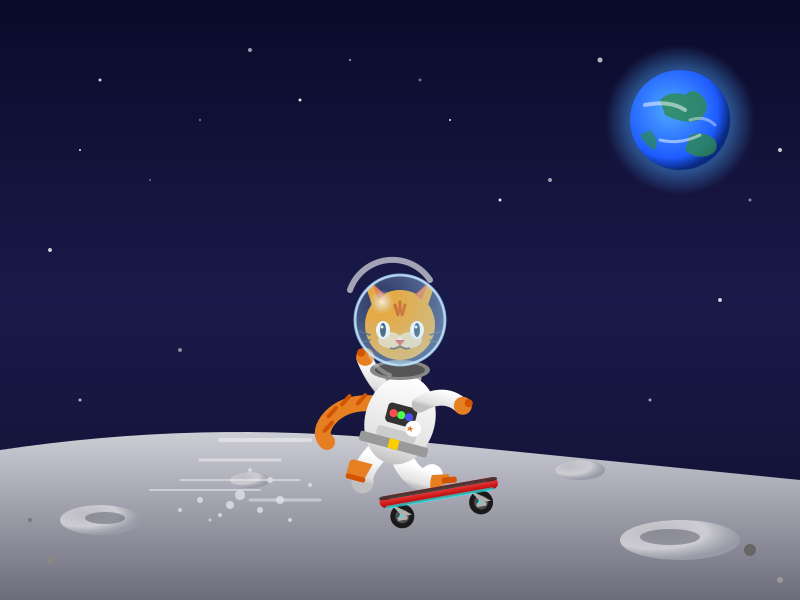
<svg xmlns="http://www.w3.org/2000/svg" viewBox="0 0 800 600" width="100%" height="100%">
  <defs>
    <!-- Space Background Gradient -->
    <linearGradient id="spaceGrad" x1="0%" y1="0%" x2="0%" y2="100%">
      <stop offset="0%" stop-color="#0a0a2a" />
      <stop offset="50%" stop-color="#1a1a4a" />
      <stop offset="100%" stop-color="#0f0f2f" />
    </linearGradient>

    <!-- Moon Surface Gradient -->
    <linearGradient id="moonGrad" x1="0%" y1="0%" x2="0%" y2="100%">
      <stop offset="0%" stop-color="#d4d4dc" />
      <stop offset="40%" stop-color="#a9a9b5" />
      <stop offset="100%" stop-color="#6b6b7a" />
    </linearGradient>

    <!-- Crater Shadow Gradient -->
    <radialGradient id="craterGrad" cx="30%" cy="30%" r="70%">
      <stop offset="0%" stop-color="#5a5a6a" />
      <stop offset="100%" stop-color="#9a9aa8" />
    </radialGradient>

    <!-- Crater Rim Gradient -->
    <radialGradient id="craterRimGrad" cx="30%" cy="30%" r="70%">
      <stop offset="60%" stop-color="#ffffff" stop-opacity="0.6" />
      <stop offset="100%" stop-color="#ffffff" stop-opacity="0" />
    </radialGradient>

    <!-- Earth Gradient -->
    <radialGradient id="earthGrad" cx="40%" cy="40%" r="60%">
      <stop offset="0%" stop-color="#4fa9ff" />
      <stop offset="80%" stop-color="#1e5bff" />
      <stop offset="100%" stop-color="#0a2a80" />
    </radialGradient>

    <!-- Earth Atmosphere Glow -->
    <radialGradient id="earthGlow" cx="50%" cy="50%" r="50%">
      <stop offset="70%" stop-color="#4fa9ff" stop-opacity="0.4" />
      <stop offset="100%" stop-color="#4fa9ff" stop-opacity="0" />
    </radialGradient>

    <!-- Helmet Glass Gradient -->
    <radialGradient id="glassGrad" cx="30%" cy="30%" r="70%">
      <stop offset="0%" stop-color="#ffffff" stop-opacity="0.8" />
      <stop offset="20%" stop-color="#aaddff" stop-opacity="0.2" />
      <stop offset="100%" stop-color="#aaddff" stop-opacity="0.5" />
    </radialGradient>

    <!-- Helmet Highlight -->
    <path id="helmetHighlight" d="M 350 290 A 45 45 0 0 1 430 280" stroke="white" stroke-width="6" stroke-linecap="round" fill="none" opacity="0.6" />

    <!-- Skateboard Deck Gradient -->
    <linearGradient id="deckGrad" x1="0%" y1="0%" x2="0%" y2="100%">
      <stop offset="0%" stop-color="#ff4d4d" />
      <stop offset="100%" stop-color="#b30000" />
    </linearGradient>

    <!-- Suit Gradient -->
    <linearGradient id="suitGrad" x1="0%" y1="0%" x2="0%" y2="100%">
      <stop offset="0%" stop-color="#ffffff" />
      <stop offset="80%" stop-color="#e0e0e0" />
      <stop offset="100%" stop-color="#c0c0c0" />
    </linearGradient>

    <!-- Neon Glow Filter -->
    <filter id="glow" x="-50%" y="-50%" width="200%" height="200%">
      <feGaussianBlur stdDeviation="3" result="blur" />
      <feMerge>
        <feMergeNode in="blur" />
        <feMergeNode in="SourceGraphic" />
      </feMerge>
    </filter>

    <!-- Cat Face Clip Path -->
    <clipPath id="helmetClip">
      <circle cx="400" cy="320" r="45" />
    </clipPath>
  </defs>

  <!-- Background Space -->
  <rect width="800" height="600" fill="url(#spaceGrad)" />

  <!-- Stars -->
  <g fill="#ffffff">
    <circle cx="100" cy="80" r="1.5" opacity="0.8" />
    <circle cx="250" cy="50" r="2" opacity="0.6" />
    <circle cx="450" cy="120" r="1" opacity="0.9" />
    <circle cx="600" cy="60" r="2.5" opacity="0.7" />
    <circle cx="750" cy="200" r="1.5" opacity="0.5" />
    <circle cx="50" cy="250" r="2" opacity="0.8" />
    <circle cx="150" cy="180" r="1" opacity="0.4" />
    <circle cx="300" cy="100" r="1.5" opacity="0.9" />
    <circle cx="550" cy="180" r="2" opacity="0.6" />
    <circle cx="700" cy="80" r="1" opacity="0.8" />
    <circle cx="80" cy="400" r="1.5" opacity="0.7" />
    <circle cx="180" cy="350" r="2" opacity="0.5" />
    <circle cx="80" cy="150" r="1" opacity="0.9" />
    <circle cx="720" cy="300" r="2" opacity="0.8" />
    <circle cx="650" cy="400" r="1.5" opacity="0.6" />
    <circle cx="350" cy="60" r="1" opacity="0.7" />
    <circle cx="500" cy="200" r="1.5" opacity="0.9" />
    <circle cx="200" cy="120" r="1" opacity="0.5" />
    <circle cx="780" cy="150" r="2" opacity="0.8" />
    <circle cx="420" cy="80" r="1.5" opacity="0.4" />
  </g>

  <!-- Distant Earth -->
  <g transform="translate(680, 120)">
    <circle cx="0" cy="0" r="75" fill="url(#earthGlow)" />
    <circle cx="0" cy="0" r="50" fill="url(#earthGrad)" />
    <!-- Continents -->
    <path d="M -20 -20 Q -10 -30 5 -25 Q 15 -35 25 -20 Q 30 -10 20 0 Q 5 5 -15 -5 Z" fill="#2d8a4e" opacity="0.8" />
    <path d="M 10 15 Q 25 10 35 20 Q 40 30 30 35 Q 15 40 5 30 Z" fill="#2d8a4e" opacity="0.8" />
    <path d="M -30 10 Q -20 20 -25 30 Q -35 25 -40 15 Z" fill="#2d8a4e" opacity="0.7" />
    <!-- Clouds -->
    <path d="M -35 -15 Q -10 -20 5 -10" stroke="white" stroke-width="4" stroke-linecap="round" fill="none" opacity="0.5" />
    <path d="M 10 0 Q 25 -5 35 5" stroke="white" stroke-width="3" stroke-linecap="round" fill="none" opacity="0.4" />
    <path d="M -20 20 Q 0 25 20 15" stroke="white" stroke-width="3" stroke-linecap="round" fill="none" opacity="0.5" />
  </g>

  <!-- Moon Surface -->
  <path d="M 0 450 Q 200 420 400 440 T 800 480 L 800 600 L 0 600 Z" fill="url(#moonGrad)" />

  <!-- Moon Craters -->
  <!-- Large Crater Bottom Right -->
  <g transform="translate(680, 540)">
    <ellipse cx="0" cy="0" rx="60" ry="20" fill="url(#craterGrad)" />
    <ellipse cx="0" cy="0" rx="60" ry="20" fill="url(#craterRimGrad)" />
    <ellipse cx="-10" cy="-3" rx="30" ry="8" fill="#5a5a6a" opacity="0.5" />
  </g>

  <!-- Medium Crater Bottom Left -->
  <g transform="translate(100, 520)">
    <ellipse cx="0" cy="0" rx="40" ry="15" fill="url(#craterGrad)" />
    <ellipse cx="0" cy="0" rx="40" ry="15" fill="url(#craterRimGrad)" />
    <ellipse cx="5" cy="-2" rx="20" ry="6" fill="#5a5a6a" opacity="0.5" />
  </g>

  <!-- Small Crater Mid Left -->
  <g transform="translate(250, 480)">
    <ellipse cx="0" cy="0" rx="20" ry="8" fill="url(#craterGrad)" />
    <ellipse cx="0" cy="0" rx="20" ry="8" fill="url(#craterRimGrad)" />
  </g>

  <!-- Small Crater Mid Right -->
  <g transform="translate(580, 470)">
    <ellipse cx="0" cy="0" rx="25" ry="10" fill="url(#craterGrad)" />
    <ellipse cx="0" cy="0" rx="25" ry="10" fill="url(#craterRimGrad)" />
  </g>

  <!-- Motion Lines / Speed Effect -->
  <g stroke="#ffffff" stroke-linecap="round" opacity="0.4">
    <line x1="200" y1="460" x2="280" y2="460" stroke-width="3" />
    <line x1="180" y1="480" x2="300" y2="480" stroke-width="2" />
    <line x1="220" y1="440" x2="310" y2="440" stroke-width="4" />
    <line x1="150" y1="490" x2="260" y2="490" stroke-width="2" />
    <line x1="250" y1="500" x2="320" y2="500" stroke-width="3" />
  </g>

  <!-- Moon Dust Kicked Up -->
  <g fill="#e0e0e8" opacity="0.8">
    <circle cx="280" cy="500" r="4" />
    <circle cx="260" cy="510" r="3" />
    <circle cx="240" cy="495" r="5" />
    <circle cx="220" cy="515" r="2" />
    <circle cx="200" cy="500" r="3" />
    <circle cx="290" cy="520" r="2" />
    <circle cx="270" cy="480" r="3" />
    <circle cx="230" cy="505" r="4" />
    <circle cx="180" cy="510" r="2" />
    <circle cx="310" cy="485" r="2" />
    <circle cx="210" cy="520" r="1.5" />
    <circle cx="250" cy="470" r="2" />
  </g>

  <!-- Astronaut Cat Group -->
  <g id="astronautCat">

    <!-- Backpack (PLSS) -->
    <g transform="translate(400, 420) rotate(15)">
      <rect x="-30" y="-55" width="40" height="70" rx="10" fill="#b0b0b0" />
      <rect x="-25" y="-50" width="30" height="60" rx="5" fill="#a0a0a0" />
      <circle cx="-10" cy="-20" r="4" fill="#555" />
      <line x1="-10" y1="-50" x2="-10" y2="-40" stroke="#555" stroke-width="2" />
      <rect x="-32" y="-45" width="5" height="50" rx="2" fill="#909090" />
    </g>

    <!-- Tail (Orange Cat Tail) -->
    <g transform="translate(400, 420) rotate(15)">
      <!-- Tail Stroke -->
      <path d="M -25 -10 Q -60 -5 -70 20 Q -75 35 -65 40" stroke="#e67e22" stroke-width="16" stroke-linecap="round" fill="none" />
      <!-- Tail Stripes -->
      <path d="M -45 -5 L -40 -15" stroke="#d35400" stroke-width="4" stroke-linecap="round" />
      <path d="M -60 0 L -55 -10" stroke="#d35400" stroke-width="4" stroke-linecap="round" />
      <path d="M -70 15 L -65 5" stroke="#d35400" stroke-width="4" stroke-linecap="round" />
      <path d="M -70 30 L -65 20" stroke="#d35400" stroke-width="4" stroke-linecap="round" />
      <!-- Tail Tip -->
      <circle cx="-65" cy="40" r="8" fill="#e67e22" />
    </g>

    <!-- Back Leg (On board) -->
    <g transform="translate(400, 420) rotate(15)">
      <path d="M -15 40 Q -25 60 -20 70" stroke="url(#suitGrad)" stroke-width="22" stroke-linecap="round" fill="none" />
      <!-- Boots -->
      <path d="M -20 70 L -35 70 Q -38 70 -38 65 L -38 55 Q -38 50 -33 50 L -15 50" fill="#e67e22" />
      <rect x="-38" y="65" width="20" height="5" rx="2" fill="#d35400" />
    </g>

    <!-- Front Leg (Kicking/Mid-air) -->
    <g transform="translate(400, 420) rotate(15)">
      <path d="M 15 40 Q 35 60 45 45" stroke="url(#suitGrad)" stroke-width="22" stroke-linecap="round" fill="none" />
      <!-- Boots -->
      <path d="M 45 45 L 60 40 Q 65 40 60 50 L 50 60 Q 45 60 45 45" fill="#e67e22" />
      <rect x="55" y="45" width="15" height="6" rx="2" fill="#d35400" transform="rotate(-20, 55, 45)" />
    </g>

    <!-- Back Arm (Swinging behind) -->
    <g transform="translate(400, 420) rotate(15)">
      <path d="M -15 -20 Q -35 -30 -50 -50" stroke="url(#suitGrad)" stroke-width="16" stroke-linecap="round" fill="none" />
      <!-- Glove -->
      <circle cx="-50" cy="-52" r="9" fill="#e67e22" />
      <circle cx="-55" cy="-55" r="4" fill="#d35400" />
    </g>

    <!-- Suit Body -->
    <g transform="translate(400, 420) rotate(15)">
      <!-- Main Torso -->
      <ellipse cx="0" cy="0" rx="35" ry="45" fill="url(#suitGrad)" />
      <!-- Chest Control Panel -->
      <rect x="-15" y="-15" width="30" height="20" rx="4" fill="#333" />
      <circle cx="-8" cy="-5" r="4" fill="#ff4d4d" filter="url(#glow)" />
      <circle cx="0" cy="-5" r="4" fill="#4dff4d" filter="url(#glow)" />
      <circle cx="8" cy="-5" r="4" fill="#4d4dff" filter="url(#glow)" />
      <rect x="-20" y="10" width="40" height="10" rx="3" fill="#cccccc" />
      <!-- Belt -->
      <rect x="-35" y="20" width="70" height="10" rx="2" fill="#999" />
      <rect x="-5" y="20" width="10" height="10" fill="#ffcc00" />
      <!-- Suit Patch (Cat symbol) -->
      <circle cx="15" cy="5" r="8" fill="#ffffff" />
      <path d="M 12 2 L 13 5 L 16 5 L 14 7 L 15 10 L 12 8 L 9 10 L 10 7 L 8 5 L 11 5 Z" fill="#e67e22" transform="scale(0.8) translate(3, 1)" />
    </g>

    <!-- Front Arm (Balancing) -->
    <g transform="translate(400, 420) rotate(15)">
      <path d="M 15 -20 Q 35 -40 55 -30" stroke="url(#suitGrad)" stroke-width="16" stroke-linecap="round" fill="none" />
      <!-- Glove -->
      <circle cx="57" cy="-30" r="9" fill="#e67e22" />
      <circle cx="62" cy="-34" r="4" fill="#d35400" />
    </g>

    <!-- Helmet & Cat Face -->
    <g id="helmetGroup" transform="translate(0, 0)">
      <!-- Helmet Collar (Metal Ring) -->
      <ellipse cx="400" cy="370" rx="30" ry="10" fill="#888" />
      <ellipse cx="400" cy="370" rx="25" ry="7" fill="#555" />

      <!-- Cat Head & Face inside Helmet -->
      <g clip-path="url(#helmetClip)">
        <!-- Cat Head Base -->
        <circle cx="400" cy="325" r="35" fill="#f39c12" />

        <!-- Cat Ears -->
        <polygon points="372,305 362,275 385,295" fill="#f39c12" />
        <polygon points="378,300 372,282 385,295" fill="#e74c3c" opacity="0.6" /> <!-- Inner ear -->
        <polygon points="428,305 438,275 415,295" fill="#f39c12" />
        <polygon points="422,300 428,282 415,295" fill="#e74c3c" opacity="0.6" /> <!-- Inner ear -->

        <!-- White muzzle/cheeks -->
        <ellipse cx="390" cy="340" rx="12" ry="8" fill="#fff" opacity="0.6" />
        <ellipse cx="410" cy="340" rx="12" ry="8" fill="#fff" opacity="0.6" />

        <!-- Cat Eyes (Big and expressive) -->
        <!-- Left Eye -->
        <ellipse cx="383" cy="330" rx="7" ry="9" fill="#ffffff" />
        <ellipse cx="383" cy="330" rx="3" ry="7" fill="#2c3e50" />
        <circle cx="382" cy="327" r="1.5" fill="#ffffff" />
        <!-- Right Eye -->
        <ellipse cx="417" cy="330" rx="7" ry="9" fill="#ffffff" />
        <ellipse cx="417" cy="330" rx="3" ry="7" fill="#2c3e50" />
        <circle cx="416" cy="327" r="1.5" fill="#ffffff" />

        <!-- Cat Nose -->
        <polygon points="395,340 405,340 400,346" fill="#e74c3c" />

        <!-- Cat Mouth -->
        <path d="M 400 346 Q 395 350 390 348" stroke="#2c3e50" stroke-width="1.5" fill="none" />
        <path d="M 400 346 Q 405 350 410 348" stroke="#2c3e50" stroke-width="1.5" fill="none" />

        <!-- Whiskers -->
        <line x1="370" y1="335" x2="355" y2="330" stroke="#2c3e50" stroke-width="1.5" stroke-linecap="round" />
        <line x1="370" y1="340" x2="355" y2="345" stroke="#2c3e50" stroke-width="1.5" stroke-linecap="round" />
        <line x1="430" y1="335" x2="445" y2="330" stroke="#2c3e50" stroke-width="1.5" stroke-linecap="round" />
        <line x1="430" y1="340" x2="445" y2="345" stroke="#2c3e50" stroke-width="1.5" stroke-linecap="round" />

        <!-- Cat Stripes on Forehead -->
        <path d="M 395 305 L 398 315" stroke="#d35400" stroke-width="3" stroke-linecap="round" />
        <path d="M 405 305 L 402 315" stroke="#d35400" stroke-width="3" stroke-linecap="round" />
        <path d="M 400 302 L 400 312" stroke="#d35400" stroke-width="3" stroke-linecap="round" />
      </g>

      <!-- Helmet Glass Dome Overlay -->
      <circle cx="400" cy="320" r="45" fill="url(#glassGrad)" />

      <!-- Helmet Outer Ring / Rim -->
      <circle cx="400" cy="320" r="45" fill="none" stroke="#aaddff" stroke-width="3" opacity="0.8" />
      <circle cx="400" cy="320" r="45" fill="none" stroke="#ffffff" stroke-width="1" opacity="0.5" />

      <!-- Helmet Reflection (Highlight) -->
      <use href="#helmetHighlight" />

      <!-- Additional Small Reflection -->
      <path d="M 370 355 A 35 35 0 0 0 390 375" stroke="white" stroke-width="4" stroke-linecap="round" fill="none" opacity="0.3" />
    </g>

  </g>

  <!-- Skateboard (Placed under the cat) -->
  <g id="skateboard" transform="translate(380, 505) rotate(-10)">
    <!-- Wheels (Back) -->
    <g transform="translate(20, 15)">
      <circle cx="0" cy="0" r="12" fill="#1a1a1a" />
      <circle cx="0" cy="0" r="7" fill="#4d4d4d" />
      <circle cx="0" cy="0" r="3" fill="#00ffff" filter="url(#glow)" />
    </g>
    <!-- Wheels (Front) -->
    <g transform="translate(100, 15)">
      <circle cx="0" cy="0" r="12" fill="#1a1a1a" />
      <circle cx="0" cy="0" r="7" fill="#4d4d4d" />
      <circle cx="0" cy="0" r="3" fill="#00ffff" filter="url(#glow)" />
    </g>

    <!-- Trucks (Metal rods connecting wheels to deck) -->
    <g fill="#b0b0b0">
      <!-- Back Truck -->
      <path d="M 10 0 L 20 15 L 30 15 Z" />
      <rect x="15" y="15" width="10" height="4" rx="1" />
      <!-- Front Truck -->
      <path d="M 90 0 L 100 15 L 110 15 Z" />
      <rect x="95" y="15" width="10" height="4" rx="1" />
    </g>

    <!-- Skateboard Deck -->
    <rect x="0" y="-8" width="120" height="12" rx="6" fill="url(#deckGrad)" />

    <!-- Deck Details (Stripe) -->
    <rect x="10" y="-6" width="100" height="2" rx="1" fill="#ffffff" opacity="0.4" />

    <!-- Deck Grip Tape Edge -->
    <rect x="0" y="-8" width="120" height="4" rx="4" fill="#2a2a2a" opacity="0.8" />

    <!-- Deck Neon Glow Underneath -->
    <rect x="5" y="2" width="110" height="3" rx="1.5" fill="#00ffff" filter="url(#glow)" opacity="0.8" />
  </g>

  <!-- Additional Floating Space Rocks (Foreground) -->
  <g filter="url(#glow)">
    <circle cx="50" cy="560" r="4" fill="#888" />
    <circle cx="750" cy="550" r="6" fill="#666" />
    <circle cx="780" cy="580" r="3" fill="#999" />
    <circle cx="30" cy="520" r="2" fill="#777" />
  </g>

</svg>
Reasoning trace (2,615 tokens)
Let me work through the design of an SVG featuring an astronaut cat skateboarding on the moon.

1.  **Analyze the Request:**
    *   **Topic:** Astronaut cat skateboarding on the moon.
    *   **Format:** SVG.
    *   **Style/Requirements:** Clean, scalable vector graphic, visually appealing, self-contained.

2.  **Break Down the Scene:**
    *   **Background:** Deep space, stars, Earth in the distance, lunar surface (craters, dusty grey).
    *   **Subject Matter:**
        *   Astronaut Cat: Helmet with cat ears/face visible, spacesuit body.
        *   Skateboard: Deck, wheels, underneath the cat.
        *   Action: Dynamic pose, maybe hovering or mid-trick (e.g., kickflip or just riding with arms out for balance).
    *   **Atmosphere:** Moon dust flying, motion lines, glowing elements.

3.  **Determine SVG Structure & Dimensions:**
    *   `viewBox="0 0 800 600"` (Good landscape aspect ratio).
    *   `<defs>` for gradients, patterns, and clipping paths.
    *   `<rect>` for the background (space).
    *   `<g>` for stars.
    *   `<g>` for Earth.
    *   `<g>` for Moon surface.
    *   `<g>` for Skateboard.
    *   `<g>` for Astronaut Cat.
    *   `<g>` for Moon dust / motion effects.

4.  **Drafting the SVG Elements:**

    *   **Background (Space & Stars):**
        *   `linearGradient` from deep blue/purple to black.
        *   Multiple small white/light-blue circles or stars (using `<circle>` and `<path>` for twinkles).
        *   A few larger glowing stars.

    *   **Earth (Distant):**
        *   `<circle>` with radial gradient (blue, green, white for atmosphere).
        *   Position: Top right.

    *   **Moon Surface:**
        *   Curved path at the bottom.
        *   `linearGradient` (dark grey to light grey).
        *   Craters: ellipses with shadow gradients.

    *   **Skateboard:**
        *   Deck: curved `<path>` with rounded edges. Wood/metal color or custom neon.
        *   Trucks: small metallic `<path>` or `<rect>`.
        *   Wheels: `<circle>`s with a glowing inner circle or distinct color (e.g., blue/green neon).

    *   **Astronaut Cat (The Core):**
        *   Need to balance "astronaut" (spacesuit) and "cat" (ears, tail, face).
        *   *Helmet:* Transparent glass dome. `<circle>` with a semi-transparent white/cyan fill and a highlight.
        *   *Face inside:* Cat features. Triangle-ish ears (or ears pressed against the helmet), big bright eyes, tiny nose, whiskers. Orange or grey tabby markings.
        *   *Suit:* Bulky white/light-grey spacesuit. Backpack (PLSS - Portable Life Support System).
        *   *Tail:* Curving out from the back of the suit, maybe with a space-cat tail sleeve.
        *   *Arms/Legs:* Posed dynamically. Holding a moon rock or just balancing.
        *   *Pose:* Leaning forward, one leg on the board, one kicked back (like a kickflip or pushing).

    *   **Moon Dust & Effects:**
        *   Low gravity floating pebbles.
        *   Motion lines behind the skateboard.
        *   A flag? No, keep it focused on the cat.

5.  **Step-by-Step Code Construction (Mental or Scratchpad):**

    *   *Defs:*
        *   Space gradient: `<linearGradient id="spaceGrad" x1="0%" y1="0%" x2="0%" y2="100%">` `#0b0b2a` to `#1b1b4a`.
        *   Moon gradient: `<linearGradient id="moonGrad" x1="0%" y1="0%" x2="0%" y2="100%">` `#c5c5d2` to `#8b8b9a`.
        *   Helmet glass: `<radialGradient>` for reflection.
        *   Earth gradient.

    *   *Background:*
        ```svg
        <rect width="800" height="600" fill="url(#spaceGrad)"/>
        <!-- Stars loop / multiple circles -->
        ```
        (Add ~30-40 stars variably distributed).

    *   *Earth:*
        ```svg
        <circle cx="680" cy="120" r="60" fill="url(#earthGrad)"/>
        <!-- Continents -->
        ```

    *   *Moon:*
        ```svg
        <path d="M0,450 Q400,380 800,480 L800,600 L0,600 Z" fill="url(#moonGrad)"/>
        <!-- Craters -->
        ```

    *   *Skateboard (Bottom Center-Right, angled):*
        Let's place the cat around `cx="400" cy="420"`.
        Skateboard deck angle: tilting up maybe 15 degrees.
        ```svg
        <g transform="translate(380, 480) rotate(-15)">
           <!-- deck -->
           <rect x="0" y="0" width="120" height="10" rx="5" fill="#2a2a2a"/>
           <!-- trucks -->
           <rect x="20" y="10" width="15" height="5" fill="#silver"/>
           <rect x="85" y="10" width="15" height="5" fill="#silver"/>
           <!-- wheels -->
           <circle cx="25" cy="17" r="8" fill="#111"/>
           <circle cx="95" cy="17" r="8" fill="#111"/>
           <circle cx="25" cy="17" r="4" fill="#0ff"/> <!-- glow -->
           <circle cx="95" cy="17" r="4" fill="#0ff"/>
        </g>
        ```

    *   *Astronaut Cat:*
        *   Position: Standing on the board. `cx="400" cy="420"`.
        *   Body: Bulky white suit.
        *   Back leg: bent, on the board.
        *   Front leg: extended slightly, kicking or balancing.
        *   Backpack: Oxygen tank on the back.
        *   Tail: Curving out from the back, orange.
        *   Helmet: `cx="400" cy="320" r="40"`.
        *   Cat Face inside:
            *   Head base: `circle` or `ellipse` (orange).
            *   Ears: `path` triangles.
            *   Eyes: large, expressive. `ellipse` or `path`.
            *   Whiskers: `line`s.
            *   Helmet reflection: white arc.

    *   *Refining the Cat Face:*
        *   Need the face to be clearly visible through the helmet.
        *   Use a clipPath for the helmet to keep the cat face and ears inside.
        *   Helmet dome: `path` `M360,320 A40,40 0 0,1 440,320 L440,340 A40,20 0 0,1 360,340 Z`. Wait, a full circle is easier, maybe a collar underneath.
        *   Let's use a base circle `cx="400" cy="320" r="45"` for the helmet.
        *   ClipPath: same circle.
        *   Inside clipPath:
            *   Orange circle for head: `cx="400" cy="330" r="35"`.
            *   Ears: `polygon points="370,305 365,280 385,300"` and `polygon points="430,305 435,280 415,300"`. Add inner ear pink.
            *   Eyes: `ellipse cx="380" cy="325" rx="6" ry="8" fill="white"`, `ellipse cx="420" cy="325" rx="6" ry="8"`.
            *   Pupils: `ellipse cx="380" cy="325" rx="2" ry="6" fill="black"`.
            *   Nose: `polygon points="395,335 405,335 400,342" fill="pink"`.
            *   Whiskers: `line`s stretching out.
        *   Helmet Glass Overlay:
            *   `circle cx="400" cy="320" r="45" fill="rgba(150, 200, 255, 0.3)"`.
            *   Highlight: `path` arc on the top left.

    *   *Suit & Pose (Dynamic Action):*
        *   The cat is skating. Let's make the skateboard tilt slightly.
        *   Body suit: `<ellipse cx="390" cy="400" rx="35" ry="50" transform="rotate(15, 390, 400)" fill="#eee"/>`
        *   Backpack: `<rect x="330" y="380" width="30" height="50" rx="5" transform="rotate(15, 390, 400)" fill="#bbb"/>`
        *   Leg 1 (Back, on board): `<path d="M380,430 Q370,470 390,480" stroke="#eee" stroke-width="20" stroke-linecap="round" fill="none"/>`
        *   Leg 2 (Front, kicking): `<path d="M410,430 Q430,450 450,470" stroke="#ddd" stroke-width="18" stroke-linecap="round" fill="none"/>`
        *   Arm 1 (Back, holding a moon rock or just swinging): `<path d="M370,390 Q340,380 330,360" stroke="#eee" stroke-width="15" stroke-linecap="round" fill="none"/>`
        *   Arm 2 (Front, balancing): `<path d="M410,390 Q440,370 460,390" stroke="#eee" stroke-width="15" stroke-linecap="round" fill="none"/>`
        *   Tail: Orange cat tail sticking out from the suit. `<path d="M360,410 Q300,430 310,380 Q320,360 340,370" stroke="#f90" stroke-width="15" stroke-linecap="round" fill="none"/>`. Add stripes.

    *   *Adding Details & Polish:*
        *   Spacesuit details: Blue/red buttons on the chest.
        *   Gloves and boots (dark grey or orange).
        *   Helmet collar (metal ring).
        *   Moon craters: ellipses with inner shadows.
        *   Earth: Ocean blue, green landmasses, white clouds.
        *   Stars: varying sizes and opacities.
        *   Motion lines: "speed lines" behind the skateboard.
        *   Moon dust: clusters of small circles kicked up behind the wheel.

6.  **Code Optimization & Styling (SVG specific):**
    *   Use exact coordinates.
    *   Ensure colors pop (NASA suit against dark space, bright colorful skateboard).
    *   Make the cat look cute but adventurous.
    *   Add a subtle glow to the Earth and the stars.
    *   Let's ensure the cat looks like a cat. The ears and tail are crucial.
    *   The transparent helmet is key for the astronaut look.
    *   Let's add a space suit patch: a tiny fish or cat symbol.

7.  **Review against Requirements:**
    *   SVG only? Yes.
    *   Valid XML? Yes.
    *   No external resources? Yes, all gradients and filters inside `<defs>`.
    *   Astronaut cat? Yes (helmet, suit, cat ears, tail, face).
    *   Skateboarding? Yes (board, wheels, dynamic pose).
    *   Moon? Yes (craters, lunar surface, Earth).

8.  **Final Code Assembly & Refinement (Self-Correction during mental draft):**
    *   *Wait, the helmet clipPath can be tricky if the helmet is bouncing.* Let's make the helmet robust.
    *   *Let's ensure the tail intersects the suit correctly.* Layer order: Backpack, Tail, Back arm, Back leg, Suit Body, Front leg, Front arm, Helmet.
    *   *Skateboard design:* Make it look like a high-tech space deck or a classic wooden one. A metallic/neon deck fits the space theme. Let's use a nice gradient for the deck.
    *   *Kicking leg dynamics:* The front leg should stretch out. A boot on the foot.
    *   *Craters:* Add a few prominent craters to establish the "moon" setting. A large crater in the foreground corner, maybe.
    *   *Earth:* Add a nice glow (drop-shadow filter or a larger semi-transparent circle).
    *   *Stars:* A `<g>` with multiple `<circle>`s, some with `<animate>` for twinkling? The prompt says "draw me an SVG", no specifically static, but static is safer and universally supported. I will stick to a beautiful static image.
    *   *Moon dust:* To emphasize motion, add some dotted trails behind the rear wheel.

9.  **Generate Output:** (Proceeding to write the exact SVG block).